SAP SuccessFactors has released new features for your People Analytics solution. They can be found in detail here (S-User ID required). Filter on Solution for People Analytics to review all the latest changes. Under the Description for each, you can click on ‘See More’ to see screenshots and detailed information.
Preview release was available on April 28 with the production release scheduled for June 2. For full details on the release cycle, check out the SAP SuccessFactors official product updates blog here. New to the release process? For tips on how to manage a release, check out our blog here.
After reviewing all of the changes in this release, we narrowed the list down to the 1H 2023SAP SuccessFactors People Analytics Top 3 Features:
Availability of Optimized View Mode in Story Reports
Users can now see an optimized story experience in the visualization of Story reports.
The optimized view mode is automatically enabled in the new stories that are built using the optimized design mode. Existing stories can be duplicated and then the optimized view mode can be enabled in the copied version.
Undo and Redo functionality lets users reverse or restore actions in Story reports
Optimized Loading Time for Workforce Analytics Reports
Load time has been reduced for Workforce Analytics reports since the widgets now appear on the screen as they are ready.
Previously, the screen would not render until all widgets were ready to view.
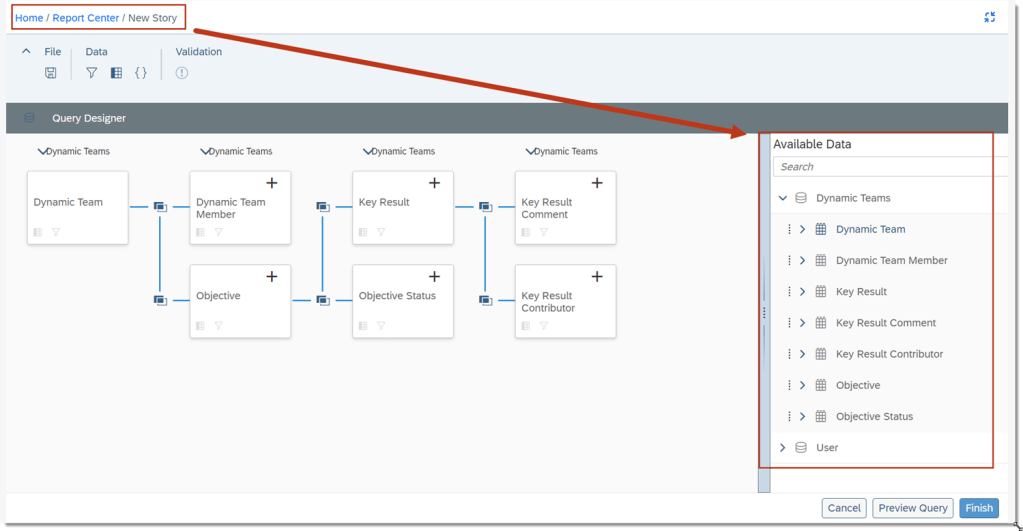
Dynamic Teams Data Available in Story Reports
Users can create a Story report with new data from Dynamic Team, Dynamic Team Member, Objective, Objective Status, Key Result, Key Result Comment, or Key Result Contributor.
After necessary role based permissions are setup, users can report on the usage of Dynamic Teams across the organization.
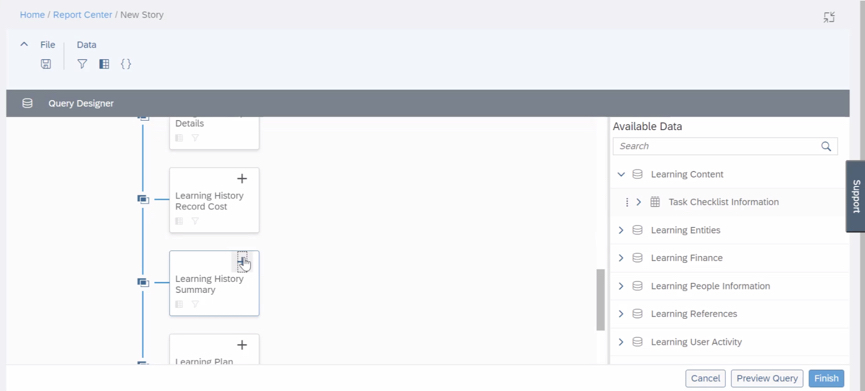
Dynamic Teams can now be added in the Query Designer
SAP SuccessFactors has released new features for your Compensation solution. They can be found in detail here (S-User ID required). Filter on Solution for Compensation to review all the latest changes. Under the Description for each, you can click on ‘See More’ to see screenshots and detailed information.
Preview release was available on April 28 with the production release scheduled for June 2. For full details on the release cycle, check out the SAP SuccessFactors official product updates blog here. New to the release process? For tips on how to manage a release, check out our blog here.
After reviewing all of the changes in this release, we narrowed the list down to the 1H 2023SAP SuccessFactors Compensation Top 5 Features:
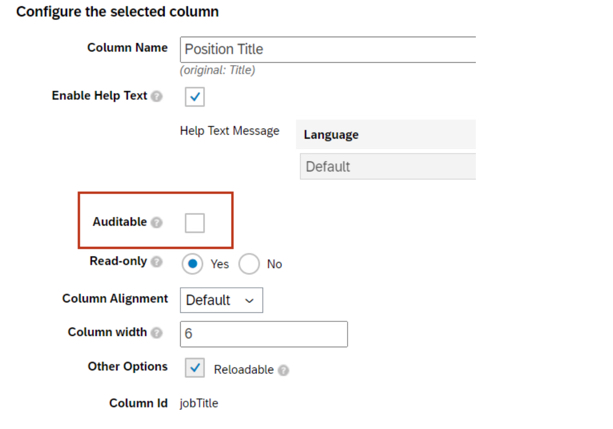
Planner Audit Feature for Compensation Planner
Compensation planners can now review field history changes made to compensation, variable pay, and total compensation worksheets.
Managers will be able to see changes to enabled fields on their worksheets via the link for Export Change History.
To enable fields for Planner Audit, go to Compensation Home – Template Name – Plan Setup – Design Worksheet
Compensation Plan Template Versions
Admins can now view the change history including Modified Date and Modified By for Compensation, Variable Pay, and Total Compensation templates.
Admins can download previous versions of the templates to assist in troubleshooting issues.
Role based permissions must be set in order to access export template history – Administrator – Manage Compensation and VarPay – Enable Export of Plan Template Versions
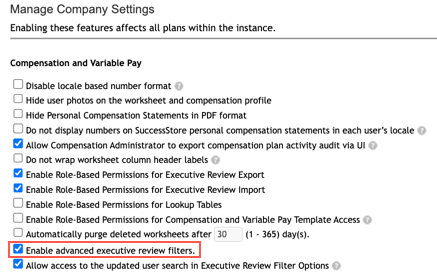
Advanced Executive Review Filters Are Now on by Default
Users can now select which fields are included in the Executive Review filter. This includes the standard fields of department, division, and location, as well as the 15 custom fields.
Filters can be saved and shared with other users.
Actions for all plans – Company Settings – Manage Company Settings – Enable advanced executive review filters is now checked by default
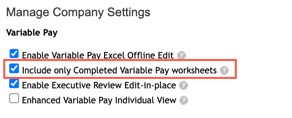
Recall Reward Statements When Worksheet Reverts
Statements are typically made visible when worksheets are in the Completed step of the route map. This enhancement automatically recalls generated statements when the worksheets are routed back from Completed Status.
This ensures that a statement is not viewed when it is not in Completed status as it may have needed to be updated with corrected information.
In order for this functionality to work for Variable Pay, the Include only Completed Variable Pay worksheets setting must be checked
Assignment Details in Bonus Payment Detail Report on Executive View
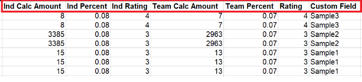
The Bonus Payout Detail Report download in the Executive Review now includes assignment level information for individual and team standard fields.
Assignment level custom fields are also included in the download.
Bonus Payout Details export now contains assignment level fields
SAP SuccessFactors has released new features for your Analytics solution. They can be found in detail here (S-User ID required). Filter on Solution for Analytics to review all the latest changes. Under the Description for each, you can click on ‘See More’ to see screenshots and detailed information.
Preview release was on October 28 and production will be released December 9. For full details on the release cycle, check out the SAP SuccessFactors official product updates blog here. New to the release process? For tips on how to manage a release, check out our blog here.
After reviewing all the changes, we narrowed the list down to the 2H 2022SAP SuccessFactors Analytics Top 3 Features:
Granular Proxy Rights for Reporting
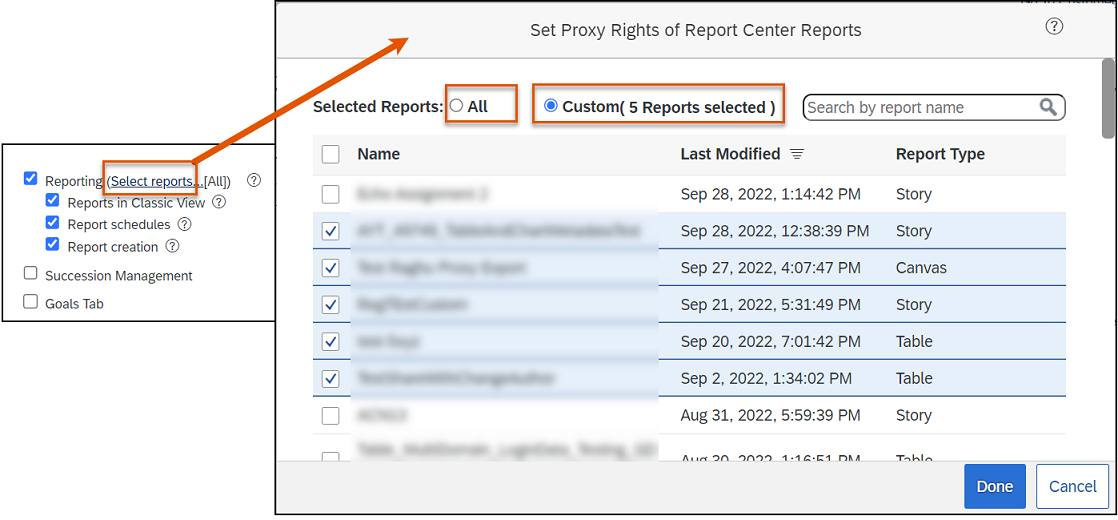
Users can choose the Report Center reports that a proxy user can access and the tasks in reporting that a proxy user can perform on behalf of the account holder.
Instead of the proxy rights being all or nothing, users can decide on an individual basis what reports a user can access and what reporting actions a user can perform as a proxy.
Status of Sync Report Center Search Jobs on the Scheduled Job Manager Page
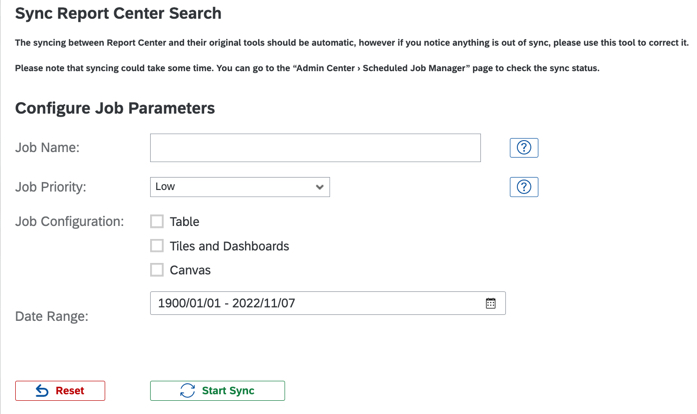
Users have the ability to check the status of the sync jobs initiated from the Sync Report Center Search page in the Job Monitor and the Job Scheduler tabs on the Scheduled Job Manager page.
Role-based permission changes Manage Dashboards / Reports –> Manage Report Center are required to access Admin Center –> Sync Report Center Search.
Manage Favorite Reports from the Report Center Page
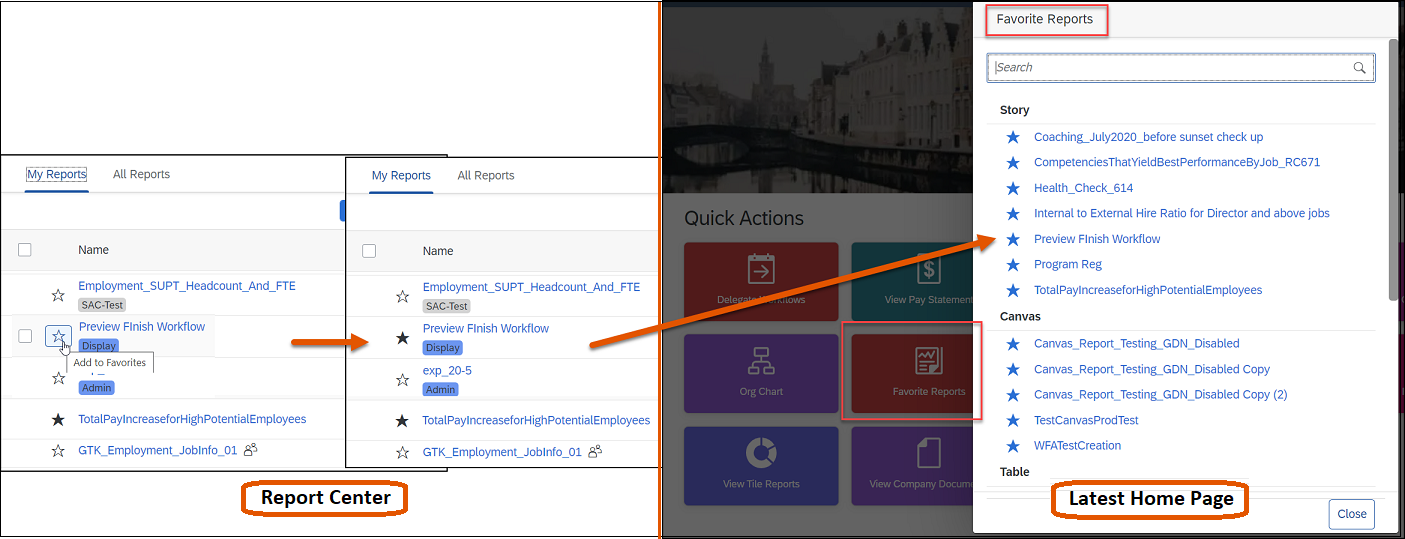
Users can use Report Center to add or remove favorite reports that are available on the home page.
For the favorite reports to appear on the latest home page, ensure that Favorite Reports quick action is enabled in Admin Center –> Manage Home Page.
SAP SuccessFactors has released new features for your Compensation solution. They can be found in detail here (S-User ID required). Filter on Solution for Compensation to review all the latest changes. Under the Description for each, you can click on ‘See More’ to see screenshots and detailed information.
Preview release was on October 28 and production will be released December 9. For full details on the release cycle, check out the SAP SuccessFactors official product updates blog here. New to the release process? For tips on how to manage a release, check out our blog here.
After reviewing all the changes, we narrowed the list down to the 2H 2022SAP SuccessFactors Compensation Top 5 Features:
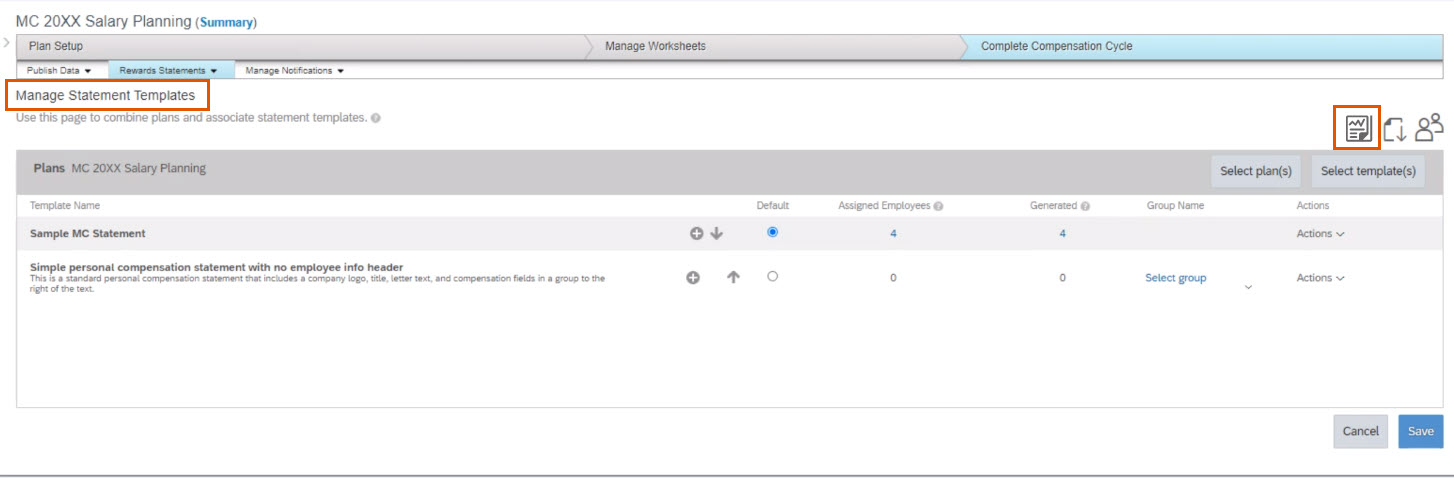
Reward Statement Generation Report
Compensation Administrators can now download a csv file that will show which employees had a statement generated for them and which did not.
This feature can be found under the Plan you are generating statements for by navigating to Complete Compensation Cycle –> Reward Statements –> Manage Statement Templates and select the Reward Statement Generation Report icon.
Additional Column Fields with Help Text When Designing Plan Worksheets
Compensation Administrators can now configure help text for up to 50 column fields when designing Compensation, Variable Pay, and Total Compensation templates.
Previously, this was limited to 10 but was extended to allow end users more visibility to useful information describing each column when needed.
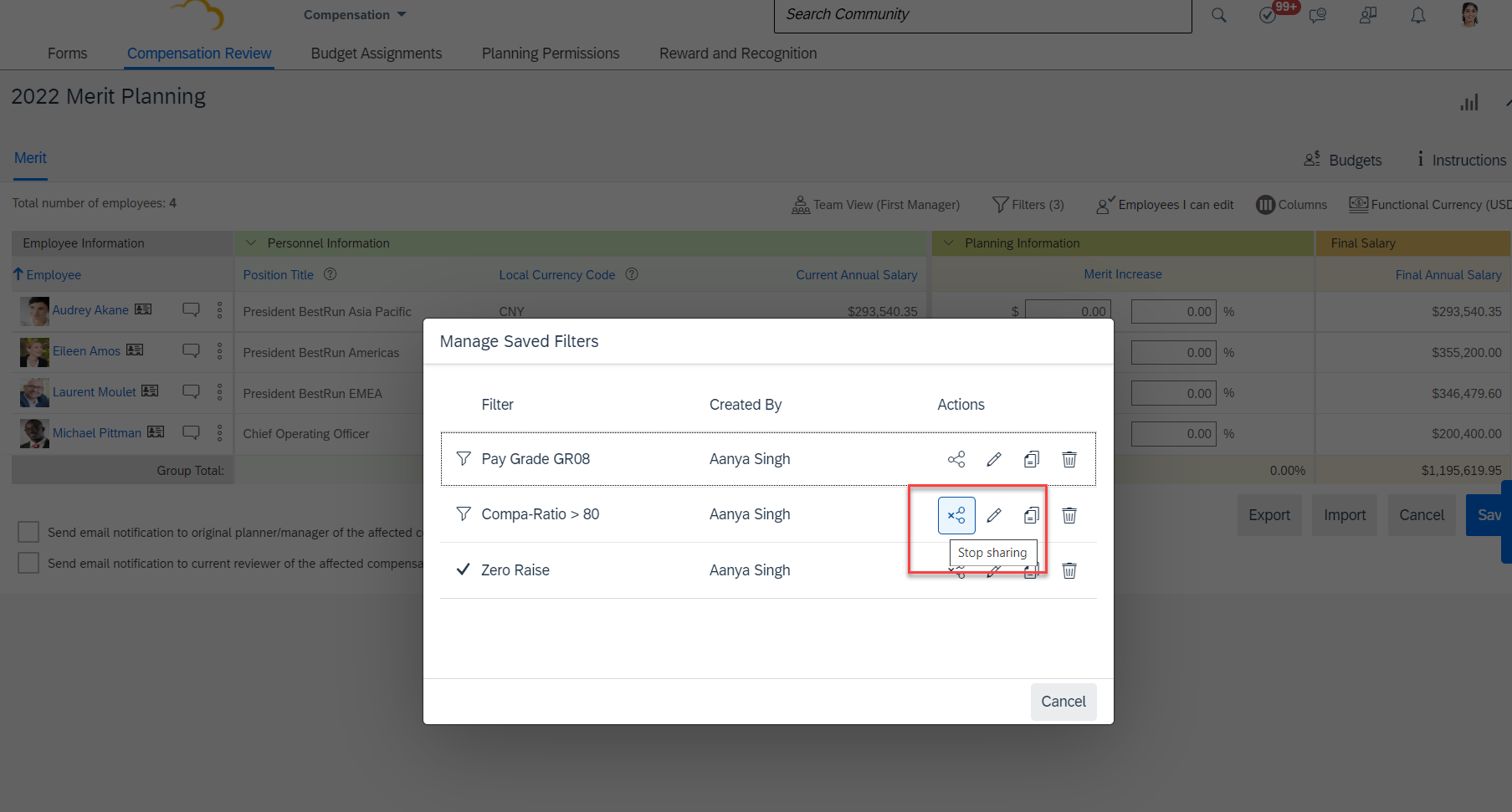
Share Option for Advanced Executive Review Filters
Users will now be able to see a Share button that allows the ability to create and use filters that can be shared across the organization.
In order for users to be able to share, Role-Based Permissions need to be updated by navigating to Administrator Permissions –> Manage Compensation and VarPay –> Enable Sharing Executive Review Filters permission.
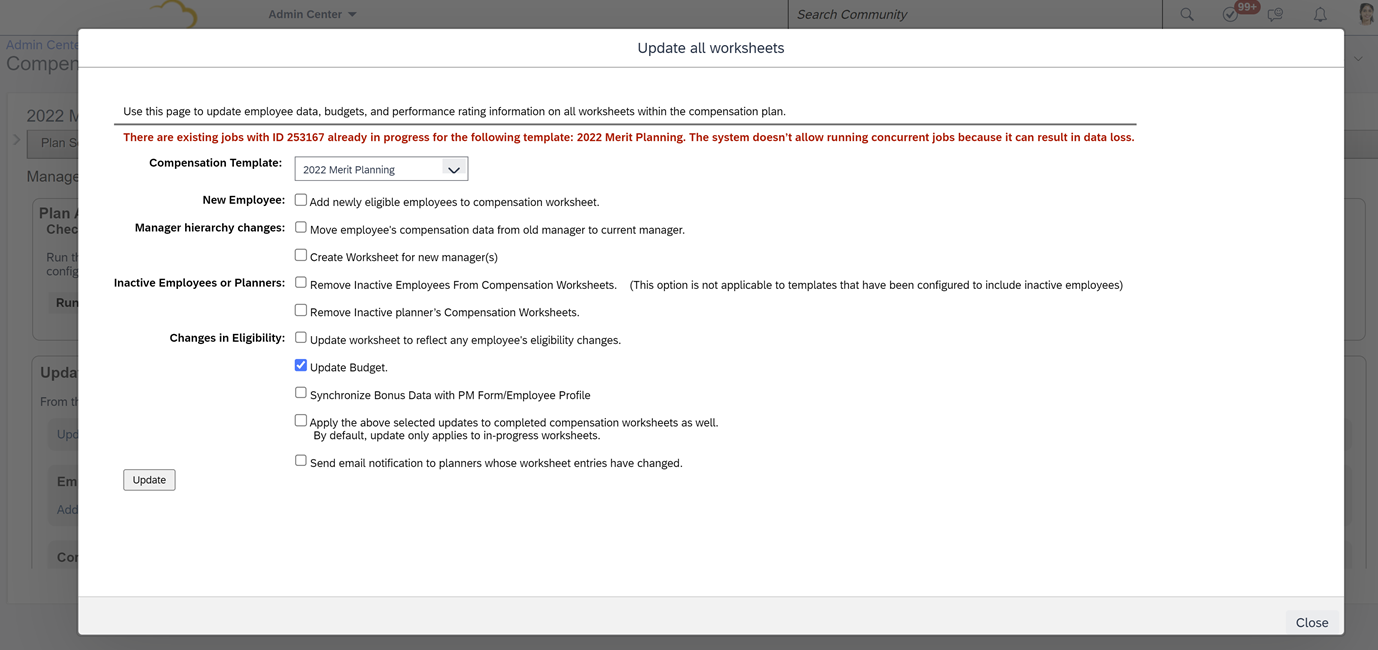
Prevent Concurrent Mass Update Jobs for Compensation
An error message will show if the Compensation Administrator tries to submit a job that is already running. This applies to:
Update Compensation Forms for Template
Apply Eligibility Rule
This is helpful to provide Compensation Administrators better visibility to the status of pending requests and help prevent data loss.
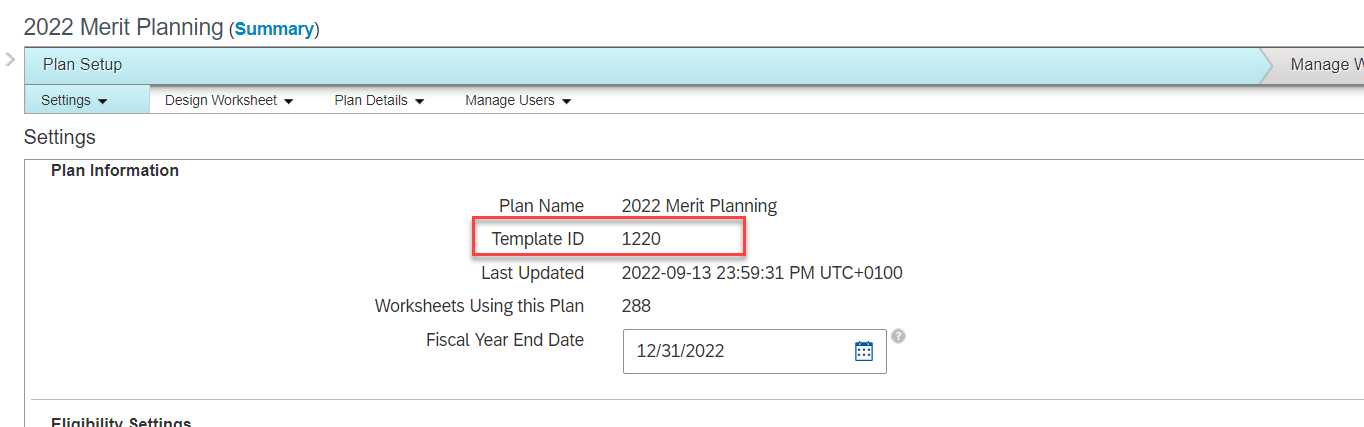
Display Template ID in the Template Settings Page
The Template ID can now be found on the Settings tab for Compensation, Variable Pay, and Total Compensation Plan templates.
Previously, this information could only be found in Provisioning or by downloading the template and reviewing the xml code.
SAP SuccessFactors has some exciting new features for your Compensation solution. They can be found in detail here (S-User ID required). Filter on Solution for Compensation to review all the latest changes. Under the Description for each, you can click on ‘See More’ to see screenshots and detailed information.
As a reminder, preview release was on April 15 and production will be released May 20. For full details on the release cycle, check out the SAP SuccessFactors official product updates blog here. New to the release process? For tips on how to manage a release, check out our blog here.
After reviewing all the changes, we narrowed the list down to the Highlights for H1 2022SAP SuccessFactors Compensation Features:
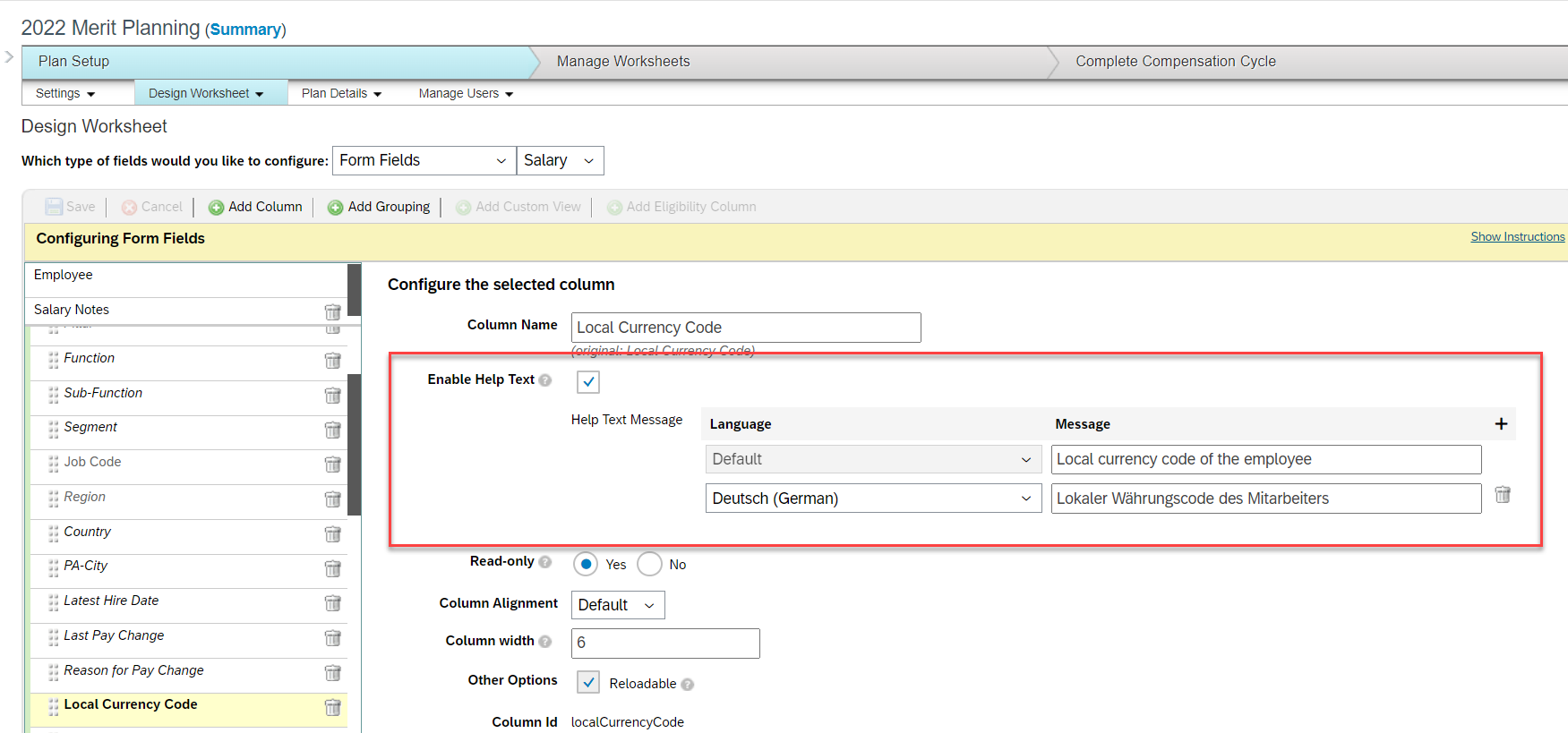
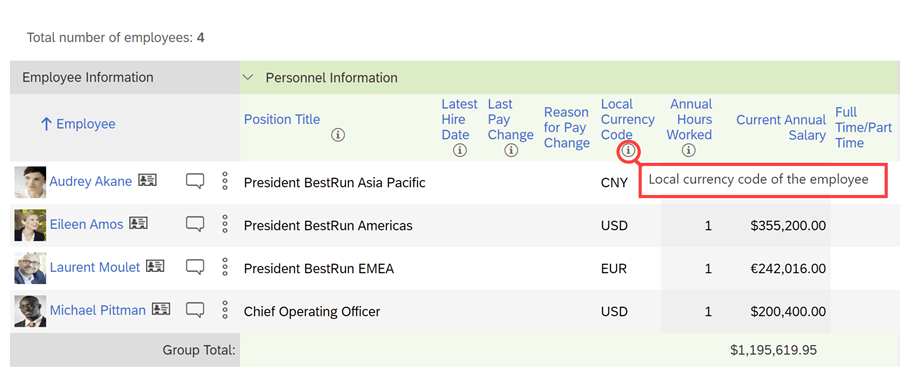
Help Text for Column Fields When Designing Plan Worksheets
Info icons can be added to provide additional details to managers as they are completing their planning.
There’s a maximum of 10 fields with help text per template and these can be configured in multiple languages.
Example of info icon being used to explain further what the column is showing
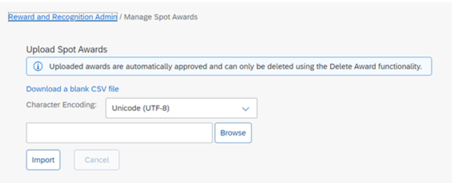
Mass Upload of Spot Awards
An administrator can download a CSV file for a mass upload of awards for Reward and Recognition that contains multiple award programs with multiple nominees.
No approval permission process is provided, the mass upload assumes approval.
Spot Awards can be uploaded in mass
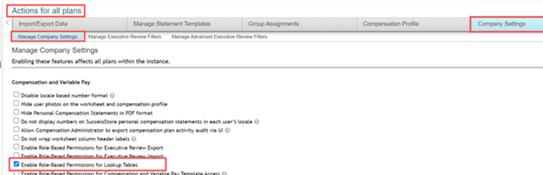
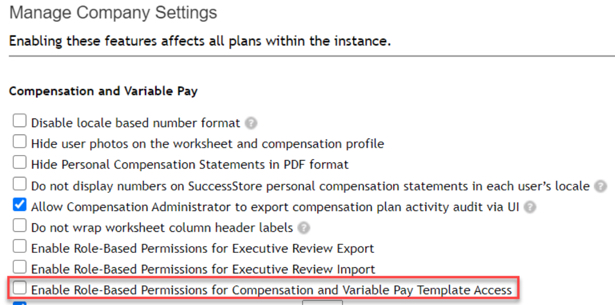
Role-Based Access to Compensation Lookup Tables
Currently an administrator is allowed access to all lookup tables. Permissions can now be set to limit access to specific lookup tables.
Role-based permissions need to be configured to select which tables the role can access.
Enable Role-Based Permissions for Lookup Tables is now available under Company Settings
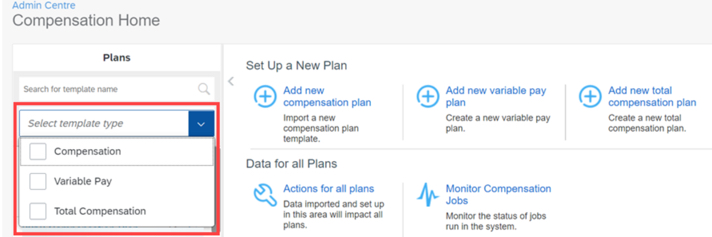
Plans List in Compensation Home Filtered by Template Type
Compensation Administrators on the Compensation Home view can now search and see results for Compensation, Total Compensation Plan, or Variable Pay plans.
Searching for plan can now be done by template type
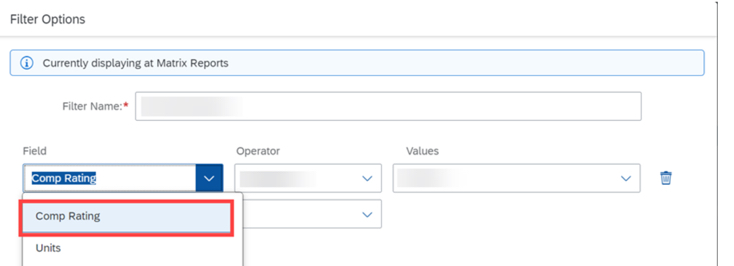
New Filter Options for Compensation Plans
In Executive Reviews, planners now have the option to apply Employee Name and Comp Rating filters to their compensation plan.
Employee Name and Compensation Rating have been added to filter options in Executive Review
SAP SuccessFactors has some exciting new features for your Analytics & Reporting solutions. They can be found in detail here (S-User ID required). Filter on Solutions for People Analytics to review all the latest changes. Under the Description for each, you can click on ‘See More’ to see screenshots and detailed information.
As a reminder, preview release was on April 15 and production will be released May 20. For full details on the release cycle, check out the SAP SuccessFactors official product updates blog here. New to the release process? For tips on how to manage a release, check out our blog here.
After reviewing all the changes, we narrowed the list down to the Highlights for H1 2022SAP SuccessFactors Analytics/Reporting Features:
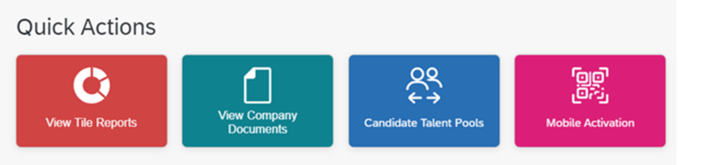
View Tile Reports Quick Action from the Latest Home Page
View Tile Reports quick action enables users to view Tile reports that are available in Analytics, based on permissions.
New Permission to Access Tile Reports from the Latest Home Page
The newly added Access Tiles from Home Page permission on the Reports Permission tab enables users to view Tile reports from the latest home page.
After the initial one-time migration, users can enable or disable the Access Tiles from Home Page permission for roles to manage their access to the View Tile Report quick action.
Quick Action – View Tile Reports has been added to Latest Home Page
Learning Queries in Story Reports has increased Number of Columns
The number of columns for Learning queries has been increase to 120 from 30.
Change of Behavior of Tabs on the View Schedules Page in Report Center
The View Schedules page in Report Center now displays user’s previously selected tab, instead of its default tab. This will remember the tab the user was last working on instead of returning to the default My Jobs tab.
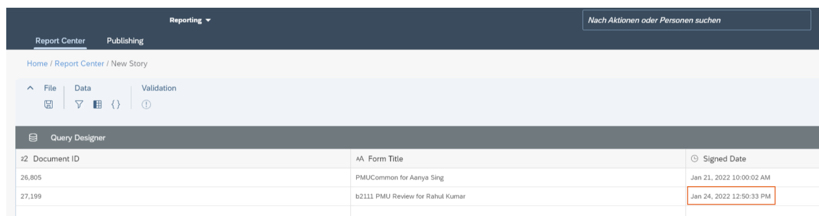
Enhanced Signed Date Column in Story Reports
Story reports now shows the date and time when the form was signed.
Signed Date and Time appears in Story Report details
SAP SuccessFactors has released new features for your overall Compensation solution. They can be found in detail here (S-User ID required). Filter on Solutions for Compensation to review all the latest changes. Under the Description for each, you can click on ‘See More’ to see screenshots and detailed information.
As a reminder, preview release was on October 15 and production will be released November 19. For full details on the release cycle, check out the SAP SuccessFactors official product updates blog here. New to the release process? For tips on how to manage a release, check out our blog here.
After reviewing all the changes, I narrowed the list down to the Highlights for H2 2021Compensation:
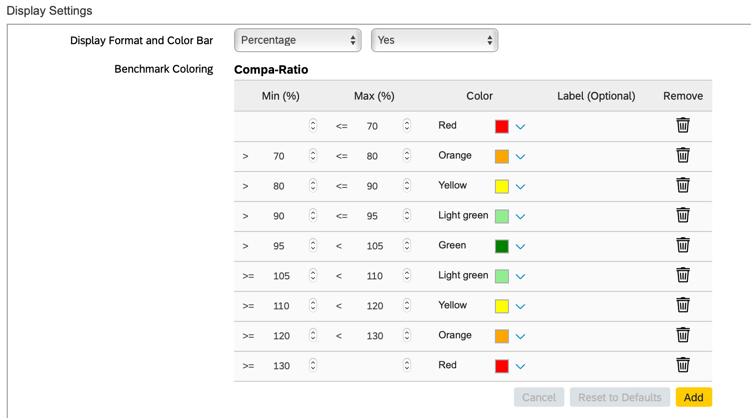
1. Create Benchmarking Ranges and Color Values for Compensation Plans Using Display Settings
Compensation administrators can now update benchmark ranges and color settings for Compa-Ratio and Range Penetration in the compensation plan template under Display Settings.
Previously this was done in XML.
Additional settings have been added to allow Compensation Administrators to make changes via configuration
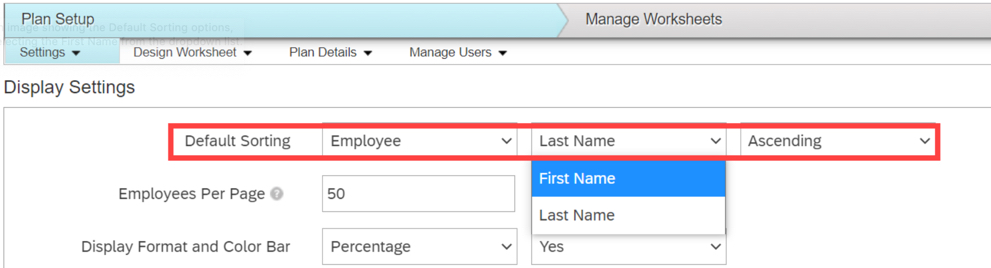
2. Enhanced Default Sorting by Employee Name for Compensation Plan Worksheets
There is now a new setting for sorting of employee names by First Name or Last Name as well as by Ascending or Descending order.
This allows end users to be able to find employees more easily.
Additional settings have been added to enhance usability
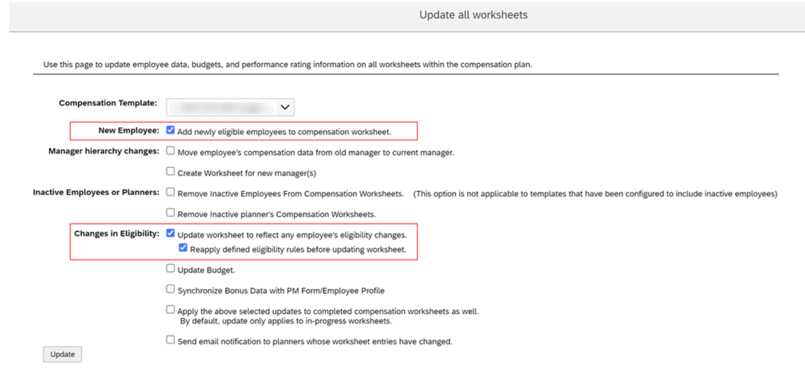
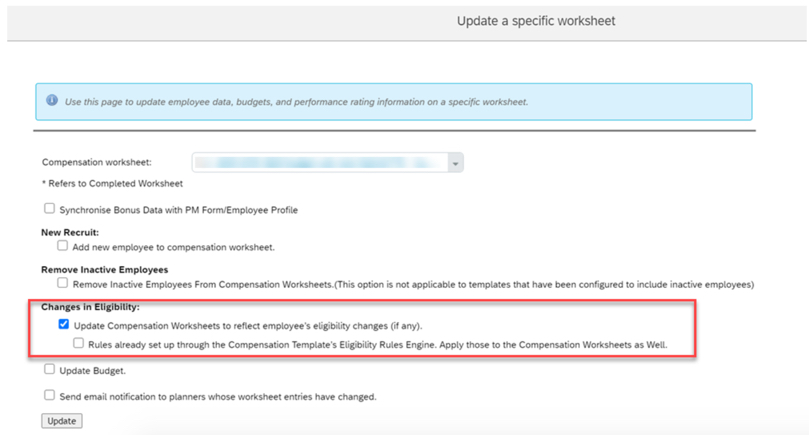
3. Enhanced Ability to Add Newly Eligible Employees to Compensation Worksheets
Users can now update settings to add eligible employees, not just new hires, to worksheets for a compensation plan.
These selections must be made on both the Update all worksheets settings and the Update a specific worksheet settings.
Both checkboxes should be selected for updating new hires as well as those newly eligible
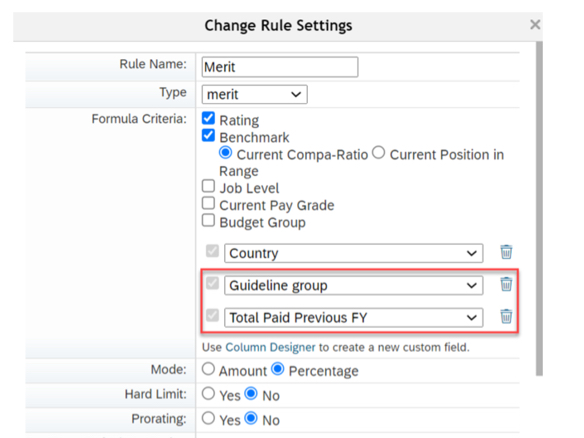
4. Guidelines Using Entered or Calculated Values for Compensation Planning
Calculated or editable fields defined in the Design Worksheet can now be used as attributes for Guideline tables in Compensation, Variable Pay, and Total Compensation Plan templates.
This is very helpful for when customers have specific guidelines they wish to use that would have otherwise been difficult to incorporate via a workaround.
Custom columns can be created and then used as part of guideline configuration
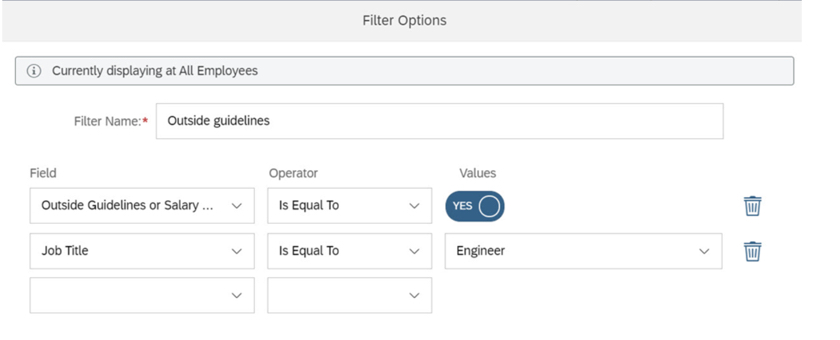
5. Show Compensation Recommendations Outside of Guidelines or Salary Range by Using a Filter in Executive Review
Compensation planners can create a filter showing employees with compensation recommendations that are outside of guidelines or salary ranges.
This is now a standard option that doesn’t require any additional configuration.
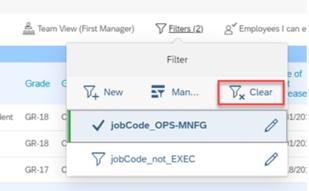
Filter can be set to show all employees, show only employees within guidelines, or show only employees outside of guidelines
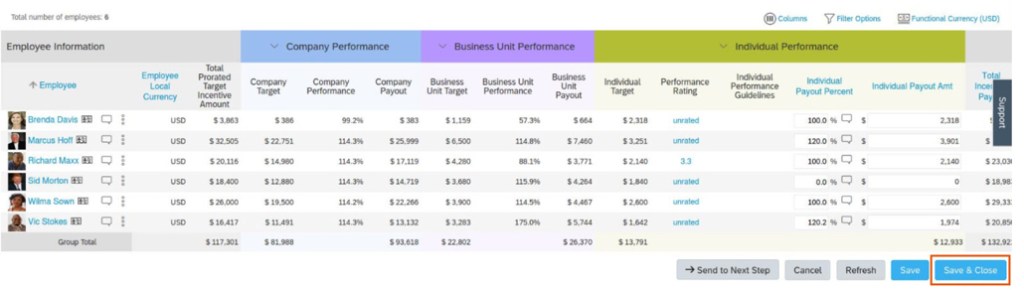
6. Improved Collaboration for Planners in Updating Worksheets
Save & Close button was added to allow easier collaboration for planners updating the same worksheet.
In the previous version, although a planner chose Save to save the updates made to the worksheet, the worksheet remained inaccessible to the other planners until the current planner exited the worksheet.
Save & Close button has been added to allow less restrictions for multiple planners on same worksheet
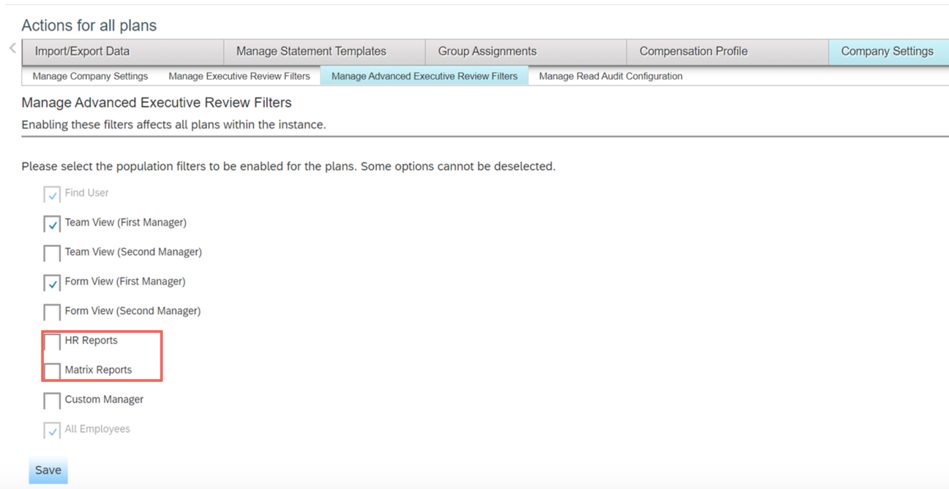
7. Define Population Views Using Manage Advanced Executive Review Filters
Compensation Administrators can now turn off Executive Review filters that are not relevant to their company.
Some of these additional filters were confusing to end users as they were not being used.
Filters can now be turned off via Company Settings – Manage Advanced Executive Review Filters
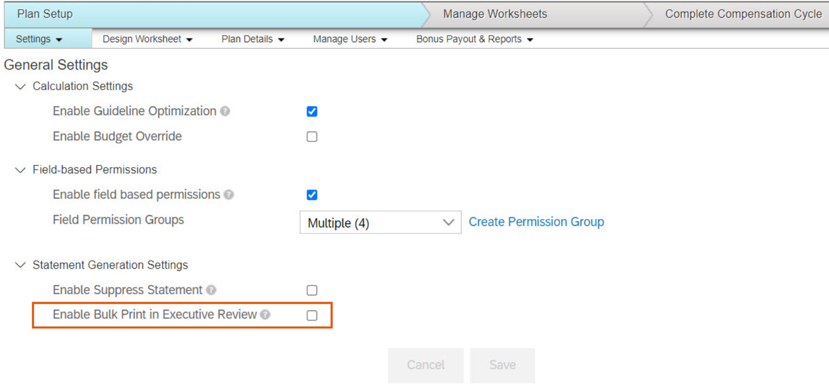
8. Enabling Bulk Print Feature in Specific Compensation Plans for Executive Review
Compensation Administrators can now set Enable Bulk Print in Executive Review from Plan Setup in the Settings page.
This change allows for plan specific control over bulk printing.
Enable Bulk Print in Executive Review checkbox is now found under plan specific Settings – General Settings
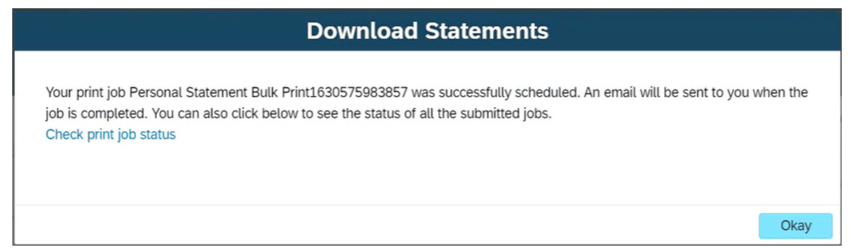
9. Integration of My Jobs Window for Bulk Print Statements in Executive Review
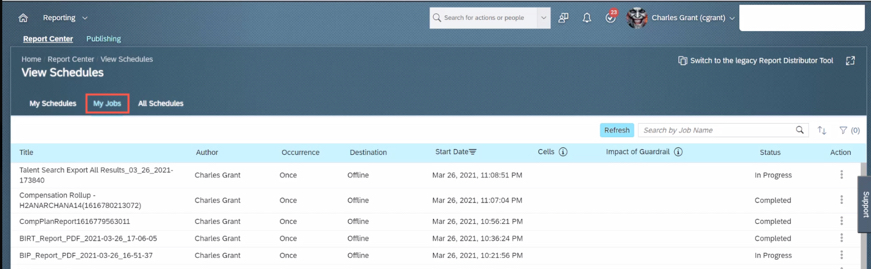
Users can now view the status and download Bulk Print statements from the My Jobs window that is now integrated with the Executive Review page.
Choosing Check print job status from this window redirects you to the Reporting – Report Center – View Schedules – My Jobs page.
Users now have an easier time navigating and find statements that were bulk printed
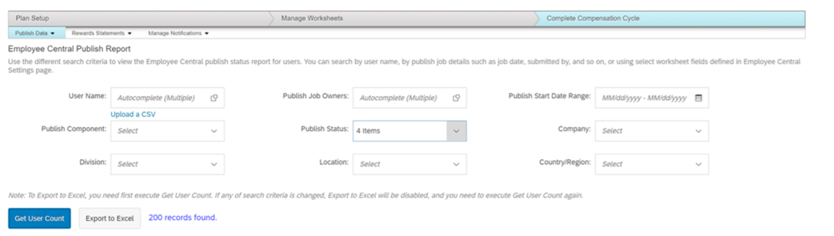
10. Publish Report for Detailed Logs on Compensation Publish to Employee Central
Compensation Administrators can now create a detailed report of the publishing status logs for employees and identify the issues during the publishing process for a given template.
The report is available in the Complete Compensation Cycle – Publish Data – Employee Central Publish Report area of the compensation plan.
To view report, Administrator – Manage Compensation – View Employee Central Publish Report permission has to be set in role-based permissions
SAP SuccessFactors has some exciting new features for your Analytics & Reporting solutions. They can be found in detail here (S-User ID required). Filter on Solutions for Analytics to review all the latest changes. Under the Description for each, you can click on ‘See More’ to see screenshots and detailed information.
As a reminder, preview release was on October 15 and production will be released November 19. For full details on the release cycle, check out the SAP SuccessFactors official product updates blog here. New to the release process? For tips on how to manage a release, check out our blog here.
After reviewing all the changes, we narrowed the list down to the Highlights for H2 2021SAP SuccessFactors Analytics/Reporting Features:
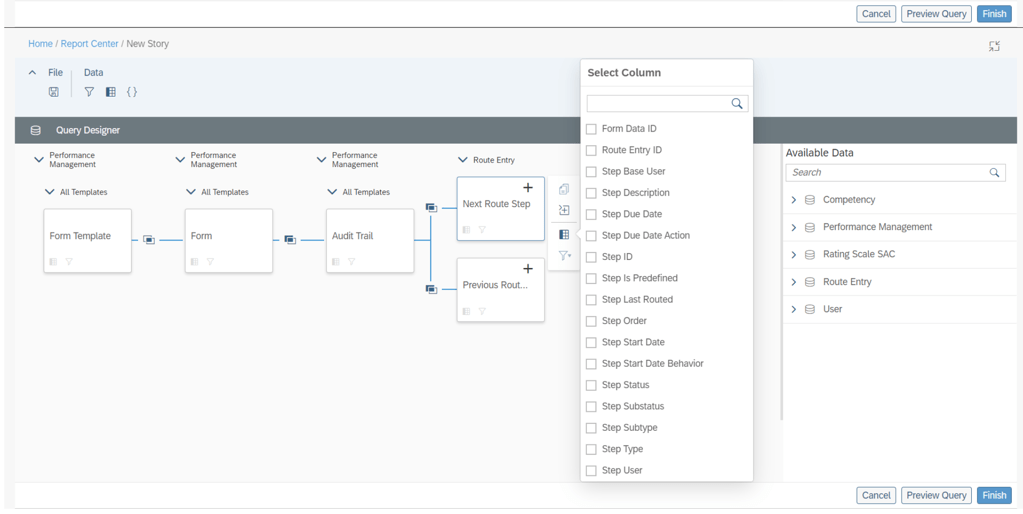
Audit Trail Now Reportable in Stories in People Analytics
Users can now use Stories in People Analytics to report the audit trail records of form completed steps, including step owner and step action.
This new feature allows you to track the routing details of Performance Management forms in a consolidated report.
Additional columns available to report on step details
Increase in the Number of Columns Supported for Learning Queries in Story Reports
The number of columns that you can select while creating a Learning query has been increased from 30 to 120.
You can now create more complex queries due to the increase in number of columns.
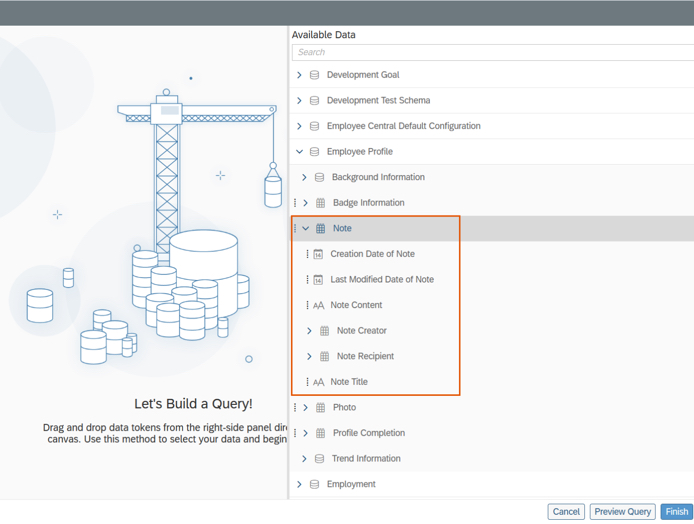
Notes of People Profile Now Reportable in Stories in People Analytics
Users can now use Stories in People Analytics to report the notes of People Profile. Information about notes that can be reported includes:
Note content
Note titles
Note creators
Note recipients
Last modified dates
Creation dates
Notes of People Profile are now reportable
Query Validation for Story Reports
The queries in Story reports are now checked for errors whenever you choose Preview or Finish on the Query Designer page.
The validation checks return a list of missing or erroneous columns, calculations, and filters used in the query.
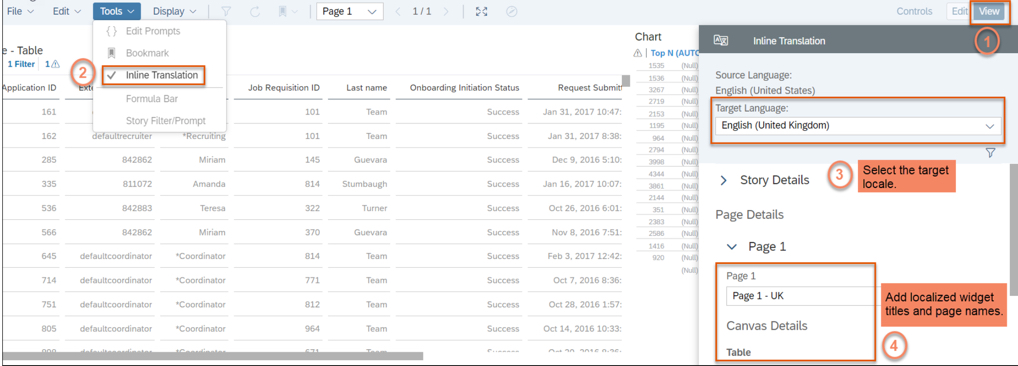
Inline Translation for Story Reports
You can now add localized values for widget titles and page names in Story reports.
Note: After you enable inline translation in a story, you can edit it only in the source language. When you enable inline translation in the story, your current locale becomes the source language for the story.
The ability to add localized widget titles and page names enhances the user experience for Story reports.
SAP SuccessFactors has some exciting new features for your Compensation Solution. They can be found in detail here (S-User ID required). Filter on Solutions for Compensation to review all of the latest changes. Under the Description for each, you can click on ‘See More’ to see screenshots and detailed information.
As a reminder, preview release was April 16th and production will be released May 21st.
After reviewing all the changes, I narrowed the list down to the Highlights for H1 2021Compensation:
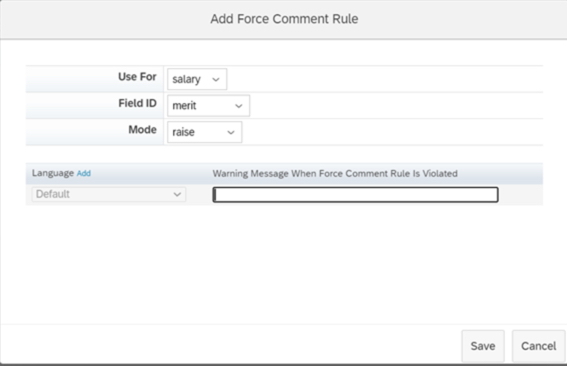
1. Ability to Configure Force Comments on Compensation Worksheets
Previously configuring forcing comments had to occur within the XML, now it can be done within Comp Admin Tools.
You can navigate to Design Worksheet – Define Standard Validation Rules to configure this functionality. The Force Comments feature is optional. When configured, you control whether users must enter comments under the following conditions:
An employee doesn’t receive a raise. Managers didn’t enter a value in a field configured to force comments.
An employee receives a raise. Managers entered a value in a field configured to force comment.
An employee receives a raise that is outside guidelines. Managers entered a value that doesn’t comply with guidelines in a field configured with force comments
Force Comments rules can now be configured via Admin Tools
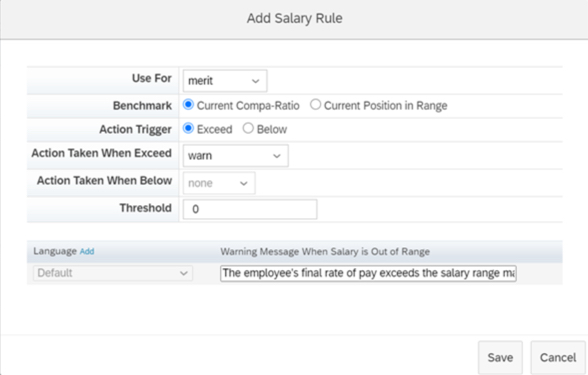
2. Salary Validation Rules Added to Compensation Worksheets
Previously configuring Salary Validation Rules had to occur within the XML, now it can be done within Comp Admin Tools.
You define rules to compare amounts using either compa-ratio or range penetration benchmarks. Configure what action the system takes when amounts exceed threshold percentages for lump sum amounts or fall below or exceed threshold percentages for merit amounts.
Salary rules can now be configured via Admin Tools
3. Compensation Worksheets Support Five Custom Validations
With this release, you can define up to five custom validations for fields in Compensation templates and configure how the system responds when validations fail, with either a warning or an error. The system processes the worksheet only after the error is corrected.
Previously, the maximum number of validations per template was three. This is especially helpful if you have complex calculations or are using 1 form for multiple plans.
Example of custom validation. Now users can define up to 5 custom validations.
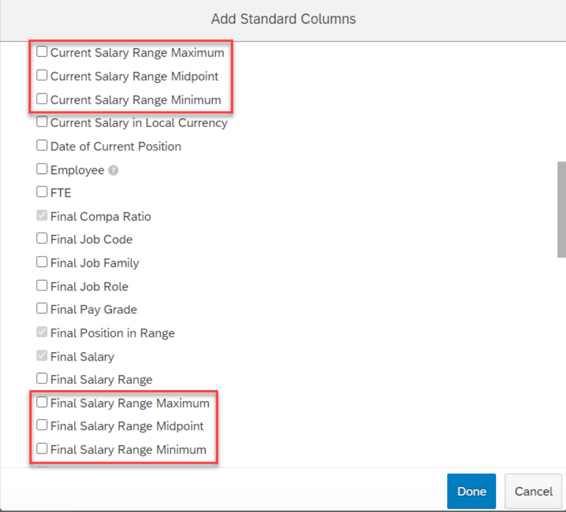
4. Current and Final Pay Ranges Configurable Through the Compensation Column Designer
You can now configure minimum, midpoint, and maximum values for current and final pay ranges through Compensation template’s column designer.
Previously, these fields weren’t available in the template configuration. There were two fields (Current Pay Range and Final Pay Range) in the min-mid-max format.
With this release, minimum, midpoint, and maximum are available as independent fields.
Separate columns exist now for Salary Range fields
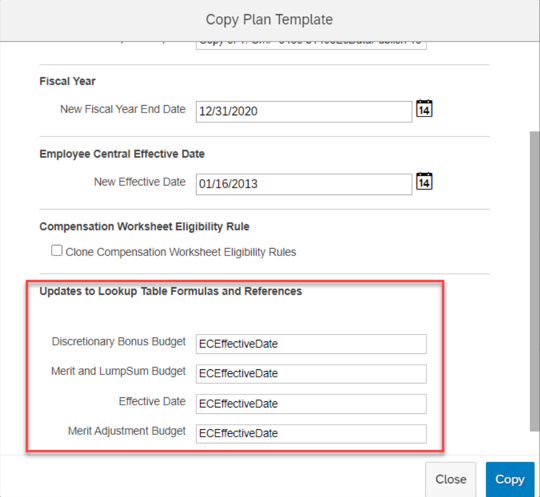
5. Update Lookup Table Formulas and References When Cloning Compensation Templates
Now when cloning Compensation templates, you can update lookup tables and references at the same time. A new section has been added to the Copy Plan Templates page, enabling you to view and edit the custom formulas and references from lookup tables on the original template.
Previously, you had to manually search through the original template’s XML file, looking for all lookup tables associated with it.
Cloning compensation templates allows for updating lookup tables and references
6. Administrative Permissions for Individual Compensation Templates
A new Role-based Permission has been added to assign administrative permissions on a template level.
Previously, access had to be granted to all or no templates.
Template access can be granted per individual template
7. Filter Enhancements Added to Compensation Executive Reviews
Enhanced filtering was added to Executive Review, new filters include:
Filter based on standard or custom reportable columns
Filter on compa-ratio and range penetration
Filter on Compensation planners
Filter based on entry in Comments fields
Filter based on promotions
To enable enhanced filtering, you must select the Enable Advanced Executive Review Filters option on the Actions for all Plans – Company Settings page.
Enhanced Filter capabilities now exist in Executive Review
8. Compensation and Variable Pay Reports are now available for download in Report Center
You can now download the reports from the My Jobs page within View Schedules in Report Center.
Previously, report outputs (i.e. Executive Review exports) were available for download on the Scheduled Reports page in classic view. This caused confusion for users on how to get to their reports by having to direct them to Switch to Classic View.
You can review my other blog post for more changes to Reporting for this release.
Executive Review export can now be accessed via My Jobs
9. Application of Eligibility Rules for Individual Compensation Worksheets After Launching
You can now reapply eligibility rules to a specific Compensation worksheet that you have already launched.
In previous releases, you could only reapply eligibility rules to all worksheets.
Eligibility can now be applied to individual worksheet updates
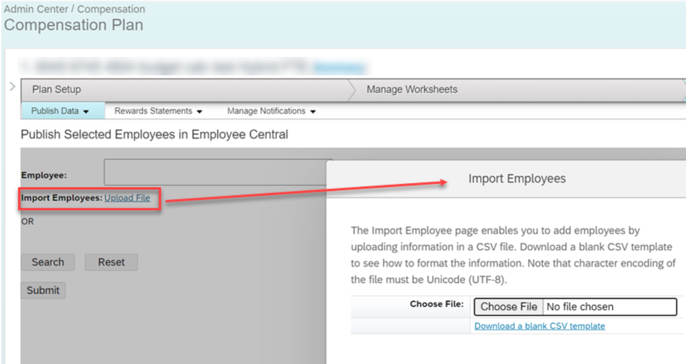
10. Publish Compensation Employees to Employee Central by Import Using CSV File
The Publish Selected Employees in Employee Central page has a new option, Import Employees. This allows publishing by importing them from a CSV file
Previously, you could publish multiple employees, but you needed to search and select them individually.
Publishing can now be done based on an imported file
SAP SuccessFactors has some exciting new features for your Analytics & Reporting Solutions. They can be found in detail here (S-User ID required). Filter on Solutions for Analytics to review all of the latest changes. Under the Description for each, you can click on ‘See More’ to see screenshots and detailed information.
After reviewing all the changes, we narrowed the list down to the Highlights for H1 2021 SAP SuccessFactors Analytics/Reporting Features:
Calibration, Succession, and Compensation and Variable Pay Reports Now Available for Download in Report Center
Previously, the reports were available for download on the Scheduled Reports page in classic view. This caused confusion for users on how to get to their reports by having to direct them to Switch to Classic View.
You can now download the reports from the My Jobs page within View Schedules in Report Center.
Reports can now be accessed via My Jobs
2. All User Info Fields Are Now Available in Story Reports
You no longer need to set a User Info field as Reportable to make it available in Story reports.
All the User Info fields are now automatically available for reporting using Stories in People Analytics.
3. Stories in People Analytics for SAP SuccessFactors Learning
You can now create, access, and share Learning stories in People Analytics for generating custom Learning reports.
You can also have the data of SAP SuccessFactors Learning and other modules side-by-side in the same story and link them to apply common filters on them.
Stories in People Analytics for SAP SuccessFactors Learning
4. Increase in Number of Columns Supported in Queries of Story Reports
The number of columns that you can select while creating a query has been increased from 30 to 120.
You can now create complex or detailed queries that involve more than 30 columns.
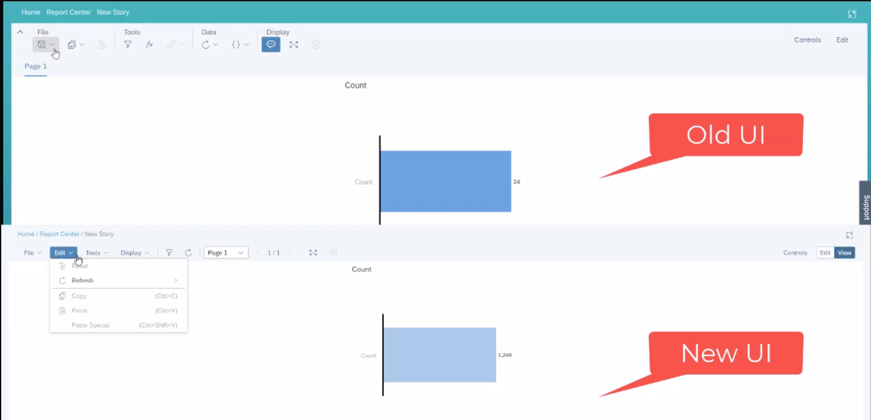
5. UI Enhancements for Stories in People Analytics
The UI enhancements on the viewer mode include:
An updated Display menu, which now has the Tab Bar, and the Comment Mode options. By default, the page dropdown view appears. The multiple pages in tab view now appear when you select the Tab Bar option.
Separate File and Edit menus.
Removal of the Data menu. The refresh option has moved into the Edit menu and the edit prompt option has moved into the Tools menu.












 Worklogix Blog