
In the past few days, SAP SuccessFactors has completed moving the H1 2020 release into production. For some well-prepared customers, users are excited about new features they are starting to enjoy. Others might be feeling some pain with critical issues that have arisen unexpectedly. Still others might not have done much preparation at all and are wondering if they missed something. In my experience consulting and providing production support services, I’ve seen all 3 types. Hopefully after reading this quick article you’ll always fall into the first category!
Step 1: Know your Dates
SAP SuccessFactors keeps a product update blog that you should check regularly here: https://community.successfactors.com/t5/Product-Updates-Blog/bg-p/ProductUpdates
Note: you will need an SAP S-ID to access all of the links in this document
The preview dates and production dates are posted in the upper-right-hand corner of the blog. Preview date refers to the date the release will be put into the preview environments. You know your environment is in a preview datacenter if the url has preview in it. For example:
- https://hcm8preview.sapsf.com/ refers to the DC8 preview environment.
- https://performancemanager8.successfactors.com/ refers to the DC8 production environment
Historically SAP SuccessFactors and SuccessFactors prior to the merger conducted quarterly releases. However starting in 2020 SAP reduced the release time to every 6 months. While I haven’t conducted a survey, my guess is most customers and SAP are pretty happy about this as it gives much more time to properly prepare. With a quarterly release, by the time you finished your regression testing it was already time to start prepping for the next release and keeping dedicated resources onboard to only conduct regression tests was impractical. I’m sure it was a similar story on the SAP side of the house.
Step 2: Read the Documentation
SAP changed how the documentation works a bit this year. The first document you should read is the Road to Release document which is also available on the SuccessFactors Community Product Updates blog. The latest road to release document tells you how to sign up for newsletters to keep you updated and also outlines some steps similar to the ones in this blog I’m writing. The document is informative and a must read, but realistically I treat is as a pamphlet on when documentation will be released because in my opinion it focuses only on new features glosses over any regression testing and misses a few key things customers should do and know that I’ll point out in this blog.
Next, given that it’s a week or so prior to the preview release (which is when SAP releases the detailed documentation), take a look at the documentation here:
https://help.sap.com/viewer/product/SAP_SUCCESSFACTORS_RELEASE_INFORMATION/2005/en-US
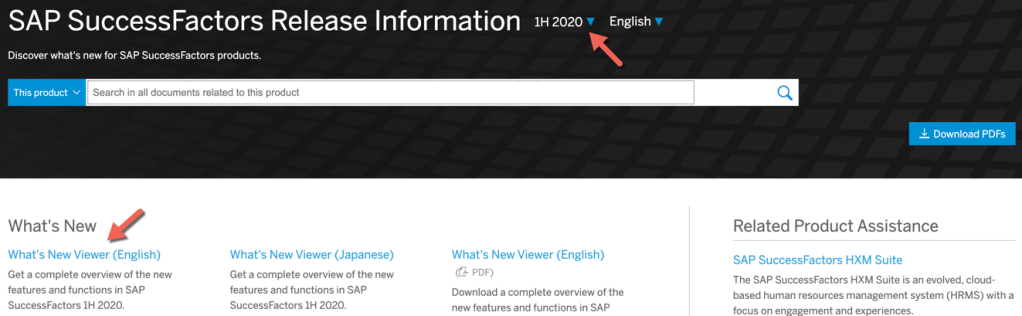
The above link lets you search the documentation for every new feature – so if you choose to turn on a new feature, this will let you know what administrator steps to take as well as some basic end user testing scenarios. You can also choose prior releases as well from the drop down above the search bar.
However, before you start searching for features to turn on, you’ll want a god’s eye view of what’s available to you. Click the link to the “What’s New Viewer” on that same page. This tool will allow you to filter by specific modules to find what’s relevant to you, providing a brief summary of each feature.
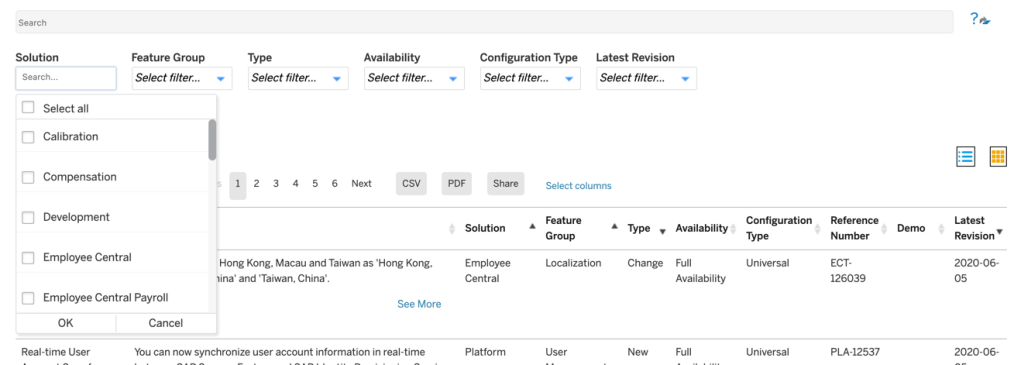
The key concept to understand when exploring this tool is the configuration type. “Universal” means that all customers will receive the feature on preview and production release dates without taking any action. “Admin Opt-In” means customers can opt to receive the feature by taking the steps outlined in the detailed documentation (search for the name of the feature in the big search bar in the first screenshot and you’ll find these steps). “Admin Opt-Out” means you’ll need to follow similar steps to not receive the feature. “Provisioning Opt-In” means you will need a partner and/or SAP to follow the steps in the detailed documentation to turn the feature on because only they have access to provisioning to do so.
There’s links to other documents on the SuccessFactors Community Product Release Blog, however if you like to jump straight to the facts and avoid the fluff, the ones I mention above will get you on your way.
Step 3: Analyze and Plan
Now that you know the dates and the scale of what’s being impacted by the release, you can setup a calendar plan and resources to execute the plan. A sample plan might roughly look like the below:
- Preview Release minus 1 week – IT Team reviews release documentation
- IT Team Meets with Stakeholders with abridged list of key features that may interest the business and discusses regression testing resources
- Preview Release Date – Regression testing commences
- IT Team reports any found defects to SAP via customer ticket
- Preview Release plus 1 week – IT Team and/or stakeholders attend Q&A sessions with SAP to clarify any feature questions
- Stakeholders report which opt-in features they would like to explore in preview
- Once Regression testing is complete, IT turns on opt-in features and/or engages SAP/Partners to turn on any provisioning opt-in features
- Stakeholders explore and test functionality in preview environment and finalize which features will be turned on in production
- Communications and training are drafted as needed on any new features
- Production Release
- Stakeholders report any production regression Issues to IT who reaches out to SAP as needed to open customer tickets
- IT Team and/or Partner/SAP turn on opt-in features
- Stakeholders report any production new feature Issues to IT who reaches out to SAP as needed to open customer tickets
Step 4: Regression Test
Being a cloud product, there’s a pretty high level of confidence that the system will continue to function as normal after release since both SAP and numerous customers are all collectively testing the same set of code. However, if you want to err on the side of caution, you may wish to regression test your key business processes in your preview environment prior to turning on any new features. In particular, you may also want to focus on business processes impacted by universal changes. The key advantage here is being able to report issues to SAP ahead of production release so there’s a solution before it becomes a problem! Often customers will reference their test scripts from their initial implementation and update them for any universal features.
Step 5: Explore New Features
Once you’ve explored the documentation on new features and have agreement with business stakeholders on what should be explored, it is time to start playing!
If you’ve chosen to regression test, I’d recommend executing that prior to turning on any new opt-in features to keep troubleshooting issues less confusing. For example, if you’ve turned on a feature you later decide you don’t want and later find a regression test issue, it may not be clear if that issue will occur in production or not. In fact, some customers who only have 1 preview and 1 production environment wait until after production release before exploring new features in their preview environment so that there is clarity on what production will look like and what issues might arise prior to sandboxing a bit with new features. If you have 2 preview environments at your disposal, then these activities can be done in parallel more confidently.
Step 6: Release Friday – Stay Away!
Typically, a release starts on a Friday evening up-until early Saturday morning. While you might try to access the system and be able to get in, I don’t recommend it. SAP will be loading code and restarting services. There’s no guarantee any data you save or changes you make will be there the next day. Have a nice weekend and come back on Monday and be glad you invested in a cloud product that handles this for you!
Step 6: Release Monday – Be on the Alert!
I don’t think I’ve ever turned on a new feature in the first week of a production release unless it has been a business-critical function/feature. SAP is wise enough to start production releases on Friday evening so that if things go wrong, they’ve maximized the time available to them before customers will come back Monday morning. However, just because the system is up does not mean everything is perfect. Often, SAP is very busy handling new tickets related to the release. If you are experiencing an issue, report it ASAP, but also be realistic. If it is a critical issue that lots of customers are experiencing, it will get fixed very quickly. If it is an issue unique to your organization and not business-critical, you may be waiting a couple weeks or more for resolution.
Step 7: Turn on Your Production Opt-Ins
Once you are comfortable your system is stable, it is time to turn on your opt-ins in production! You can follow the steps outlined in the detailed documentation that you followed in preview again or use instance sync depending on the particular configuration.
Step 8: Rinse and Repeat
Congratulations! You’ve made it through your release! Time to check back on the dates for the next release!
Do you need help updating your SAP SuccessFactors system? Download our support services brochure or contact us at: info@worklogix.com


Leave a reply to SAP SuccessFactors 1H 2022 What’s New in Performance Management – Worklogix Blog Cancel reply