SAP has announced the latest updates and changes for SuccessFactors for the first half of 2023.
Preview release is on April 28 with the production release is scheduled for June 2. You can view the full set of documentation in the What’s New Viewer here. For full details on the release cycle, check out the SAP SuccessFactors official product updates blog.
For tips on how to manage a release, check out our blog here.
For your convenience, we’ve summarized the highlights of what’s new for 1H 2023 Career Development below.
Career Development
There are a few universal updates for Career Development that are reviewed below.
Career Worksheet – General Availability
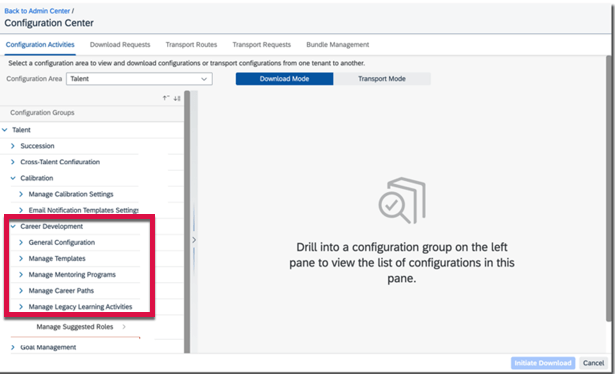
Career Development Configurations Available in Configuration Center
You can now view, download, and transport Career Development configurations using Configuration Center.
Configuration Center
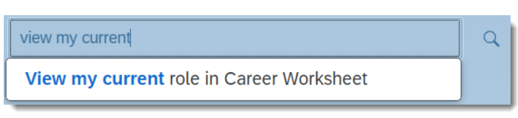
New Action Available in Action Search
On a career worksheet, View my current role in Career Worksheet action is now available for use in the global search box. Users can enter the exact text of the action or select from suggested actions to navigate to the Career Worksheet page.
Current Role Action
The new action takes users directly to a selected page and eliminates multiple steps to get there.
Career Worksheet Data in Story Reports Now Limited to Target Population
The Career Worksheet data that users can view in Story reports, including current and target roles, is now limited to their target population.
Changed Permission for Users to Show Target Roles in People Profile
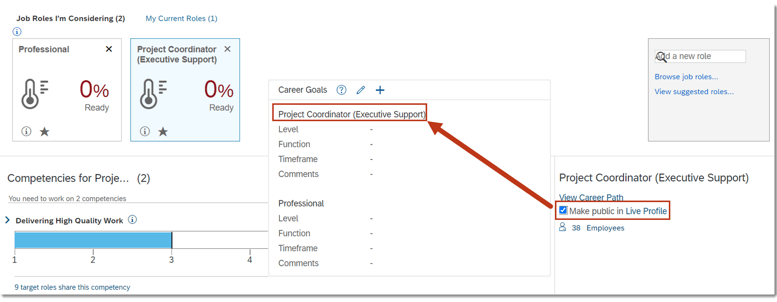
Now a user only needs View permission (User Permissions>Employee Data>Preferred Next Move) in order to select the Make public in Live Profile checkbox in Career Worksheet to show target roles in People Profile.
Previously, View and Edit permissions were required. Now a user can select the option to show a role in Career Worksheet. The role then appears in the Career Goals block in People Profile.
Link to Career Goal Block
Mentoring – General Availability – Universal
Approvals for Mentoring Requests on the Latest Home Page
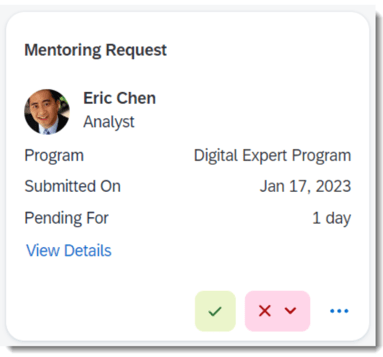
In an open enrollment or unsupervised mentoring program, Mentors can now accept or decline the mentoring requests sent by mentees in the Approvals section on the latest home page.
Accept or Decline Mentoring Requests
View More Recommended Mentors
When a user signs up for a mentoring program as a mentee, they can now view up to 100 recommended mentors. Previously, only 10 mentors were recommended.
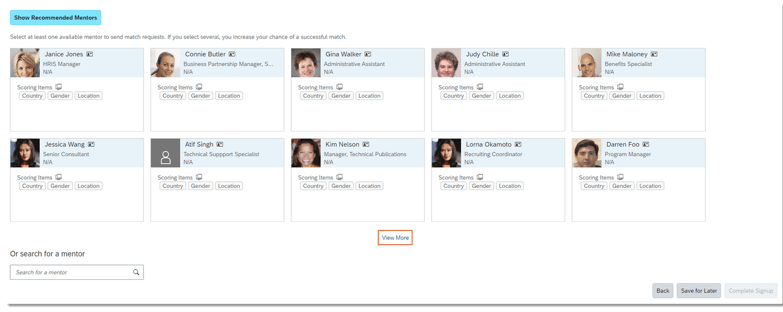
While signing up and choosing Show Recommended Mentors, now there will be two rows of recommended mentor cards with the View More link below the cards.
Recommended Mentors
Customize Mentoring Email Notifications
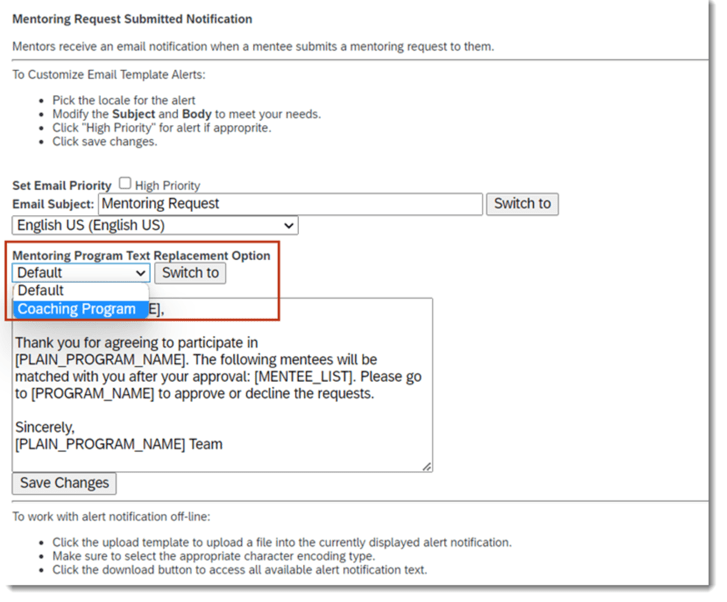
For any customized program type created with text replacement for a Mentoring programs, email notifications for a specific program type may be customized in Email Notification Templates Settings as well.
Customize Mentoring Emails
Approvals for Mentoring Requests on the Latest Home Page in iOS and Android Mobile Apps
SAP SuccessFactors Mobile users can now search for mentors from a recommended mentoring program they haven’t joined in Opportunity Marketplace. Previously, they had to join the program first.
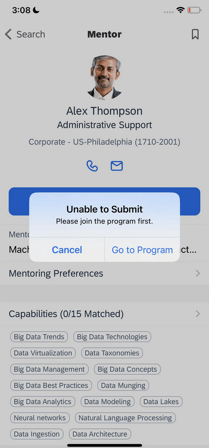
When a user wants to invite someone they found to be their mentor, choose Submit Request on the Mentor or Bookmarks page. They will be prompted with a message guiding them to join the program first.
Mobile Message when Joining
After joining the program, users can submit a mentoring request to their preferred mentor directly on the page.
Let’s quickly take a glance on what’s there on 2H 2022 Employee Central.
Configuration Type: Universal
Full-Time Equivalent (FTE) validation.
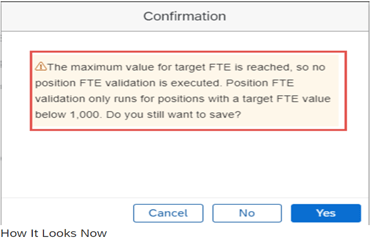
Watch over on “Full-Time Equivalent (FTE)” validation because system is not going to perform a Full-Time Equivalent (FTE) validation check for positions that have more than 1000 target FTEs for the below scenarios.
Save Job Information through Centralized services, either through import or on the Job Information history.
Save a position target FTE with a value greater than 1000.
Employee Central API Permissions are no longer required!
Employee central entities “EmpEmployment and EmpJob” Permissions are only required to access the Employee Central Service Center.
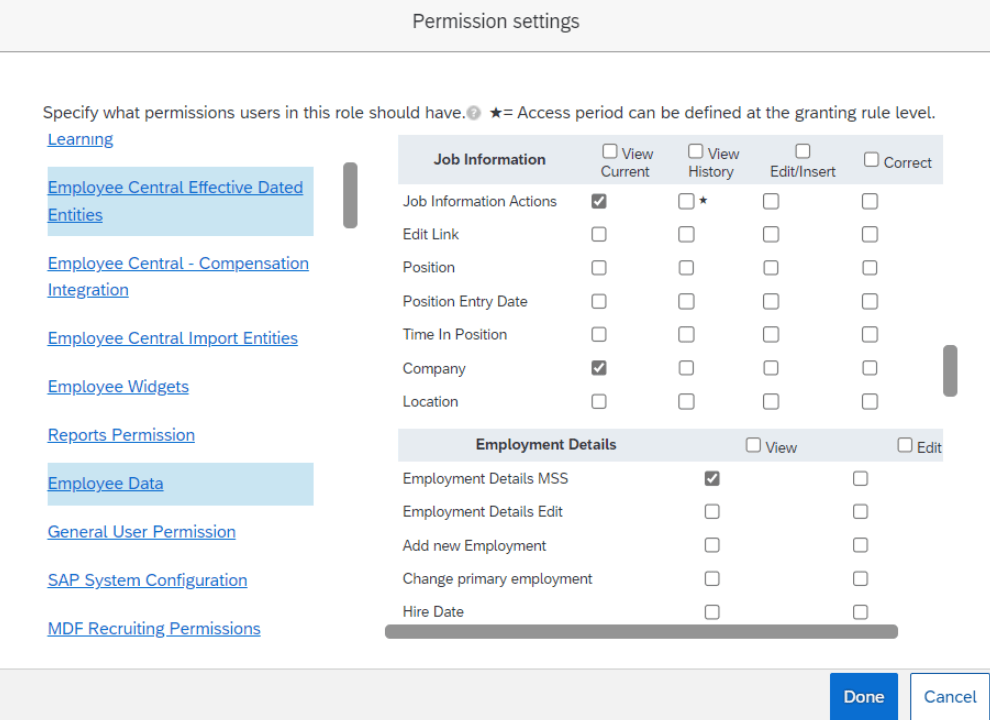
Below Permissions settings will help to view a tickets in Ask HR.
User > Employee Central Effective Dated Entities > Job Information
Select permission View for items Job Information Actions and Company.
User > Employee Data >Employment Details
Select permission View for item Employment Details MSS.
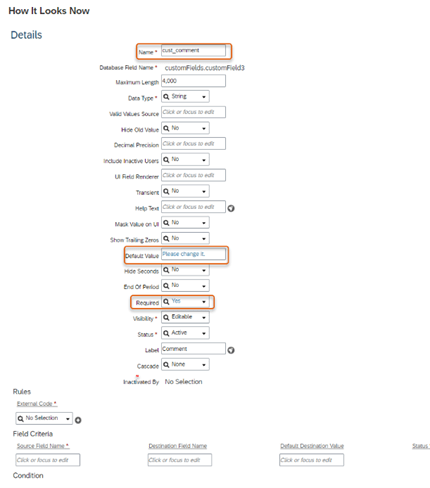
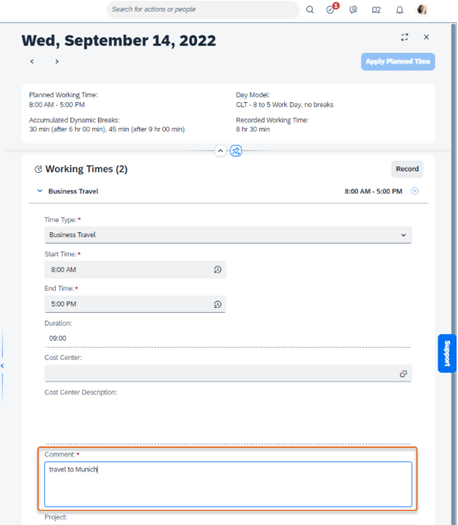
Enhancement in Time Sheet UI required custom fields
Restrictions in creating required custom fields on the EmployeeTimeSheet and TimeSheetValuationResults objects
Required custom fields on the EmployeeTimeSheetEntry and Allowance objects are restricted to the below primitive data types:
String
Number
Decimal
Time
DataTime
Date
Boolean
End of Development Time
Benefits Auto Enrollment Job – End of development on May 20, 2022 and will be deleted on May 19, 2023.
Old time sheet – Maintenance end on December 9, 2022 and will be deleted on May 19, 2023.
Savings Plan related fields – End of Development on December 9, 2022 and will be removed on May 19, 2023.
HTTP Basic authentication with SAP Cloud for Customer – End of Development on May 20, 2022 and will be Deleted on Nov 17, 2023.
Employee Central Payroll endpoint URL subscriptions
New Event Subscription Management tool supports the following events
Employee Hire
Employee Rehire
Employee Termination
Payroll Data Maintenance Task Configuration Change
New subscriptions can no longer be created; Existing subscriptions related to Employee Central Payroll will be automatically migrated to Event Subscription Management.
Configuration Type: Admin Opt-out
Centralized Support on the UI action save.
Yeah!!! Now, Centralized Support has extended their hands on saving the following action on UI, based on role-based permission.
Admin Center > Company System and Logo Settings >
History UI of Compensation Information and Recurring Pay Components
Global Assignments
Employment Details
Contact Information
Employment Details for a Higher Duty or Temporary Assignment
By default, Saving changes on UI and data imports for Emergency Contacts are enabled. No role based permission required.
Centralized Services Support through MSS.
Using role-based permission, centralized services now support making changes to an employee’s records when changes are made in the Manager Self-Service (MSS).
Change Job and Compensation Info
Company System and Logo Settings > Enable Centralized Services to Save Changes on the Manager Self-Service UI for Change Job and Compensation Info.
Termination Information
Company System and Logo Settings > Enable Centralized Services to Save Changes on the Manager Self-Service UI for Termination Details.
New Key Property in OData API EmpWorkPermit.
In order to maintain multiple work permit of employee with same document details, the new composite business key ‘issueDate‘ has been introduced.
Whenever the employee work permits is renewed, we can create a new record without touching the old one.
Configuration Type: Admin Opt-in
We can validate employee’s and their dependents addresses using SAP DQM Microservices that is hosted on SAP BTP (SAP Cloud Platform) which requires X.509 Certificate authentication, that the customers would manually adopt.
The DQM Microservices in SAP BTP account must be configured on Cloud Foundry and download the X.509 Certificate.
The downloaded X.509 Certificate needs to be uploaded in .pem format in the Security Center.
Set up the OAuth Configuration in the Security Center against the OAuth Configuration tile.
Configure the Destination Settings in the Security Center.
WBS Element can be used as a standard field without having to maintain the WBS Element as a custom field. Using WBS Element as a standard field, you can replicate the complete WBS Element information from SAP S/4HANA to SAP SuccessFactors Employee Central. You can also migrate WBS Element from a custom field to the standard field.
Admin Center > Manage Permission Roles > Industry Features > Download Employee Cost Assignment Migration Data
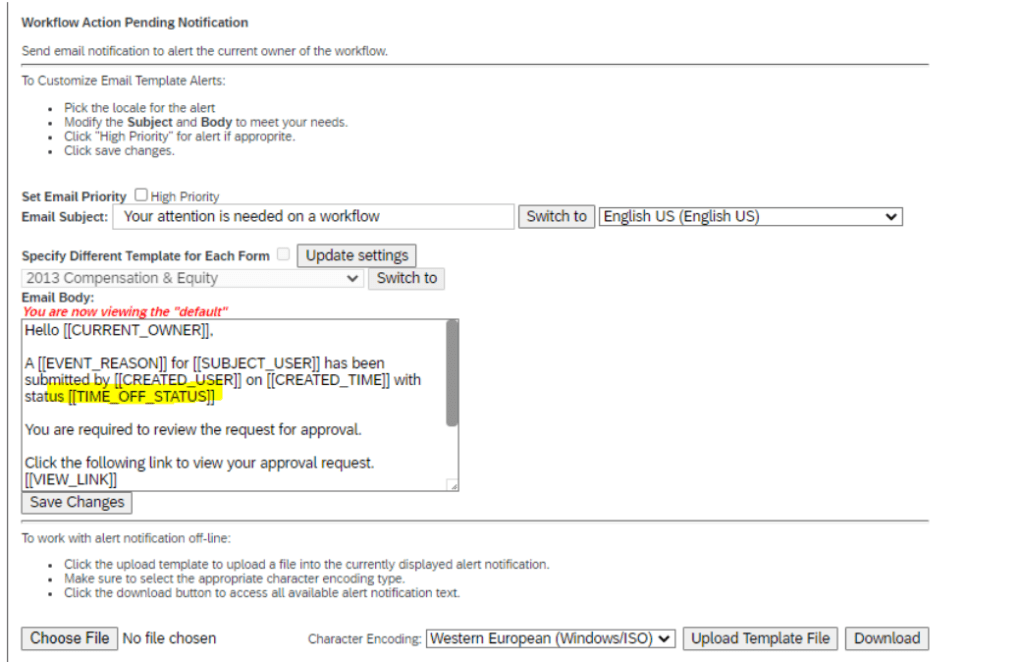
New token ‘TIME_OFF_STATUS’ is available for e-mail notifications on Time Off, which helps to differentiate the email notification by the status of the absence.
In Conclusion
We have now covered the highlights of the Employee Central related updates for 2H 2022.
Update to the Expiration Duration of Reset Password Link
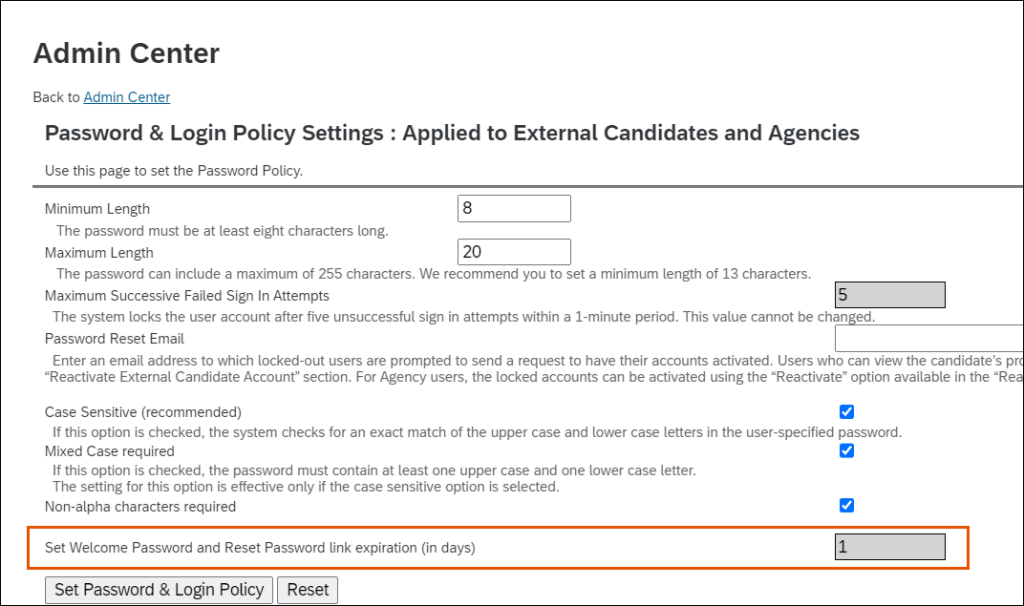
Link expiration duration for the Set Welcome Password and Reset Password link expiration (in days) option is now set to 1 day by default.
The Set Welcome Password and Reset Password link expiration (in days) option is now disabled for editing. This option is available in the Password and Login Policy Settings: Applied to External Candidates and Agencies page.
This update enhances the privacy of Agency user accounts and external candidate accounts.
Improved Special Character Support in Job Searches
Keyword and location searches in career sites enabled by Career Site Builder now recognize special characters and treat them as if they were regular characters, so that search results are the same whether the term you use includes special characters or not.
The following table shows an example of how search functionality now treats “Quebec”:
Term Used in Job Posting
Search Query
Search Result
Québec
Quebec
Returns job postings that list both Québec and Quebec.
Quebec
Québec
Returns job postings that list both Québec and Quebec.
The following special characters are recognized for both keyword and location searches, and are treated as if they were unaccented:
é – accent acute
è – accent grave
ë – umlaut
ê – circumflex
ç – cedilla
ñ – tilde
ø – streg
ð – eth (capital form Ð)
å – bolle
æ – ligature
œ – ligature
ē – macron
č – háček
ŭ – crescent
This enhancement to improve the search experience for the candidate, as well as to provide more flexibility for persons writing job requisitions.
New Recruiting Career Site Details for SSL Certificate Expiration Email Reminders
The SSL certificate expiration email reminders are improved with additional details that help administrators identify the specific Recruiting career site certificate that is set to expire.
The email reminders now include the following details:
RCM Company ID
Career Site Builder Site ID
Site Name
Career Site URL
This enhancement to make it easier for administrators to easily identify which career site is associated with the expiring SSL certificate email reminder.
Enhanced Search Functionality for Redesigned Applicant Workbench
The redesigned Recruiting Applicant Workbench now provides an improved user experience for searching, filtering, and displaying applicants who have applied for specific jobs.
You can now filter the applicants using:
Background elements configured in your candidate profile template. For example, previous employment, education, and so on.
Applicant first name and last name.
Fields defined in your application templates and candidate profile.
Keyword search in resume and cover letter.
Facet counts for picklist items, such as Country, where you can see the number of applicants.
For example, you can easily find the list of applicants:
Who currently live in New York and previously worked for the ABC organization.
Who have proficiency in speaking and writing in the French language.
Whose resume contains keywords, such as Java, Python, User Assistance, and so on.
Note:
The Latest Applicant Workbench is available only for customers who have joined the Early Adopter Care (EAC) Program for Recruiting. Find more details at the Customer Community link in the Related Information section: Early Adopter Care for Applicant Workbench Management – Registration is now open!
New Qualtrics Feedback Opportunity for Recruiting Application Status Change
You can use Intelligent Services events to send information to SAP SuccessFactors Recruiting.
Manage Qualtrics Integrations in the Admin Center now includes the Application Status Change option in the Event Name field’s dropdown list for Recruiting.
Here’s a screenshot of the enhanced feature.
This enhancement was delivered so customers would have a way to get feedback from candidates when their application status changed. This, in turn, can help organizations make appropriate corrections or adjustments to the Recruiting process.
Replacement of Google Universal Analytics for Career Sites
Google is replacing Universal Analytics with Google Analytics 4. Career Site Builder administers should update their configuration settings by July 1, 2023, when all standard Universal Analytics properties stop processing new hits.
Key Dates
Future dates are subject to change.
Milestone
Date
Definition
End of Development
December 9, 2022
The deprecation milestone after which SAP stops enhancing a product or part of a product. You can continue to use the software, but you should begin planning for a time when it will no longer be available for use. We still fix high-priority bugs.
End of Maintenance
December 9, 2022
The deprecation milestone after which SAP does not fix bugs or deliver patches for the software. SAP continues to answer your how-to questions. We strongly encourage you to adopt an alternative method for your business scenario.
Deleted
July 1, 2023
The deprecation milestone when a feature is no longer available for productive use. You should now be using an alternative method for your business scenario.
Deprecation Details
Career Site Builder has a new Google Analytics 4 ID field, in SettingsSite ConfigurationSite Information. After you configure your Google Analytics 4 account, you can enter this account’s identification number in the new field. Doing so ensures that new hits continue to be processed for your career site after Google retires Universal Analytics on July 1, 2023.
If you’ve been using Universal Analytics for your career site, the existing Google Analytics ID field will continue to be available in Career Site Builder during this transition period. To reduce confusion between the old and new fields, we’ve revised the label of the retiring field from Google Analytics ID to Google Analytics (Universal Analytics) ID.
In Conclusion
We have now covered the highlights of the Recruiting related updates for 2H 2022.
SAP SuccessFactors has released new features for your Analytics solution. They can be found in detail here (S-User ID required). Filter on Solution for Analytics to review all the latest changes. Under the Description for each, you can click on ‘See More’ to see screenshots and detailed information.
Preview release was on October 28 and production will be released December 9. For full details on the release cycle, check out the SAP SuccessFactors official product updates blog here. New to the release process? For tips on how to manage a release, check out our blog here.
After reviewing all the changes, we narrowed the list down to the 2H 2022SAP SuccessFactors Analytics Top 3 Features:
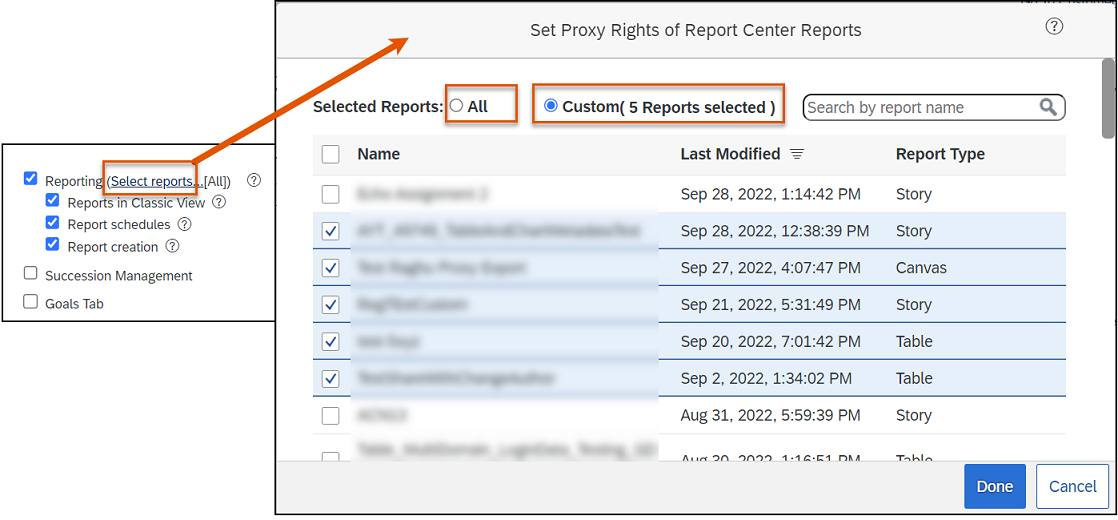
Granular Proxy Rights for Reporting
Users can choose the Report Center reports that a proxy user can access and the tasks in reporting that a proxy user can perform on behalf of the account holder.
Instead of the proxy rights being all or nothing, users can decide on an individual basis what reports a user can access and what reporting actions a user can perform as a proxy.
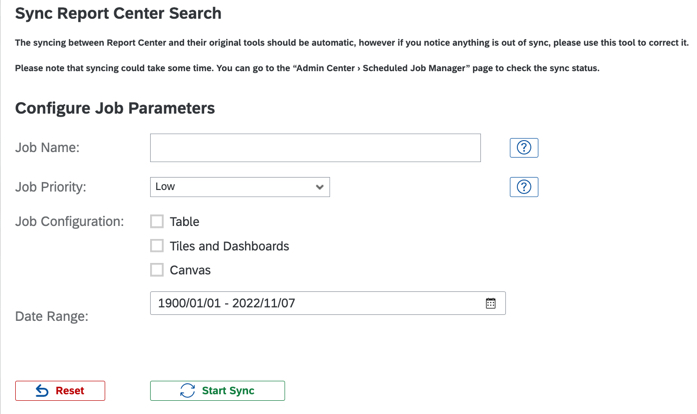
Status of Sync Report Center Search Jobs on the Scheduled Job Manager Page
Users have the ability to check the status of the sync jobs initiated from the Sync Report Center Search page in the Job Monitor and the Job Scheduler tabs on the Scheduled Job Manager page.
Role-based permission changes Manage Dashboards / Reports –> Manage Report Center are required to access Admin Center –> Sync Report Center Search.
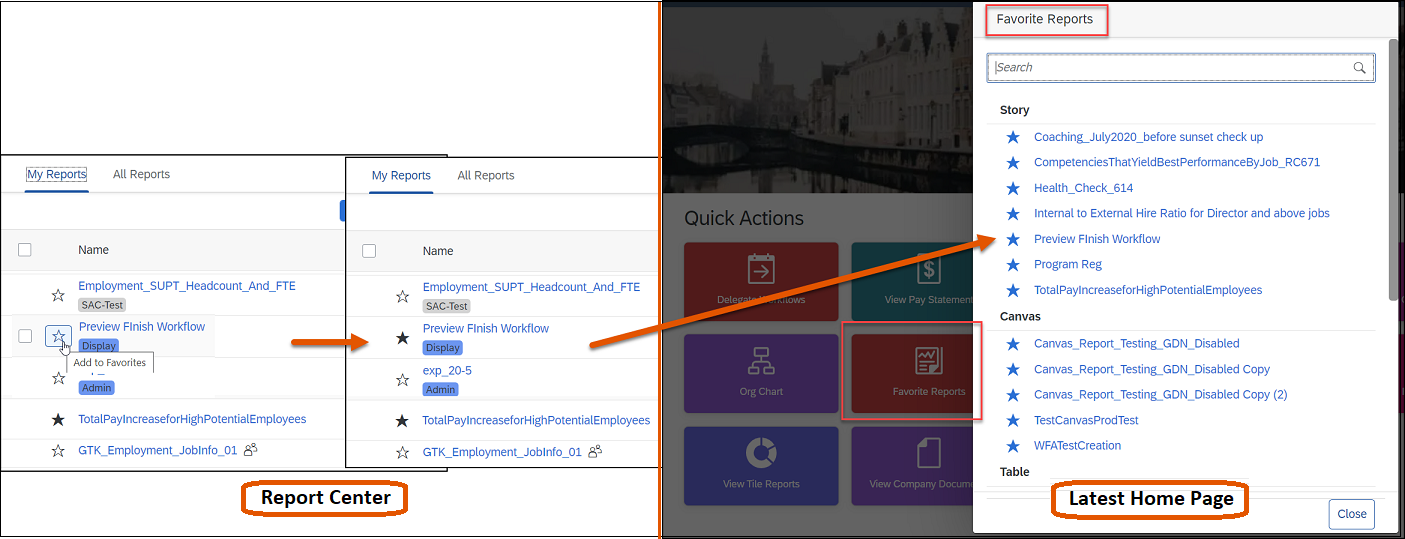
Manage Favorite Reports from the Report Center Page
Users can use Report Center to add or remove favorite reports that are available on the home page.
For the favorite reports to appear on the latest home page, ensure that Favorite Reports quick action is enabled in Admin Center –> Manage Home Page.
SAP SuccessFactors has released new features for your Compensation solution. They can be found in detail here (S-User ID required). Filter on Solution for Compensation to review all the latest changes. Under the Description for each, you can click on ‘See More’ to see screenshots and detailed information.
Preview release was on October 28 and production will be released December 9. For full details on the release cycle, check out the SAP SuccessFactors official product updates blog here. New to the release process? For tips on how to manage a release, check out our blog here.
After reviewing all the changes, we narrowed the list down to the 2H 2022SAP SuccessFactors Compensation Top 5 Features:
Reward Statement Generation Report
Compensation Administrators can now download a csv file that will show which employees had a statement generated for them and which did not.
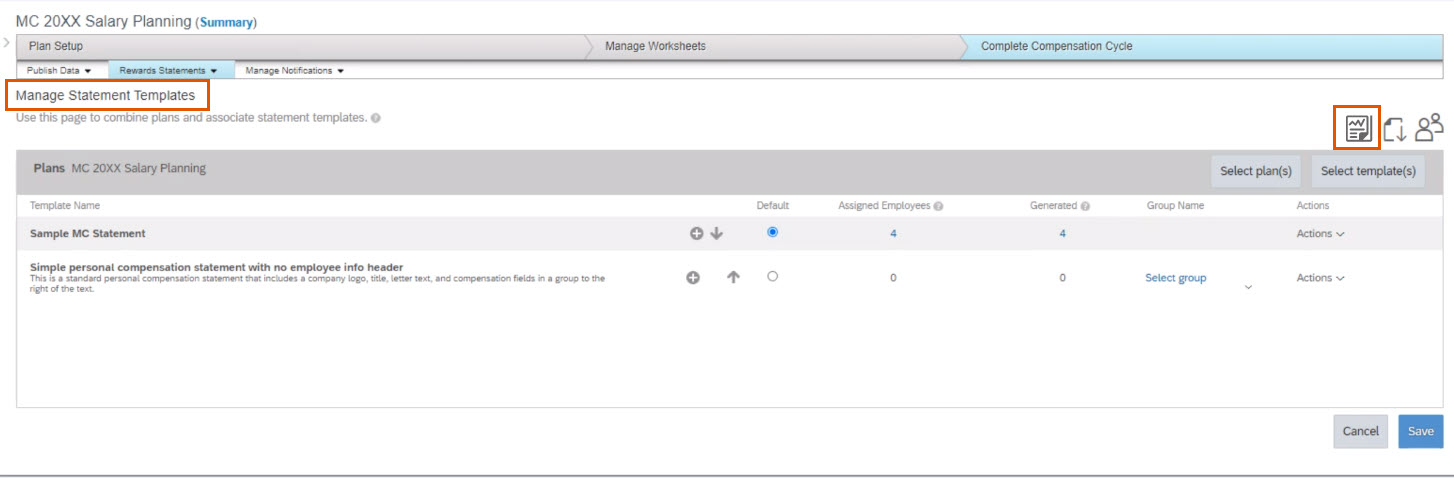
This feature can be found under the Plan you are generating statements for by navigating to Complete Compensation Cycle –> Reward Statements –> Manage Statement Templates and select the Reward Statement Generation Report icon.
Additional Column Fields with Help Text When Designing Plan Worksheets
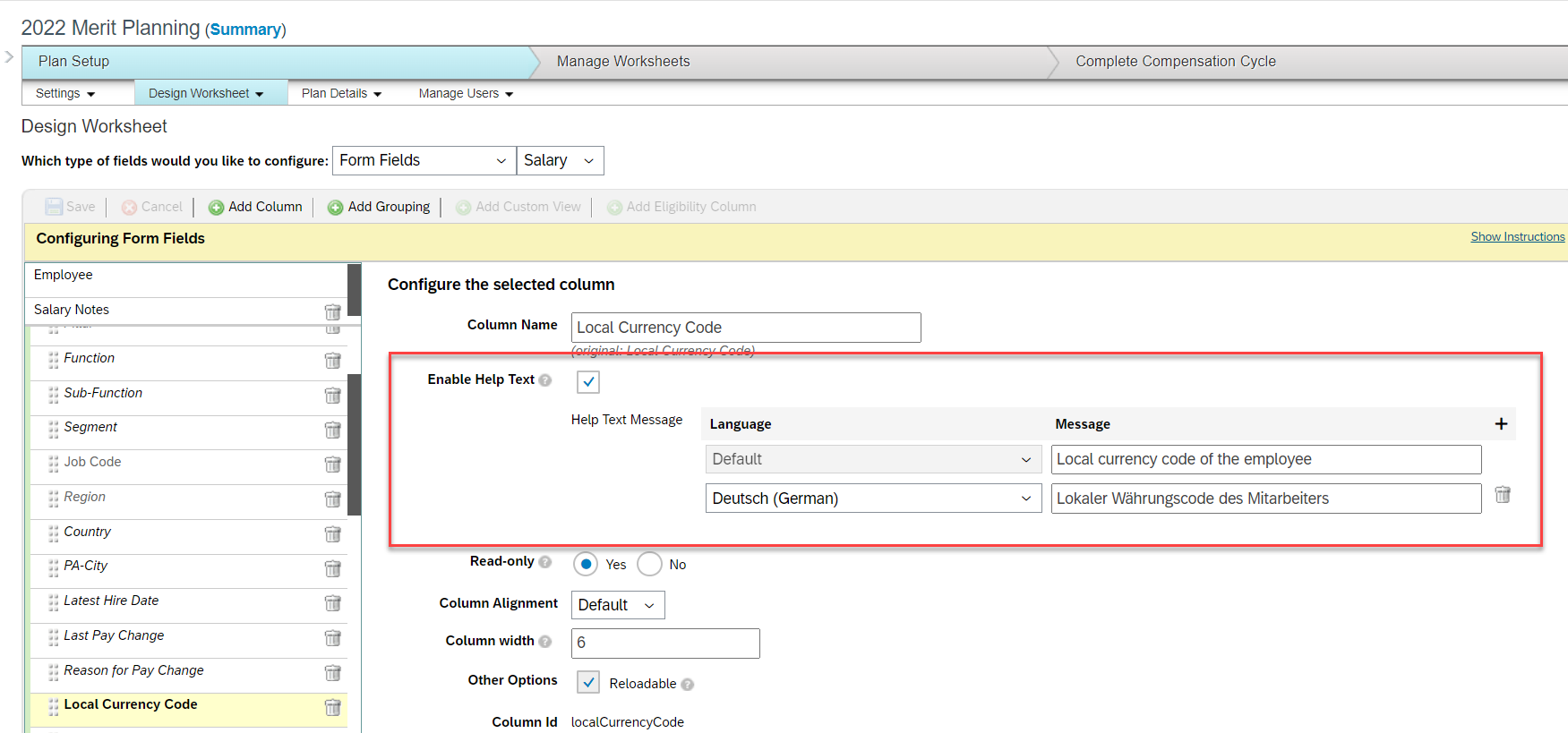
Compensation Administrators can now configure help text for up to 50 column fields when designing Compensation, Variable Pay, and Total Compensation templates.
Previously, this was limited to 10 but was extended to allow end users more visibility to useful information describing each column when needed.
Share Option for Advanced Executive Review Filters
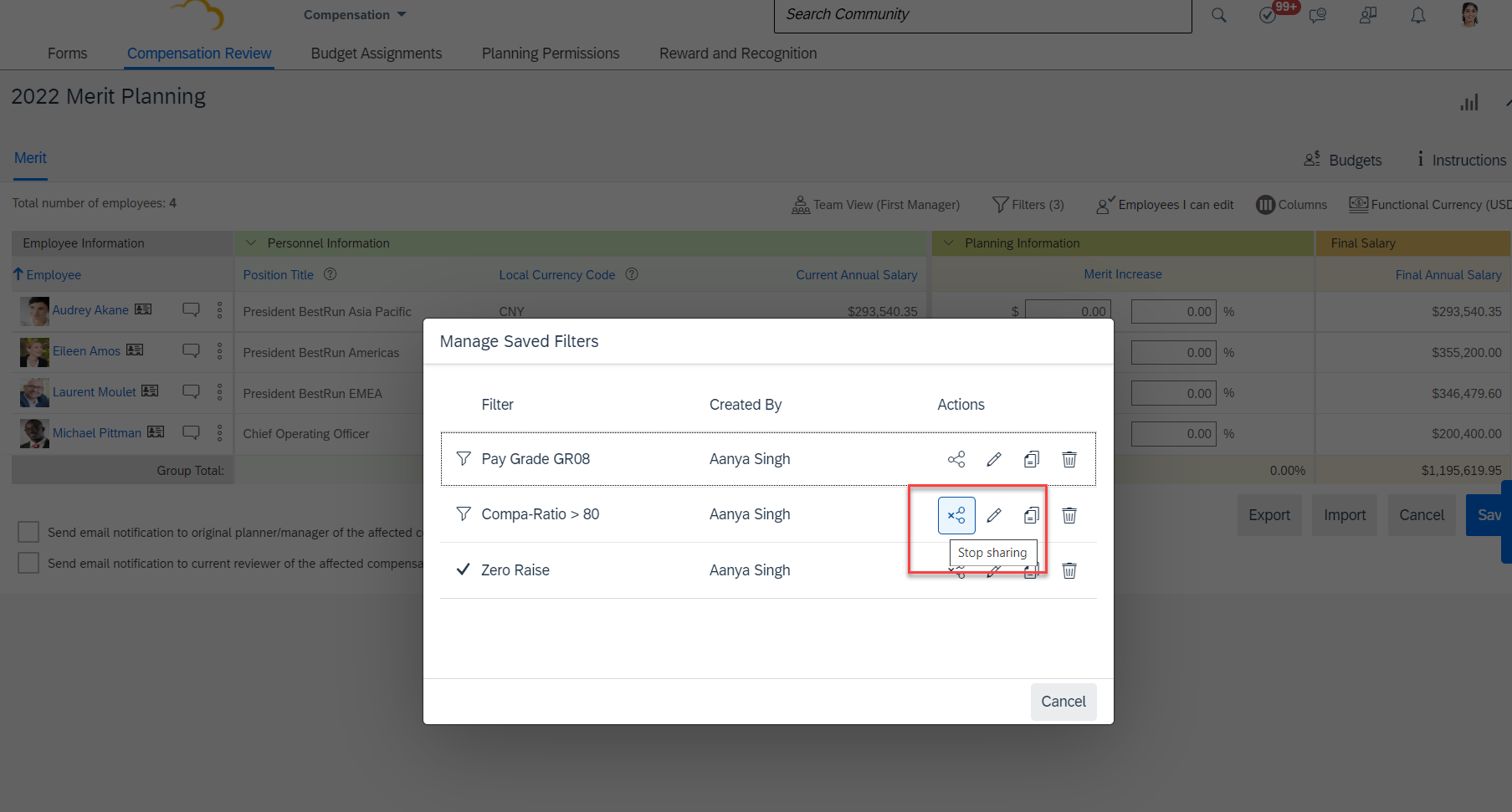
Users will now be able to see a Share button that allows the ability to create and use filters that can be shared across the organization.
In order for users to be able to share, Role-Based Permissions need to be updated by navigating to Administrator Permissions –> Manage Compensation and VarPay –> Enable Sharing Executive Review Filters permission.
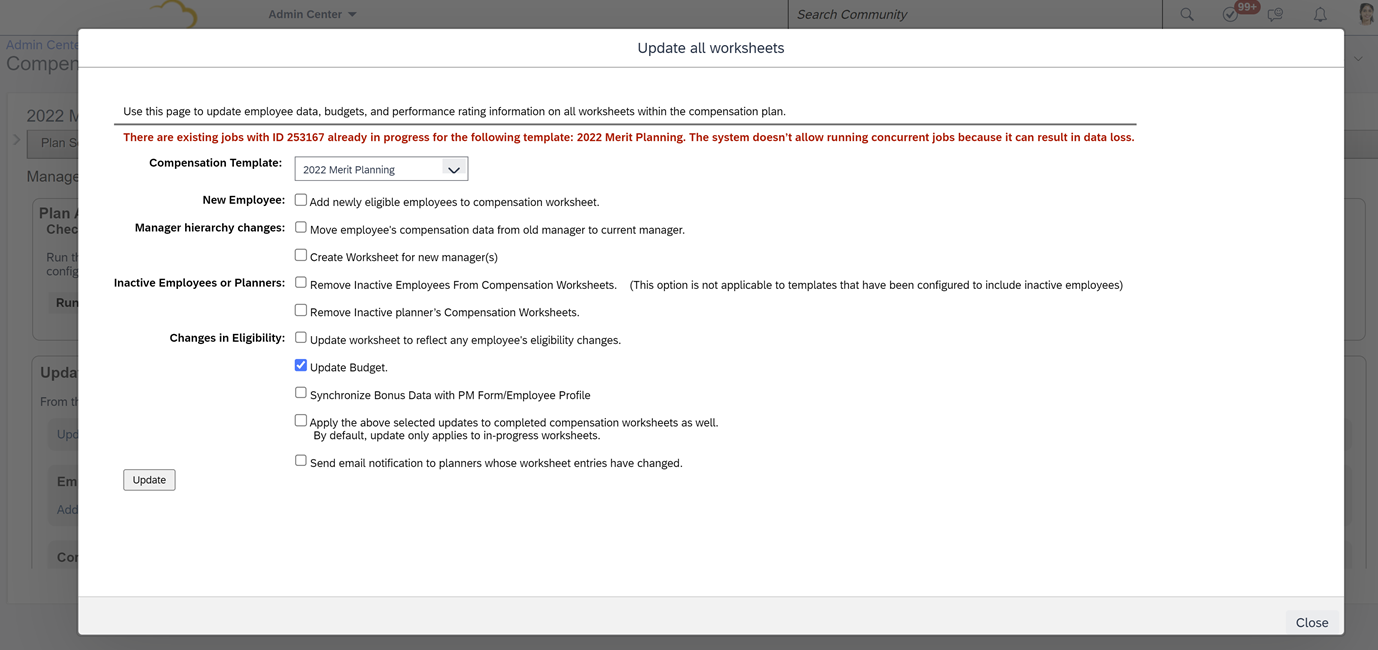
Prevent Concurrent Mass Update Jobs for Compensation
An error message will show if the Compensation Administrator tries to submit a job that is already running. This applies to:
Update Compensation Forms for Template
Apply Eligibility Rule
This is helpful to provide Compensation Administrators better visibility to the status of pending requests and help prevent data loss.
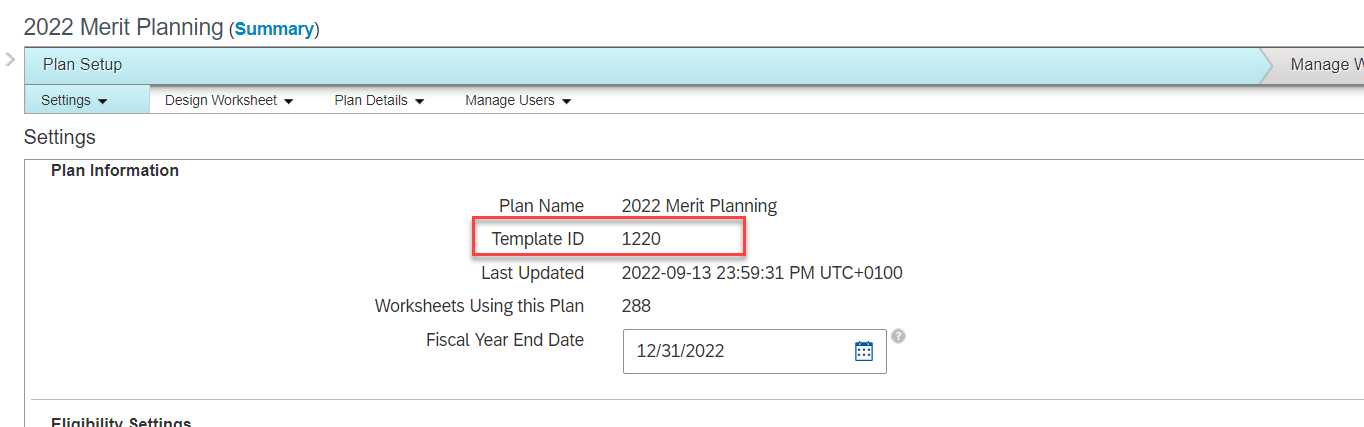
Display Template ID in the Template Settings Page
The Template ID can now be found on the Settings tab for Compensation, Variable Pay, and Total Compensation Plan templates.
Previously, this information could only be found in Provisioning or by downloading the template and reviewing the xml code.
New minor & major updates in Admin Opt-in Configuration Type
Country Currency Changed to EURO for Croatia
The local currency in Croatia, HRK (Croatian Kuna) will be changed to the euro on January 1, 2023.
Learning Administrators can use various tools to update data due to currency changeover:
Learning connectors
Import Data tool
Admin UI SAP SuccessFactors Learning connectors will enable Learning Administrators to update their data to reflect currency changes
Learning objects with currencies that can be updated using the import tool: • Instructors Learning Administrators can make the rest of their necessary currency changes through the Admin UI. Learning objects with currencies that can be updated using the Admin UI, found under Finance: • Prepaid Accounts • Coupons Learning objects with currencies that can be updated using the Admin UI, found under References -> Physical Resources: • Materials • Custom Resources • Equipment • Facilities • Locations.
Enhanced Course Home
The new Course Home experience now supports items with a classification of Other, such as task checklists. In addition, the following features are supported for all applicable item classifications:
Jam integration
Selection of missing approvers when registering
We also updated behavior for previously released item classifications. For instructor-led training, the class details now display the timezone. For online courses that are launched in a new window, the Refresh after done button no longer displays.
The complete list of supported features by item classification is available on the SAP SuccessFactors Learning Course Home page. A link is provided in the Related Information section at the bottom of this page.
The remaining features required to achieve parity are as follows:
Government reporting
Users with an external shopping cart
Associated competencies
Manager view
Approval comments when registering for a class
If you don’t use one of those features, the new Course Home experience is considered to have parity.
We’re continuing to add functionality to the new Course Home experience because our customers have asked for an updated user experience.
In the current version, setting enableCourseHomeBlended=true provides the new Course Home experience for external courses, online courses, instructor-led training, courses that are instructor-led with online content (blended), and items with a classification of Other. The enableCourseHome setting is no longer available.
Certificate-Based Authentication for Learning APIs (Inbound mTLS)
In order to support this change the security certificate now displays for Technical Adminstrators on the System Administration > Security > Adminstrators > Certificate tab. The certificate information displayed here is only used for SAP Cloud Identity Services API based integrations.
We also added the Learning URL for mTLS communication to the System Administration > Environment page.
We provided certificate-based authentication to support a more secure method for our API integrations.
Custom Field in User Profile for Alternate Microsoft Azure Email Address
Administrators can now add an alternate Microsoft Azure email address to a custom field in the user profile.
We configured the custom fields in user profiles so they now recognize an alternate Microsoft Azure email address. This enhancement ensures attendance is properly processed for virtual time slots where Microsoft Teams is the vendor.
Configuration Requirements
If users have an alternate email address in Microsoft Azure, administrators must provide it in the user profile for Microsoft Teams virtual time slot attendance to be properly processed. You don’t need to provide any additional information if the user’s Microsoft Azure email address matches the one in their SuccessFactors Learning user profile.
You can add an alternate Microsoft Azure email address to any unused custom field in the user profile, but you must use the same custom field in every user profile (Learning AdministrationUsersCustom Fields). For example, if you designate custom field number 10 for one user’s Microsoft Azure email address, you must also use custom field number 10 for the same purpose in all other user profiles.
You need to specify which custom field contains the alternate email address in the VLS configuration for Microsoft Teams (Learning AdministrationSystem AdministrationConfigurationVLS Configuration).
Enhanced Qualtrics Feedback Opportunity for Learning Assignment Completion
In addition to the User ID field , the Learning integration now sends data from the following fields to Qualtrics.
In the current version, Intelligent Services Center automatically submits additional data from Learning to Qualtrics that includes fields such as completion status (to indicate whether the learner passed or failed an assignment). It also sends the Learning Item ID, which allows admins to create surveys for specific courses.
Email Survey Settings for Learning
This integration sends email to employees to obtain feedback through a Qualtrics survey when they complete an assignment in SAP SuccessFactors Learning.
Qualtrics Email Feedback for Learning Completion
Configure SAP SuccessFactors Learning and Intelligent Services to send employee information to Qualtrics, so that you can send employees surveys in email to find out how they feel a Learning assignment they just completed.
Creating this integration requires:
SAP SuccessFactors Learning.
A Qualtrics account that includes a Employee Experience license for Lifecycle projects.
Enabling Intelligent Services.
Enabling Integration Service Registration Center.
You use your Qualtrics account to create surveys and view their results. All the settings to configure the contents and schedule for the email survey are performed in Qualtrics.
To add Qualtrics feedback opportunities, enable and integrate Qualtrics with your SAP SuccessFactors system. Refer to Integrating SAP SuccessFactors with Qualtrics for details.
New minor & major updates in Universal Configuration Type
SuccessFactors Platform Token Server Support for Public Learning APIs
Learning-only users authenticated by Identity Authentication can now use the SuccessFactors platform token server to validate authentication for public APIs.
This enhancement improves API support by enabling user migration from the SuccessFactors Learning token server to the platform token server.
Requesting an Access Token
With a SAML assertion, you can now call API /oauth/token to request an access token for authentication with the API server.
If both instance-level and user-level IP restrictions are set, a user can access these APIs if either condition is met.
The API returns the token type, expiration time in seconds, and the token value you can use to authorize API requests. An access token expires in 24 hours after it’s generated.
Automatic Updates for Learning Assignments and Approvals on the Latest Home Page
Whenever you change the successFactorsLearningEnabled, baseURL, or successFactorsCompanyID settings in the BizX Configuration file, the system triggers a background job to update the learning assignments and learning approvals cards on the latest home page.
If change the integration, the new data may take up to a few hours to update. The cards are updated when the job is completed.
In the current version, when you change the integration, a background job runs automatically to display learning assignments and learning approvals on the latest home page.
Global User ID Display on User Details Page
To have the Global User ID display on the User Details page you need to select the System AdministrationConfigurationEntity ConfigurationSelect EntityUserGlobal User ID checkbox on the Entity Configuration page. This field displays on the User Details page as read-only.
We added the ability to display the Global User ID so you can verify if a user is created in SuccessFactors platform at the same time they are created in Learning.
Learning Integration Status Confirmation
Learning and platform systems are on the same data center. The only exceptions are when the platform tenant is in DC04 and the Learning tenant is in DC08, or when the Learning tenant is a validated tenant.
The existing configuration values on the System Administration > Configuration > System Configuration > BIZX page are valid.
When updating an existing integration, SuccessFactors platform Provisioning has Enable SuccessFactors Learning integration available.
We streamlined the application for clearer usability by enabling you to update the integration configurations in SuccessFactors Learning.
Configuration Requirements
Enable SuccessFactors Learning integration in Provisioning should be enabled only after updating the integration from the Learning Administrator. We added this guardrail to ensure that a currently enabled integration in SuccessFactors platform is not inadvertently changed.
Learning Assessments for Content Packages
You can now select an assessment in the Exam field on the ContentContent PackagesContent TabEdit page. This replaces the legacy exam functionality for content packages that was previously removed. Previous legacy exam associations are preserved, and can be used as a point of reference for new assessment associations.
In SAP SuccessFactors Learning, an assessment is a generic term for measuring users’ understanding or mastery of content. We offer different kinds of assessments for different purposes. When you choose the right assessment, you can do a better job of measuring users’ mastery while doing less work to manage the assessment.
Using Quiz Assessments to Easily Create a Simple Test of Users’ Knowledge
Features of quizzes:
Multiple question types:
True/False
Multiple choice – Single Answer and Multiple Answer
Drag and drop ordering
Fill in the blank (free text)
Translation support with ability for users to take a quiz in their language of preference
Import/Export of quizzes and quiz questions
Feedback to users based on correct/incorrect responses to questions
Pretest and post-test messages for test takers
Reporting on quiz results and usage
Using Exam Assessments to Create Powerful Tests of Users’ Knowledge
Features of Exams:
Exams have all quiz features in terms of support for question types, images, translations, feedback, pretest and posttest messages.
Exam questions are shared among exams. If you create a question in the question library, it can be used in any exam in your system; conversely, exam questions automatically become part of the question library, allowing for centralized question management.
Questions have revisions to keep up with changing standards. For example, if a governing body changes regulations and you need to keep up with the change, you can revise the question to keep pace. We support reporting at the version level.
Question variants test the same knowledge in different ways from user to user (to prevent cheating) or in repeated exam attempts by the same user (to eliminate guessing and ensure learning effectiveness). For example, a question can be asked with a true/false question or with a fill in the blank question.
Objective pools enable testing for specific learning objectives and analyzing learning effectiveness (Kirkpatrick Level 2 Evaluations). For example, you might want to test financial regulations as a whole, but you might also want to know how well users met an ethics objective. This feature, along with variants, enhances the randomization capabilities of exams.
To Learn More
Overall there are 17 items being changed or enhanced in this release for LMS and we didn’t cover every detail here. For more information, What’s New Viewer here.
For your convenience, we’ve summarized the highlights of what’s new for 2H 2022 Onboarding 2.0 below.
New Hire Enhancements
New Hires got enhancements to their email notifications. Welcome emails will now get sent after completing the New Hire Data review step if the onboarding process is restarted after onboarding initiation but before New Hire Data Review. Before the email never got sent in this scenario (oops!) There’s also new tokens for Legal Entity and Position available for email notifications.
There’s also now a new guided experience for onboarding in SuccessFactors Work Zone. Admins can configure an experience based on the 3 phases of “Before Your First Day”, “Your First Day”, and “Your First Three Months”.
Hiring Manager / Admin Enhancements
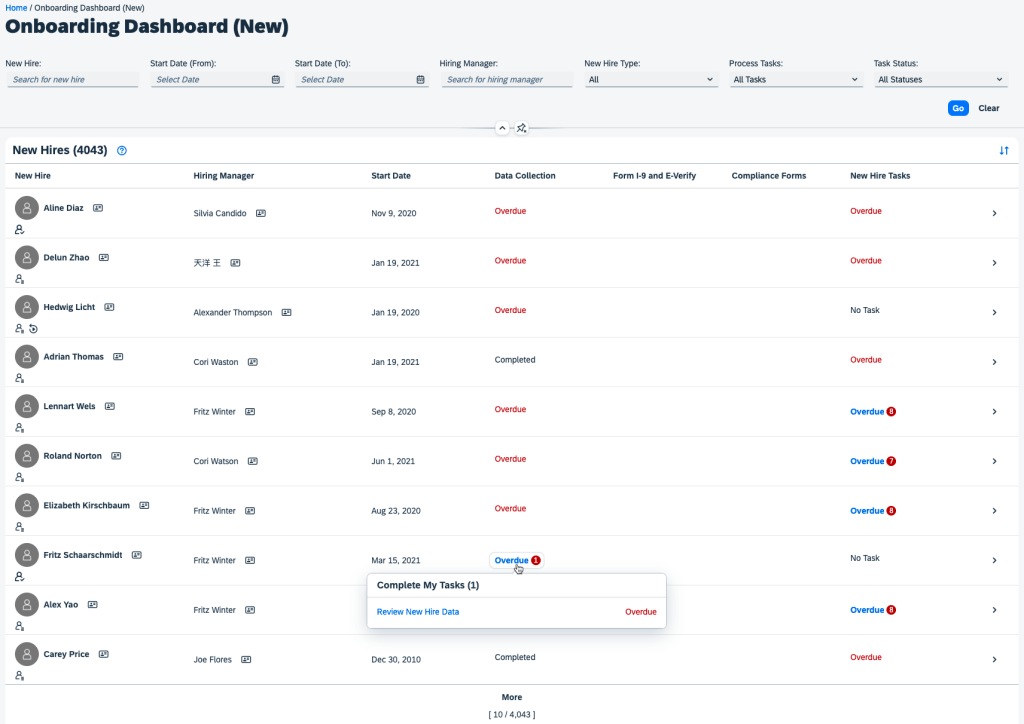
The Onboarding Dashboard (New) has been improved with multiple new UI enhancements. For example you can now view contact information of new hires and hiring managers by clicking the business card icons next to their names. Also, notification badges now let you more easily scan how many tasks you have for a particular category. The status shown for each onboarding task is now an interactive button that can take you to the task details page to complete the task. Also, instead of a “View Details” button for each row of data, there is now a > which takes you to the task details page.
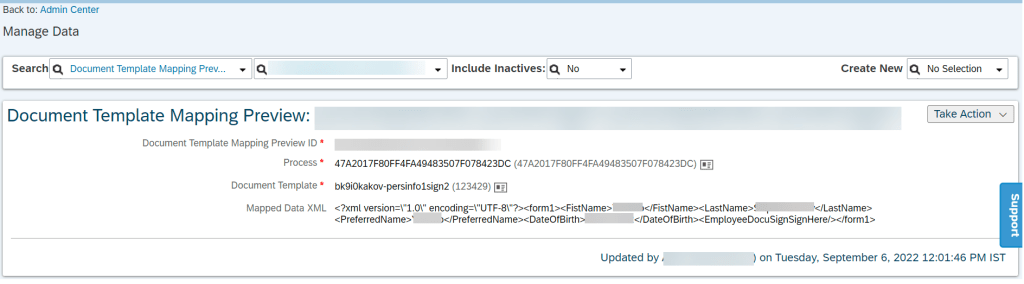
Admins can also now preview what a new hire’s data will look like in a form by using a new “Document Template Mapping Preview” MDF object. This allows you to better troubleshoot issues with the onboarding user’s data. You can see in the screenshot below that the incoming data shows as an XML to further help troubleshoot this data:
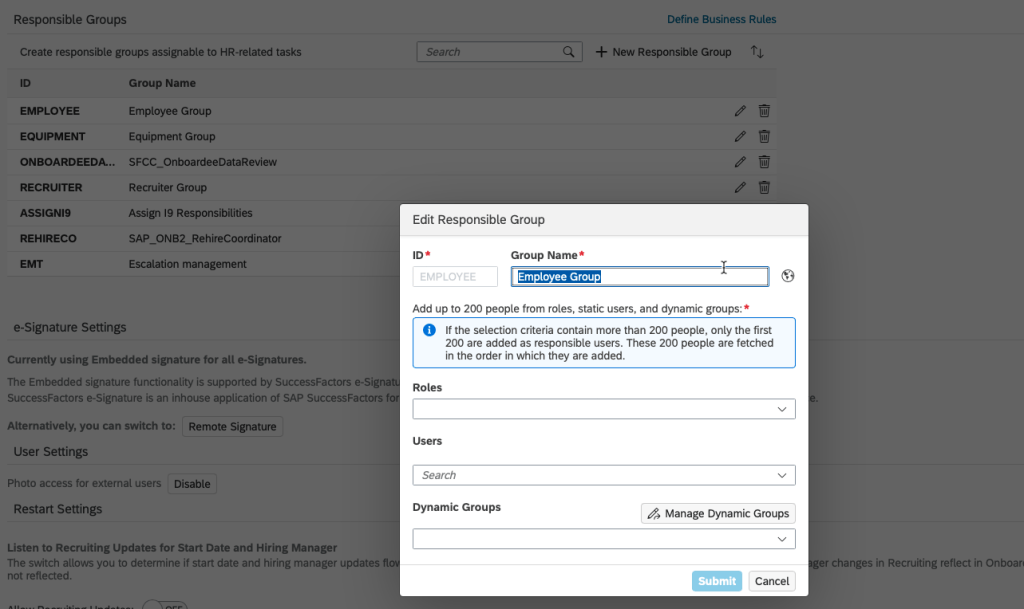
The UI of the Onboarding General Settings screen and how responsible groups work got enhancements as well. Now, all responsible groups can be displayed – when more than 10 groups are created a “More” option appears to view the extras. Responsible groups can now also be searched by ID or name and sorted by name. Up to 200 people from roles, static users, or dynamic groups can be added to a single responsible group.
It is also important to note that DocuSign has switch to OAuth – so if you use DocuSign for Onboarding or recruiting, you’ll need to update your authentication method (no more basic authentication!). Do this before March 31, 2023!
Croatian Currency will change to the Euro on January 1, 2023
General Process Enhancements / Behind The Scenes Enhancements
At its core, an onboarding system is designed to streamline the onboarding process and make sure accurate data is flowing into the HRIS and other systems to that the new employee’s onboarding and day 1 experience is successful, productive, and easy. We can definitely seem some enhancements that speak to this greater goal in this release!
One helpful process enhancement is that when you complete the New Hire Data Review, it no longer triggers the follow up processes in position such as adapt hierarchy, adapt the to-be-hired status on the position, reclassify or transfer positions, and job relationship sync. Instead this only occurs after hire completion in manage pending hires. I can see where this makes more sense to push down stream in the process and will help data integrity – you generally wouldn’t want to make these kinds of changes until the actual hire (e.g. avoids situations where you’ve changed position data and the person is a no show or the hire is never finally made).
Another helpful process change is that you can now rehire with old employment data within the manage pending hires tool. This is setup for admin users by adding the corresponding permission to their permission role(s).
Data validation also got multiple enhancements. For example, the onChange and onSave events in Employee Central can now access Employment_Info, Comp_Info, Job_Relations_Info, Pay_Component_Recurring, and Pay_Component_NonRecurring. This is great for example if someone is crossboarding and needs to update these entities and trigger subsequent system actions. Another example is that redundant job relationship entries when the job relationship is passed from recruiting to onboarding. You also no longer have to pass dummy data from Recruiting to Onboarding in order to retain original values for dates like original start date, hire date, service date, etc. Country-specific field mappings can also now occur when data is passed from recruiting to onboarding. All of these new data integrity enhancements are activated by turning on the “Enable Enhanced Internal Hire Process” switch on the “Onboarding General Settings” screen.
Cancelling an onboarding process also got simplified. The errors shown when a cancellation is requested are more clear now and less permissions are required in order to be able to cancel (e.g. previously this required OData permissions).
The ability to rehire using old employment data is now generally available (was previously just an early adopter feature).
Integrations / APIs
There is a new helpful field called “isRehireOnOldEmployment” in the createOnboardee OData API function import. The idea is that this field identifies if the person is a rehire so that the system tries to find the old employment record which will then be activated. By exposing this to the apis it allows external ATS systems to use the rehire functionality and not just SuccessFactors Recruiting.
There’s also a new getUserNameOfNewlyHiredEmployee API that gets the username of the of the onboarding new hire. This is a great function in my opinion! Many times the benefit of an onboarding system is that it can allow a new username to be setup and shared across systems so that access to multiple systems is ready to go on day one. Given that the HRIS system is often the system of record for the username, it makes a lot of sense to use this API to provision users across multiple third party systems.
Conclusion
The SAP SuccessFactors Onboarding product continues to grow and become increasingly more robust! This does not represent all of the enhancements in the H2 2021 release – only the highlights we found most compelling. Check out the What’s New Viewer here for the complete list of enhancements.
See this great article for useful information on how to prepare for a SAP SuccessFactors Regular Release.
For your convenience, we’ve summarized the highlights of what’s new for 2H 2022 Succession and Career Development below.
Succession
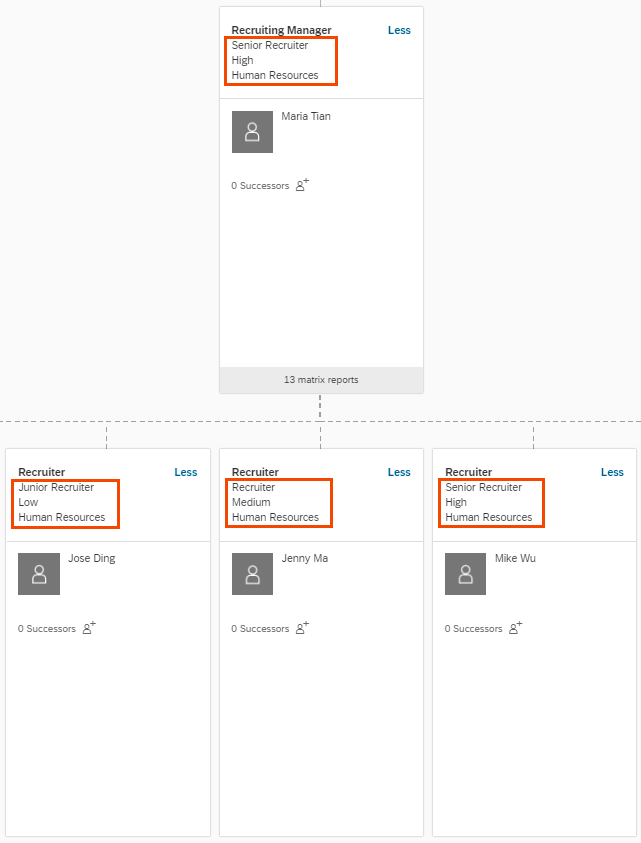
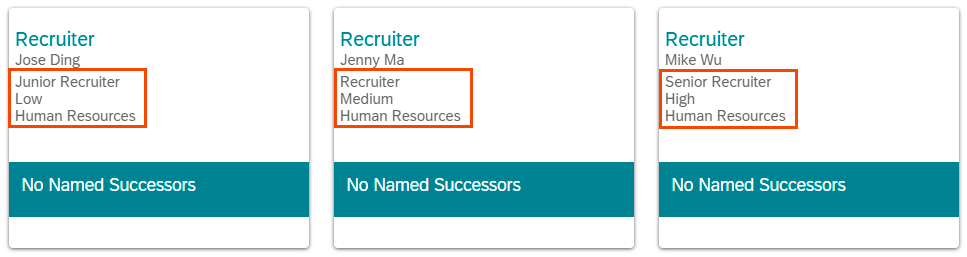
On the Succession side of the house, the Succession Org Chart and position tiles received a functional enhancement to now be able to show the Job Title, Job Level, and Department in the header of the position tile. The options to turn these on is in the Org Chart Configuration screen in admin tools.
Enhancements to Calibration
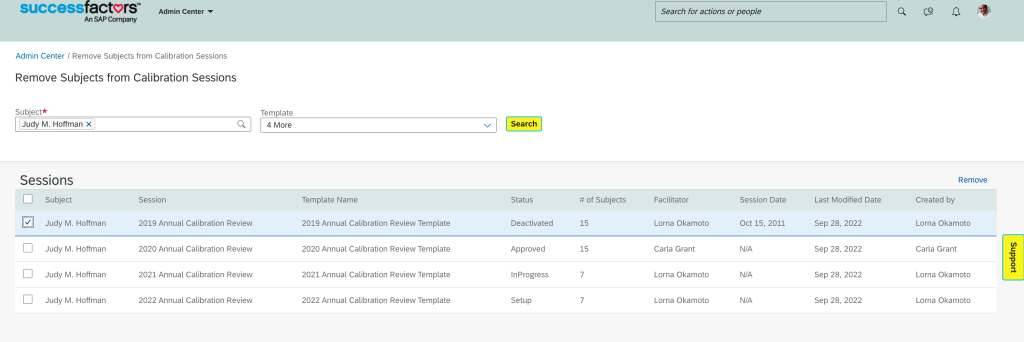
There have been multiple enhancements to calibration sessions that impact Performance as well as Succession and Development. Specifically, you can now remove subjects from all calibration sessions where before you could only remove from inactive or setup statuses.
Additionally, there’s been enhancements to the enforcement of distribution guidelines so that more guidelines enforcement scenarios are supported when more than one session is finalized at a time. Specifically, you can now include more than one rating in the guideline, you can use operators other than “=”, and not all ratings may have a guideline. Before, these were only supported when you finalized sessions individually.
Reporting
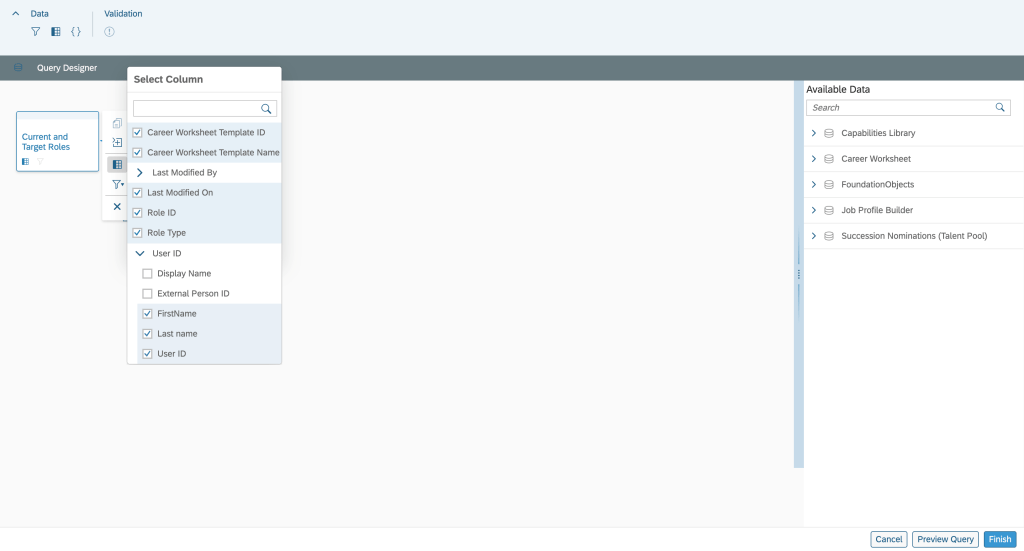
Multiple new options are available in reporting on the Succession and development modules as well. The Career Worksheet is now available in Story Reports.
Mentoring data is also available now for Story Reports and Cross Domain Table Reports. This can be helpful for example if you wanted to cross domains of employee profile with mentoring to see which departments have mentors and mentees and which do not.
Career Development
SAP continues to catch up the old features of the old development module with the new look and feel.
Development Goals
For example, you can now copy goals from an old plan again. The comments feature is also now available in the latest goal management on the goal details page. In addition to Development Goals, this feature is also available for performance and 360 forms. To use this, you must add the comments field in the XML.
Career Worksheet and Career Explorer
The Career Worksheet now visually shows the gaps between target and actual competency levels for a role.
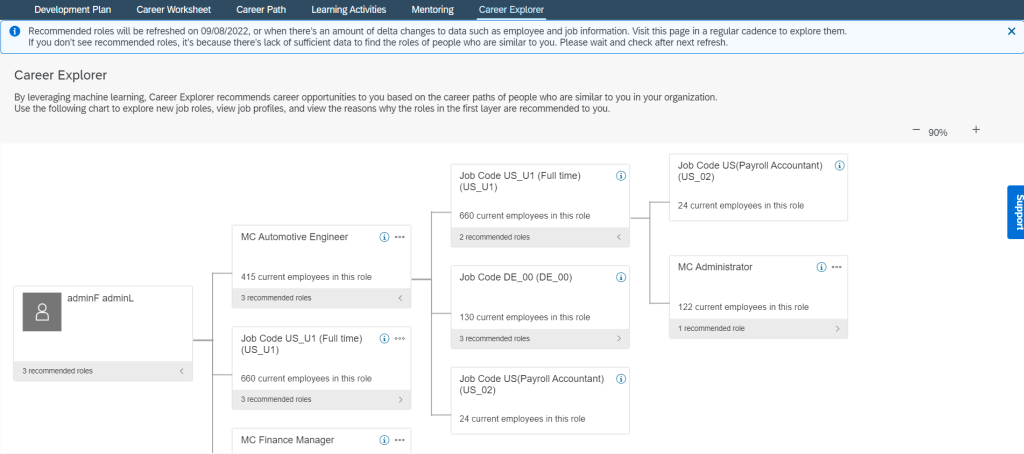
The career explorer is also generally available now with AI powered recommendations. It provides a hierarchy career path that allows for recommendations the employee may not have thought of pursuing based on career moves of people similar to them and/or roles from outside their hierarchy. The feature can also be a data source for the new opportunity marketplace.
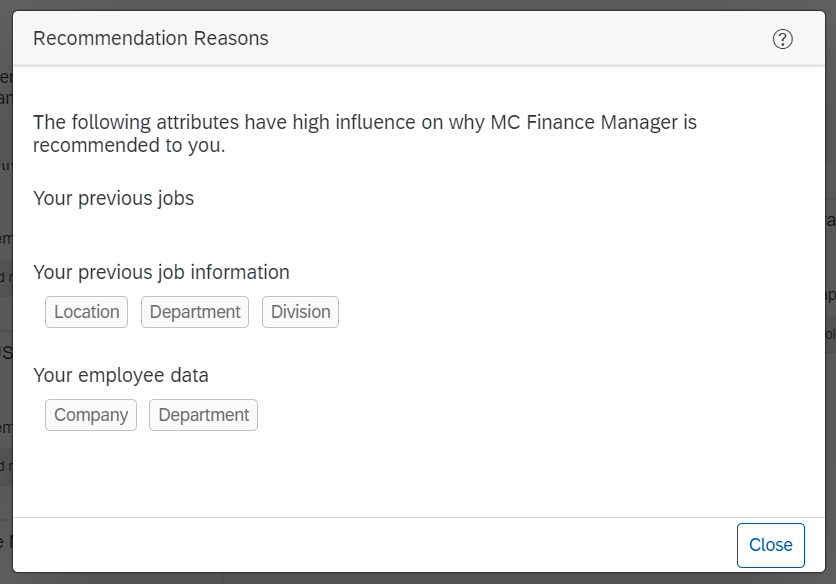
You can also see why the system made such recommendations:
Mentoring
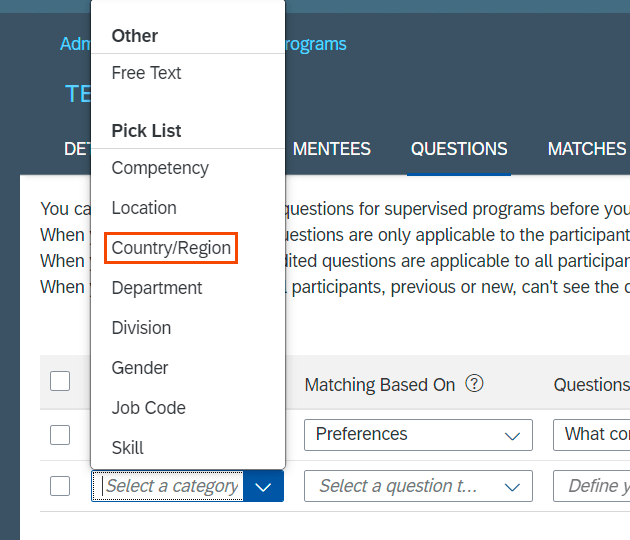
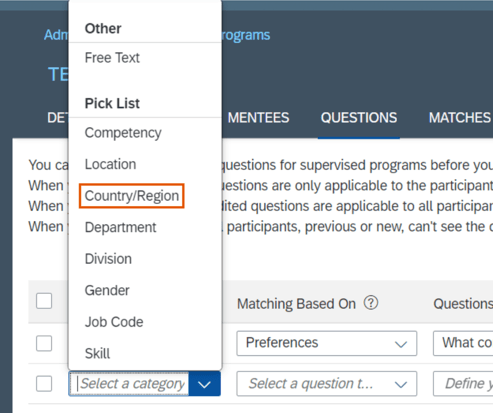
You can now add Country/Region as a matching category criteria for mentors and mentees. This option comes available so long as you have the country/region standard field setup in your data model.
Wrap Up
We have now covered the highlights of the Succession and Career Development related updates for 2H 2022.
Highlights are identified by module and the type of change.
Universal- for modules enabled, universal means no steps are required to have access to the new functionality. These features are automatically made available.
Admin Opt-In – the admin must enable the new feature, usually in Admin Tools
Admin Opt-Out – the admin must disable the new feature, usually in Admin Tools
Provisioning Opt-In and Opt-Out require a Partner or Product Support request For your convenience, we’ve summarized the highlights of what’s new for 2H 2022 Performance Management below.
Latest Goal Management
The updates are for the latest Goal Management are admin opt-ins. The new features are described below. These features are also now available in iOS and Android mobile apps.
General Availability – Admin Opt-Ins
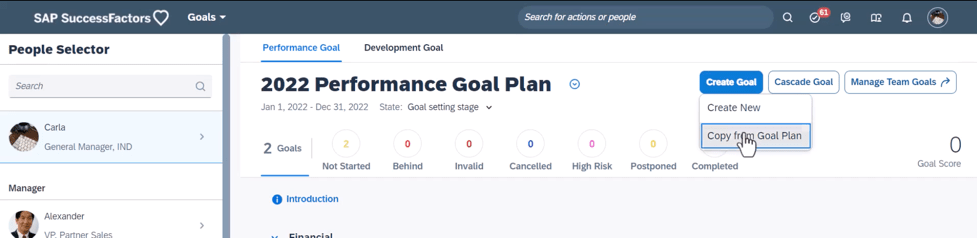
Copy Goals from Goal Plans using the latest Goal Management
Users can now copy personal goals from their own goal plans as a new option to create goals.
Requirements to use this feature include:
The TGM/CDP Goal Transfer Wizard feature is enabled
The create permission is granted in XML configurations
The write permission for goal fields is granted
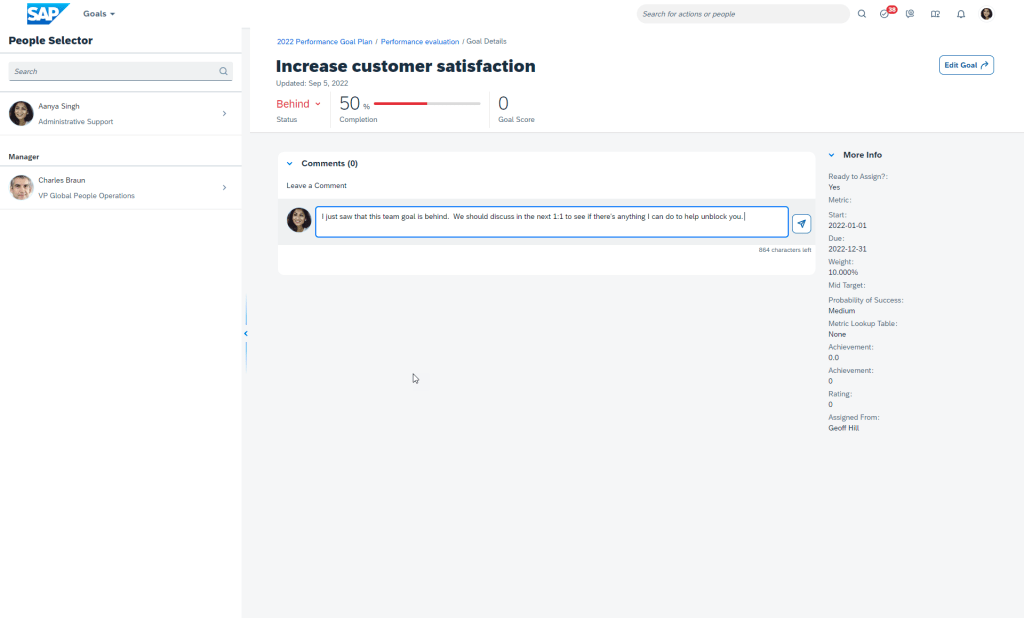
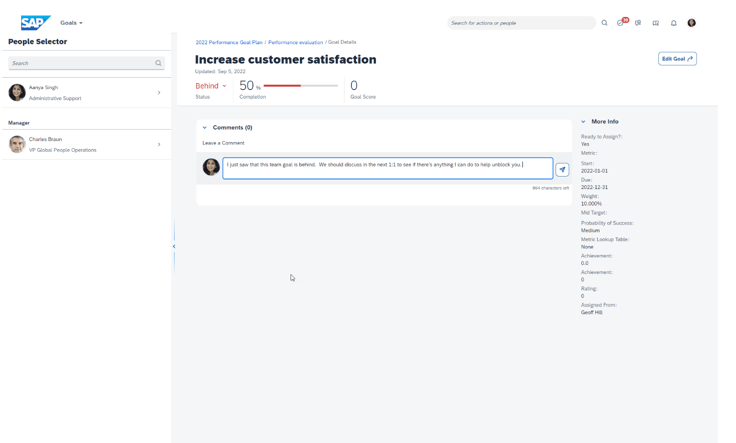
Leave Comments on Goals when using the latest Goal Management
Users can now add, edit, or delete comments on their own goals or those of their direct reports. In legacy Goal Management, comments are shown in the goal list or on the goal editing page.
Copy form Goal Plan
In the latest Goal Management, the updated comment feature is supported and comments are shown on the goal details page.
Comments Section on Goal Details
Comments can also be managed in Performance Management forms, 360 Reviews forms, and Career Development.
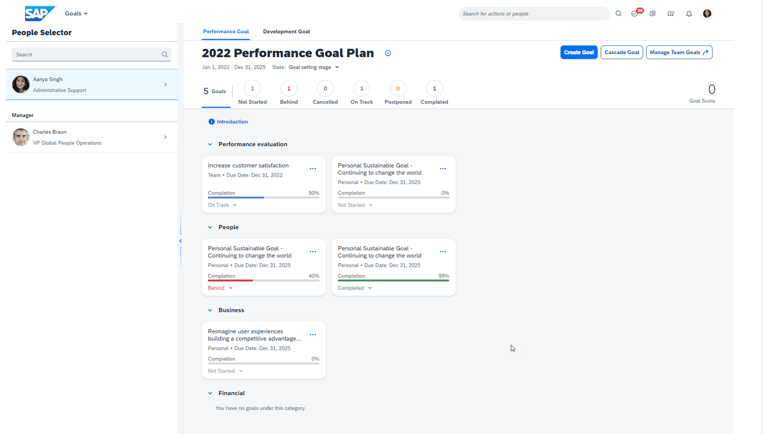
Team Goals Now Available when using the latest Goal Management
Users can now create, manage, and be assigned team goals in the latest Goal Management.
Users may:
Create, edit, or delete team goals
Access team goals from their own goal plan
Assign/unassign team goals to people from their team or people found via search
Share/unshare team goal ownership with others
If configured, users can manage team goals assigned to them in Continuous Performance Management.
Team Goal Landing Page
Users can also manage team goals assigned to them in Performance Management forms, 360 Reviews forms, and Continuous Performance Management.
Group Goals are no longer supported.
These new features are available in iOS and Android Mobile Apps as well.
Performance Management
The majority of the performance management updates involve Multi-Rater 360 forms and Calibration. However there are a few goal and performance related updates that we will begin with.
General Availability – Universal Updates
SMART Goal Wizard not available when using the latest Goal Management
It will not be possible to use the SMART Goal Wizard when adding a goal to a performance form. This feature currently is not supported. Even if you enable the SMART Goal Wizard setting in Form Template Settings this option will not appear when adding a goal.
Enhanced OData Entities for Querying Development Goal Sections on Forms
You can now use APIs to query development goal sections and goal items on Performance Management forms. The FormContent, FormPMReviewContentDetail, FormObjective, FormObjectiveDetails, and FormObjectiveSection APIs. Previously these APIs were used to query performance goal sections and goal items only
General Availability – Admin Opt-In
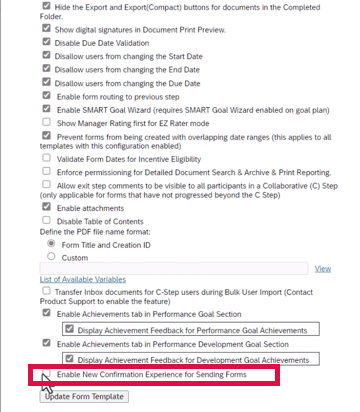
Confirmation prior to Sending Forms
When users send a form, a message popup appears and allows them to confirm the action.
In the advanced settings for the template, there will be a new option to enable the new experience as seen below.
New Setting Available
A pop-up will appear for a user that is sending a form back or forward a step to allows the user to confirm the action. It is also applicable when signing a form, rejecting form or sending a copy of a completed form.
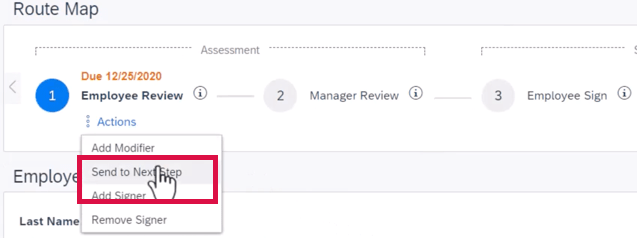
In the route map on the form, clicking Actions in the current step, will display a dropdown list.
Actions on Route Step
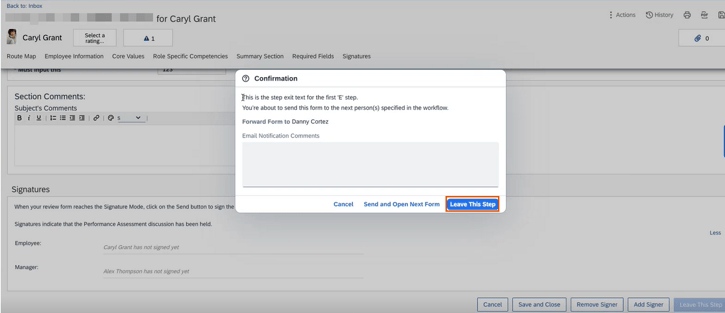
Selecting the action will cause a pop-up to display.
Confirmation Pop-up
Continuous Performance Management
General Availability – Universal
Updated Character Count for Continuous Feedback Topic Field
In the previous version, when users chose the “send” button on a form, a confirmation page appeared.
The character count for the Continuous Feedback topic field to 200 characters.
Replacement of Continuous Performance Management Legacy Version with the Continuous Performance Management Latest Version
The legacy version of Continuous Performance Management (CPM) will reach End of Maintenance on May 20, 2022 and will be retired as of May 24, 2024. The replacement is the latest version of CPM, initially released in 2H 2020, that is currently available in the Upgrade Center. If no action is taken, your company will be automatically upgraded to the latest version after the retirement date.
General Availability – Admin Opt-Ins
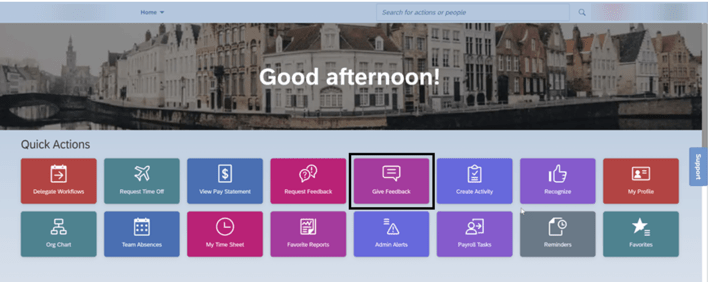
New Quick Action to Give Feedback on the Latest Home Page
Employees can now choose to Give Feedback from the Quick Actions section on the latest home page.When the Give Feedback is selected, the user can search and select one person, input a topic, and provide feedback to the other user.
Give Feedback from Quick Actions
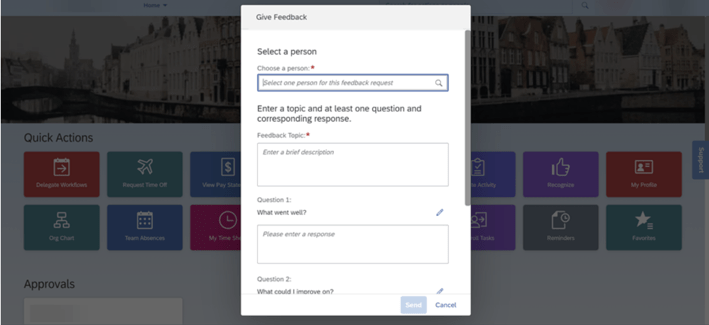
Once selected, the user may select the person, feedback topic, and questions.
Selections for Feedback
OData v4 API Continuous Feedback for the Latest Version of Continuous Performance Management
You can now use the Continuous Feedback OData v4 API with the latest version of Continuous Performance Management.
The OData v4 API for Continuous Feedback has been added to support third-party integrations and extensions for the latest version of Continuous Performance Management (CPM).
Calibration
General Availability – Universal
Remove Subjects from Calibration Sessions
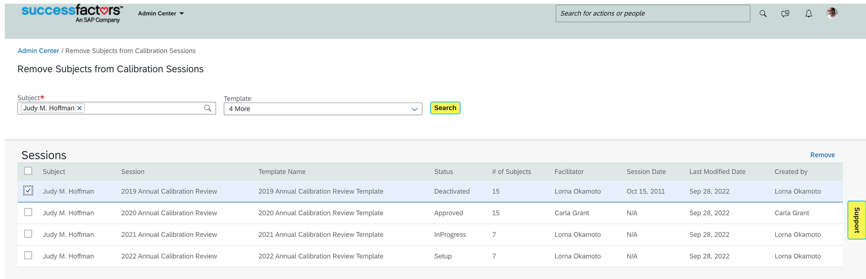
There is a new admin tool, Remove Subjects from Calibration Sessions, used to search for the sessions where an employee has been included as a calibration subject.
When the employee is included in many sessions, you narrow down the search results by selecting a calibration template name. Then, only the sessions created with the specified template are listed.
Remove Subjects from Calibration Sessions
General Availability – Admin Opt-In
More Gender Values in Calibration Views
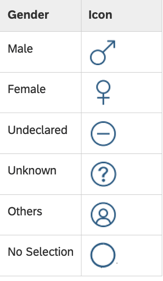
Male and Female were supported for visualization in Calibration Views. Now there are the other three standard values: Unknown, Undeclared, and Others.
The gender icon is displayed next to the employee’s name. When the gender of an employee hasn’t been specified in the system yet, it will be indicated as No Selection.
Gender Icons
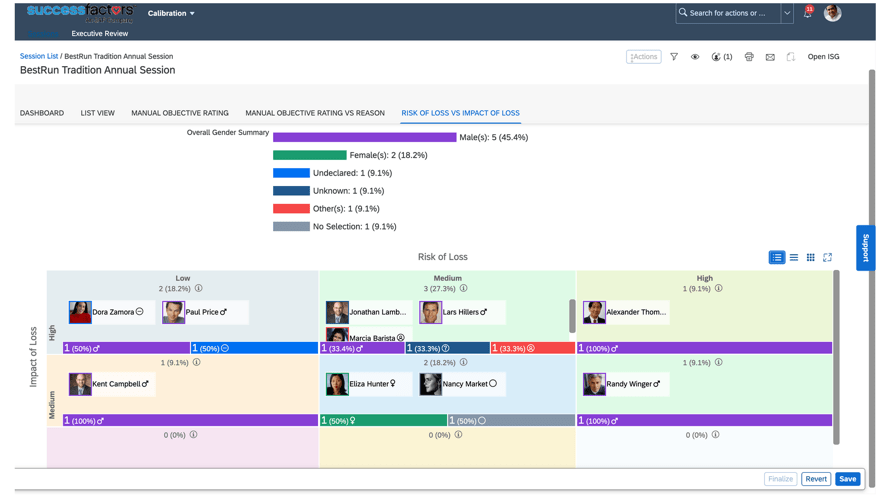
The gender bars in the matrix grid view are now rendered in different colors:
Male: Violet
Female: Green
Undeclared: Blue
Unknown: Dark Blue
Others: Red
No Selection: Grey
Matrix Grid View
Enhancement to Guidelines Enforcement During Mass Finalization
There are more guidelines enforcement scenarios that are supported when you finalize multiple sessions at one time.
More than one rating is included in a guideline defined with a rating group
An operator other than “=” is configured in a guideline defined with a rating range
Not all ratings have a guideline
No longer are guidelines enforced only when finalizing an individual calibration session. With the latest release, multiple sessions can be finalized as long the distribution of subjects doesn’t meet one of the above-mentioned definitions. Distributions would need to be adjusted in order to finalize all of the sessions.
Previously, these guidelines were enforced only when you finalized individual sessions.
360 Reviews
There are several updates for 360 Reviews. Highlights are described below.
General Availability – Universal
Hide Route Map on 360 Reviews Forms
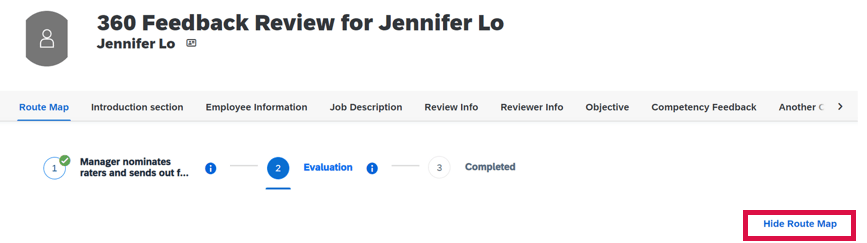
Similar to PM forms, a route map may be collapsed on the form.
This is done through the advanced settings of the 360 Review template by selecting “Hide Route Map on the Form”. Once enabled, when viewing the form, clicking on Hide Route Map will hide the route map from view on the form.
Visible Route Map
Clicking on Hide Route Map will collapse the route map from view on the form.
Click Show Route Map
Hidden Route Map
Required Fields Marked on 360 Reviews Forms
Fields defined as required are now identified with red asterisks on forms in the Evaluation stage. This now matches how required fields display in PM forms.
Updated Messages for Users Approving or Routing Forms Using Unsupported Tools
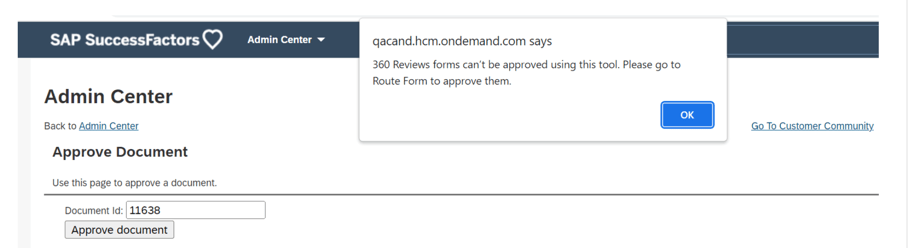
In the Approve Form or Route Signature Stage Form tool, once users enter document IDs and chose the buttons to approve or route forms, they weren’t informed that these tools don’t work for 360 Reviews forms.
Now if a user tries to approve or route 360 Reviews forms using unsupported tools in Admin Center, a message will display reminding them that these tools aren’t supported and are shown the correct tool to use.
Messaging when Routing using Unsupported Tools
“competency-filter” Attribute Supported in 360 Reviews Forms
The competency-filter attribute can be used to control what competencies users from different participant categories can view and rate on 360 Reviews.
Within the meta-cat element in the meta section of the form XML, define different participant categories in order to:
After the form is launched, in the Show Assignments dialog, participants belonging to the categories allowed to rate a competency are automatically selected for that competency. However, users can still select any competencies for a participant that weren’t initially included in the competency-filter defined for the participant’s category.
If a participant’s category is changed in the Modify stage, the participant’s competency assignment will be automatically updated to comply with the new category’s competency-filter.
If a participant is added in the Evaluation stage, the participant’s competency assignment will follow the competency-filter defined for the participant’s category.
If a competency is added to the form, filters including or not including this competency will apply to related competency assignments.
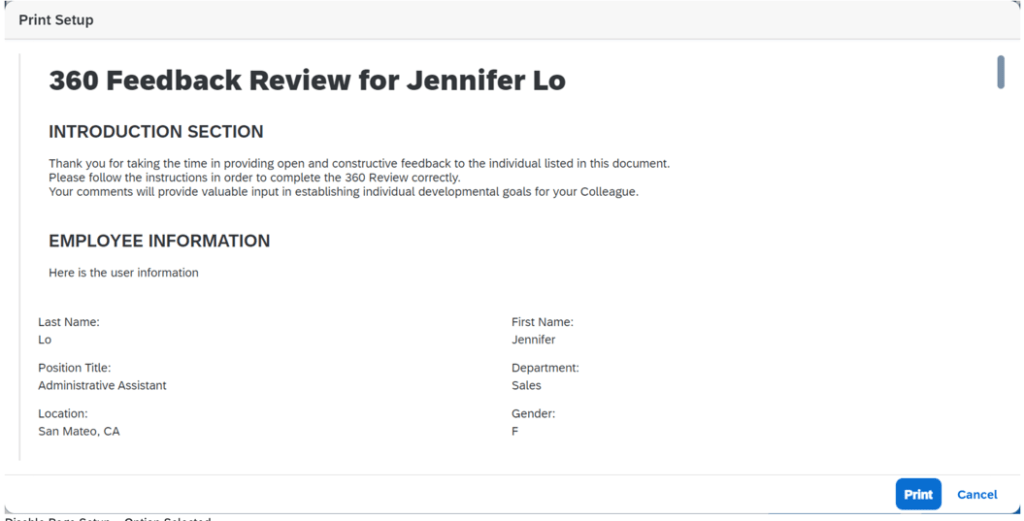
Disable Page Setup When Printing 360 Reviews Forms
It is now possible to prevent a user from specifying to print the Summary View or 360 Executive Review form. Instead the form will be printed in its entirety.
In Form Template Settings there is a new option – Disable Page Setup. When enabled, users aren’t allowed to specify the sections to print and the entire form will print.
Print Setup without Section Option
Show Behaviors in Summary Section by Enabling Rate-by-Behavior
When behaviors are associated with competencies, it is now possible to show behavior names and ratings in the Summary section.
To enable rate-by-behavior, set use-behavior to true and behavior-mode-opt to 0. In the Summary section, add the show-behaviors-in-summary element.
Purge Data of External Users in 360 Reviews
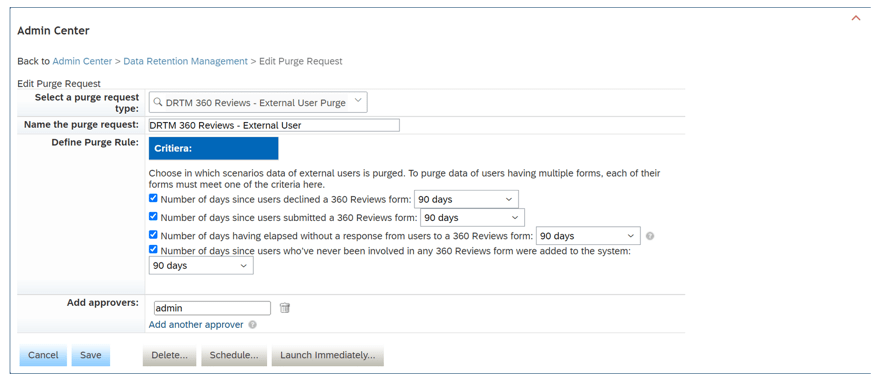
There is a new purge request, DRTM 360 Reviews – External User Purge used to delete data of external users no longer needed in 360 Reviews forms.
The External User Purge for 360 Reviews can be defined by the following purge rules.
A specified number of days have passed since the user declined a form
A specified number of days have passed since the user submitted a form
A specified number of days have passed and the user hasn’t responded to a form
A specified number of days have passed since the user who has never been involved in any form was added to the system
To successfully purge a user’s data who has multiple 360 Reviews forms, each form must satisfy one of the first three criteria.
360 Reviews External User Purge Request
Deprecation of 360 Reviews v11 Version
The 360 Reviews v11 version will reach the end of maintenance on May 19, 2023 and will be deleted on November 17, 2023.
360 Reviews v11 Version is being depreciated because 360 Reviews – SAP Fiori Version is generally available and includes the majority of features and functions that were available in 360 Reviews v11. In addition the SAP Fiori version has an enhanced user experience and updated visualizations.
If you’re using 360 Reviews v11 Version, please migrate to 360 Reviews – SAP Fiori Version.
Career Development
There are a few universal updates for Career Development that are reviewed below.
Career Worksheet – General Availability – Universal
Enhanced Competency Gap Graph in Career Worksheet
Previously, the gap graph was shown only when a competency had both a last rating and expected rating. With the latest release, if a competency has either a last rating or expected rating, a horizontal bar graph for ratings is shown below the competency.
In the example below, the competency has an expected rating shown in blue with no last rating.
Gap Graph
In the previous version, no horizontal bar graph was available if both ratings were not available.
Career Worksheet – General Availability – Admin Opt-Ins
Career Explorer Now Generally Available
Previously, Career Explorer was only available for customers in an Early Adopter Care (EAC) program. It is now generally available.
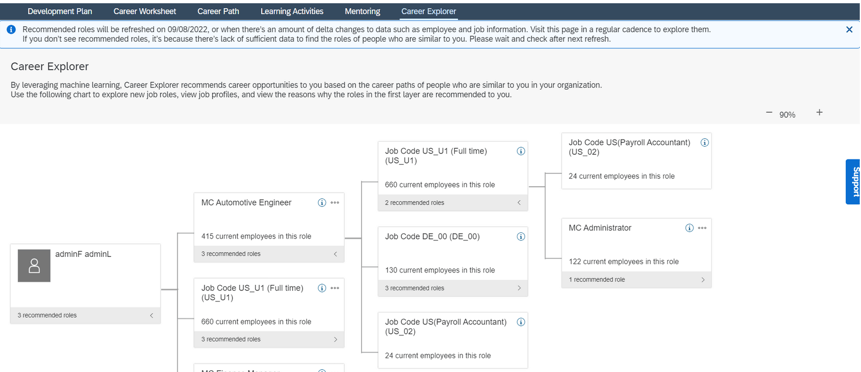
Career Explorer recommends career opportunities to employees based on the career paths of people who are similar to them in the organization. It provides a means for employees to find relevant opportunities in their organization outside their hierarchy, career moves of people who are similar and paths that they may not have considered.
For a recommended role, an employee can expand the card to see a career path in a lineage chart and view job profiles and recommendation reasons. The role may be added to Career Worksheet to do gap analysis for personal skills, or dislike the role to further personalize subsequent recommendations.
Recommended roles are refreshed every two weeks or when there are enough delta changes to the data. This allows employees to visit the Career Explorer page regularly to explore new recommendations.
Career Explorer Page
Mentoring – General Availability – Universal
Country/Region Picklist Available for Mentoring Matching Questions
A “Country/Region” picklist is now available in the question category to use for automatic matching. Matching rules can be created to allow mentees to define their preferred country/region when signing up for a program, and mentors’ country/region information is pulled from their profile data.
Country/Region Picklist for Mentoring
Mentoring Program Available in Cross Domain Table Reports
Mentoring Program is now available as a domain in Cross Domain reports in Table reports. This can be used with Performance Management, Goal Management and Employee Profile domains to gather mentoring program related data.
In Conclusion
We have now covered the highlights of the PM related updates for 2H 2022.
SAP SuccessFactors has some exciting new features for your Compensation solution. They can be found in detail here (S-User ID required). Filter on Solution for Compensation to review all the latest changes. Under the Description for each, you can click on ‘See More’ to see screenshots and detailed information.
As a reminder, preview release was on April 15 and production will be released May 20. For full details on the release cycle, check out the SAP SuccessFactors official product updates blog here. New to the release process? For tips on how to manage a release, check out our blog here.
After reviewing all the changes, we narrowed the list down to the Highlights for H1 2022SAP SuccessFactors Compensation Features:
Help Text for Column Fields When Designing Plan Worksheets
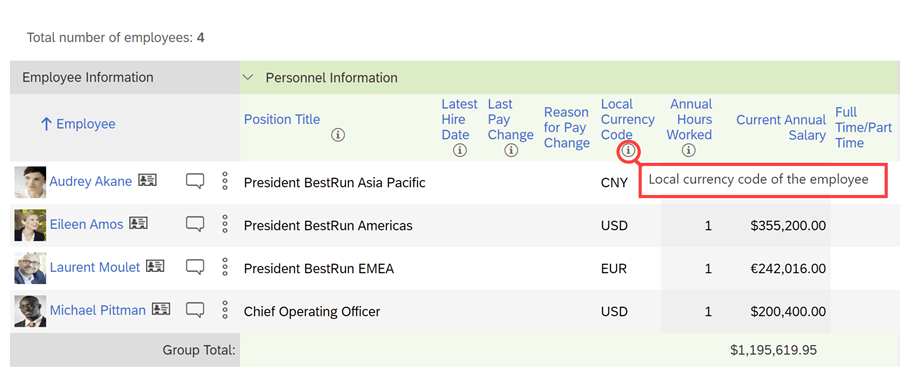
Info icons can be added to provide additional details to managers as they are completing their planning.
There’s a maximum of 10 fields with help text per template and these can be configured in multiple languages.
Example of info icon being used to explain further what the column is showing
Mass Upload of Spot Awards
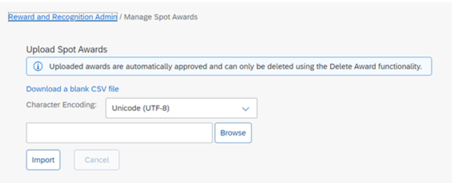
An administrator can download a CSV file for a mass upload of awards for Reward and Recognition that contains multiple award programs with multiple nominees.
No approval permission process is provided, the mass upload assumes approval.
Spot Awards can be uploaded in mass
Role-Based Access to Compensation Lookup Tables
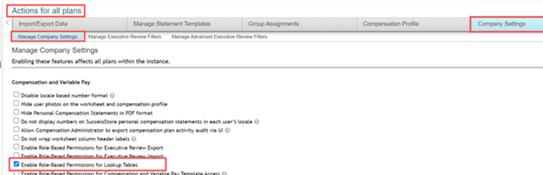
Currently an administrator is allowed access to all lookup tables. Permissions can now be set to limit access to specific lookup tables.
Role-based permissions need to be configured to select which tables the role can access.
Enable Role-Based Permissions for Lookup Tables is now available under Company Settings
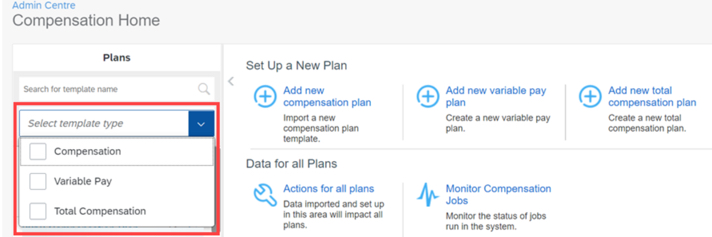
Plans List in Compensation Home Filtered by Template Type
Compensation Administrators on the Compensation Home view can now search and see results for Compensation, Total Compensation Plan, or Variable Pay plans.
Searching for plan can now be done by template type
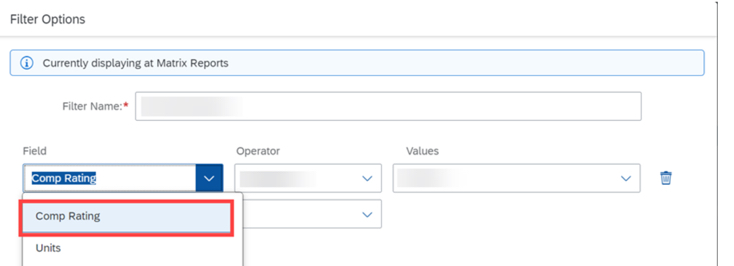
New Filter Options for Compensation Plans
In Executive Reviews, planners now have the option to apply Employee Name and Comp Rating filters to their compensation plan.
Employee Name and Compensation Rating have been added to filter options in Executive Review





















 Worklogix Blog