SAP SuccessFactors has some exciting new features for your Compensation solution. They can be found in detail here (S-User ID required). Filter on Solution for Compensation to review all the latest changes. Under the Description for each, you can click on ‘See More’ to see screenshots and detailed information.
As a reminder, preview release was on April 15 and production will be released May 20. For full details on the release cycle, check out the SAP SuccessFactors official product updates blog here. New to the release process? For tips on how to manage a release, check out our blog here.
After reviewing all the changes, we narrowed the list down to the Highlights for H1 2022SAP SuccessFactors Compensation Features:
Help Text for Column Fields When Designing Plan Worksheets
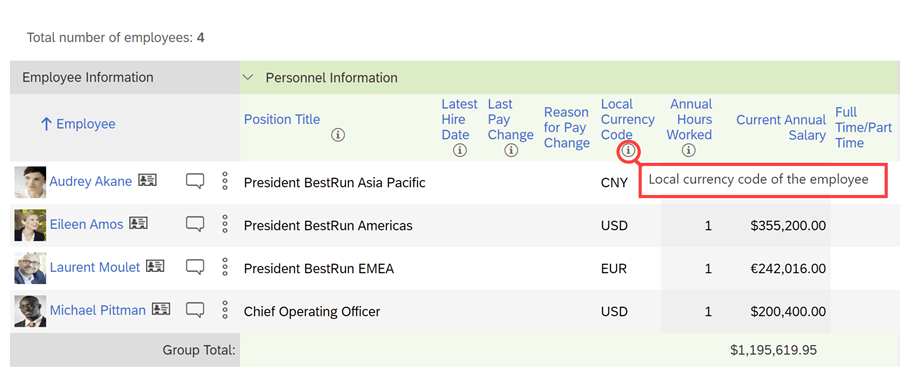
Info icons can be added to provide additional details to managers as they are completing their planning.
There’s a maximum of 10 fields with help text per template and these can be configured in multiple languages.
Example of info icon being used to explain further what the column is showing
Mass Upload of Spot Awards
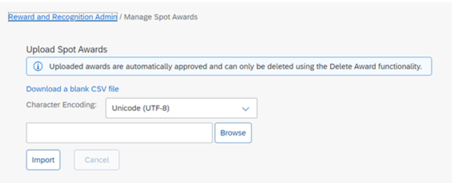
An administrator can download a CSV file for a mass upload of awards for Reward and Recognition that contains multiple award programs with multiple nominees.
No approval permission process is provided, the mass upload assumes approval.
Spot Awards can be uploaded in mass
Role-Based Access to Compensation Lookup Tables
Currently an administrator is allowed access to all lookup tables. Permissions can now be set to limit access to specific lookup tables.
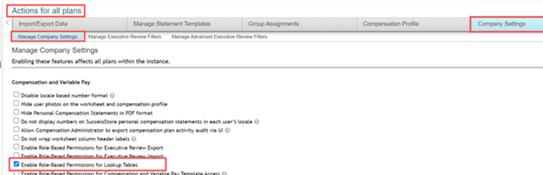
Role-based permissions need to be configured to select which tables the role can access.
Enable Role-Based Permissions for Lookup Tables is now available under Company Settings
Plans List in Compensation Home Filtered by Template Type
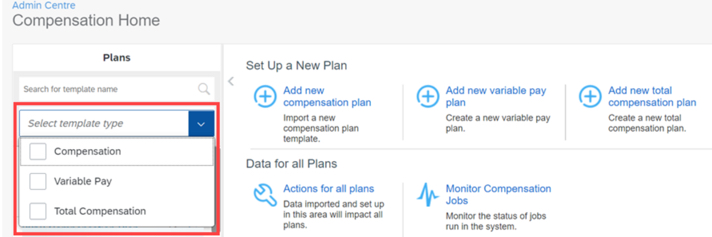
Compensation Administrators on the Compensation Home view can now search and see results for Compensation, Total Compensation Plan, or Variable Pay plans.
Searching for plan can now be done by template type
New Filter Options for Compensation Plans
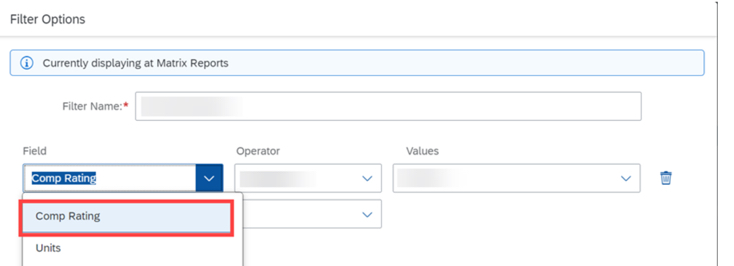
In Executive Reviews, planners now have the option to apply Employee Name and Comp Rating filters to their compensation plan.
Employee Name and Compensation Rating have been added to filter options in Executive Review
SAP SuccessFactors has some exciting new features for your Analytics & Reporting solutions. They can be found in detail here (S-User ID required). Filter on Solutions for People Analytics to review all the latest changes. Under the Description for each, you can click on ‘See More’ to see screenshots and detailed information.
As a reminder, preview release was on April 15 and production will be released May 20. For full details on the release cycle, check out the SAP SuccessFactors official product updates blog here. New to the release process? For tips on how to manage a release, check out our blog here.
After reviewing all the changes, we narrowed the list down to the Highlights for H1 2022SAP SuccessFactors Analytics/Reporting Features:
View Tile Reports Quick Action from the Latest Home Page
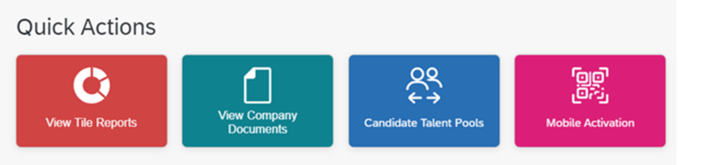
View Tile Reports quick action enables users to view Tile reports that are available in Analytics, based on permissions.
New Permission to Access Tile Reports from the Latest Home Page
The newly added Access Tiles from Home Page permission on the Reports Permission tab enables users to view Tile reports from the latest home page.
After the initial one-time migration, users can enable or disable the Access Tiles from Home Page permission for roles to manage their access to the View Tile Report quick action.
Quick Action – View Tile Reports has been added to Latest Home Page
Learning Queries in Story Reports has increased Number of Columns
The number of columns for Learning queries has been increase to 120 from 30.
Change of Behavior of Tabs on the View Schedules Page in Report Center
The View Schedules page in Report Center now displays user’s previously selected tab, instead of its default tab. This will remember the tab the user was last working on instead of returning to the default My Jobs tab.
Enhanced Signed Date Column in Story Reports
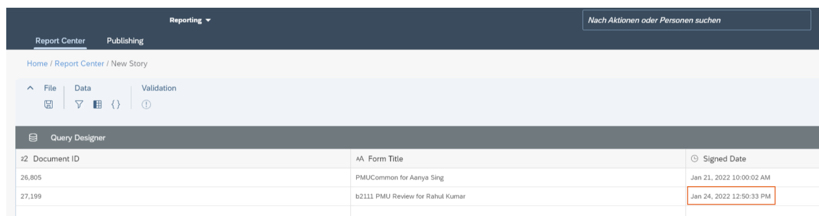
Story reports now shows the date and time when the form was signed.
Signed Date and Time appears in Story Report details
SAP has announced the latest updates and changes for SuccessFactors for the first half of 2022.
Preview release was on April 15 and production will be released May 20. You can view the full set of documentation in the What’s New Viewer here. For full details on the release cycle, check out the SAP SuccessFactors official product updates blog.
For your convenience, we’ve summarized the highlights of what’s new in the 1H 2022 Platform release below.
Overview
SAP continues to invest in numerous updates into the platform, topping most of the other modules for the past few releases. Due to the large number of updates (89 in this release!), we’ve highlighted only some of the most significant changes below. We’ve categorized the updates based on who the affected audience for each change: User Experience Updates, Admin Updates, and System Updates.
User Experience
SAP continues to remind customers that the Universal release of the Latest Homepage will be in June 3rd for preview and June 24th for production environments. If you haven’t reviewed the changes and opted-in, you should do so now and plan your communication strategy so your users aren’t caught wondering why their homepage changed!
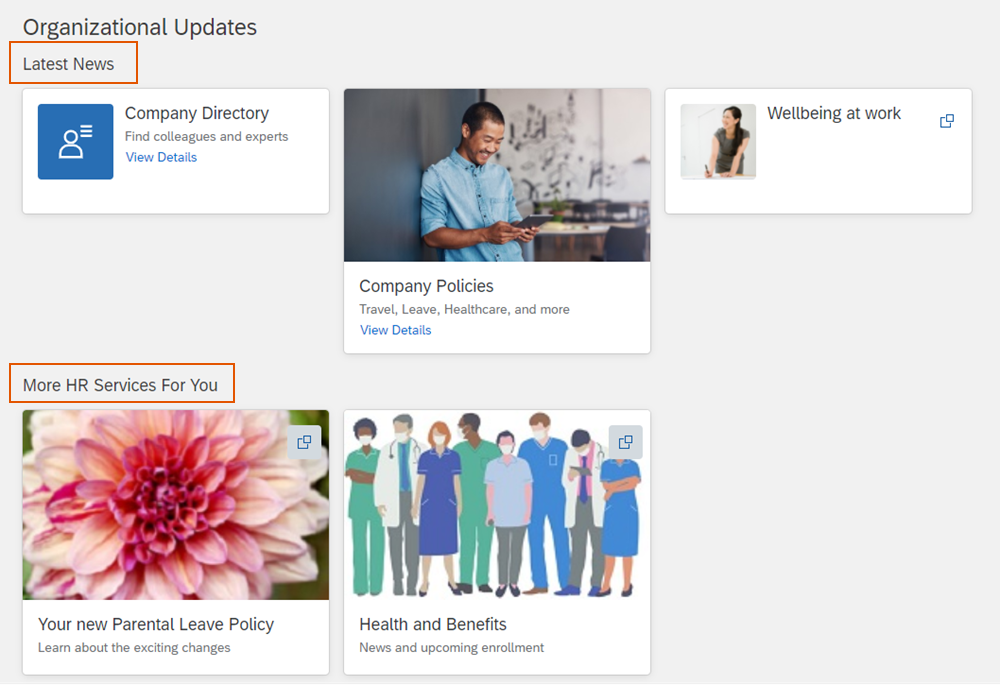
SAP also continues to add more quick actions to the latest homepage, thus increase its usefulness as a quick way to access needed areas of the system without having to click through navigation. The actions added include “Candidate Talent Pools”, “Learning Administration”, “Mobile Activation”, “View Company Documents”, and “View Tile Reports”. The homepage also now allows for grouping of custom cards within the Organizational Updates section as seen in the screenshot below:
Screenshot of Card Groupings within the Organizational Updates Section
You can also see an example of the new half sized custom cards in the screenshot above.
There are also various updates to the opportunity marketplace including allowing Assignment offer approvals, allowing assignment owners to see descriptions of capabilities including proficiency levels when creating assignments and applicants to see their own capability details. The capability picker also got updates you can read about in our blog here: https://worklogix.blog/2022/04/17/sap-successfactors-1h-2022-whats-new-in-succession-and-career-development/
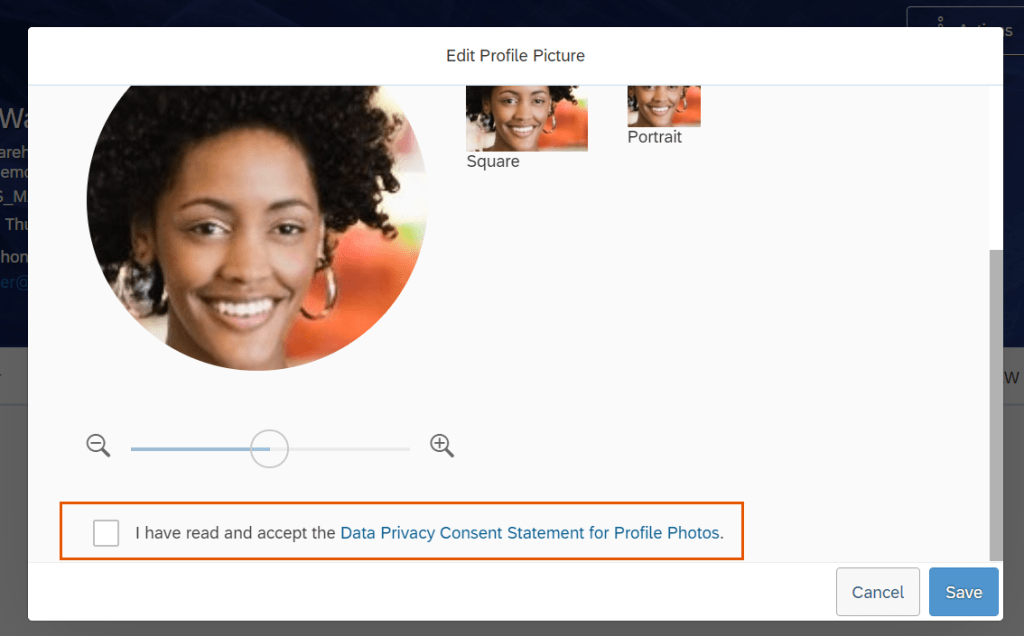
You can also now turn on a data privacy consent form for uploading photos that is shown to users as in the example screenshot below:
Screenshot of data privacy consent message for employee photos
Also related to photos- you can now have just one photo for a person on global assignment with multiple employments.
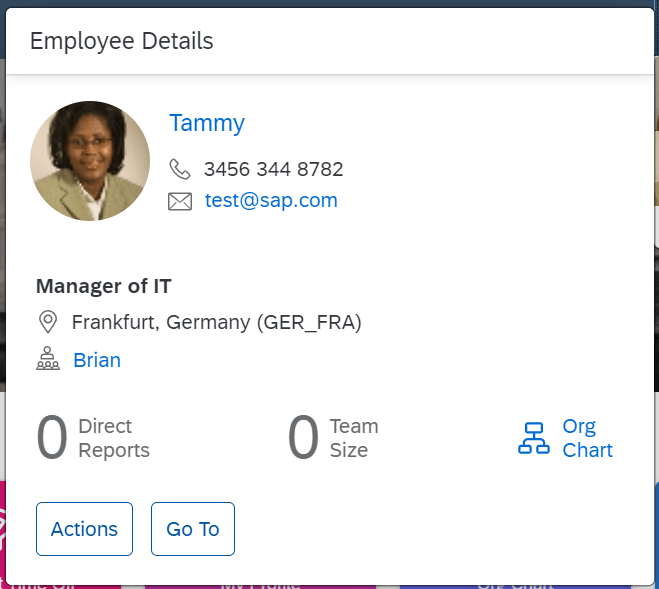
After many years of service, quickcards have finally got an upgrade across the system. This gives a better look and feel consistent across the platform. An example is shown below:
Updated Quickcard
Admin Updates
Do you still love to use the old admin page like me? I’m sorry to say the nostalgic use of the OneAdmin page will end on May 20th this year. Time to start using the NextGen admin page.
If you are a security or compliance admin, you’ll be happy to know you can now perform read and change audit reports on multiple users for up to 30 days now. The storage limit has also been increased from 1GB to 10GB.
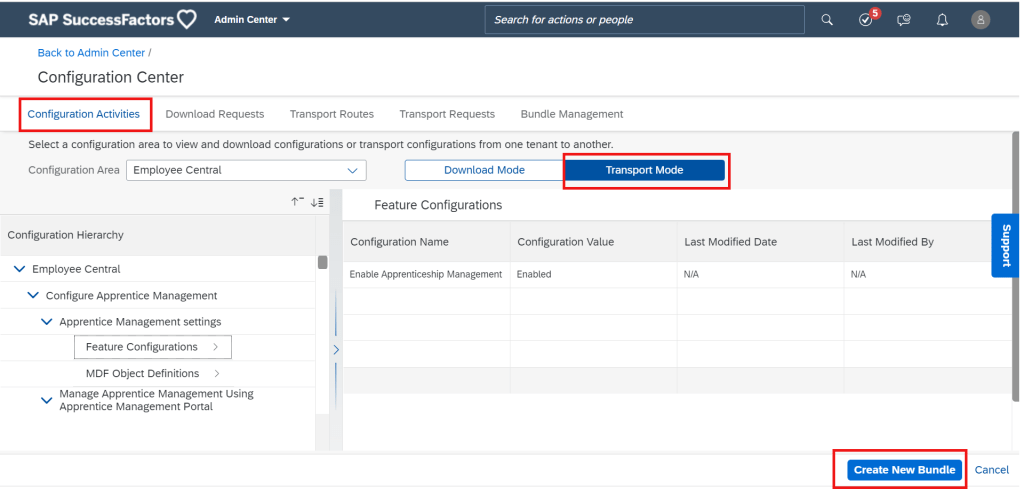
The still evolving transport system in SuccessFactors also got an enhancement in the form of Bundle Management in Configuration Center. You can now create bundles, edit them, and even share them with others! Checkout the screenshot below:
New Bundle Management Feature Screenshot
There’s also now a handy import history report available for download in the Configuration Center as well!
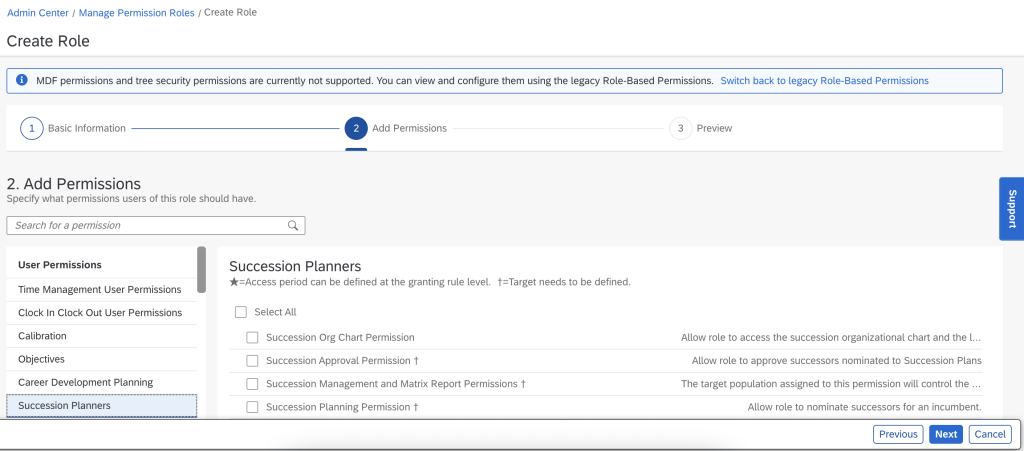
The RBP admin screen also got a new facelift! You have the option to turn this one on by selecting the option on the old screen. Check it out below!
New RBP Admin Screen
System Updates
Access to APIs based on HTTP Basic Authentication will no longer be supported on November 17 2023. This gives customers about a year and a half to adapt any existing interfaces that log on to the APIs directly to OAuth 2.0.
The APIs will now also start to be throttled. Probably a smart move on the part of SAP to keep system stability, but but news if you have interfaces that make lots of calls. Don’t worry – the limit is now 40 requests per second so you’d have to be doing A LOT of calls to be affected.
The APIs have also been enhanced with more linking between a variety of entities. Check the main What’s New Viewer page for specifics.
Wrap Up
We have now covered the Platform update highlights for 1H 2022! SAP continues to invest greatly in the platform to expand the overall capabilities of the system, concentrating on consistent and enhanced user experience while giving admins more helpful tools.
SAP has announced the latest updates and changes for SuccessFactors for the first half of 2022.
Preview release was on April 15 and production will be released May 20. You can view the full set of documentation in the What’s New Viewer here. For full details on the release cycle, check out the SAP SuccessFactors official product updates blog.
For your convenience, we’ve summarized the highlights of what’s new for 1H 2022 Onboarding below.
Overview
In this update we see SAP continuing to streamline the onboarding experience. From helpful to-do tasks and a few features that help smooth out the rehire process, SAP continues to pay more attention to details now that the latest onboarding product has begun to stabilize. We’ve divided up the new functionality in the latest release into 3 sections based on who is using the system and their visibility to the updates: “Onboarding Experience”, “Admin Updates”, and “System Updates”.
Onboarding Experience
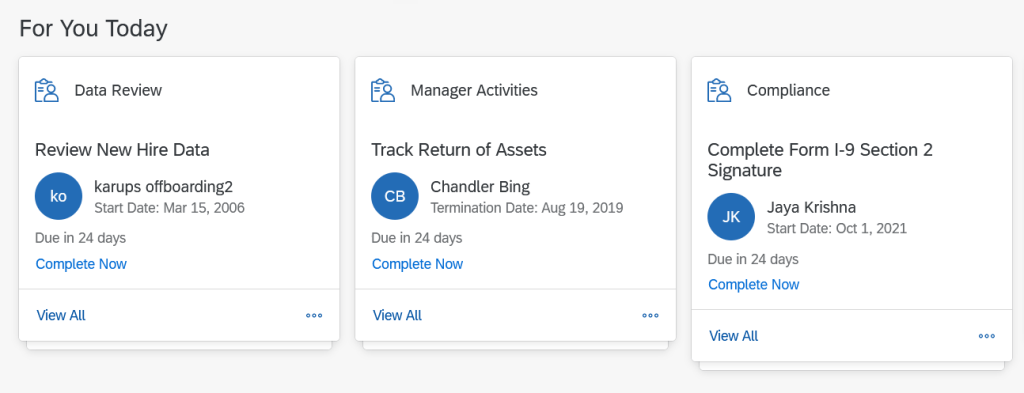
In this section, we cover updates that are visible to new hires /rehires/managers/HR or affect their perceived onboarding experience. First, the Latest Home Page now shows 3 cards in the “For You Today” section relevant for Onboarding Tasks. The cards are “Data Review”, “Manager Activities” and “Compliance”. An example is shown below:
Example of 3 cards in the “For You Today” section of the Latest Home Page
Within the “Data Review” card, users will see the “Review New Hire Data”, “Review Offboarding Data” and “Complete Rehire Verification” tasks. Within the “Compliance” card, users will see the “Complete Form I-9” and “Complete Form I-9 Signature” tasks. Within the “Manager Activities” card, users will see the “Set Goals for New Hires”, “Recommend Links for New Hires”, “Write Welcome Message”, “Assign a Buddy”, “Schedule Onboarding Meetings”, “Recommend People for New Hires”, “Prepare for New Hire’s Day 1″, Update New Hire’s Day 1 Locations”, “Request Equipment for New Hires” and “E-Sign Employee Documents” tasks for Onboarding. Also within the “Manager Activities card, users will see the “Announce Termination to Coworkers”, “Write Farewell Message”, “Create Knowledge Transfer Plan”, “Complete Knowledge Transfer”, “List Assets to Return”, “Schedule Offboarding Meetings”, “Track Return of Assets”, and “E-Sign Employee Documents” tasks related to Offboarding. This allows for quick access for managers and employees/new hires to complete their needed tasks.
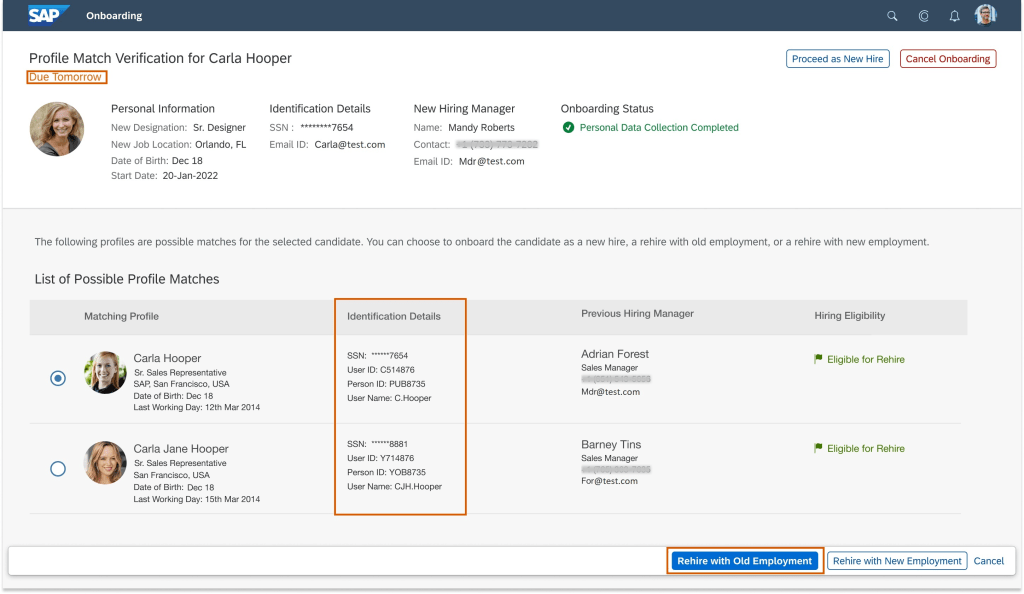
In this section, we cover those updates most relevant to system or HR admins. First is an update to the rehire process. Rehire can be a painful process if you don’t catch the fact that someone is a rehire during the recruiting and onboarding process. Not identifying a rehire properly can lead to miscalculation of benefits, giving away new hire bonuses unjustly, or even hiring blacklisted candidates mistakenly. This functionality helps fix just that problem! Now, when you use onboarding with SAP SuccessFactors recruiting, the system can automatically choose matching profiles as shown in the screenshot below.
Image of Employment Record Match and Selection during Onboarding Process
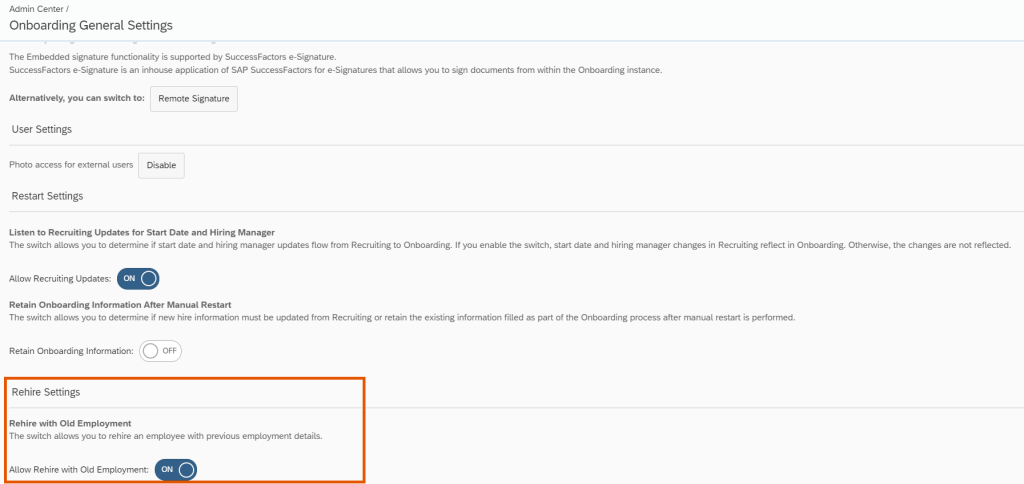
This feature can be turned on using the switch on the “Onboarding General Settings” page as shown in the screenshot below:
Onboarding General Settings Page showing where Rehire Settings can be updated
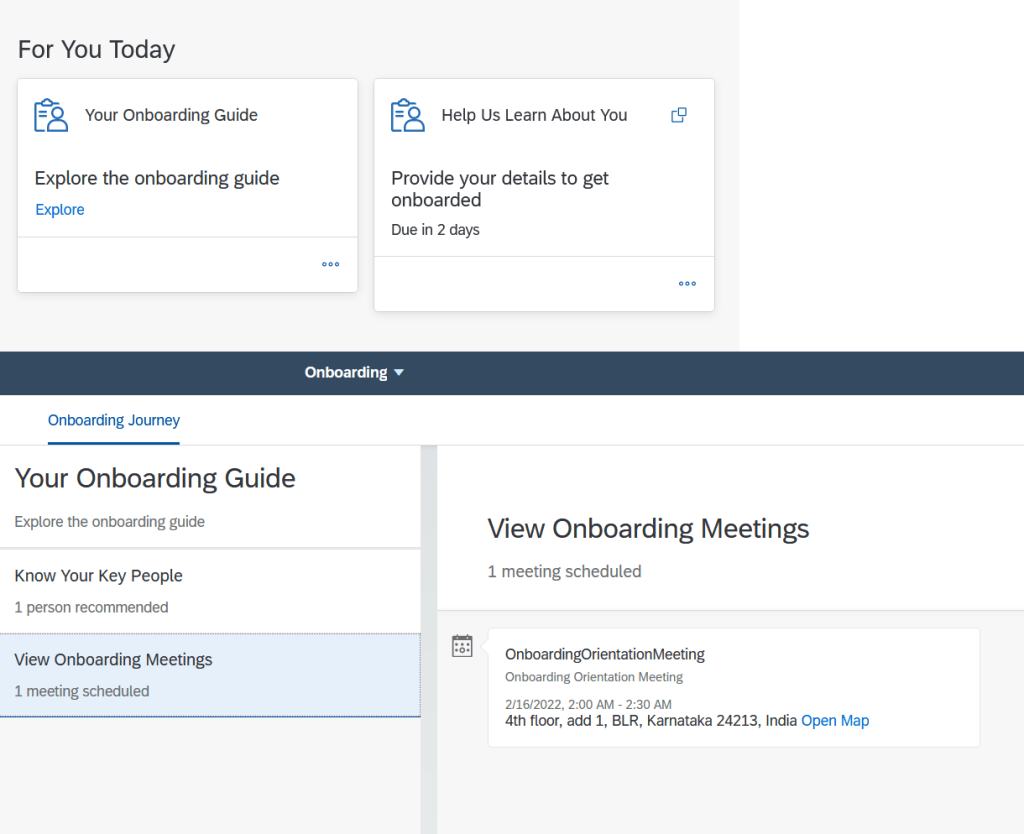
Additionally on the latest home page, users can now view an onboarding guide that includes onboarding meetings organized by their managers and orientation meetings organized by their HR admins.
Screenshot of “For You Today” section on the Latest Home Page as well as View Onboarding Meetings within Your Onboarding Guide
There also now more compliance forms available for end users to fill out including the Starter Checklist for the Welch locale for the UK, the CC-305 Voluntary Self-Identification of Disability for the USA, DR 0004 Colorado Employee Withholding Certificate for the USA, and the WI – 221 Nonresident Military Spouse Withholding Exemption for the USA.
System Updates
In this section, we briefly cover items that the system handles automatically or are less visible to general users and admins. First, with the SAP Master Data Integration, workforce integration now replicates rehired employees only after manage pending hire is completed (before manage pending hire didn’t have to be completed). This allows for better data integrity so that only needed employees are sent to SAP Master data.
Secondly, the Compliance Metadata Sync, Onboarding Process Closure, and Where to Go Sync jobs have been decoupled from one job into three. This allows for better troubleshooting and more precise issue correction when one of the individual jobs fails and/or needs to be re-run. These jobs exist in provisioning so this update is transparent to all users except partners and SAP.
Wrap Up
From new cards on the homepage and simplified authentication to a simplified rehire process, we continue to see SAP making the onboarding process more smooth for all types of hires as well as HR and System Admins!
Highlights are identified by module and the type of change.
Universal- for modules enabled, universal means no steps are required to have access to the new functionality. These features are automatically made available.
Admin Opt-In – the admin must enable the new feature, usually in Admin Tools
Admin Opt-Out – the admin must disable the new feature, usually in Admin Tools
Provisioning Opt-In and Opt-Out require a Partner or Product Support request For your convenience, we’ve summarized the highlights of what’s new for 1H 2022 Performance Management below.
Performance Management
The majority of the performance management updates involve Multi-Rater 360 forms and Calibration. However there are a few performance related updates that we will begin with.
General Availability – Universal Updates
Restrict Data Access of Inactive Users’ Forms
This enhanced was designed to comply with data privacy and protection standards.
Currently there is no way to limit a user’s access to inactive employee forms. With this release, there is a role permission that may be enabled which restricts the data in an inactive user’s PM form.
To set this up, open a permission role that should have the restriction.
Under User Permissions>Performance>Restrict Data Access of Inactive Users’ Forms
With this permission set, users with this permission role will not be able to access the data of inactive users’ forms in the following areas:
Home Page (only can review performance related To-Dos but not form pages)
Stack Ranker
Team Overview
Form OData APIs that include form subject information
Use Capability Picker in Performance & Goals
The previous “New Competency Picker”, now the Capability Picker, has a new UI which includes employees’ competencies, behaviors, and skills within an organization.
The Capability Picker can be used to add competencies in competency sections on PM forms.
To this use, Job Profile Builder must be enabled. In Performance Management Feature Settings in Admin Center, Enable Capability Picker must be selected.
New Columns for Performance Management in Story Reports
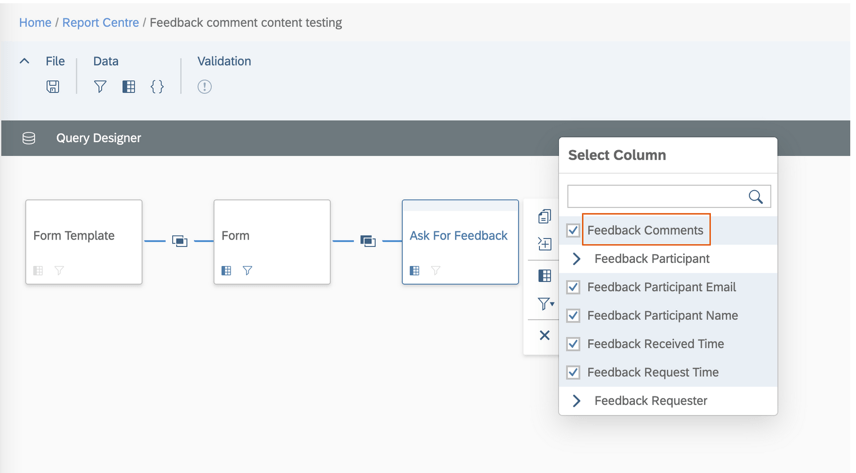
In Story reports for Performance Management, users can now include feedback comments in the Ask For Feedback table as seen below.
Ask For Feedback Comments Columns
These are the Ask for Feedback comments provided by internal and external users through emails.
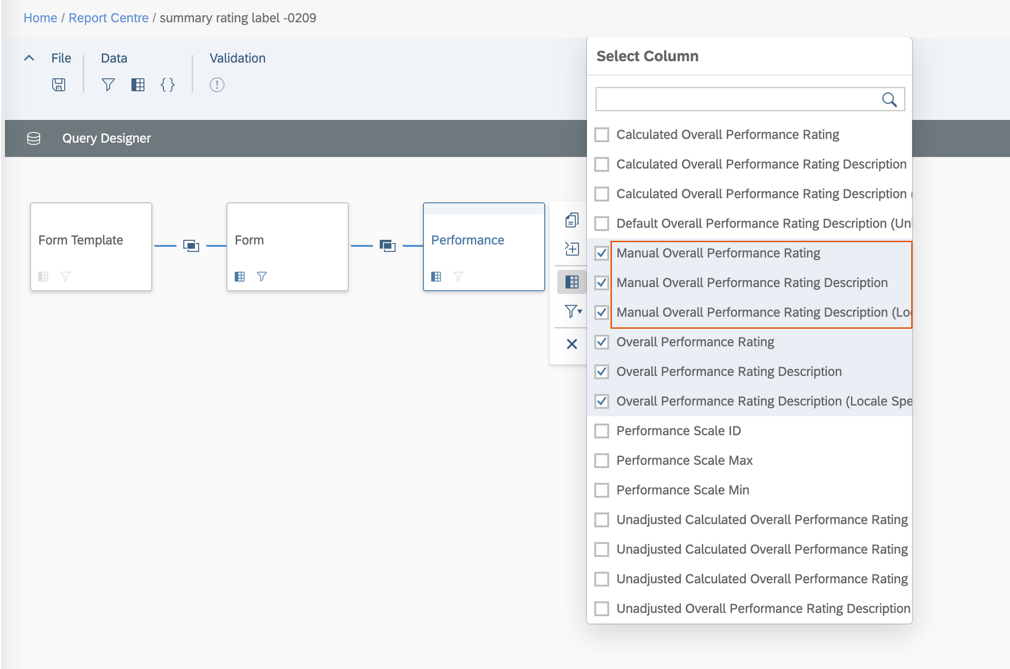
In addition, manual overall performance rating, manual overall performance rating description, and locale specific manual overall performance rating description are available in the Performance table.
Rating Columns
Enhanced Signed Date Column in Story Reports
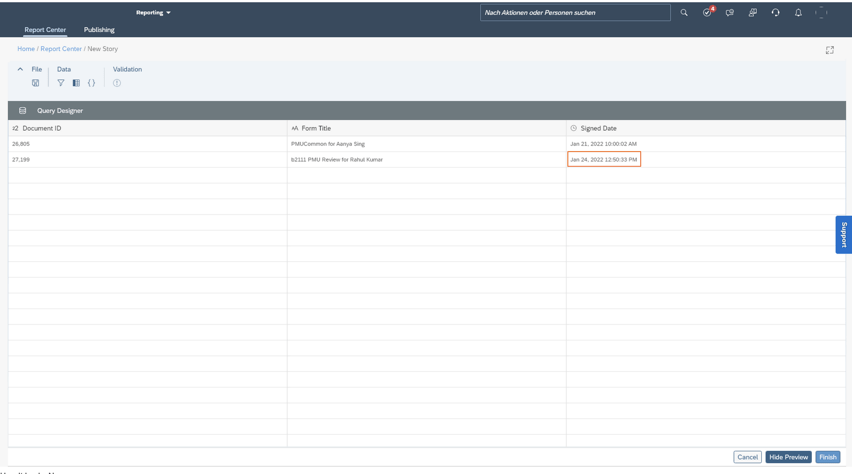
Signing a form using Route Form and Sign Form, the Signed Datecolumn in Story reports now shows the date and time when the form was signed using the time of tenant preferred time zones. Only the latest record is shown in the reports if users have signed the form multiple times.
Form Signed Date and Time
Enhanced OData Entity FormAuditTrail
The FormAuditTrail API has been updated with a permission check. This API can be used to access all audit trail records of forms in the system. Otherwise, users can only access audit trail records of forms in their folders.
Permission is needed to access all audit trail records of forms in the system and the permission role should include Administrator Permissions> Manage Documents>Admin Access to Forms OData API permission.
General Availability – Admin Opt-Ins
There is a performance management related admin opt-in that is applicable for CPM achievements and feedback on a performance form.
View Achievements and Feedback on Forms on iOS and Android Mobile Apps
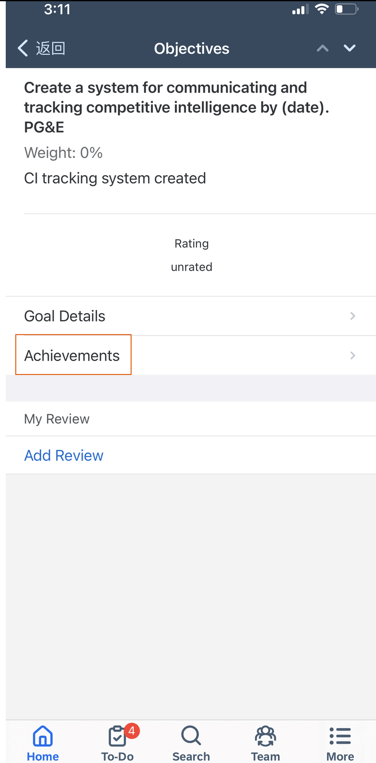
Performance reviewers with iOS and Android SAP SuccessFactors mobile apps, achievements and feedback linked to employees’ goals on performance forms can now viewed.
On the goal item page, there will be an Achievements row as seen in the example below.
Goal item on PM form
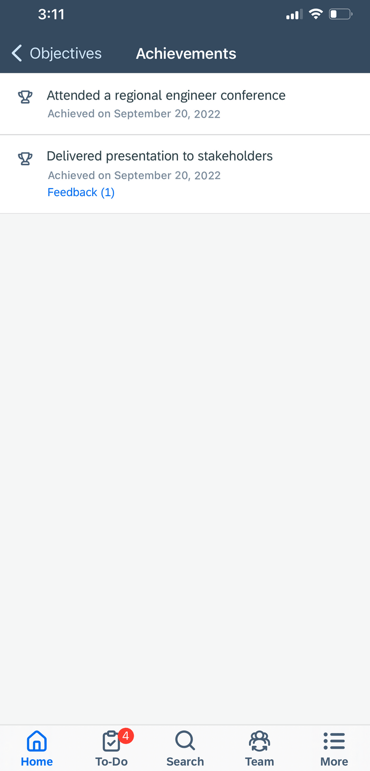
Achievement details may be viewed by clicking Achievements for the goal. If the employee had any achievements linked to a goal, they would appear as seen below.
Achievements linked to a goal
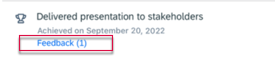
If there is any feedback for an achievement, it will noted with the number of feedback given.
Feedback Indicator for an Achievement
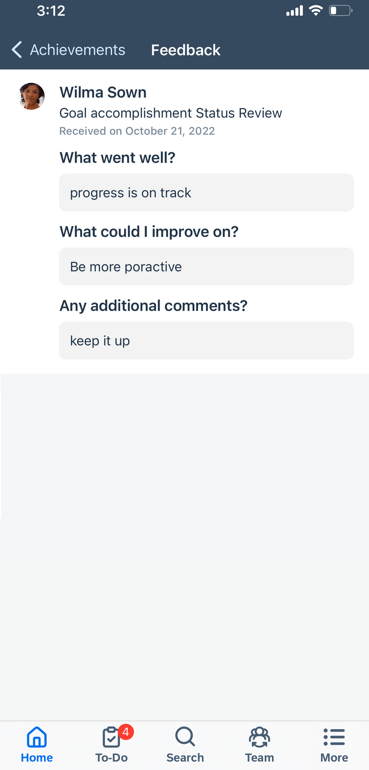
Clicking the feedback indicator, reviewers can view feedback for the achievement.
Feedback for an achievement
To take advantage of this feature, the latest version of CPM must be enabled.
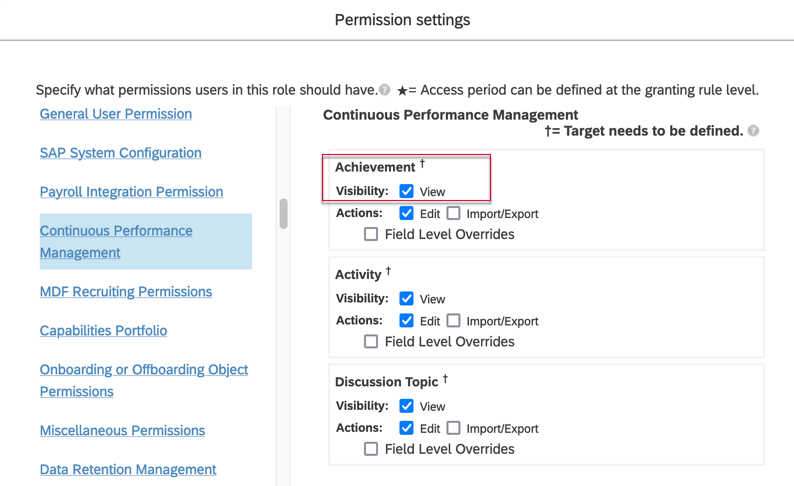
Reviewers will have to the View permission for User Continuous Performance Management Achievement in their permission role.
Permission to View Achievements
360 Reviews
There are several 360 Reviews – SAP Fiori Version updates. One is also applicable to 360 Reviews v11.
General Availability – Universal Updates
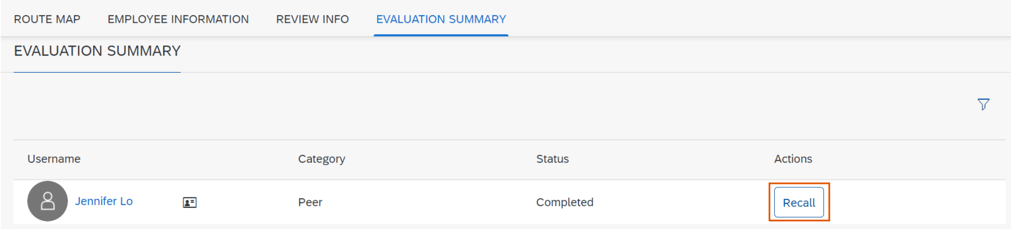
Participants Able to Recall Completed Forms
A participant may recall a 360 Reviews form after providing feedback and submitting it. However this recall feature available for raters but is not applicable to process owners, managers, employees, HR representatives, or approvers.
A Recall button will appear in the action column of the Evaluation Summary section of the form.
Recall 360 Form by Participant
Using the Recall button moves the form back to the participant’s inbox.
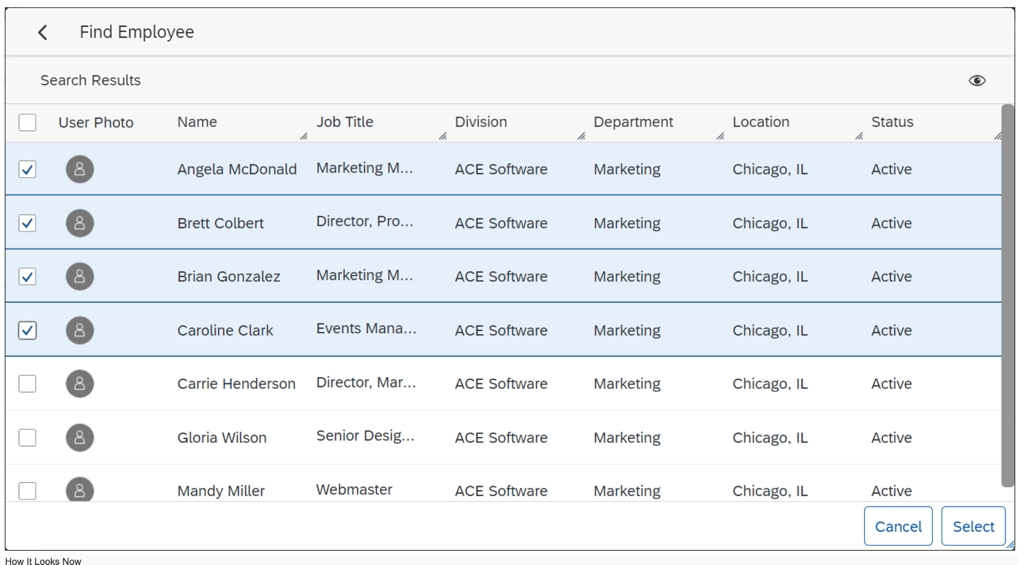
Select Multiple Employees on Advanced Search Dialog
Previously, managers were only able to select/add one employee from the search results at a time. To add more, filters had to redefined for each selection.
Managers can now select multiple employees from a search done on the Advanced Search Dialog and add them all to the Participant List at once.
Multi select employees
Refill the Participant List After Declines Occur
Process owners may now add alternative participants to the participant list if some of the initially added participants have declined to evaluate. This helps ensure that process owners get enough feedback for evaluations.
In order to use this feature, in the advanced settings of the 360 form template, all check boxes should be deselected for the option Hide the Decline to Participate button on the 360 Form for as seen below.
Deselect Hide Button
In the advanced settings of the 360 form template, select at least one role for the option Enable Add New Participants after 360 Evaluation starts for. This allows the selected role to add participants after the evaluation has begun.
Enable adding a Participant
Form Titles Editable in 360 Reviews
It is now possible for users to edit titles of 360 Reviews forms received in their Performance Inbox folder. Already available in 360 Reviews v11, it is now available in the SAP Fiori Version as well.
In the advanced settings of the 360 form template, select the option Enable form title editability in Form info page (V10) or Enable form title editability in the Form (V10), depending on where you want to change titles.
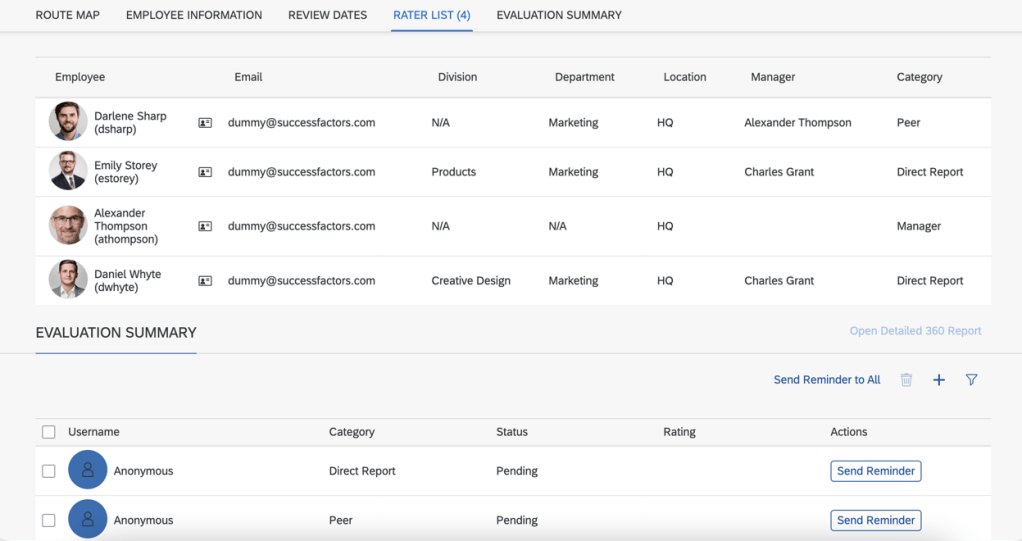
Process Owners Able to See Participants on Anonymous Forms
Process owners now can see the participants who have given evaluation feedback even on anonymous 360 Reviews forms. This provides participant information such as employee name, email, division, department, location, manager and category.
The Evaluation Summary will still show “anonymous” for each rater, but the Rater List will show rater names instead of “anonymous”.
Rater List with Names
In order to use this feature of a Multi-rater form, some set up is needed.
The 360 template to be used should have Anonymous 360 configured in Provisioning >Form Template Administration.
Anonymous 360 Form Attributes
Within Form Template Settings for the form, on Show Participants in Status Summary (Applicable to Anonymous 360’s only) needs to be enabled.
Enable Show Participants in Status Summary
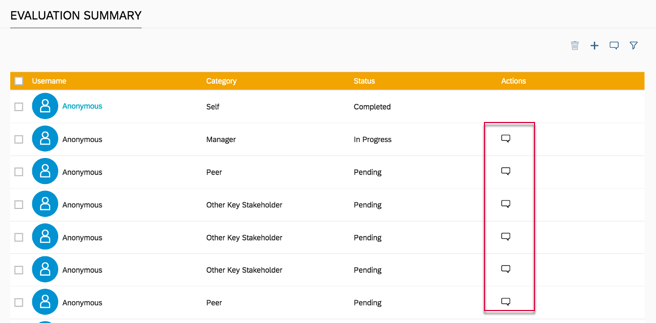
Improved Reminders Buttons
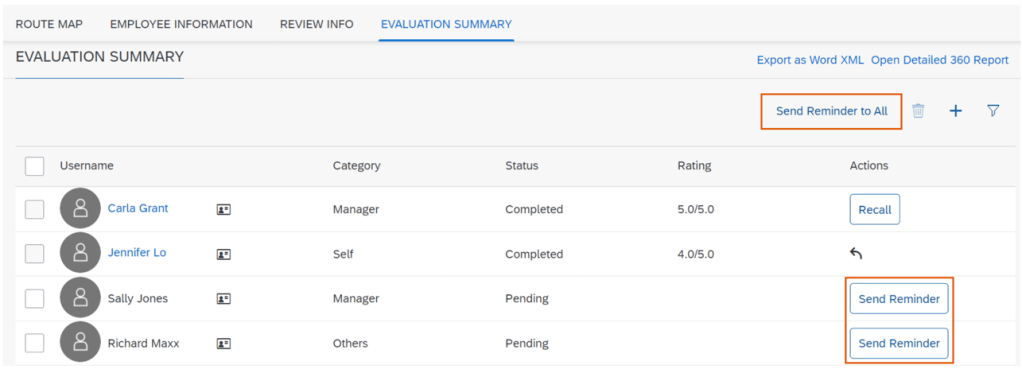
The Reminder icon in the Evaluation Summary section has been transformed into a button. Previously the Actions column contain a reminder icon as seen below.
Recall icon
This has been replaced with a Recall button in the Actions column. Users can now send reminders to those who have not given feedback yet; to a one or multiple participants. There is a new Send Reminder to All button will send a reminder to any rater that has not given feedback yet (a status of Pending). The user will also receive a confirmation of this action before reminders are sent.
Send Reminder Buttons
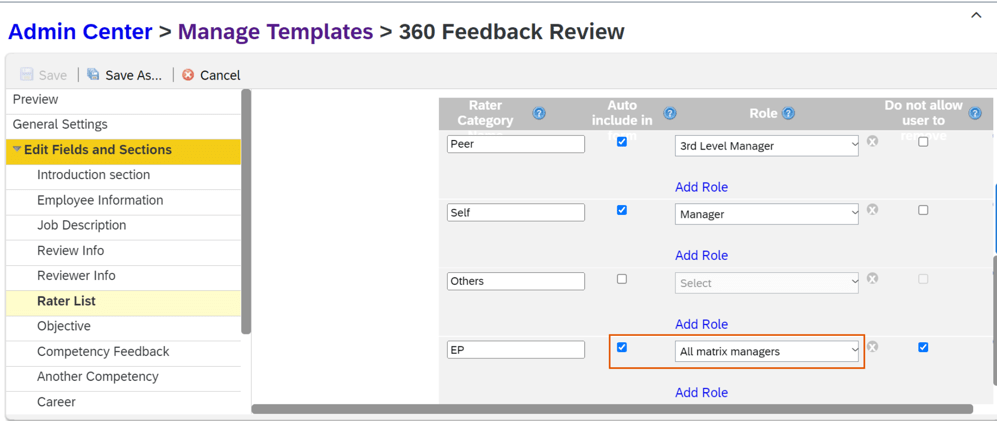
Add “First Matrix Manager” and “All Matrix Managers” as Default Rater Categories 360 Reviews v11 and 360 Reviews – SAP Fiori Version
Within the Manage Templates tool or by editing the XML form template, First matrix manager and All matrix managers are now options as default rater categories in both 360 Reviews v11 and 360 Reviews – SAP Fiori Version. When selected, the employee’s first matrix manager or all matrix managers will then show on the rater list by default when a 360 Review form is launched.
All Matrix Managers Role
The feature saves users from manually adding a first matrix manager or all matrix managers as raters after the form is launched.
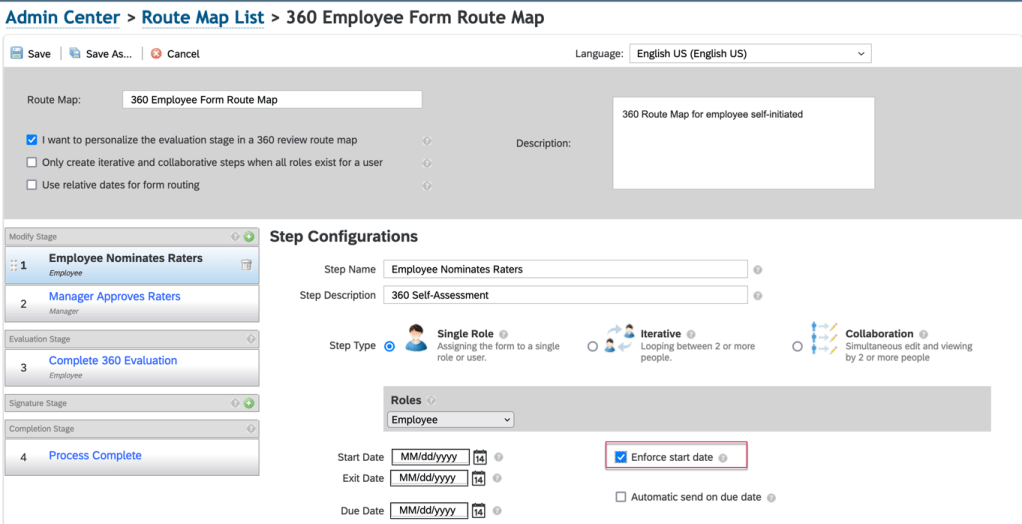
Enforce Start Date in Route Map
A feature currently available for PM forms is now available for 360 forms.
Within the route map associated with the 360 template, select the Enforce start date option and then enter the start date for the step. This may be done for any step in the Modify and Evaluation stages on the route map.
Before the step start date, forms are read-only, but participants can open the forms to check the details.
Support for Learning Activities in Development Goal Section in 360
It is now possible to use Learning activities in the Development Goal section of a 360 Review form. A user may view details of a learning activity, add LMS learning activities, and delete LMS learning activities or Transcript-enabled custom learning activities.
In Provisioning>Company Settings make sure to select the option: Transcript — requires “Version 11 UI framework (ULTRA)”.
Show Behavior Descriptions When Not Rating by Behavior
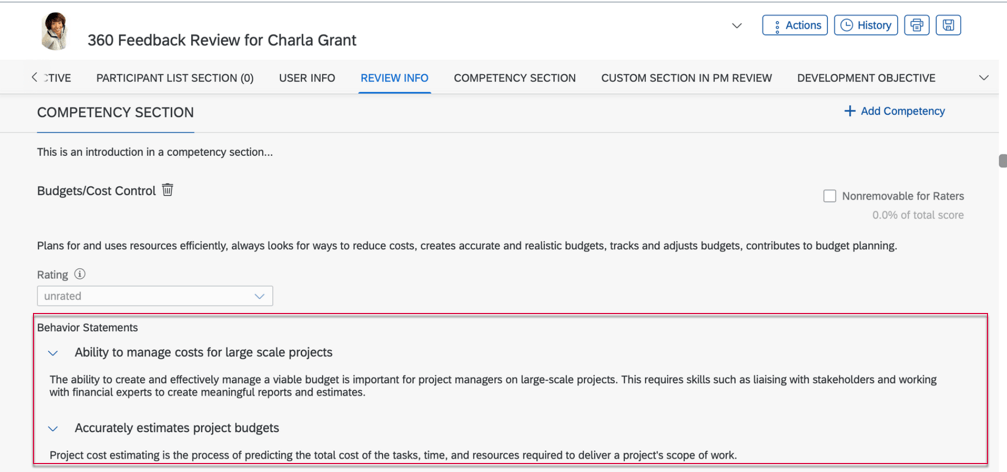
If competencies have behaviors associated with them, behavior descriptions may be included in the Competency section of a 360 multi-rater form, even if the behaviors are not being rated.
Competency Behaviors
When including behaviors, the behavior name displays but descriptions are hidden by default. Clicking the arrow button will show the behavior’s description.
In order to use behaviors on the form, the XML form template needs to have behavior-mode-opt in the competency-sect set to a non-zero value (1, 2, 4 or 5) and use-behavior should be false.
General Availability – Admin Opt-Ins
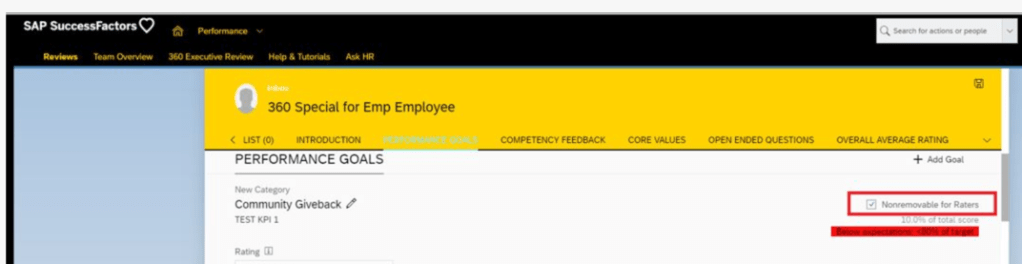
Hide the Nonremovable Checkbox in 360 Reviews – SAP Fiori Version
You can now hide the Nonremovable for Raters checkbox on a 360 Reviews form if it’s not needed.
Nonremovable by Raters Checkbox
In the advanced settings of the 360 form template, enable the Hide the Nonremovable checkbox on a form in the Modify stage.
Previously, the checkbox always appeared on a form, even if a rater was not permitted to use it for editing linked skills.
Deprecation of 360 Reviews v11 Version
November 18, 2022 is the end of maintenance for 360 Reviews v11 and will be deleted on May 20, 2023.
360 Reviews – SAP Fiori Version has been Generally Available and now includes the majority of features and functions that were available in 360 Reviews v11.
It is recommended if you’re using 360 Reviews v11 Version to migrate to 360 Reviews – SAP Fiori Version.
Goal Management
General Availability – Universal Updates
There are no universal updates for Goal Management.
General Availability – Admin Opt-Ins
Create and Edit Goals in Non-Goal Management Modules
When the latest Goal Management is enabled, you can try out the latest Goal Management to create and edit goals through an embedded dialog.
When you create or edit a goal in the following modules, you’ll be prompted with a dialog with brand new UIs offered by the latest Goal Management:
Career Development
Continuous Performance Management
360- Multi-Rater
People Profile
Performance Management
Succession
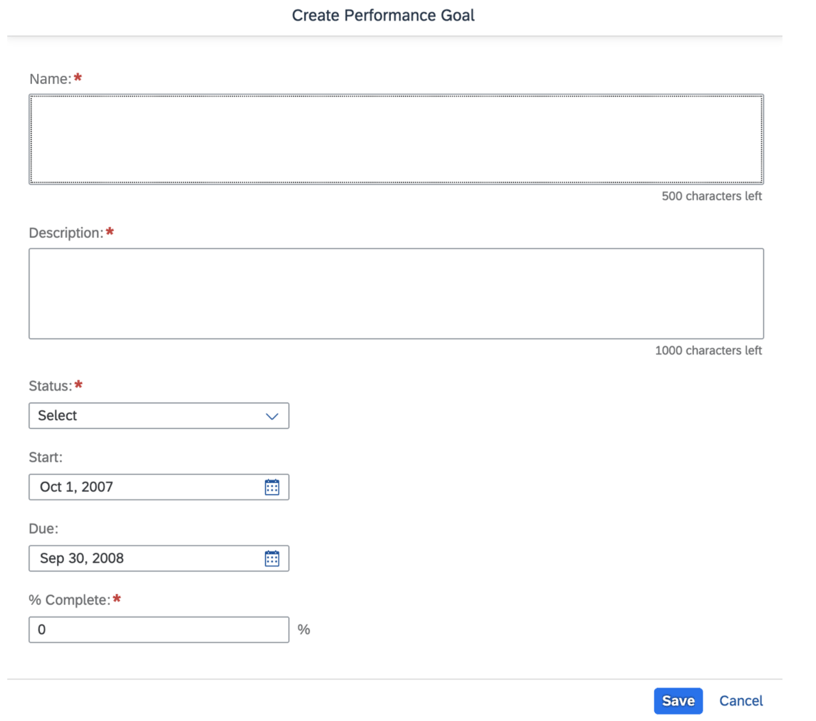
Goal Creation
Calibration
General Availability – Universal Updates
There are several universal updates for a calibration session.
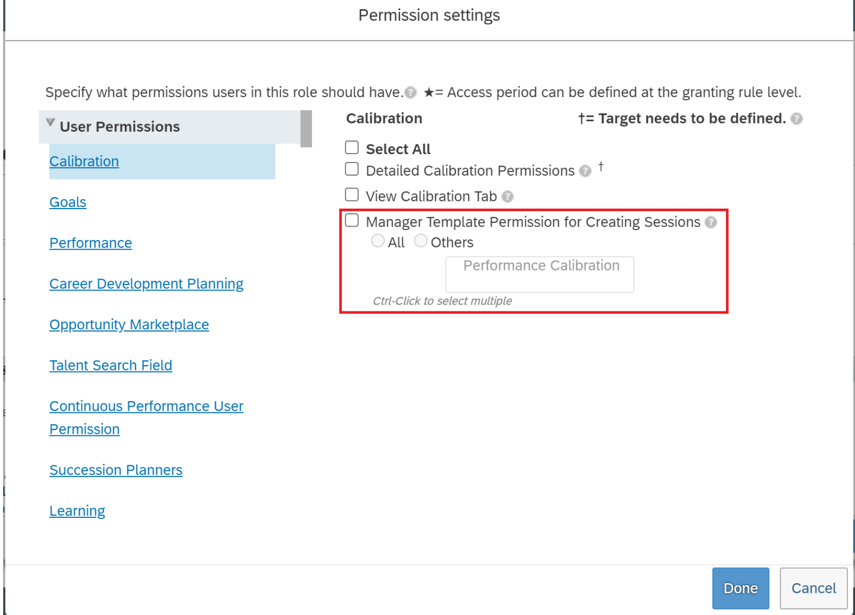
Manager Template Permission for Creating Calibration Sessions
It is now possible to identify which calibration templates managers can access when they create calibration sessions. The new permission, Manager Template Permission for Creating Sessions, is added under User Permissions >Calibration for a permission role.
Permission for Manager Calibration Sessions
Total of Expected Number of Subjects Equals Actual Number of Subjects
Logic has been enhanced for subject distribution in scenarios where the guidelines are defined with rating groups or when not all ratings have a distribution guideline.
When the guidelines are defined with rating groups or only part of the ratings have distribution guideline, but these are not met:
Ratings are included once in the guidelines
All guidelines are defined with “=” operator
Total of distribution guidelines is 100%
The system sums up the decimal parts and distributes the whole numbers to the ratings if there are decimal parts in the calculated results. This is done to ensure the total number of expected subjects for all ratings is equal to the actual number of subjects in the session.
Enhancement to Guidelines Enforcement
Distribution guidelines have been enhanced to support more guideline scenarios. Finalizing sessions individually, enforcement is now supported in three more guideline scenarios.
Distribution Guidelines are set in the Data tab of Manage Calibration Templates.
The enhancement only applies to finalizing sessions individually.
Guideline is defined in a rating group when there is one more than one rating
Guideline is defined with a rating range with an operator other than “=”
Not all ratings have a guideline
When the distribution of subjects doesn’t meet the guidelines for any these scenarios, the session cannot be finalized.
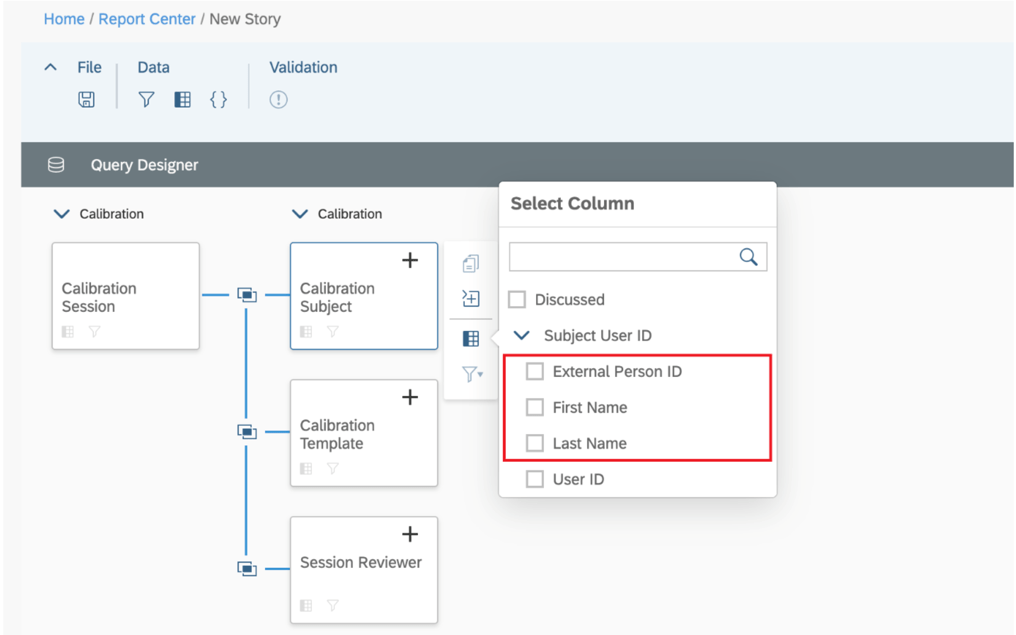
More User Information of Calibration Subject Available in Story Reports
You can now include the name and external user ID of a session subject in a Story report. The first and last names and external user ID are supported in the auto-joins for calibration subjects. This makes it easier to get calibration subject information.
Subject Name Columns
General Availability – Admin Opt-Ins
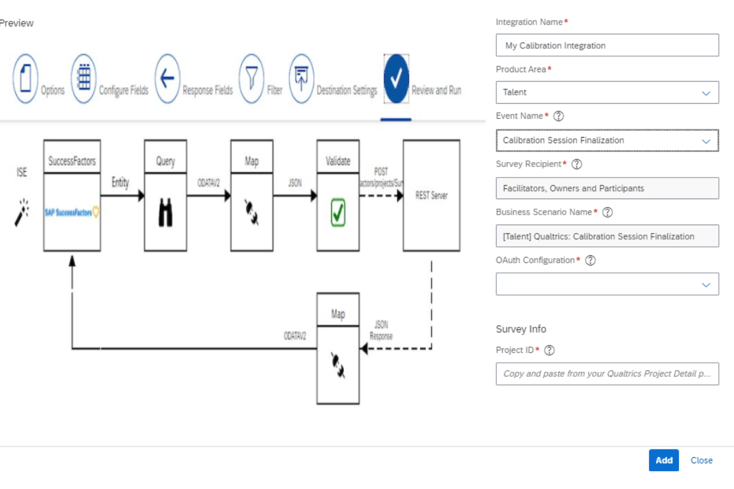
Qualtrics Feedback Opportunity for Calibration Session Finalization
Manage Qualtrics Integrations in the Admin Center now includes the Calibration Session Finalization option in the Event Name field’s drop-down list for Talent.
Calibration Session Finalization
Intelligent Services events can be used to send employee information to Qualtrics so when an employee finalizes a calibration session, a Qualtrics feedback survey may be sent via email.
Calibration, Intelligent Services and Integration Center must be enabled and a Qualtrics Employee Experience license for Lifecycle projects is required.
Continuous Performance Management (CPM)
The legacy version of Continuous Performance Management (CPM) will reach End of Maintenance on May 20, 2022 and will be retired as of May 19, 2023.
The latest version of CPM, initially released in 2H 2020 is available in the Upgrade Center. If no action is taken, your company will be automatically upgraded to the latest version after the retirement date.
In Conclusion
We have now covered the highlights of the PM related updates for 1H 2022. See our blog for 1H 2022 Career Development release features.
SAP SuccessFactors has released new features for your overall Compensation solution. They can be found in detail here (S-User ID required). Filter on Solutions for Compensation to review all the latest changes. Under the Description for each, you can click on ‘See More’ to see screenshots and detailed information.
As a reminder, preview release was on October 15 and production will be released November 19. For full details on the release cycle, check out the SAP SuccessFactors official product updates blog here. New to the release process? For tips on how to manage a release, check out our blog here.
After reviewing all the changes, I narrowed the list down to the Highlights for H2 2021Compensation:
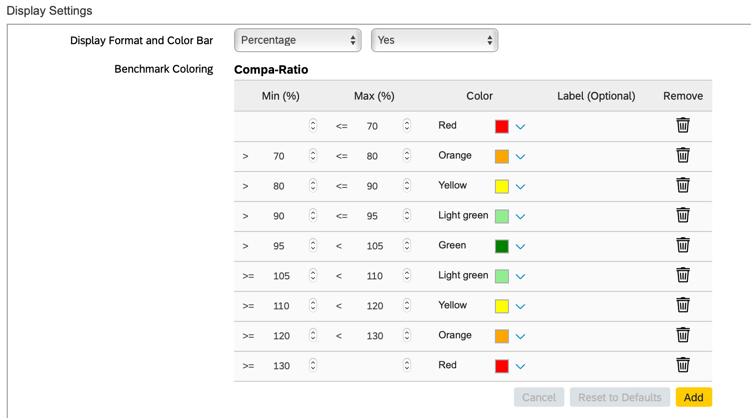
1. Create Benchmarking Ranges and Color Values for Compensation Plans Using Display Settings
Compensation administrators can now update benchmark ranges and color settings for Compa-Ratio and Range Penetration in the compensation plan template under Display Settings.
Previously this was done in XML.
Additional settings have been added to allow Compensation Administrators to make changes via configuration
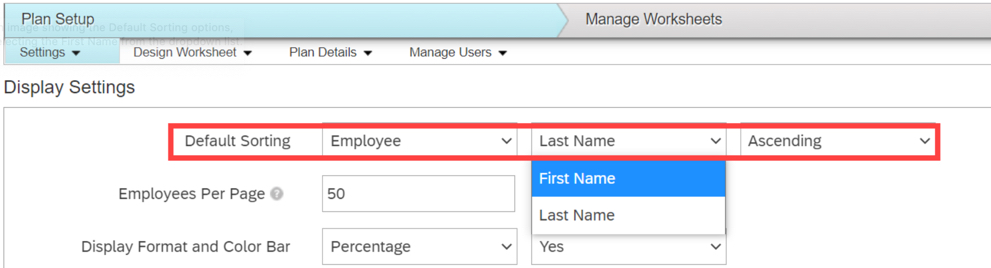
2. Enhanced Default Sorting by Employee Name for Compensation Plan Worksheets
There is now a new setting for sorting of employee names by First Name or Last Name as well as by Ascending or Descending order.
This allows end users to be able to find employees more easily.
Additional settings have been added to enhance usability
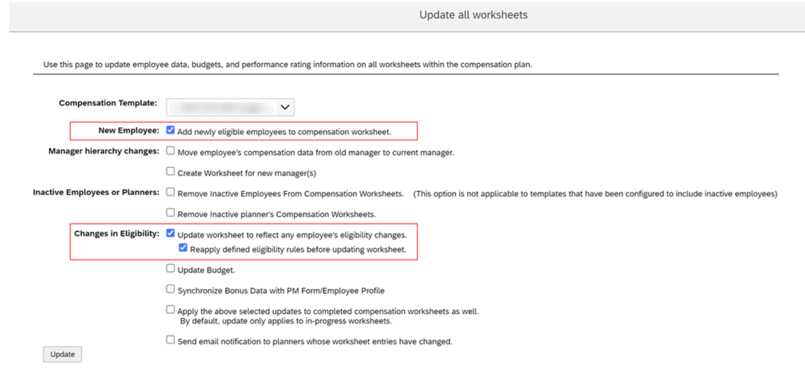
3. Enhanced Ability to Add Newly Eligible Employees to Compensation Worksheets
Users can now update settings to add eligible employees, not just new hires, to worksheets for a compensation plan.
These selections must be made on both the Update all worksheets settings and the Update a specific worksheet settings.
Both checkboxes should be selected for updating new hires as well as those newly eligible
4. Guidelines Using Entered or Calculated Values for Compensation Planning
Calculated or editable fields defined in the Design Worksheet can now be used as attributes for Guideline tables in Compensation, Variable Pay, and Total Compensation Plan templates.
This is very helpful for when customers have specific guidelines they wish to use that would have otherwise been difficult to incorporate via a workaround.
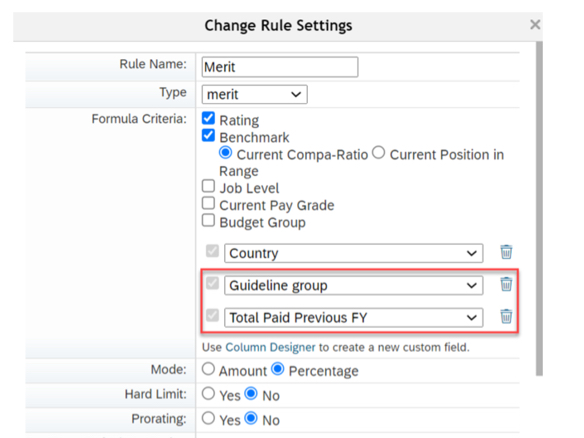
Custom columns can be created and then used as part of guideline configuration
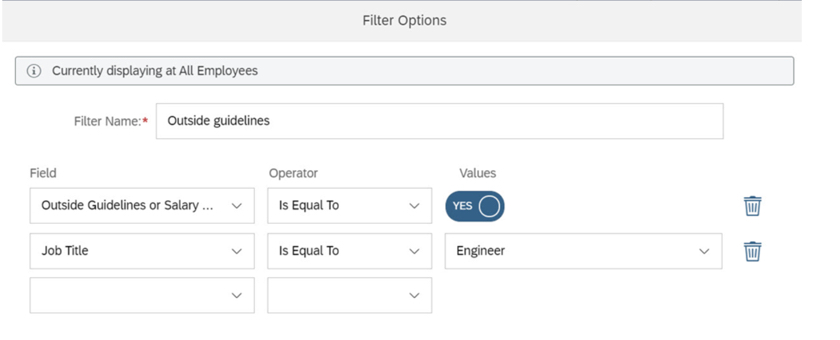
5. Show Compensation Recommendations Outside of Guidelines or Salary Range by Using a Filter in Executive Review
Compensation planners can create a filter showing employees with compensation recommendations that are outside of guidelines or salary ranges.
This is now a standard option that doesn’t require any additional configuration.
Filter can be set to show all employees, show only employees within guidelines, or show only employees outside of guidelines
6. Improved Collaboration for Planners in Updating Worksheets
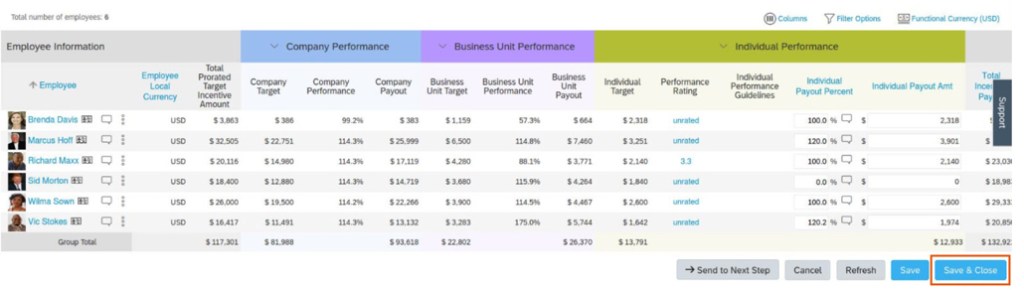
Save & Close button was added to allow easier collaboration for planners updating the same worksheet.
In the previous version, although a planner chose Save to save the updates made to the worksheet, the worksheet remained inaccessible to the other planners until the current planner exited the worksheet.
Save & Close button has been added to allow less restrictions for multiple planners on same worksheet
7. Define Population Views Using Manage Advanced Executive Review Filters
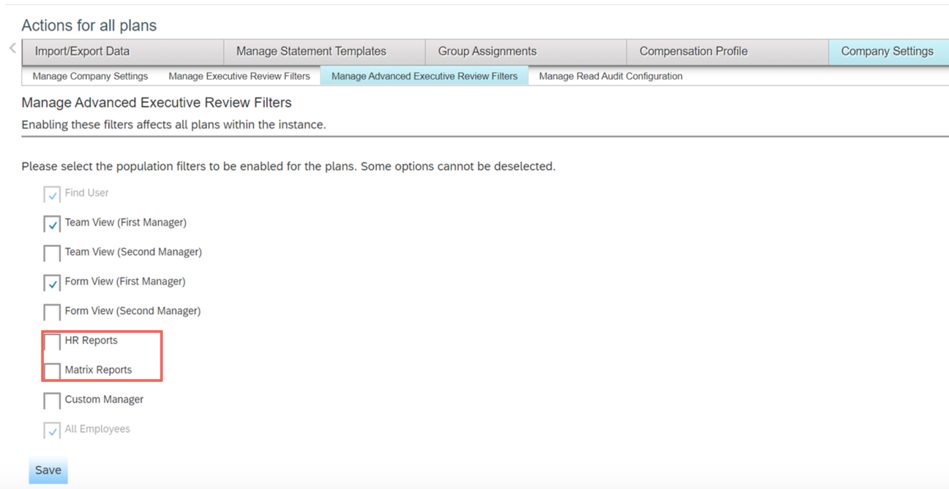
Compensation Administrators can now turn off Executive Review filters that are not relevant to their company.
Some of these additional filters were confusing to end users as they were not being used.
Filters can now be turned off via Company Settings – Manage Advanced Executive Review Filters
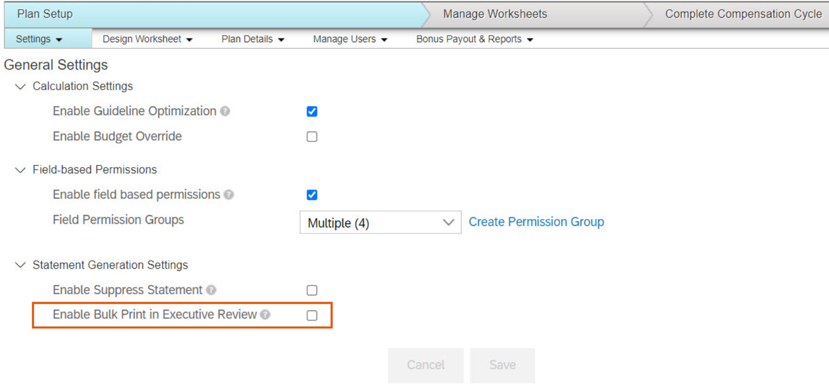
8. Enabling Bulk Print Feature in Specific Compensation Plans for Executive Review
Compensation Administrators can now set Enable Bulk Print in Executive Review from Plan Setup in the Settings page.
This change allows for plan specific control over bulk printing.
Enable Bulk Print in Executive Review checkbox is now found under plan specific Settings – General Settings
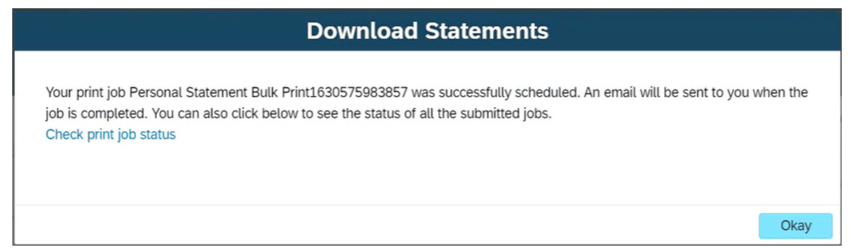
9. Integration of My Jobs Window for Bulk Print Statements in Executive Review
Users can now view the status and download Bulk Print statements from the My Jobs window that is now integrated with the Executive Review page.
Choosing Check print job status from this window redirects you to the Reporting – Report Center – View Schedules – My Jobs page.
Users now have an easier time navigating and find statements that were bulk printed
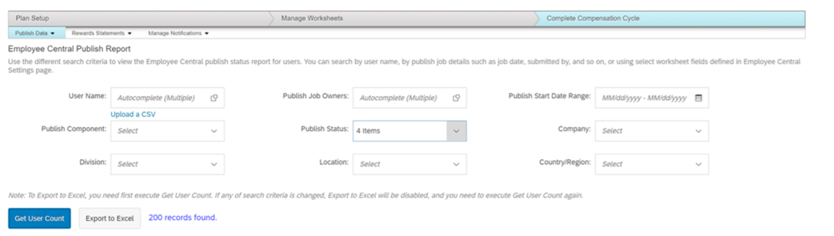
10. Publish Report for Detailed Logs on Compensation Publish to Employee Central
Compensation Administrators can now create a detailed report of the publishing status logs for employees and identify the issues during the publishing process for a given template.
The report is available in the Complete Compensation Cycle – Publish Data – Employee Central Publish Report area of the compensation plan.
To view report, Administrator – Manage Compensation – View Employee Central Publish Report permission has to be set in role-based permissions
On October 9, 2021, SAP released documentation for the H2 2021 release. Preview release is October 15 and production is November 19. In this article we take a quick look at the latest updates for SAP SuccessFactors Platform. It’s a huge list for Platform this release – so we’ve tried to summarize the most interesting items. You can view the full set of documentation in the What’s New Viewer here. For full details on the release cycle, check out the SAP SuccessFactors official product updates blog here. Let’s get started! We’ve categorized the enhancements below for you starting with the most compelling in our opinion!
Of Special Interest
What stood out to me as the most interesting part of this release is the introduction of a Digital Assistant! As with most digital assistants, the feature is basically a natural language processing program that appears in the form of a chat window. Right now SAP is reporting they have over 250 scenarios programmed on the web version and over 20 on the mobile app. This feature is currently only available to early adopters.
The Center of Capabilities continues to expand its functionality. There is now a proficiency rating scale available that allows you to quantify the skill level of employees in the skills within the Center of Capabilities. There are also a new Center of Capabilities Library Reports for Stories in People Analytics.
There have also been some general UI Enhancements to the center of capabilities functionality overall. In addition, the capabilities portfolio is now available which is the main experience that shows the list of capabilities for a worker.
In addition, there are a lot more Quick Actions available on the latest homepage. For example, there is a My Team quick action for managers to review info and take actions on their team members. Clock Time lets you clock in and out. Complete Payroll tasks, Delegate Workflows, My Profile, Org Chart, View Admin Alerts, and View Team Absences all pretty much do exactly what you would expect them to do as well. You can check out the full details here: https://help.sap.com/doc/62fddbd651204629b46bbccbabf886ba/cloud/en-US/f6d92d1c4a834f29b8b1998c7b845d1b.html
Also the header page now conforms to Fiori standards. This is always great news to me to see more and more parts of the system align with Fiori – have you notices how much better the web system looks on your mobile phone these days? That’s thanks to Fiori!
If you are still on the V12 Employee Profile, its time to move to the latest employee profile! This functionality is finally deleted.
Security
Certificate-Based authentication is now supported for standard third party integration packages for Boomi and CPI. My sources inside SAP tell me that certificate-based authentication will be the preferred method of authentication going forward for interfaces in general. Aligned to this, SAP also announced the depication of HTTP Basic Authentication for APIs. End of maintenance is November 19, 2021 and deletion will be November 1, 2022! Get your certificates ready!
You can also now Restrict API Access to Specific Users through OAuth 2.0. Additionally, you can now restrictindividual user’s login to specific IP addresses. These allow for an extra layers of security in your integrations and general user access.
Also of Note
There were also some minor curiosities for me in this batch of platform enhancements that I thought were pretty…pretty good! For example, you can now provide a Zip file for the job that updates employee photos en masse. Before this was a bear for anyone who suffered through putting a bunch of uncompressed photos on an SFTP server and waited for the large data transfer!
There’s also deep linking now available to go straight to someone’s employee profile. I could see this being useful for succession planners or managers talking about employees and wanting to share their profiles.
The employee import email also now includes a new troubleshooting section to help you figure out what went wrong on the import. Nice!
Conclusion
The SAP SuccessFactors product continues to grow and become increasingly more robust! This does not represent all of the enhancements in the H2 2021 release – only the highlights we found most compelling. Check out the What’s New Viewer here for the complete list of enhancements.
See this great article for useful information on how to prepare for a SAP SuccessFactors Regular Release.
As of October 9, 2021, SAP has released their documentation for the H2 2020 release. In this article we take a quick look at the latest updates for SAP SuccessFactors Recruiting. Preview release is October 15 and production is November 19. You can view the full set of documentation in the What’s New Viewer here. For full details on the release cycle, check out the SAP SuccessFactors official product updates blog here. Let’s get started! We’ve categorized the enhancements below for you starting with what is deprecated with this release.
Deprecation of Data Privacy Consent Statement 1.0
Data Privacy Consent Statement 1.0 will reach End of Maintenance on November 19, 2021 and will be deleted on May 20, 2022.
You must replace the Data Privacy Consent Statement 1.0 with Data Privacy Consent Statement 2.0 to avoid confusion because of parallel or competing features.
Marketing Central reached end of development and end of maintence on November 20, 2020 and will be deleted on November 19,2021.
Deprecation Details
The deprecation of Marketing Central includes the end of the ability to post jobs using eQuest, Solique, Broadbean, and a version of Recruiting Posting that was accessible from Marketing Central. The Market Job link that was available on the action menu of the selected job requisition is now called Campaign URL Builder.
Deprecation of Job Classification Data Usage from Foundation Objects
Recruiting will no longer refer to Job Classification data from Foundation Objects.
Deprecation Details
Recruiting will now utilize Job Classification data only from Generic Objects. This deprecation will only impact the customers who hadn’t migrated to Generic Objects in the previous releases. The following pages, which were used only for supporting Job Classification Foundation Objects are removed:
Job Code Export page in Admin Center.
Migrate Job Code Related Picklist page in Provisioning Company Settings Manage Recruiting.
Deprecation of Requisition Reports
The Requisition Reports will reach the end of maintenance on November 19, 2021, and will be deleted on May 20, 2022
Deprecation Details
To avoid identical or competing features, SAP SuccessFactors plan to delete Requisition Reports by consolidating reporting capabilities through the Table Reports or Stories in People Analytics. Unlike the Requisition Reports, which can report on job requisitions alone, the Table Reports or Stories in People Analytics allows you to report across job requisitions, applications, candidates, offers, and other recruiting data. Additionally, you can configure the field-level permissions using the Table Reports or Stories in People Analytics, thus making the reports more secure. Therefore, SAP SuccessFactors is deprecating the Reports tab from the View Reports page:
Support for Country/Region Generic Object in Recruiting
SAP SuccessFactors Recruiting customers must now maintain country/region data in the Country/Region Generic Object. The country/region data is used in the backend processing of the two or three letter country codes in the ISO codes list. There is no UI impact for this feature.
For existing customers,
If you haven’t maintained the country/region data in the Country/Region Generic Object, the data is auto-populated.
If you’ve maintained some or all the country/region information, we aren’t going to add or update any entries. You have to manually add the missing country codes to your instance from the Manage Data page in Admin Center.
For new customers, the country/region data is auto-populated in the Country/Region Generic Object. The data is populated only when the Recruiting , Role-Based Permission, and Enable Generic Objects options are collectively enabled.
Addition of Time Zone Resilient Date Fields
A new version of some date fields (columns) for Table, Tile, Canvas, and Story reports is available, suffixed with either (Timestamp) or (Date).The suffix in the new fields indicates that the fields are resilient to time zone changes. The fields suffixed with (Timestamp) display a transaction date as per the tenant preferred timezone (or as per the logged in user’s timezone), whereas the fields suffixed with (Date) are independent of time zone and always display the same values. To know more about tenant preferred time zone, refer to the Tenant Preferred Time Zone Available in Admin Center topic.
SAP recommends that the older date columns in your Table, Tile, Canvas, and Story reports be replaced with their newer version, which are time zone resilient. Additionally, you must use only the newer version of the date fields in all your future reports.
Tenant Preferred Time Zone Available in Admin Center
Tenant preferred time zone is the server time zone before servers are migrated to the UTC time zone. You can access it in Admin Center Company Settings Platform Feature Settings.Different time zones are used in the system to present date and time information based on business scenarios, including logged in user time zone, browser time zone, tenant preferred time zone, and UTC time zone. In places where server time zone was used, tenant preferred time zone is now used to keep the date and time information unchanged after the server migrates to UTC. However, there are occurrences of date and time information in the system where the behavior changes after the tenant preferred time zone is introduced.
This enhancement is available in the following recruiting area:
Posting start and end date in Job Req Audit trail
Posted on date on career page
Posted date on job listing page
Status Date and Date Applied fields in the Jobs Applied page for External Career Site
Created date and Last modified date for job req status audit and Job requisition.
Career Site Builder Functions Viewer
The Functions Viewer in Career Site Builder lets you see existing functions that may be in your implementation, and delete them. The functions transform strings in SAP SuccessFactors Recruiting job posting data before they’re forwarded to your career site.
By transforming strings, functions address things such as misconfigurations or style changes. If the Functions Viewer page is blank, this means that your implementation partner didn’t create any functions for your career site in the legacy Command Center.
This enhancement now gives the ability to the Career Site Builder administrators access to view all functions for the career site.
These functions continue to replace misconfigured strings. We created the Functions Viewer so that you could fix the original strings that are coming from the source in SAP SuccessFactors Recruiting.
Self-Service Support for Career Site SSL Certificates
Career Site Builder now has a new feature that lets organizations manage their SSL certificates for the public career sites on their production environments, without the need for Product Support assistance.
The SSL Certificates page in Career Site Builder lets organizations generate their own certificate signing requests, and upload and install both initial as well as renewal SSL certificates directly. Beginning on December 1, 2021, Product Support will recommend the use of the SSL Certificates page for organizations that file tickets for SSL certificate requests. Implementation partners can also use this tool to add or renew an SSL certificate for a customer career site through Career Site Builder.
If you use the role-based permissions available within Career Site Builder, you need to enable the “SSL Certificates” permission
Updates to Email Reminder for SSL Certificate Renewals
Career Site Builder administrators get email reminders automatically 90 days before a certificate expires. The content of the email also refers to the new SSL Certificates feature.
If you are currently using job board or planning to in the future. Here are additional job boards in the Job Board Market Place that you can link to the Recruiting Posting interfaces:
SAP SuccessFactors has some exciting new features for your Analytics & Reporting solutions. They can be found in detail here (S-User ID required). Filter on Solutions for Analytics to review all the latest changes. Under the Description for each, you can click on ‘See More’ to see screenshots and detailed information.
As a reminder, preview release was on October 15 and production will be released November 19. For full details on the release cycle, check out the SAP SuccessFactors official product updates blog here. New to the release process? For tips on how to manage a release, check out our blog here.
After reviewing all the changes, we narrowed the list down to the Highlights for H2 2021SAP SuccessFactors Analytics/Reporting Features:
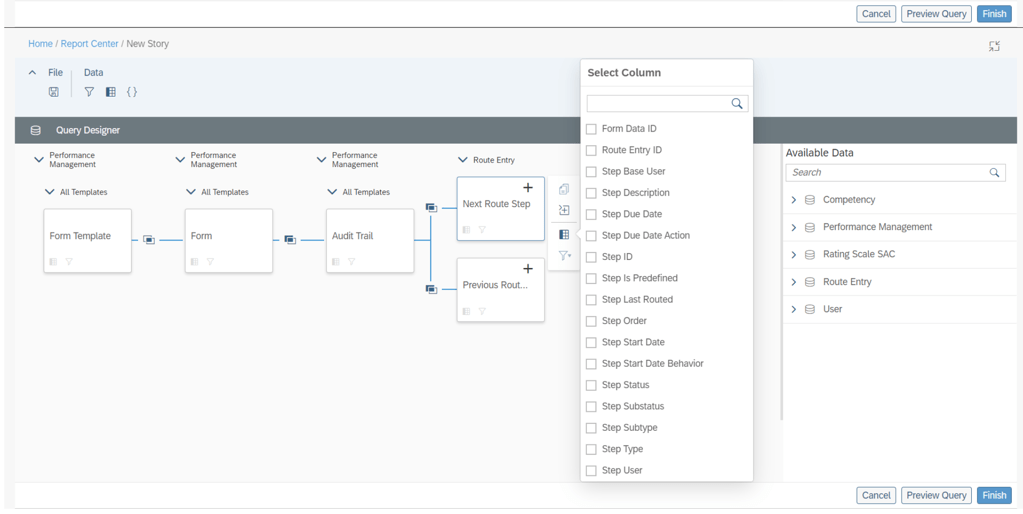
Audit Trail Now Reportable in Stories in People Analytics
Users can now use Stories in People Analytics to report the audit trail records of form completed steps, including step owner and step action.
This new feature allows you to track the routing details of Performance Management forms in a consolidated report.
Additional columns available to report on step details
Increase in the Number of Columns Supported for Learning Queries in Story Reports
The number of columns that you can select while creating a Learning query has been increased from 30 to 120.
You can now create more complex queries due to the increase in number of columns.
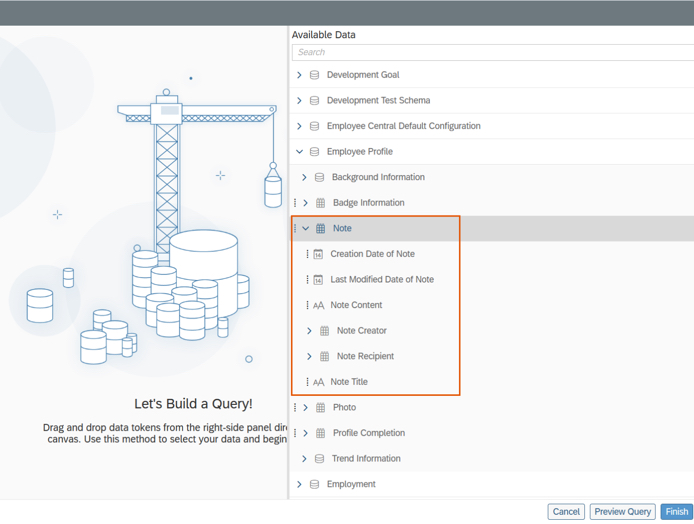
Notes of People Profile Now Reportable in Stories in People Analytics
Users can now use Stories in People Analytics to report the notes of People Profile. Information about notes that can be reported includes:
Note content
Note titles
Note creators
Note recipients
Last modified dates
Creation dates
Notes of People Profile are now reportable
Query Validation for Story Reports
The queries in Story reports are now checked for errors whenever you choose Preview or Finish on the Query Designer page.
The validation checks return a list of missing or erroneous columns, calculations, and filters used in the query.
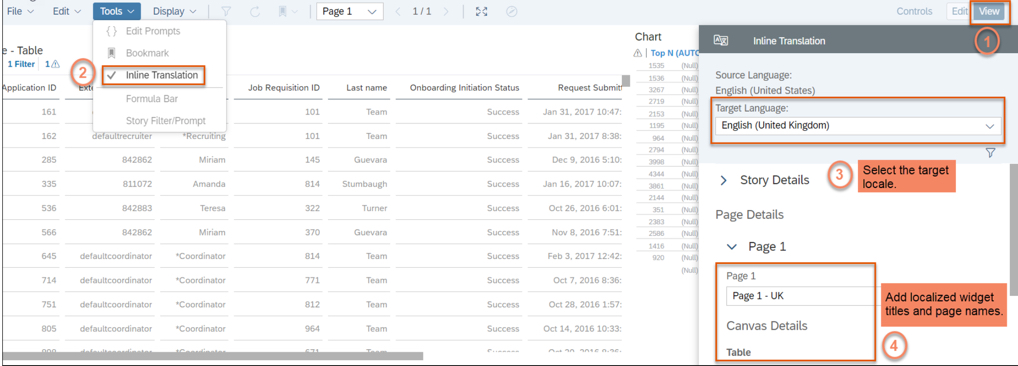
Inline Translation for Story Reports
You can now add localized values for widget titles and page names in Story reports.
Note: After you enable inline translation in a story, you can edit it only in the source language. When you enable inline translation in the story, your current locale becomes the source language for the story.
The ability to add localized widget titles and page names enhances the user experience for Story reports.
The latest release updates are here! In this article we take a quick look at the latest updates for SAP SuccessFactors Onboarding 2.0. Preview release is October 15 and production is November 19. You can view the full set of documentation in the What’s New Viewer here. For full details on the release cycle, check out the SAP SuccessFactors official product updates blog here. Let’s get started! We’ve categorized the enhancements below for you!
Security Enhancements
In the category of security, there’s been an enhancement to proxy where you now have more granular control over whether or not a person who can proxy has access to onboarding. You can select the check box on the Proxy Management screen.
In addition to US I-9, the Canadian TD1form for all provinces is now supported. The New Zealand KS2 KiwiSaver deduction form, Tax code Declaration, and Tax rate notification for contractor forms are now supported.
Qualtrics Integration
SAP continues to further their integrations with Qualtrics across the board. There’s now a new Intelligent Services event to send internal hire information to Qualtrics. This allows you to send email surveys to employees when the internal hire step is completed. There is a new configuration screen that makes this setup easy! It is shown below:
New Hire Enhancements
A few enhancements have been made to the new hire experience. New Hires can now complete the onboarding process on the homepage. There’s new “To Do” tasks that show up for onboarding here for the new hires such as compliance tasks and completing personal data collection.
New hires can also now access LMS courses before their first day of work as shown below!
The complete new hire experience for the home page can now be done on the latest version of the homepage.
Hiring Manager / Admin Enhancements
In addition to new hire experience, the hiring manager and admin experiences have seen some updates as well. Future Managers can also now access information about their new hires in the onboarding dashboard and “To Do” tasks. Role-based permissions also now allow you to assign based on this new future manager relationship.
The Restart process for onboarding has also been enhanced so that you can choose whether or not to retain data or instead reload from recruiting.
General Process Enhancements / Behind The Scenes Enhancements
Behind the scenes, there’s been some other updates as well!
When it comes to picklists, the mapping from recruiting to employee central can be a pain. The system has now been updated to map based on a series of potential exact matches rather than just on labels. First, the system will attempt to map based on the option id since this is the most unique identifier. If no exact match is found, then mapping is performed via label using the external code value. If no external code is available, then the label alone is used.
Also behind the scenes, when a major patch/release is deployed to the system, the default onboarding process in the Business Process Engine is now automatically upgraded. Previously, an admin had to manually upgrade the flow.
The rehire process has also been enhanced to make life easier for admins managing this process. Values such as date of birth, national id, legal entity, and user records can now be seen as shown below:
No shows and rehires are handled better as ell. The value “No Show” has been added as an event reason for cancelling the second rehire check. There is also a new welcome email template specifically designed for rehires.
Conclusion
The SAP SuccessFactors Onboarding product continues to grow and become increasingly more robust! This does not represent all of the enhancements in the H2 2021 release – only the highlights we found most compelling. Check out the What’s New Viewer here for the complete list of enhancements.
See this great article for useful information on how to prepare for a SAP SuccessFactors Regular Release.
























 Worklogix Blog