
Category: Release Updates

  • What’s New in Onboarding 2.0 H2 2021

    What’s New in Onboarding 2.0 H2 2021

    The latest release updates are here! In this article we take a quick look at the latest updates for SAP SuccessFactors Onboarding 2.0. Preview release is October 15 and production is November 19.  You can view the full set of documentation in the What’s New Viewer here. For full details on the release cycle, check out the SAP SuccessFactors official product updates blog here. Let’s get started! We’ve categorized the enhancements below for you!

    Security Enhancements

    In the category of security, there’s been an enhancement to proxy where you now have more granular control over whether or not a person who can proxy has access to onboarding. You can select the check box on the Proxy Management screen.

    A screenshot of the Proxy Management page with a box highlighting the new Grant Proxy Rights options.

    Compliance Form Updates

    There’s been a number of compliance form updates. Form I-9 was enhanced so that the instructions of the form now show up in the system help icon sections. Various popups and warning messages make the form more informative to users. You can view the complete list of enhancements to form I-9 here: https://help.sap.com/doc/62fddbd651204629b46bbccbabf886ba/cloud/en-US/587c828977e84747868fa5125cf38eb9.html

    A screenshot of the help text displayed for the First Name field in USCIS Form I-9.

    In addition to US I-9, the Canadian TD1form for all provinces is now supported. The New Zealand KS2 KiwiSaver deduction form, Tax code Declaration, and Tax rate notification for contractor forms are now supported.

    Qualtrics Integration

    SAP continues to further their integrations with Qualtrics across the board. There’s now a new Intelligent Services event to send internal hire information to Qualtrics. This allows you to send email surveys to employees when the internal hire step is completed. There is a new configuration screen that makes this setup easy! It is shown below:

    A screenshot of the Add New Integration screen in Manage Qualtrics Integrations shows Onboarding, with Internal Hire Process Completed as the event name.

    New Hire Enhancements

    A few enhancements have been made to the new hire experience. New Hires can now complete the onboarding process on the homepage. There’s new “To Do” tasks that show up for onboarding here for the new hires such as compliance tasks and completing personal data collection.

    New hires can also now access LMS courses before their first day of work as shown below!

    A screenshot of the home page where new hires can access the assigned courses.

    The complete new hire experience for the home page can now be done on the latest version of the homepage.

    Hiring Manager / Admin Enhancements

    In addition to new hire experience, the hiring manager and admin experiences have seen some updates as well. Future Managers can also now access information about their new hires in the onboarding dashboard and “To Do” tasks. Role-based permissions also now allow you to assign based on this new future manager relationship.

    The Restart process for onboarding has also been enhanced so that you can choose whether or not to retain data or instead reload from recruiting.

    The switches to determine the new hire information after restart are available under Restart Settings. The Allow Recruiting Update switch allows you to determine whether values must be updated from Recruiting or the existing values must be retained in Onboarding for auto-restart. The Retain Onboarding Information switch allows you to determine whether to update new hire information from Recruiting or retain the existing value for manual restart.

    General Process Enhancements / Behind The Scenes Enhancements

    Behind the scenes, there’s been some other updates as well!

    When it comes to picklists, the mapping from recruiting to employee central can be a pain. The system has now been updated to map based on a series of potential exact matches rather than just on labels. First, the system will attempt to map based on the option id since this is the most unique identifier. If no exact match is found, then mapping is performed via label using the external code value. If no external code is available, then the label alone is used.

    Also behind the scenes, when a major patch/release is deployed to the system, the default onboarding process in the Business Process Engine is now automatically upgraded. Previously, an admin had to manually upgrade the flow.

    The upgraded versions of the Default Onboarding Process flow are visible under Process Definitions.

    The rehire process has also been enhanced to make life easier for admins managing this process. Values such as date of birth, national id, legal entity, and user records can now be seen as shown below:

    Enhanced version of the Rehire Verification screen with date of birth, national ID, legal entity, and last working day.

    No shows and rehires are handled better as ell. The value “No Show” has been added as an event reason for cancelling the second rehire check. There is also a new welcome email template specifically designed for rehires.

    Conclusion

    The SAP SuccessFactors Onboarding product continues to grow and become increasingly more robust! This does not represent all of the enhancements in the H2 2021 release – only the highlights we found most compelling. Check out the What’s New Viewer here for the complete list of enhancements.

    See this great article for useful information on how to prepare for a SAP SuccessFactors Regular Release.

    Contact info@worklogix.com for any assistance supporting and implementing your SAP SuccessFactors Modules, or download our support services brochure.

  • What’s New in the 1H 2021 SAP SuccessFactors Performance Management Release

    What’s New in the 1H 2021 SAP SuccessFactors Performance Management Release

    As of April 9, 2021, SAP has released their documentation for the H1 2021 release. 

    Preview release will be April 16 and production will be released May 21st.  You can view the full set of documentation in the What’s New Viewer here. For full details on the release cycle, check out the SAP SuccessFactors official product updates blog here

    For tips on how to manage a release, check out our blog here

    For your convenience, we’ve summarized the highlights of what’s new for 2021 Performance Management below.

    The updates for Performance Management are primarily targeted for 360 Reviews so we will start with those. The PM form updates will be discussed after these features have been reviewed. Calibration updates can be found in our separate blog here.

    What’s New for 360 Forms – Fiori Version

    Here are the 10 universal updates made for the Fiori version of 360 forms to provide the same features that are available 360 Reviews v11.

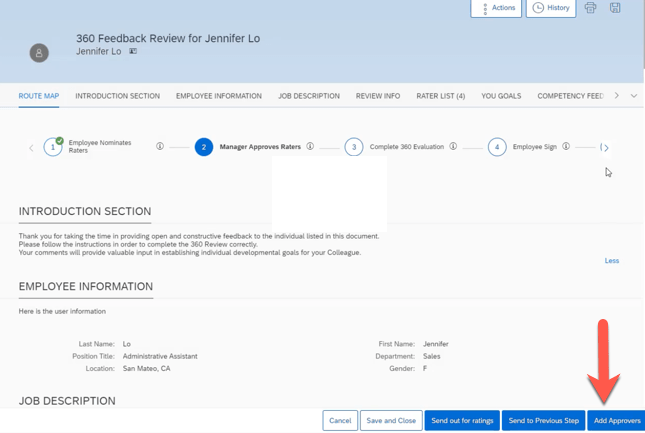
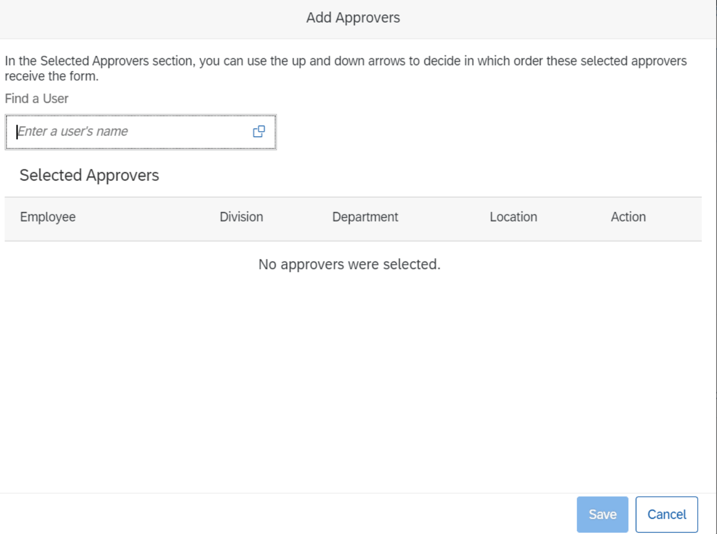
    Add Approvers in 360 Reviews

    Approvers may now be added in the Modify stage.

    Development Goal Section Available in 360 Reviews

    A development goal section may be added to a 360 Review form template. These enables employees the opportunity to add and edit development goals.

    Display a Data Table for a Chart

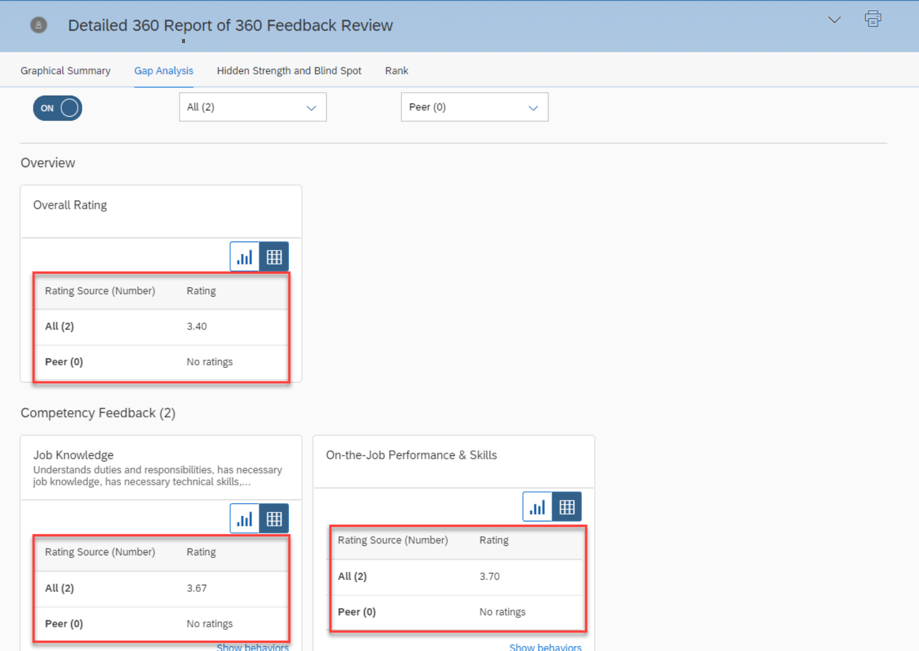
    Within a 360 Executive Review and Detailed 360 Report, a user may select the table icon on a chart to see a data table. This provides text equivalents for non-text content.

    Display External Users in Search Results When Adding Participants

    It is now possible to add external users as participants without having to disable the system setting Hide External Users from search results.

    EZ Rater Available in 360 Reviews

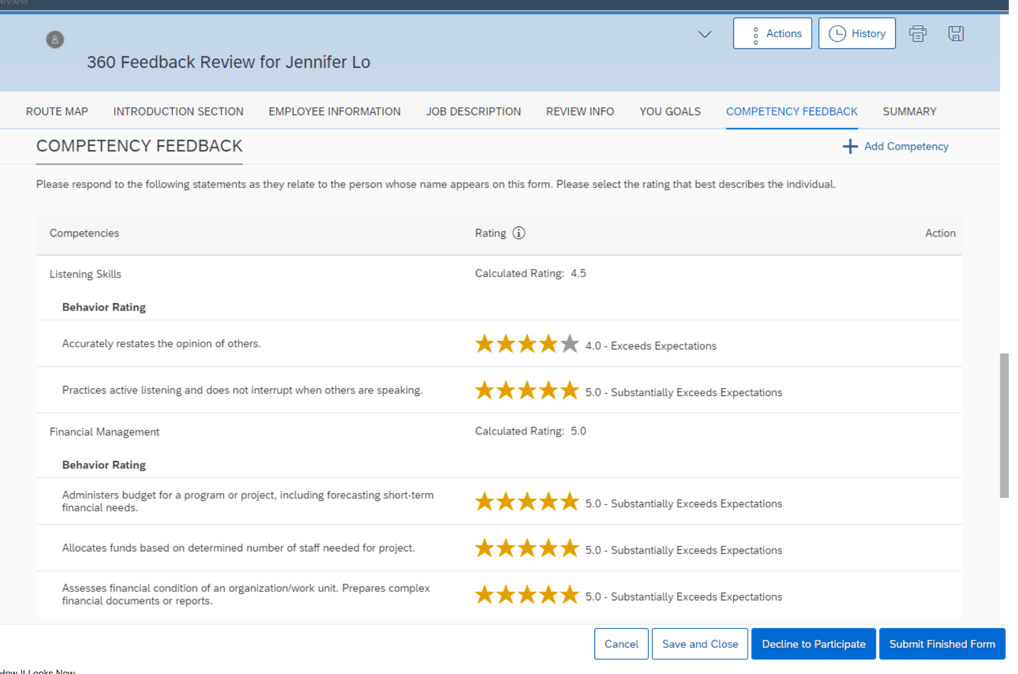
    When enabled, the EZ Rater option provides a more condensed list view for rating goal and competencies.

    Form History Available in 360 Reviews

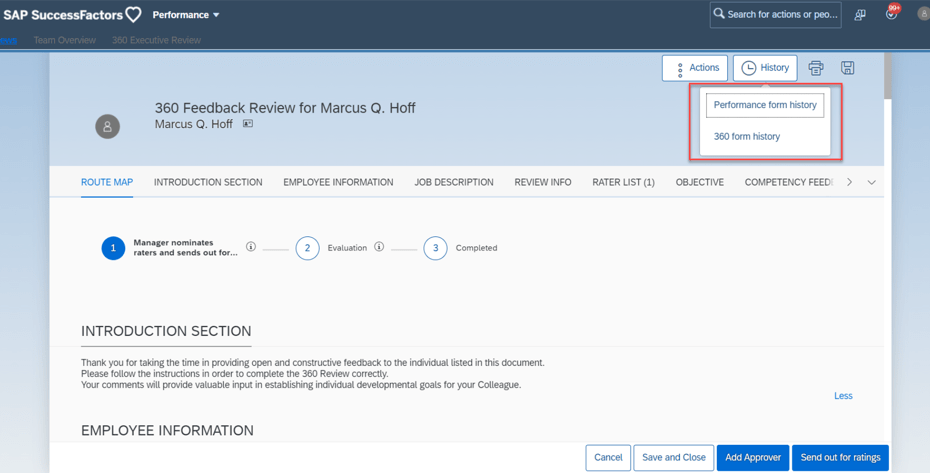
    Prior performance and 360 forms are now available within a 360 Review. The History button will display options to view either form type if available.

    More Form Actions Available in 360 Reviews

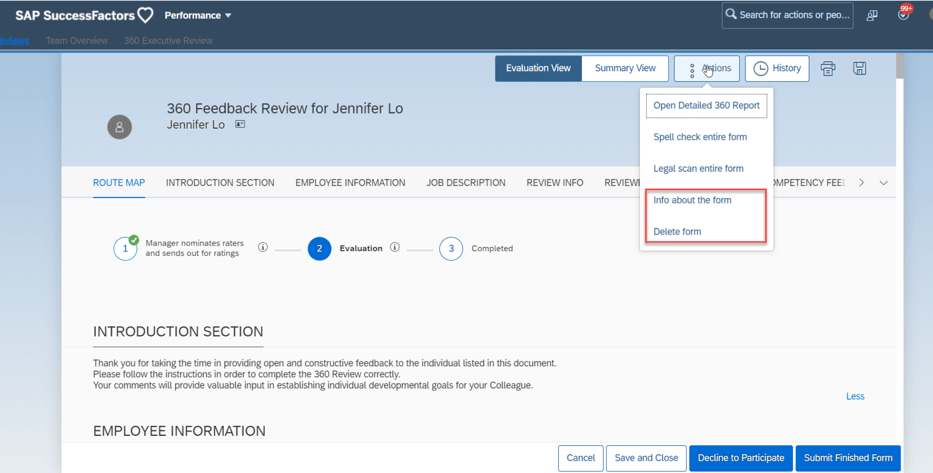
    Additional action options are now available for 360 forms. Information about the form may be viewed and the form may be deleted.

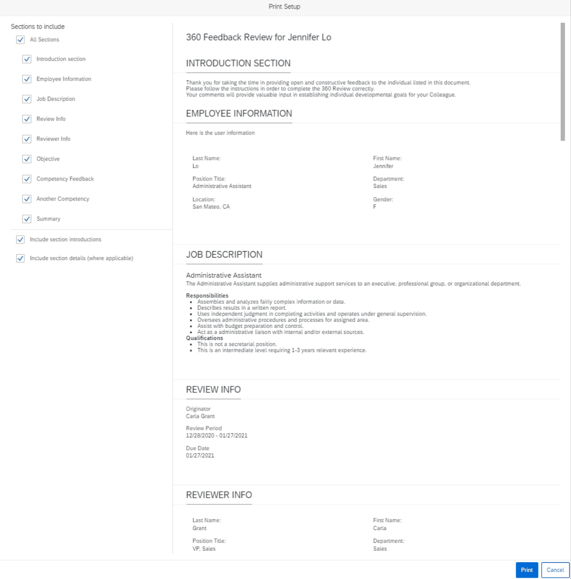
    Print Preview Available in 360 Reviews

    When the user clicks the Print button, a popup displays a preview of the form. This provides the user the opportunity to select the entire form or selected sections to print.

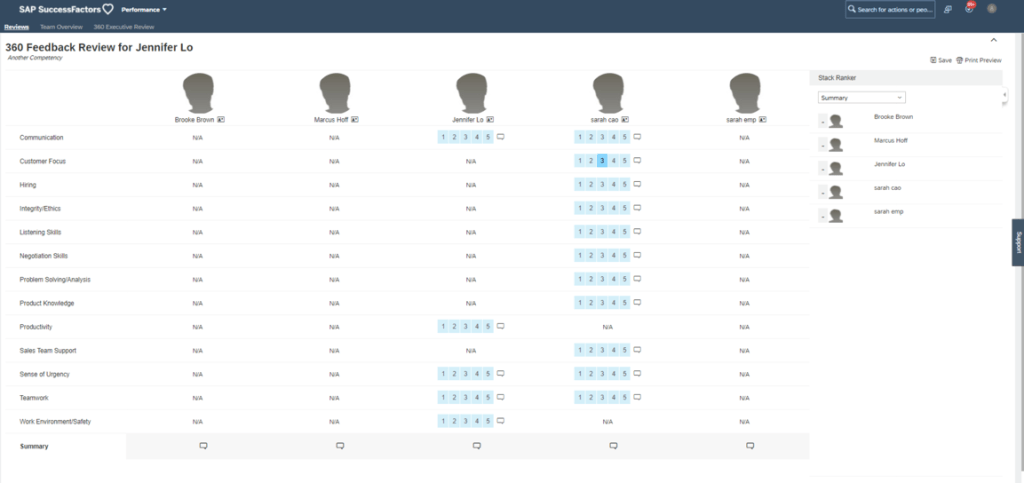
    Stack Ranker Available in 360 Reviews

    Stack Ranker can be enabled which allows side by side ranking of employee competencies. Ratings may be modified and comments added.

    Section Descriptions Fully Displayed by Default

    Now section descriptions are fully displayed by default and can be collapsed. Clicking Show Less to hide content. Previously sections were collapsed and the user had to click Show More to see the content.

    What’s New for PM Forms

    There are 5 universal updates for PM forms.

    Customized Weighted Rating Supported in Import Overall Scores

    Previously it was only possible to import overall scores into the Objective Competency Summary, and Performance Potential Summary, and Summary sections. The new release enables you to update overall scores for the Customized Weighted Rating section.

    On the import file, use <PERFORMANCE> rating in the CSV file. The rating field is also used to update the Summary and Performance Potential section overall rating. If there is more than one PERFORMANCE rating, there is a priority for updating. The section order for uploading from high to low is:

    • Customized Weighted Rating
    • Performance Potential Summary
    • Summary

    Deep Link to Performance Management Forms

    There is now a deeplink available to access a performance form: /sf/openFormByDocId

    New OData V2 API Entity FormCustomizedWeightedRatingSection

    There is a new OData V2 API Entity: FormCustomizedWeightedRatingSection. It can be used to get the Customized Weighted Rating section details of a performance form in order to update the manual ratings section of the performance form.

    Target Population in Role-Based Permissions for Import Overall Scores

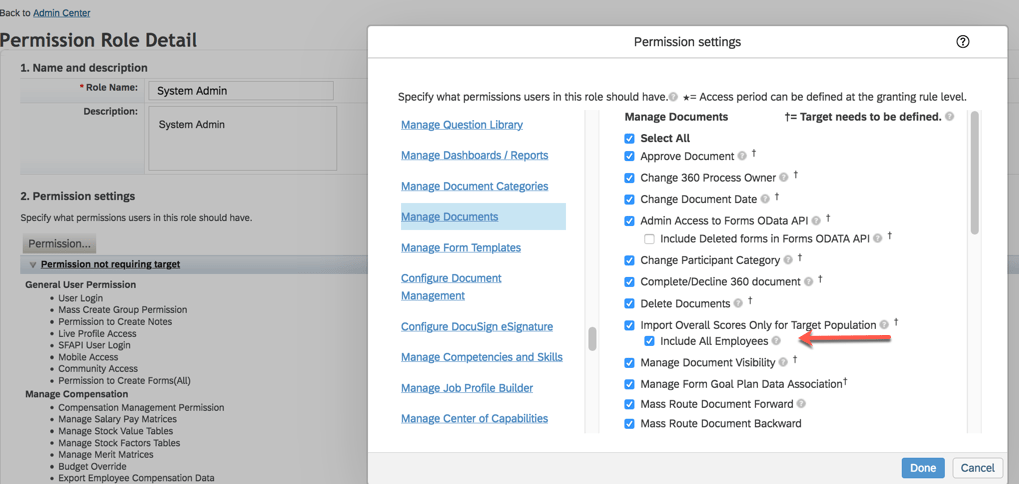
    This update pertains to the Customized Weighting Rating import that we just covered. Role based permissions may now be used to restrict users to importing scores for only their target population.

    Select a role in Manage Permission Roles. Go to Permission>Administrator Permissions>Manage Document and select “Import Overall Scores Only for Target Population” and “Include All Employees” which allows granted users to update manual overall scores for all employees.

    Live Profile Section Deleted

    A Live Profile section can no longer be added to PM forms. Information in the existing section is no longer available. A link to People Profile can be used on the form instead.

    What’s New in Continuous Performance Management (CPM)

    There are some new early adapter features for the latest version of Continuous Performance Management (CPM). They are admin opt-in or opt-out features. We won’t cover these here since the latest version is not widely enabled. When the latest version of CPM is enabled, these email reminder notifications will become obsolete: Conduct 1:1 Meeting, Update Status, along with Activity and Achievement reminder notifications.

    The latest version will handle notifications differently since multiple roles can be used and meeting channels can be created. Requests and meeting notifications can be created for anyone in the user’s meeting channel.

    We have now covered the highlights of the PM related updates for H1 2021. See our blog for Calibration release features.

    Do you need help managing your SuccessFactors Release cycles?  Download our support services brochure or email info@worklogix.com to see how we can help!

  • SAP SuccessFactors H1 2021 Employee Central Release Updates

    SAP SuccessFactors H1 2021 Employee Central Release Updates

    Interested in what’s new for Employee Central for H1 2021? There’s quite a few enhancements! In this quick blog we run through the major release updates that caught our attention the most.

    As of April 9, 2021, SAP has released the documentation for the H1 2021 release.  The preview release will be April 16 and the move to production will be May 21st.  You can view the full set of documentation in the What’s New Viewer here. For full details on the release cycle, check out the SAP SuccessFactors official product updates blog here.  New to the release process? For tips on how to manage a release, check out our blog here

    Qualtrics Integration

    Increasing the integration between Qualtrics and SuccessFactors has been a priority for SAP – we’ve seen multiple integrations across modules and now there’s a few more for EC. SAP has added 4 email survey integrations based on intelligent services to trigger in the below events:

    • Employee Rehire
    • First Time Manager
    • Transition from Individual Contributor to Manager
    • Transition from Manager to Individual Contributor

    These surveys can be very insightful to find out if employees are comfortable in their new roles and identify where they might need help!

    BizX Talent Integration / Succession Data Model

    Integration with the BizX Talent side of SuccessFactors has also been improved. In particular, SAP has made it possible to run a full HRIS sync (that pushes data from EC to BizX) based on individual user ids.

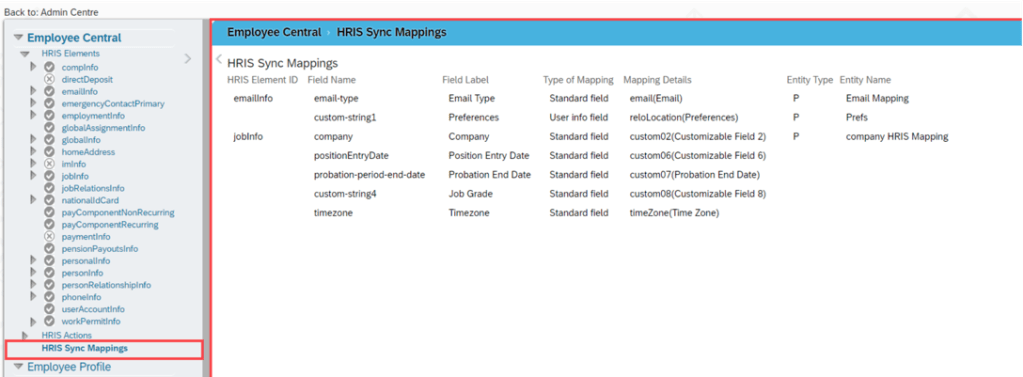
    In addition, they’ve made it easier to view what the HRIS mapping looks like in the Manage Business Configuration Screen with an overview screen of all of the mappings in one location. Previously you had to dig through all of the fields individually to find this information! Check out the screenshot below:

    Overview of HRIS Sync Mappings

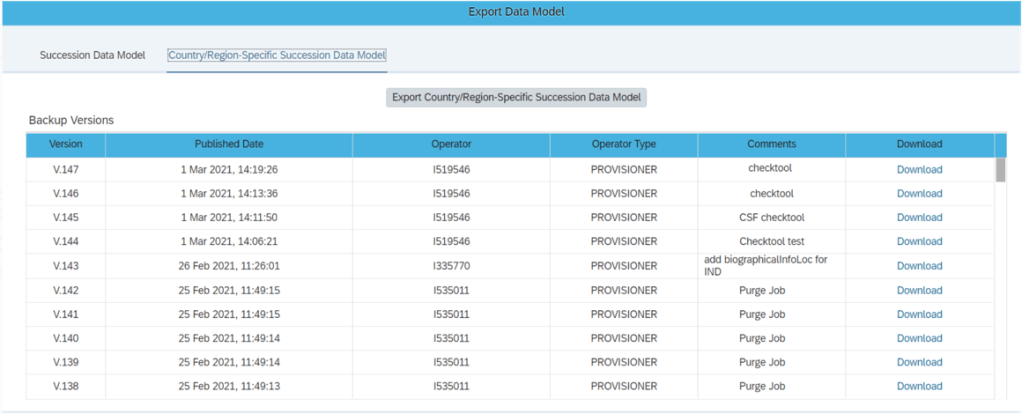
    Admins can also now export the Succession Data Model and Country/Region_specific Succession Data models from Admin Center (previously only partners could do this in provisioning). Simply give the new permission “Export Succession Data Model or Export Country-Specific Succession Data Model” permission and you’ll get access to the screen shown below:

    New Export Succession Data Model Screen

    These enhancements help make the integration between employee central and the talent modules more clear cut.

    Business Rule Scenarios

    Multiple new business rule scenarios are now available that allow you to:

    • Configure cross-entity rules triggered from a source entity with changes executed on the target entity
    • Calculate Full Time Equivalent for a user
    • Create business validations / raise alert messages for HRIS elements

    These enhancements contribute to the ongoing effort to increase the flexibility and robustness of business rules.

    SAP Integration

    If you sync your HRIS data with SAP, you’ll be happy to know there are 10 enhancements to this integration including:

    • A comparison tool that compares configuration between EC instances
    • An enhancement considering the purging status of ERP communication data while replicating employee communication data from EC
    • The ability to select specific foundation objects by object ID ad choose log or list view when viewing the Foundation Object Transfer Report
    • In Define Employee Data Settings for EC instance, the field names have been changes to “Standard Mapping (PERNR)” and “Standard Mapping (CP)” for clarity
    • The Enhanced Work Schedule Rule Transfer Report was updated with a new BAdi to maintain the external code of work schedule rules
    • Better data replication that considers purged data
    • Replication of inactive employees that were terminated in EC before the full transmission start date
    • Sample contract elements (IT0016) content
    • Replication of OM data infotypes even when relationship data (IT1001) can’t be replicated
    • Organizational assignment data that was marked as status “Failed” will change to “Outdated” once the next replication job runs

    These enhancements help to make the interface more robust and reliable for customers wishing to replicate employee data to on-premise SAP.

    Global Benefits

    Enhancements and automations came to the global benefits functionality as well. Let’s take a quick look at these:

    • When an employee has a job change that affects their benefits eligibility, this can now trigger an intelligent service event to create or update benefit enrollments
    • When benefit master data changes, a new automatic enrollment job now exists to handle creating and updating enrollments
    • A new pension / retirement savings plan type has been introduced called “Workplace” that offers additional contribution options

    Once again, we see how the system continues to provide helpful automations and features to make this functionality more simple and robust to use.

    Reporting

    Custom fields are now allowed in story reports. The fields can be seen within the query designer.

    Conclusion

    The SAP SuccessFactors Employee Central product continues to grow and become increasingly more robust! This does not represent all of the enhancements in the H1 2021 release – only the highlights we found most compelling. Check out the What’s New Viewer here for the complete list of enhancements.

    See this great article for useful information on how to prepare for a SAP SuccessFactors Regular Release.

    Contact info@worklogix.com for any assistance supporting and implementing your SAP SuccessFactors Modules, or download our support services brochure.

  • What’s New for Recruiting  in 1H 2021

    What’s New for Recruiting in 1H 2021

    As of April 9, 2021, SAP has released the documentation for the H1 2021 release.  The preview release will be April 16 and the move to production will be May 21st.  You can view the full set of documentation in the What’s New Viewer here. For full details on the release cycle, check out the SAP SuccessFactors official product updates blog here.  New to the release process? For tips on how to manage a release, check out our blog here

    For your convenience, we’ve summarized the highlights of 2 legacy items that will require your attention if there are still used in your current SAP SuccessFactors implementation and 6 features for 2021 Recruiting.

    Migration of Legacy Quickcard to Latest Quickcard

    If you are using this feature for recruiting. You will need to move to the latest quickcard, the legacy Quickcard will be retired/deleted as of May 21st. Transition to the latest quick card will help to maintain consistency with the SAP SuccessFactors Quickcard. Additionally, the latest Quickcard improves user experience with the updated user experience.

    Deprecation of Legacy Picklists Management

    The legacy Picklist Management tool reached end of maintenance on December 31, 2018 and will be retired/deleted on November 18, 2021.

    Support for Posting Jobs to Twitter and Jobvite from Job Postings is Deleted

    The ability for posting jobs to Twitter and Jobvite from Job Postings is deleted as of May 21, 2021.

    SSL Certificate Renewal Reminders for Career Sites

    After a nice long and relaxing weekend. You come back to the office Monday morning and your career site is down because the SSL certificate has expired and now as you struggle to get the career site back up and running again your stress level is at it’s peak again. Well hopefully you will never experience these feelings again with this new feature.

    SAP SuccessFactors Recruiting now proactively reminds organizations when their career site’s SSL certificate needs to be renewed.

    To avoid career sites from becoming unreachable due to an expired SSL certificate, Career Site Builder offers two reminder methods: A pop-up dialog that appears when logging in to Career Site Builder, as well as the ability to enable email reminders for admin users.

    Content Security Policy for Career Sites

    Career Site Builder has introduced the Content Security Policy setting, which enables an HTTP header to automatically disallow external domains and only allow the browser to render resources from your domain. This will protect your career site against cross-site scripting attacks.

    The content security policy is designed to guard against cross-site scripting (XSS) attacks through the use of a Content-Security-Policy HTTP response header that lets you control the resources allowed to load for a web page. The headers are used in career site pages owned by the organization.

    Enhanced External Password Policy Configuration

    The enhancement includes increasing the minimum password length and limiting the lock-out threshold. The enhanced external password policy impacts:

    • External candidates creating an account for the first time. 
    • Existing external candidates trying to change their passwords. For example, password reset and forgot password. 
    • Agency users trying to change their passwords.

    Ability to Edit Existing Category Page Names in Career Site Builder

    Career Site Builder administrators can now edit category names directly, without having to contact Professional Services, an implementation partner, or SAP Support.

    In the previous version, the Name field became readonly after the category page was created and saved. Changing a category name was performed in the backend Command Center tool by Professional Services, an implementation partner, or SAP Support.

    New Job Status Available in Job Postings Table

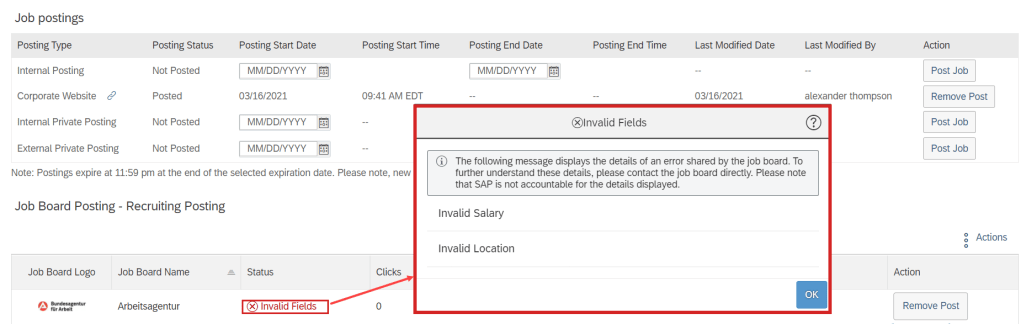
    You can now see a new job status, Invalid Fields, in the job postings table when the job board’s system sends back error messages because of one or more incorrectly populated fields while posting a job.

    See this great article for useful information on how to prepare for a SAP SuccessFactors Regular Release.

    Contact info@worklogix.com for any assistance supporting and implementing your SAP SuccessFactors Modules, or download our support services brochure.
  • H1 2021 SAP SuccessFactors Compensation Features

    H1 2021 SAP SuccessFactors Compensation Features

    SAP SuccessFactors has some exciting new features for your Compensation Solution. They can be found in detail here (S-User ID required).  Filter on Solutions for Compensation to review all of the latest changes. Under the Description for each, you can click on ‘See More’ to see screenshots and detailed information.

    As a reminder, preview release was April 16th and production will be released May 21st.  

    After reviewing all the changes, I narrowed the list down to the Highlights for H1 2021 Compensation:

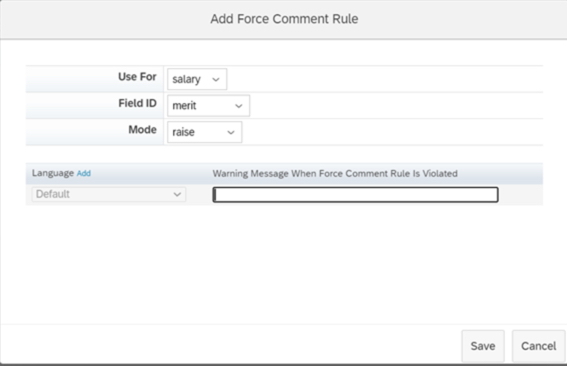
    1. Ability to Configure Force Comments on Compensation Worksheets

    • Previously configuring forcing comments had to occur within the XML, now it can be done within Comp Admin Tools.
    • You can navigate to Design Worksheet – Define Standard Validation Rules to configure this functionality. The Force Comments feature is optional. When configured, you control whether users must enter comments under the following conditions:
      • An employee doesn’t receive a raise. Managers didn’t enter a value in a field configured to force comments.
      • An employee receives a raise. Managers entered a value in a field configured to force comment.
      • An employee receives a raise that is outside guidelines. Managers entered a value that doesn’t comply with guidelines in a field configured with force comments
    Force Comments rules can now be configured via Admin Tools

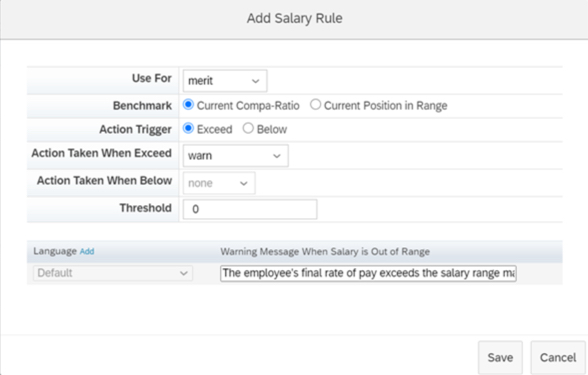
    2. Salary Validation Rules Added to Compensation Worksheets

    • Previously configuring Salary Validation Rules had to occur within the XML, now it can be done within Comp Admin Tools.
      • You define rules to compare amounts using either compa-ratio or range penetration benchmarks. Configure what action the system takes when amounts exceed threshold percentages for lump sum amounts or fall below or exceed threshold percentages for merit amounts.
    Salary rules can now be configured via Admin Tools

    3. Compensation Worksheets Support Five Custom Validations

    • With this release, you can define up to five custom validations for fields in Compensation templates and configure how the system responds when validations fail, with either a warning or an error. The system processes the worksheet only after the error is corrected.
      • Previously, the maximum number of validations per template was three. This is especially helpful if you have complex calculations or are using 1 form for multiple plans.
    Example of custom validation. Now users can define up to 5 custom validations.

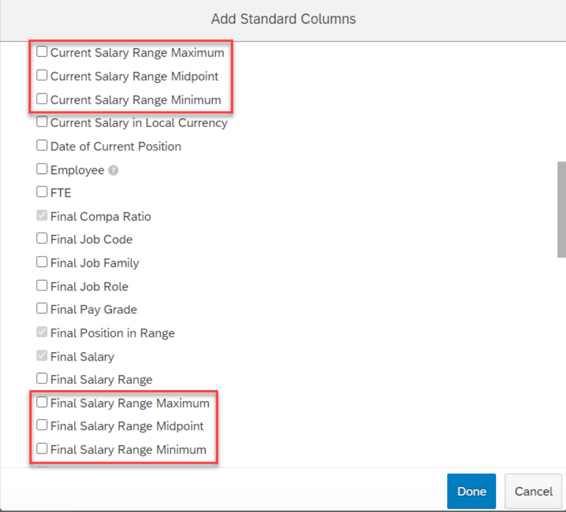
    4. Current and Final Pay Ranges Configurable Through the Compensation Column Designer

    • You can now configure minimum, midpoint, and maximum values for current and final pay ranges through Compensation template’s column designer.
      • Previously, these fields weren’t available in the template configuration. There were two fields (Current Pay Range and Final Pay Range) in the min-mid-max format.
      • With this release, minimum, midpoint, and maximum are available as independent fields.
    Separate columns exist now for Salary Range fields

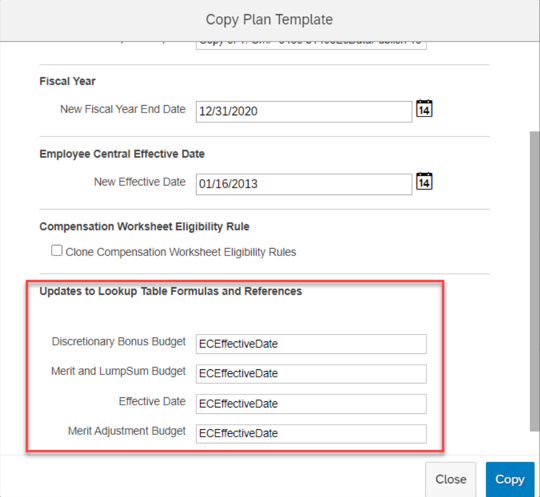
    5. Update Lookup Table Formulas and References When Cloning Compensation Templates

    • Now when cloning Compensation templates, you can update lookup tables and references at the same time. A new section has been added to the Copy Plan Templates page, enabling you to view and edit the custom formulas and references from lookup tables on the original template.
      • Previously, you had to manually search through the original template’s XML file, looking for all lookup tables associated with it.
    Cloning compensation templates allows for updating lookup tables and references

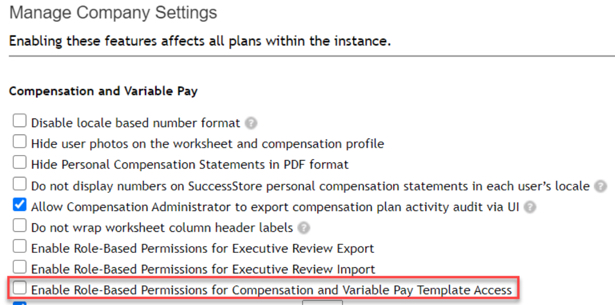
    6. Administrative Permissions for Individual Compensation Templates

    • A new Role-based Permission has been added to assign administrative permissions on a template level.
      • Previously, access had to be granted to all or no templates.
    Template access can be granted per individual template

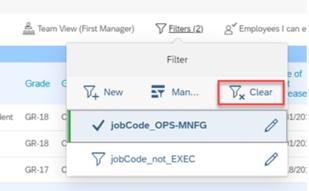
    7. Filter Enhancements Added to Compensation Executive Reviews

    • Enhanced filtering was added to Executive Review, new filters include:
      • Filter based on standard or custom reportable columns
      • Filter on compa-ratio and range penetration
      • Filter on Compensation planners
      • Filter based on entry in Comments fields
      • Filter based on promotions
    • To enable enhanced filtering, you must select the Enable Advanced Executive Review Filters option on the Actions for all Plans – Company Settings page.
    Enhanced Filter capabilities now exist in Executive Review

    8. Compensation and Variable Pay Reports are now available for download in Report Center

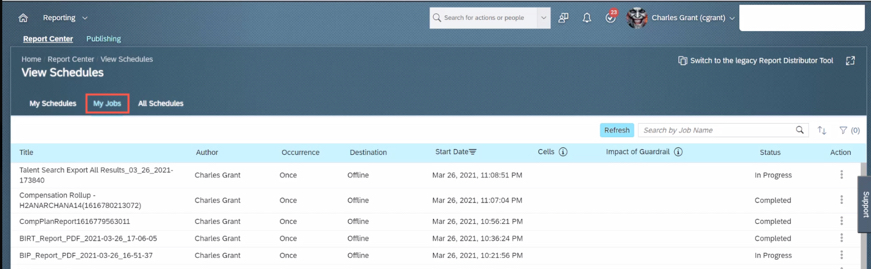
    • You can now download the reports from the My Jobs page within View Schedules in Report Center.
      • Previously, report outputs (i.e. Executive Review exports) were available for download on the Scheduled Reports page in classic view. This caused confusion for users on how to get to their reports by having to direct them to Switch to Classic View.
      • You can review my other blog post for more changes to Reporting for this release.
    Executive Review export can now be accessed via My Jobs

    9. Application of Eligibility Rules for Individual Compensation Worksheets After Launching

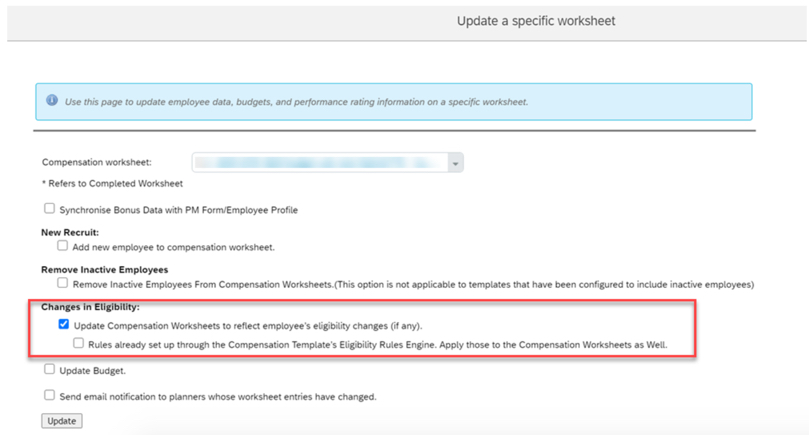
    • You can now reapply eligibility rules to a specific Compensation worksheet that you have already launched.
      • In previous releases, you could only reapply eligibility rules to all worksheets.
    Eligibility can now be applied to individual worksheet updates

    10. Publish Compensation Employees to Employee Central by Import Using CSV File

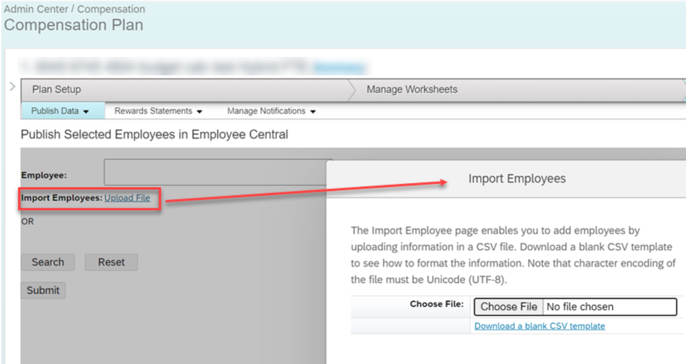
    • The Publish Selected Employees in Employee Central page has a new option, Import Employees. This allows publishing by importing them from a CSV file
      • Previously, you could publish multiple employees, but you needed to search and select them individually.
    Publishing can now be done based on an imported file

    Do you need help implementing or supporting your SAP SuccessFactors system?  Contact info@worklogix.com for assistance, download our support services brochure, or visit https://www.worklogix.com/implementation.html for additional information.

  • H1 2021 SAP SuccessFactors Analytics/Reporting Features

    H1 2021 SAP SuccessFactors Analytics/Reporting Features

    Photo by PhotoMIX Company from Pexels

    SAP SuccessFactors has some exciting new features for your Analytics & Reporting Solutions. They can be found in detail here (S-User ID required).  Filter on Solutions for Analytics to review all of the latest changes. Under the Description for each, you can click on ‘See More’ to see screenshots and detailed information.

    As a reminder, preview release will be April 16th and production will be released May 21st.  For full details on the release cycle, check out the SAP SuccessFactors official product updates blog here.  New to the release process? For tips on how to manage a release, check out our blog here
    After reviewing all the changes, we narrowed the list down to the Highlights for H1 202SAP SuccessFactors Analytics/Reporting Features:

    1. Calibration, Succession, and Compensation and Variable Pay Reports Now Available for Download in Report Center
      • Previously, the reports were available for download on the Scheduled Reports page in classic view. This caused confusion for users on how to get to their reports by having to direct them to Switch to Classic View.
      • You can now download the reports from the My Jobs page within View Schedules in Report Center.
    Reports can now be accessed via My Jobs

    2. All User Info Fields Are Now Available in Story Reports

    • You no longer need to set a User Info field as Reportable to make it available in Story reports.
    • All the User Info fields are now automatically available for reporting using Stories in People Analytics.

    3. Stories in People Analytics for SAP SuccessFactors Learning

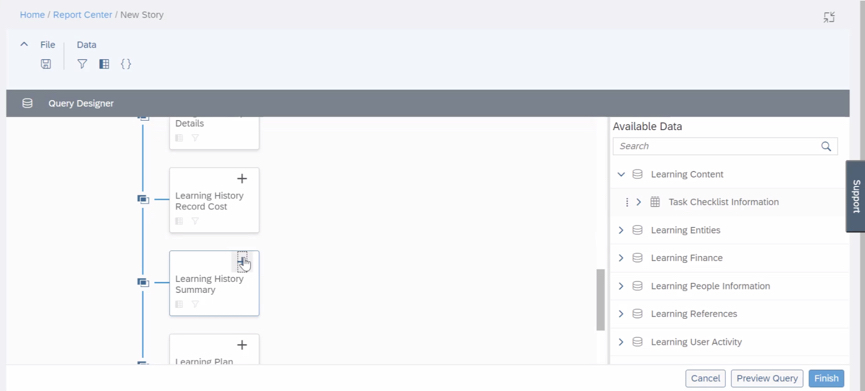
    • You can now create, access, and share Learning stories in People Analytics for generating custom Learning reports.
    • You can also have the data of SAP SuccessFactors Learning and other modules side-by-side in the same story and link them to apply common filters on them.
    Stories in People Analytics for SAP SuccessFactors Learning

    4. Increase in Number of Columns Supported in Queries of Story Reports

    • The number of columns that you can select while creating a query has been increased from 30 to 120.
    • You can now create complex or detailed queries that involve more than 30 columns.

    5. UI Enhancements for Stories in People Analytics

    • The UI enhancements on the viewer mode include:
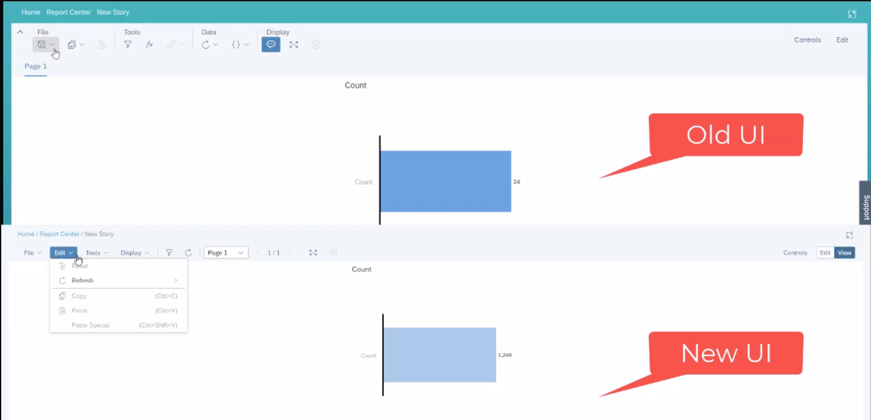
      • An updated Display menu, which now has the Tab Bar, and the Comment Mode options. By default, the page dropdown view appears. The multiple pages in tab view now appear when you select the Tab Bar option.
      • Separate File and Edit menus.
      • Removal of the Data menu. The refresh option has moved into the Edit menu and the edit prompt option has moved into the Tools menu.
    Enhancements to UI to improve usability

    Do you need help implementing or supporting your SAP SuccessFactors system?  Contact info@worklogix.com for assistance, download our support services brochure, or visit https://www.worklogix.com/implementation.html for additional information.

  • What’s New in Onboarding H1 2021

    What’s New in Onboarding H1 2021

    It’s that time of year! As of April 9, 2021, SAP has released the documentation for the H1 2021 release.  The preview release will be April 16 and the move to production will be May 21st.  You can view the full set of documentation in the What’s New Viewer here. For full details on the release cycle, check out the SAP SuccessFactors official product updates blog here.  New to the release process? For tips on how to manage a release, check out our blog here

    In the SAP SuccessFactors Onboarding H1 2021 release, we’ve mainly seen updates to compliance forms and processes as well as some user experience enhancements and security Features. Let’s take a look at what’s new in the Onboarding module below!

    Compliance Forms & Processes

    As expected, SAP continues to expand the number of compliance forms supported. In this release SAP has included these forms:

    In addition, reporting information is also now available for I-9 and E-Verify data so that you can create Stories in in People Analytics using the information.

    Also important on the compliance front: Russian Personally Identifiable Information (PII) data will also now be stored in the Russian data center from Day 1. For more details, take a look at the help guide here: https://help.sap.com/viewer/c94ed5fcb5fe4e0281f396556743812c/2105/en-US/d9e6b7923a9049a6a742f13d05b28d5a.html

    User Experience

    In addition to compliance features, there’s some nice enhancements to user experience. Of all the modules, I think onboarding is one of the more confusing to navigate as an admin user and these enhancements help address this issue. Let’s take a look!

    First, users can now navigate directly to the onboarding dashboard from the global navigation (early adoption feature). I personally liked this one because when I first started with Onboarding, I was used to the main page of every module being accessible through the navigation menu – onboarding was the only one where you had to click on a home page tile instead. I think this will provide some nice consistency for users.

    In addition to easier navigation to the dashboard, its features have also been enhanced. Here’s a list of the new feaures:

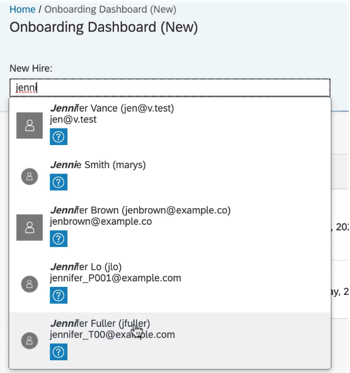
    • New Hire Search – allows onboarding users to type a name to search through new hires
    • Checklist Task – can now be viewed under “New Hire Tasks”, items can be added for a specific user using the “Delegated” drop down (delegates can also be notified via email when the task is assigned to them), and under “View Details” users can edit the checklist tasks,
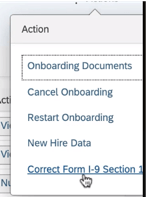
    • I-9 – corrections to section 1 can now be initiated from the “New Hire Details” action menu
    • E-Verify – view details from the “E-Verify Case Details” link on the “New Hire Details” screen
    User Search
    Correct I-9 from the Action Menu

    Its great to see the dashboard getting some new features to make transitioning between screens easier!

    Next, the locale for external users of Onboarding will now be updated automatically based on their recruiting settings. This is a common sense win. Locale can also be set when manually adding users via the “Add New Hire to Onboarding” screen. If no value is specified in either scenario, the locale will default to the default language set in provisioning.

    Security Features

    In addition to compliance enhancements and improvements to usability, there’s a few cool security features worth mentioning.

    First, the target population for the external user target population can now be based on the division, department, and location of the user. This allows organizations to have multiple admins specific to division, department, and/or location rather than just admins who can see the whole new user population.

    Next, on the new hire side, the external user visibility tool lets you make objects visible to new hires. This gives a level of flexibility to administrators they previously had to contact SAP to modify. For a full list of objects and how to configure, check out this link: https://help.sap.com/viewer/c94ed5fcb5fe4e0281f396556743812c/2105/en-US/5df8a72caabf4848a145b74f0516cff8.html

    Last, read access audit logs for onboarding have been enhanced to show context and reason why sensitive fields were accessed (e.g. through the UI, or APIs, or a downloaded document). This is designed to give auditors better understanding of why data was accessed.

    Wrap up

    I hope you’ve enjoyed this quick review of the latest Onboarding features available in the H1 2021 release! Do you need help managing your SuccessFactors Release cycles?  Download our support services brochure or email info@worklogix.com to see how we can help!

  • SAP SuccessFactors H1 2021 Release Updates for Succession

    SAP SuccessFactors H1 2021 Release Updates for Succession

    Photo by Sigmund on Unsplash

    It’s finally here! As of April 9, 2021, SAP has released the documentation for the H1 2021 release.  The preview release will be April 16 and the move to production will be May 21st.  You can view the full set of documentation in the What’s New Viewer here. For full details on the release cycle, check out the SAP SuccessFactors official product updates blog here.  New to the release process? For tips on how to manage a release, check out our blog here

    In this release, we saw a wide range of enhancements across the Talent modules – some specific to Succession and others that lay across the modules but help out succession planners. Let’s take a look at what’s new in the Succession module below!

    Succession Management Specific Changes

    Let’s start with what’s new just for Succession Management before we take a look at some general talent improvements that are relevant to Succession.

    Nomination History

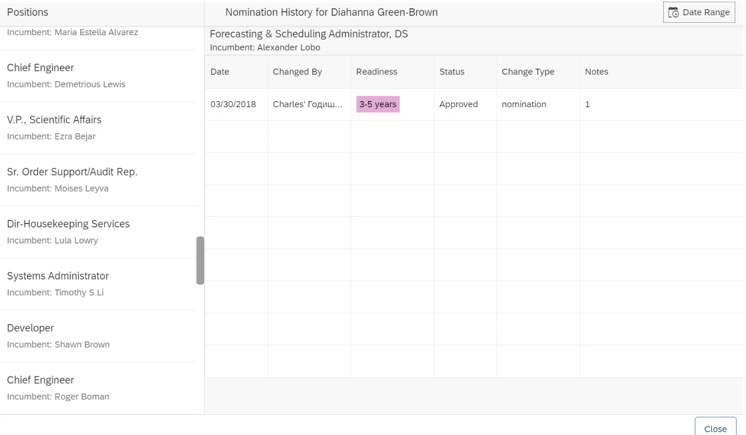
    The main new feature exclusive to Succession Management is the ability to view nomination history in the talent card and in the people profile. Users will with Succession Planning permission can click a history icon on these screens to see a list of positions for which the employee has been nominated and information about the nomination history for each including the date, nominator, readiness level, status, change type, and notes. The information includes deleted nominations as well.

    Nomination History View

    Hide Pending Nominations for Talent Pools

    Succession configurators have had the ability to hide pending nominations from succession planners for some time now, but the ability was only extended to position nominations. Now, this feature works for talent pool nominations as well. This configuration setting remains in the same in Admin Center -> Nomination Setup.

    Form-Based Nomination Deleted

    Another update specific to succession with this release is that form-based succession nomination will be completely deleted as of May 21,2021. This was a legacy method of approving nominations – if you never used it, then don’t worry because no action is required. If you are still using forms to approve nominations, you have little time left to switch to the newer permission-based method!

    General Talent Management Updates Relevant to Succession

    There are also numerous updates across the talent modules in general that affect not only Succession, but also Performance, Goals, Development, and/or Calibration. Let’s take a look at these briefly below.

    Editing Talent Info Directly on a Talent Card

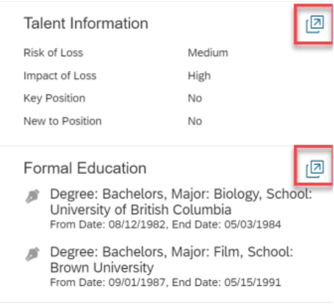
    It seems like every customer for whom I’ve implemented Succession has asked why they need to switch between the employee profile view and other views to edit talent information. Why can’t customers just change the information right on the talent card that shows up across the different views that contain the talent card? This way data like impact of loss or risk of loss can be updated when the user has the contextual information they need to make the decision. Well now, customers can!

    Users can now click the icon shown below to open a popup that allows these fields to be changed.

    Editing Information on a Talent Card

    My Jobs Downloads

    Previously Succession (and other talent reports) could be downloaded from the Scheduled Reports page in Classic View. Reports may now be downloaded from My Jobs page within Report Center. This eliminates the need to switch to Classic View prior to downloading.

    A report with multiple files can be downloaded in a compressed .zip file or downloaded individually.

    Numerous Calibration Session Improvements

    There are a variety of calibration session feature that have been added/updated as well. For example specifying default facilitators or allowing managers to more easily create calibration sessions for their teams. For more information on these improvements, check out our blog on What’s in in H1 2021 SAP SuccessFactors Calibration Release.

    That’s a Wrap!

    That’s all of the updates for H1 2021! We hope you found this blog informative!

    Do you need help managing your SuccessFactors Release cycles?  Download our support services brochure or email info@worklogix.com to see how we can help!

  • What’s New in the 1H 2021 SAP SuccessFactors Career Development Release

    What’s New in the 1H 2021 SAP SuccessFactors Career Development Release

    Want to learn what is coming soon in SAP SuccessFactors Career Development? The latest updates for H1 2021 have been announced.

    As of April 9, 2021, SAP has released their documentation for the H1 2021 release.  You can view the full set of documentation in the What’s New Viewer here.  As a reminder, preview release will be April 16 and production will be released May 21st.  For full details on the release cycle, check out the SAP SuccessFactors official product updates blog here.  For tips on how to manage a release, check out our blog here.  For your convenience, we’ve summarized the highlights of what’s new for 2021 Career Development below.

    There are five universal updates related to Mentoring and one for Development Goals. Let’s take a look!

    Mentoring

    The mentoring features are related to the mentor program sign up process and are designed to improve the user experience.

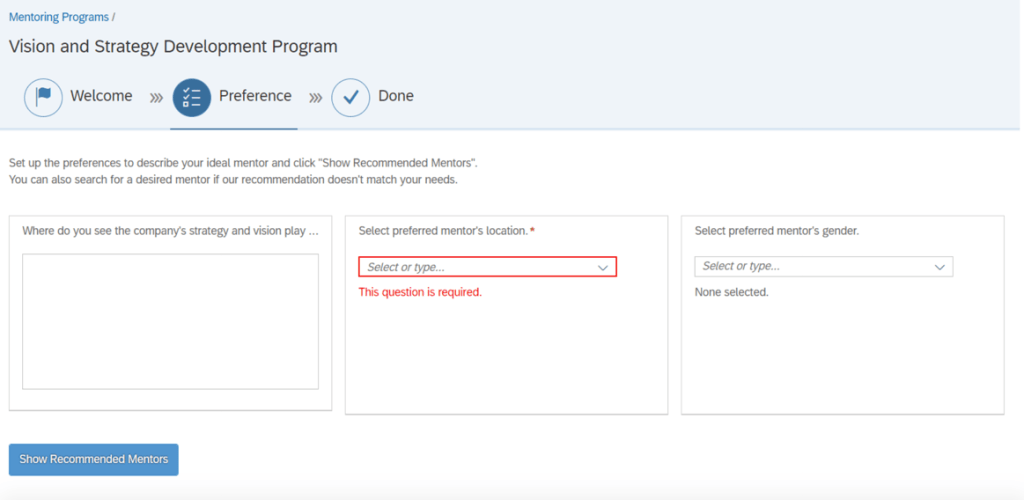
    Key Questions Indicated

    In the sign up sheet, required entries are noted by a red asterisk. This ensures the mentees complete these fields prior to looking at the recommended mentors. Answering the key questions will improve the recommended mentors match.

    Answers to questions will be saved but preferred mentors are not saved.

    Save Sign Up Program to Complete Later

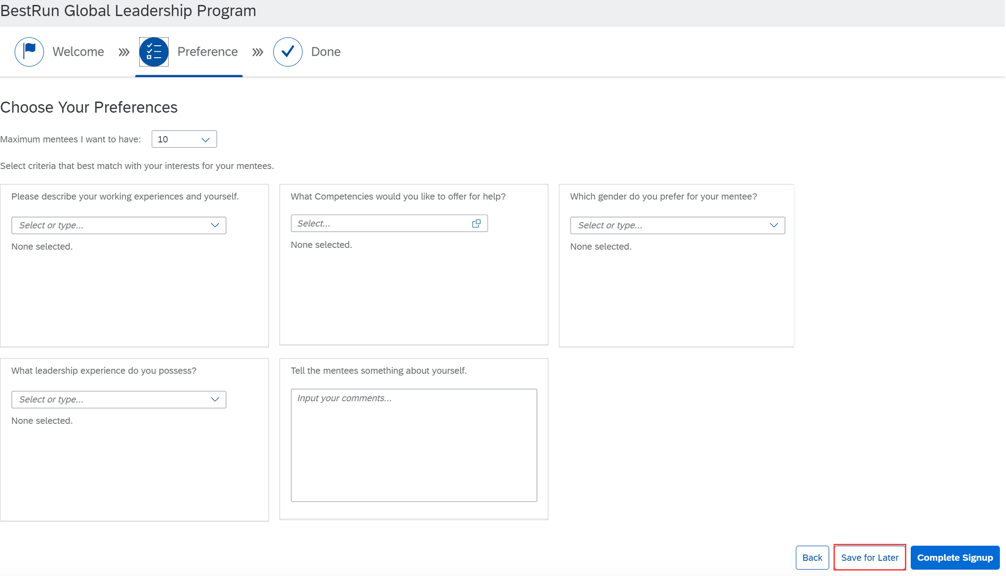
    There may be times when an employee starts to enroll in a mentoring program but is not ready to commit. Maybe they need to consider their mentoring preferences further or need to check in with their manager first. The employee may start to fill out the sign up form, save it and come back to it later to make any updates prior to signing up.

    There will be a “Save for Later” button that will display within the program sign up page.

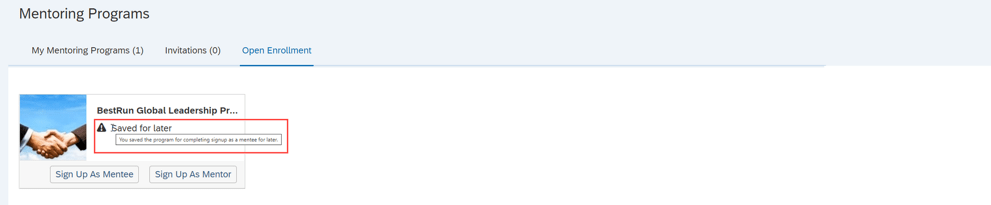
    Once saved, the program will appear on either the Invitations or Open Enrollment tab, whichever is applicable.

    The program visible on the tab and can be easily be identified with an icon and “Saved for later” text.

    Identify Mentor Requests

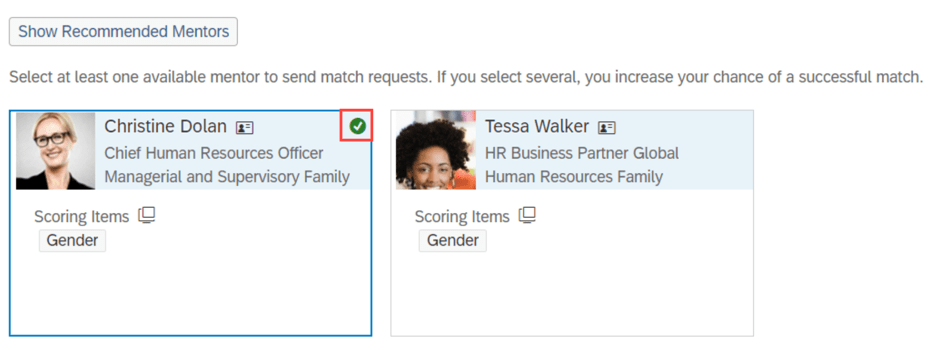
    While filling out the sign up form, mentors that are selected from the recommended list will display a green check mark on the mentor cards.

    Confirm Sign up

    A mentee will see a confirmation popup when they are completing a program sign up. This gives the mentee the opportunity to confirm signing up for a mentor program. By clicking the “Complete Signup” button, the mentee is enrolled and mentor requests are submitted.

    Your Mentor Requests

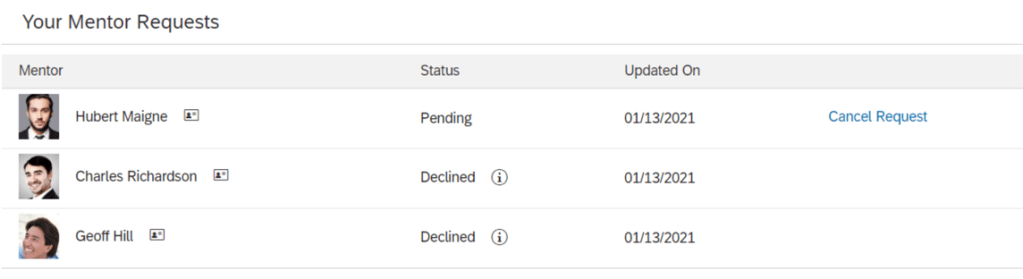
    The Mentoring Page will contain a new section that tracks any mentor requests that a mentee has made. The “Your Mentor Requests” section allows a mentee to see the status of their mentor requests. Pending requests will appear as well as any declined requests and reasons. This feature is only applicable to open enrollment and unsupervised programs. Supervised programs rely on a matching program instead.

    Mentees may also cancel any pending mentor requests.

    Admin Opt-Ins for Mentoring

    There is one admin opt-in available to for Mentoring.

    Qualtrics Surveys for End of Mentoring Relationships

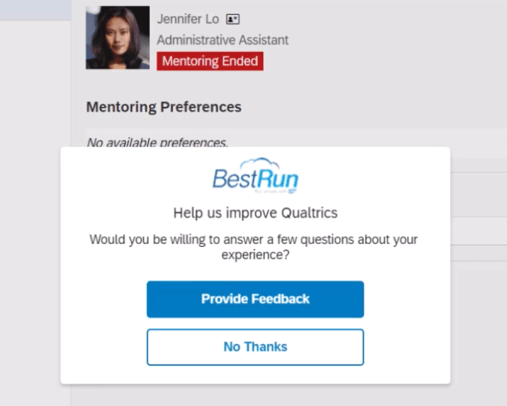
    Qualtrics Surveys may now be used with Mentoring. The survey can be used when a mentor program participant opts to end the mentoring relationship. Based on how the program was configured, either the mentor or the mentee may cancel the mentoring relationship. A survey will pop up after a participant ends the mentoring relationship.

    An email survey is sent to the other participant in the mentor relationship.

    The feedback provided in the survey results are seen by the program owner and may be helpful when designing new mentoring programs.

    In order to take advantage of this feature, Manage Qualtrics Integrations from the SAP SuccessFactors Admin Center needs to be set up.

    Development Goals

    Learning OData V4 Service

    There is a new Learning OData V4 service. When using transcript or legacy learning activities, learning activities may be created and updated in mass to be associated with development goals and competencies.

    Do you need help managing your SuccessFactors Release cycles?  Download our support services brochure or email info@worklogix.com to see how we can help!

  • What’s New in the 1H 2021 SAP SuccessFactors Calibration Release

    What’s New in the 1H 2021 SAP SuccessFactors Calibration Release

    What’s New in Calibration?

    As of April 9, 2021, SAP has released their documentation for the H1 2021 release.  You can view the full set of documentation in the What’s New Viewer here.  As a reminder, preview release will be April 16 and production will be released May 21st.  For full details on the release cycle, check out the SAP SuccessFactors official product updates blog here.  For tips on how to manage a release, check out our blog here

    For your convenience, we’ve summarized the highlights of the 7 new universal features for 2021 Calibration along with the an admin opt-in. Let’s start with the universal features.

    Universal

    Distribution Range and Group of Ratings in Guidelines

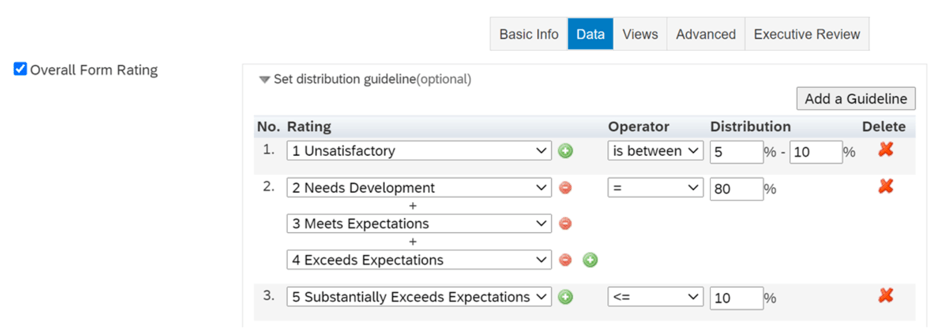
    When defining your Calibration template and Performance was selected as the data source on the Data tab, previously an individual percentage could be set for each rating with one rating in a guideline.

    It is now possible to create a distribution range for ratings including a group of ratings in a guideline.

    In addition to an individual rating, a group of ratings can be used when creating a guideline. As an added bonus, more operators besides “=” can be used:

    • <
    • <=
    • >
    • >=
    • is between

    This allows you to set a distribution range for ratings and also include a group of ratings in a guideline with different operators.

    Group Ratings and Distribution Ranges in Bin View

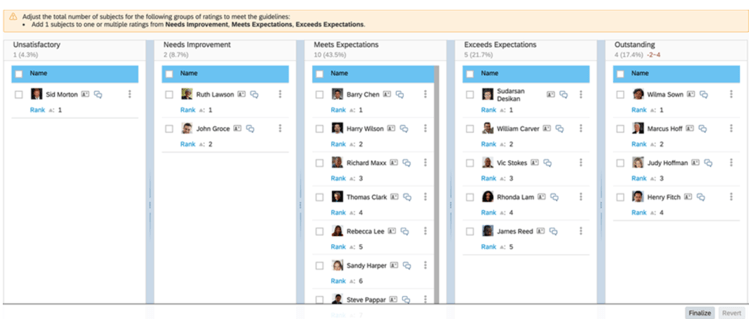
    Here is a feature that works with the new distribution ranges and groups of ratings in guidelines. When a guideline includes an individual rating with a distribution range, in Bin View, you can see the number of subjects in a range that can be added or removed from the bin to meet the guidelines. A warning message will display above the bins if a guideline includes a group of ratings.

    You may modify the total number of subjects for groups of ratings to meet the guidelines. You may also adjust the number of subjects displayed as a range within a bin.

    Dashboard and Executive Review Bar Charts

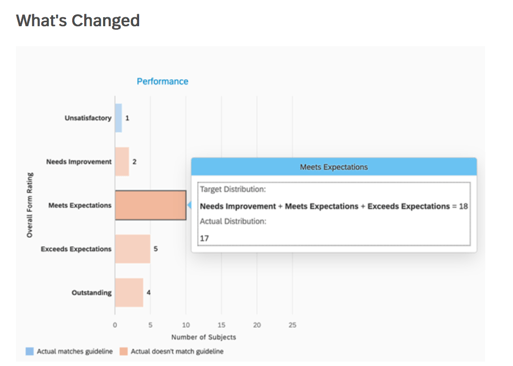
    Working in tandem with the new distribution range and groups of ratings that can be configured in guidelines, there is a new UI for bar charts for the Dashboard view and the Executive Review view. The bar charts identify actual distribution for each rating from the rating scale. Blue and orange bars are used to identify the distribution that matches or does not match the guideline.

    Hover over the chart to see target vs. actual distribution if any of these conditions are met:

    • A rating appears more than once in multiple guidelines.
    • Not all ratings are configured in all guidelines.
    • There is more than one rating in a guideline.
    • There is more than “equal” configured in a guideline.

    When none of these conditions are met, the bar charts will still display the actual distribution and the guideline.

    Filters in Manage Calibration Settings

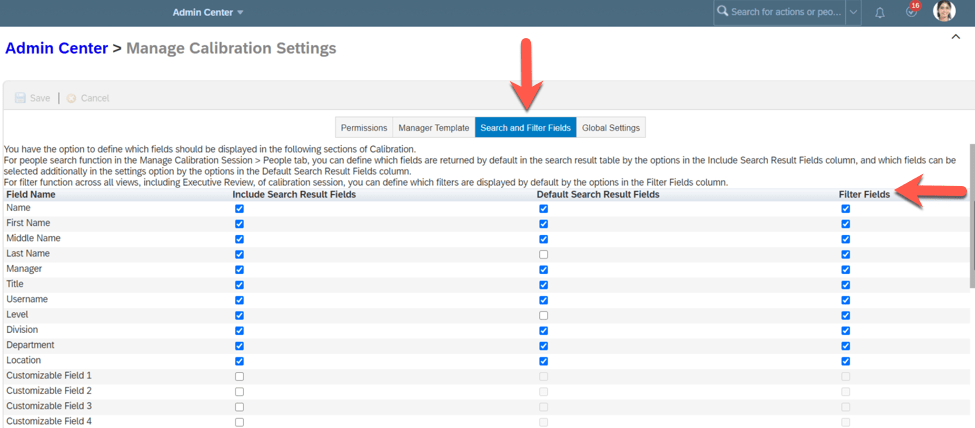
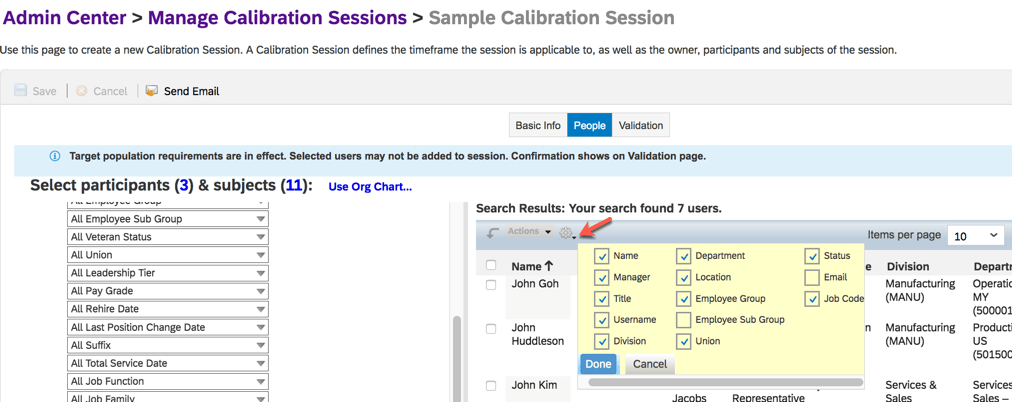
    Within Manage Calibration Settings, the “Search Results Fields” tab has been relabeled as “Search and Filter Fields”.

    On this tab, the existing columns has been relabeled:

    • “Include Field” is now “Include Search Results Fields”
    • “Make Default” is now “Default Search Results Fields”

    There is a new column, “Filter Fields”, applies to all views of a calibration session and allows you to identify the default filters.

    There are also new filter fields: Name, First Name, Middle Name, Last Name, Title, Username, Email, Gender, Level, and Status.

    Manager Created Calibration Sessions

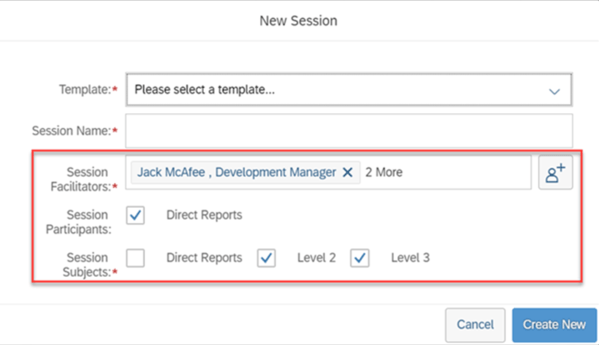
    It is now easier for a manager to create his team calibration session. Previously a manager could identify the template, session name and number of reporting levels when creating the session. Now the manager has more options. Session co-facilitators may be chosen, the default co-facilitators changed and the direct reports may also be participants rather than just subjects. The default co-facilitators option will only appear if the admin opt-in on Manage Calibration Settings is used. It will be explained in the admin opt-in section at the end of this blog.

    Deep Links to Performance Management

    Within a calibration session view, it is now possible to use a deep link to view a performance form:

    /sf/viewPMFormFromCAL

    Also to use a deep link to edit a performance form:

    /sf/editPMFormFromCAL

    Appending the deep link to the application server address will go to a Performance Management form in calibration views as well.

    My Jobs Downloads

    Previously Calibration reports could be downloaded from the Scheduled Reports page in Classic View. Reports may now be downloaded from My Jobs page within Report Center. This eliminates the need to switch to Classic View prior to downloading.

    A report with multiple files can be downloaded in a compressed .zip file or downloaded individually.

    Admin Opt-In

    There is one admin opt-in for Calibration which we touched upon when looking at manager created calibration sessions.

    Specify Default Facilitators for Manager-Initiated Calibration Sessions

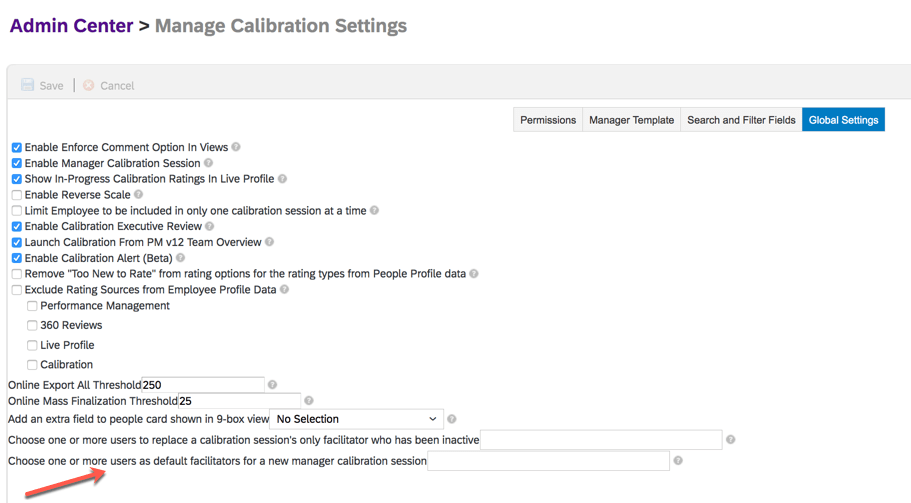
    A manager initiated calibration session can now have default facilitators. To set this up, a user who has access to Manage Calibration Settings would go to the Global tab and use the setting: Choose one or more users as default facilitators for a new manager calibration session to identify active users to default as facilitators.

    This can be useful to specify an HR manager to act as a co-facilitator in order to access a manager initiated session.

    When creating a session, the New Session dialog window will display the default facilitators but can be edited by the manager.

    We have now reviewed what is coming soon for Calibration.

    Do you need help managing your SuccessFactors Release cycles?  Download our support services brochure or email info@worklogix.com to see how we can help!