Tag: Platform

  • Highlights of SAP Successfactors 2H 2025 Release Updates for Platform

    Highlights of SAP Successfactors 2H 2025 Release Updates for Platform

    Learn what’s new Platform features available with the 2H 2025 SAP SuccessFactors Release. The updates will be in production November 14-16.

    For greater details, you can view the full set of documentation in the What’s New Viewer here. For full details on the release cycle, check out the SAP SuccessFactors official product updates blog.

    For tips on how to manage a release, check out our blog here

    Of major note, Profile Preview and Spotlight are now universally available as part of the latest People Profile experience. They are now standard without any opt-ins needed providing the latest People Profile is enabled.

    Keep reading to discover more of what is now available.

    Enhancements to Profile Preview and Spotlight of the Latest People Profile

    Updates to the Home Page Experience

    The Home Page has been enhanced with better use of space, less scrolling, with a consolidated list of tasks. There are new options, such as banner cards,analytic cards and personalization settings. There is improved design of custom content.
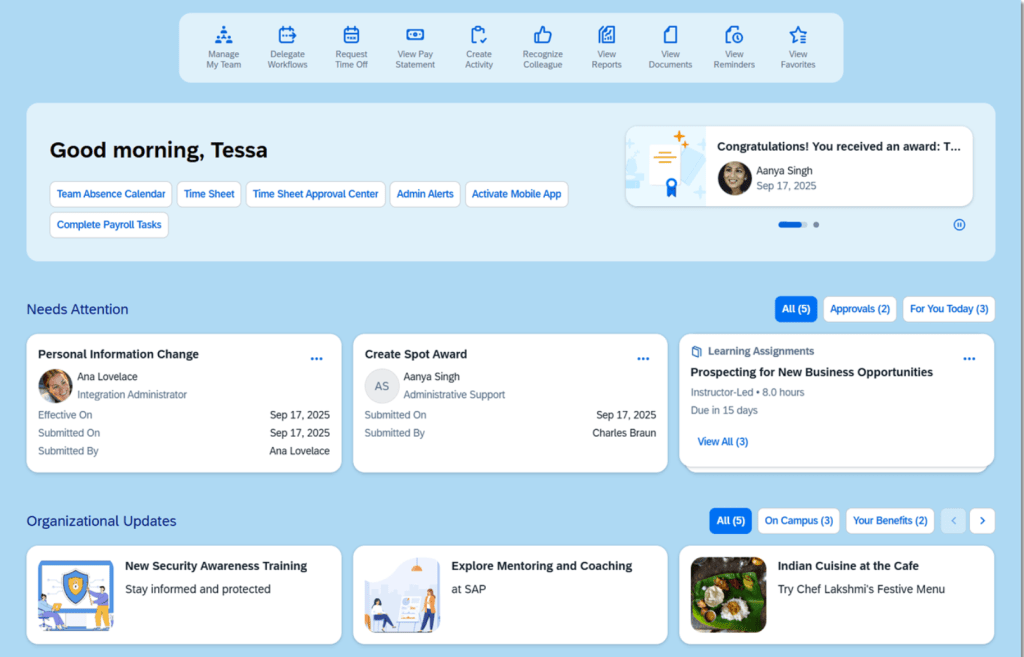
    New Home Page

    Profile Header Updated

    The category list has been updated and the profile header automatically collapses as you scrolled down the categories
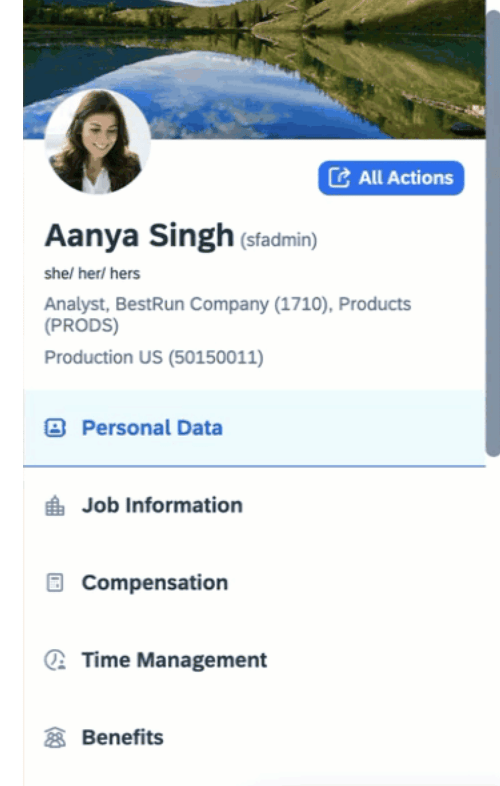
    Header Collapsed and Pinned

    Only the employee’s photo, display name, login name, and job title remain visible at the top of the page when the categories are collapsed,

    Three Additional Fields May be Added to the Profile Header

    It is now possible to add 3 fields in the header of the full profile, such as gender pronouns, or alternate name. These additional fields will be read-only. The fields to select from are the same as those available for the Employee Information card in Full Profile.
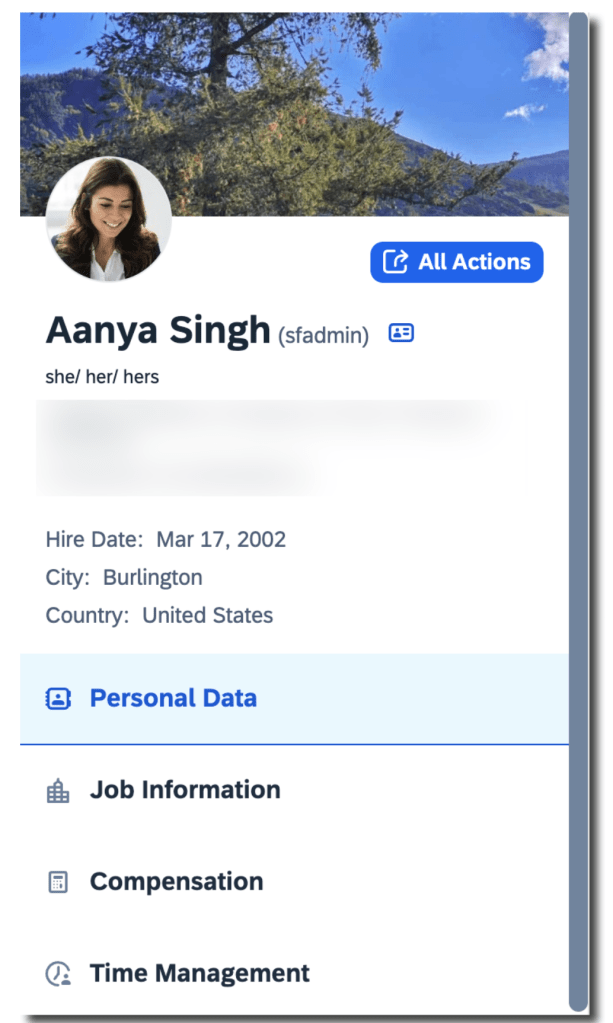
    Additional Fields Added to Profile Header

    Quick Access to Profile Preview

    To easily get to the Profile Preview from the Full Profile page or any card’s details page, click the “Show employee details” icon next to the user name.
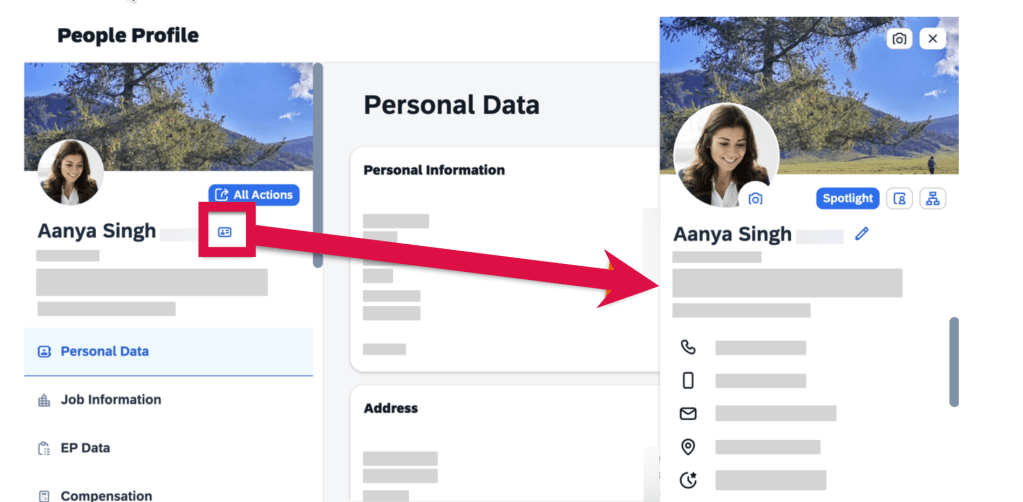
    Access to Profile Preview using Icon

    Upload Background Images

    Employees may upload their own background images, not just from the image library.

    Analytic Cards on the Home Page

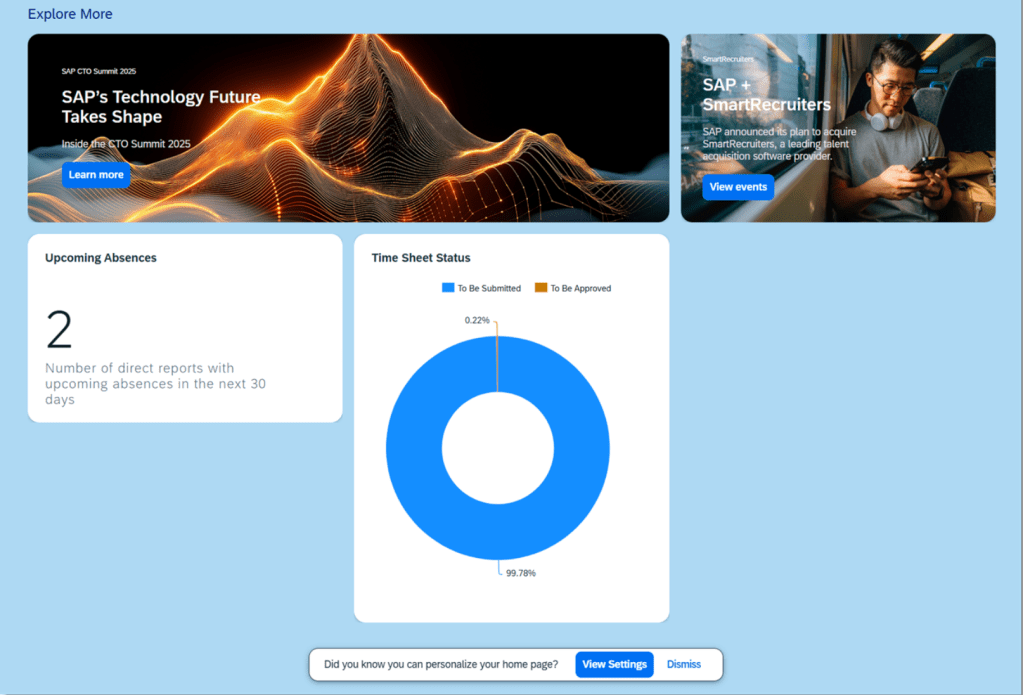
    There are now 2 analytic cards available that may be displayed on the Home Page: Upcoming Absences and Time Sheet Status. These display charts may be enabled and would appear in the Explore More section on the latest home page.
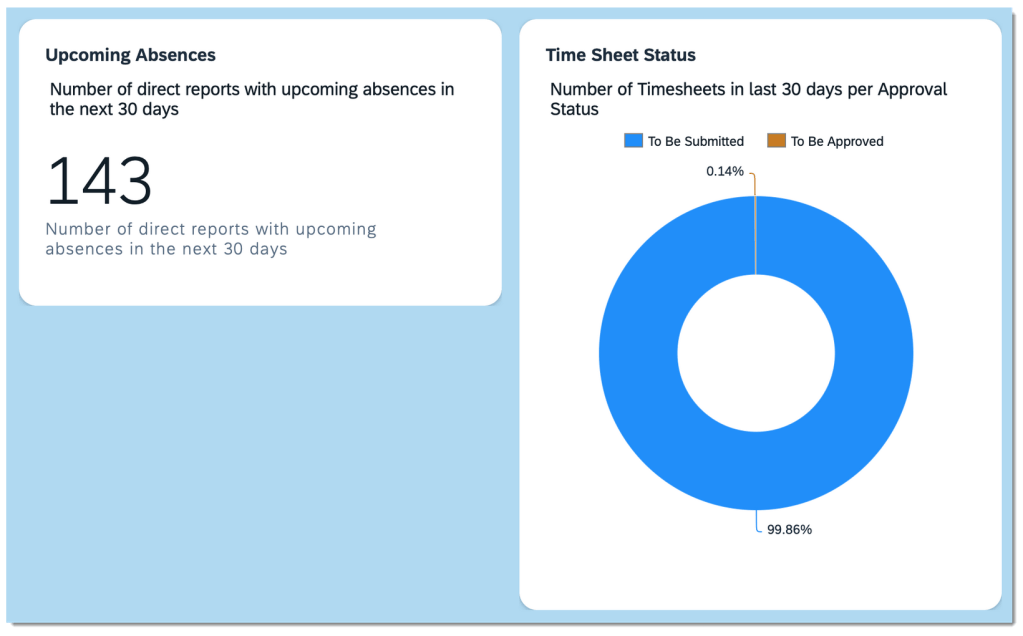
    Analytic Cards on the Home Page

    Manager’s Full Profile Contains Direct Report Count and Team Size

    Direct reports view include photos, names and titles.
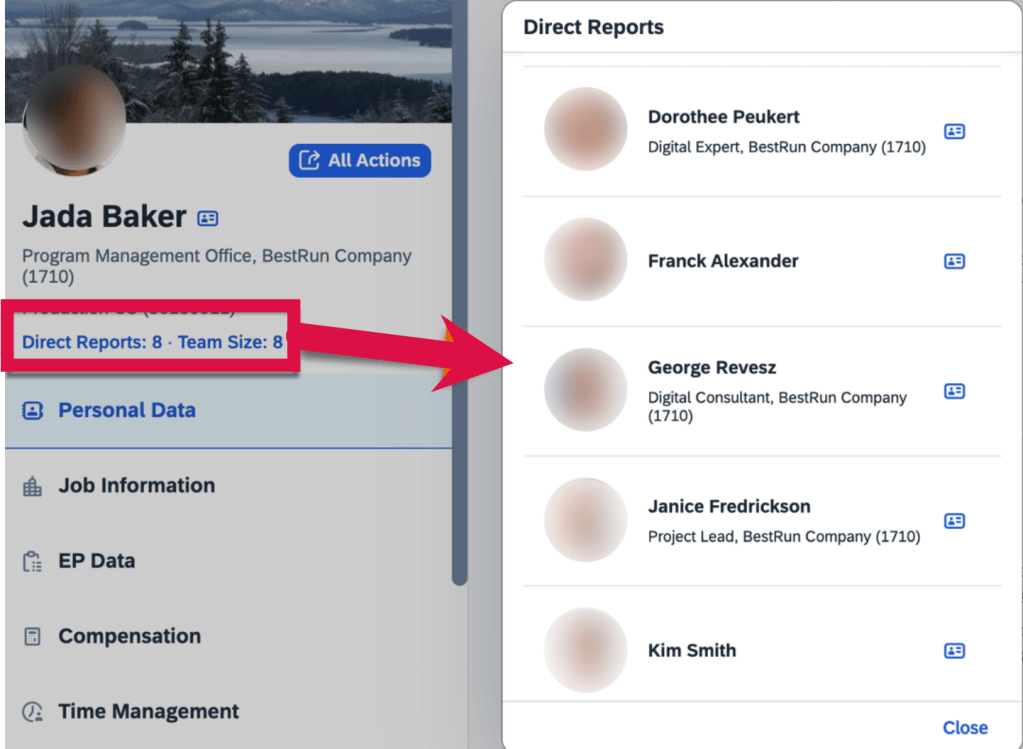
    Manager’s Full Profile View with Direct Reports and Team Size

    Advanced People Search

    Enhanced People Search features now apply to the global header and Directory Search. The experience includes facets, filters and more searchable fields.

    The Global Header People Search uses the enhanced Autocomplete Search.

    Directory Search incorporates the enhanced Advanced Search, allowing users to search for employees with specific criteria.
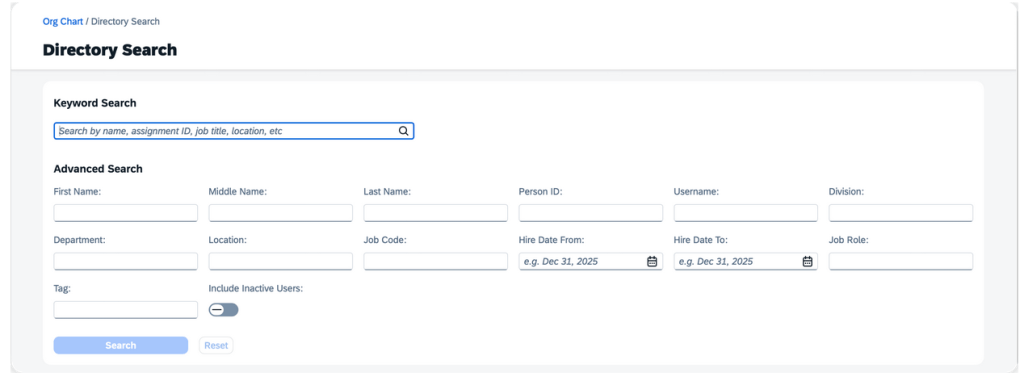
    Directory Search

    On the search criteria page, users can search for employees using keywords like name, assignment ID, job title, and location. Alternatively, they can use the search widget for more advanced search criteria.
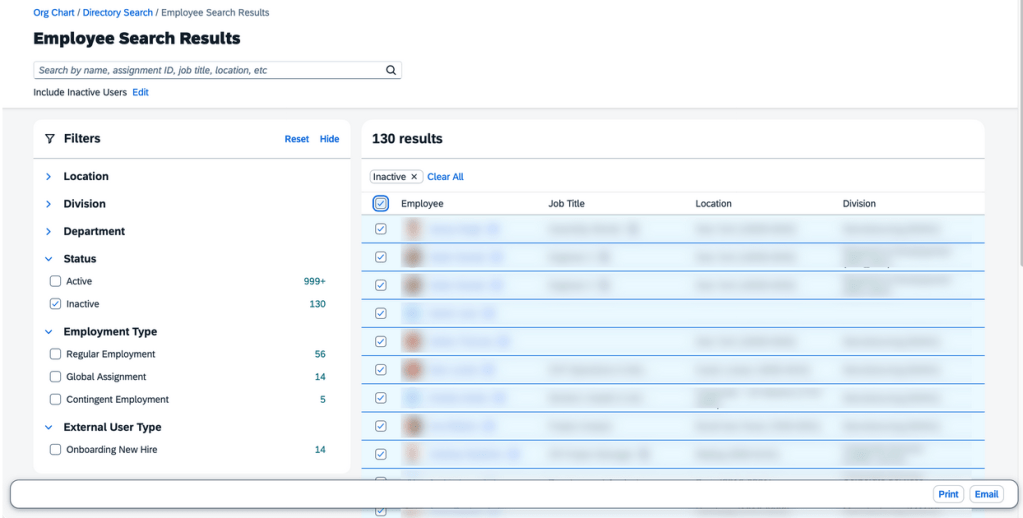
    User Search

    Option to Delete Scheduled Job on My Jobs Page

    Scheduled jobs for all report types, except Canvas reports, can be deleted directly from the My Jobs page. Simply choose the ellipses button under the “Action” column and then select “Delete”.
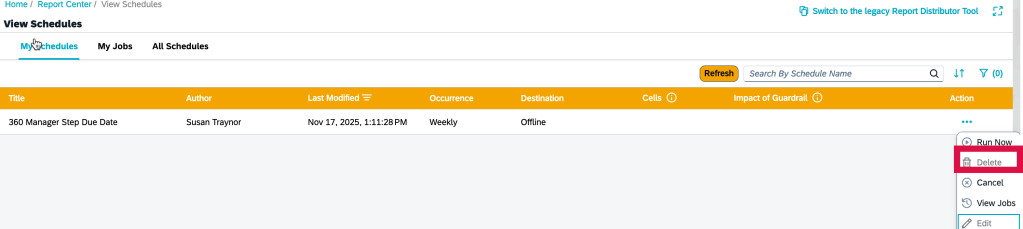
    Delete Scheduled Job

    Visual Changes Across the Platform

    Throughout the system there are text, icon and label changes. Here are just a few of the updates.

    • More clear label for admin Settings page to identify when using system email notifications
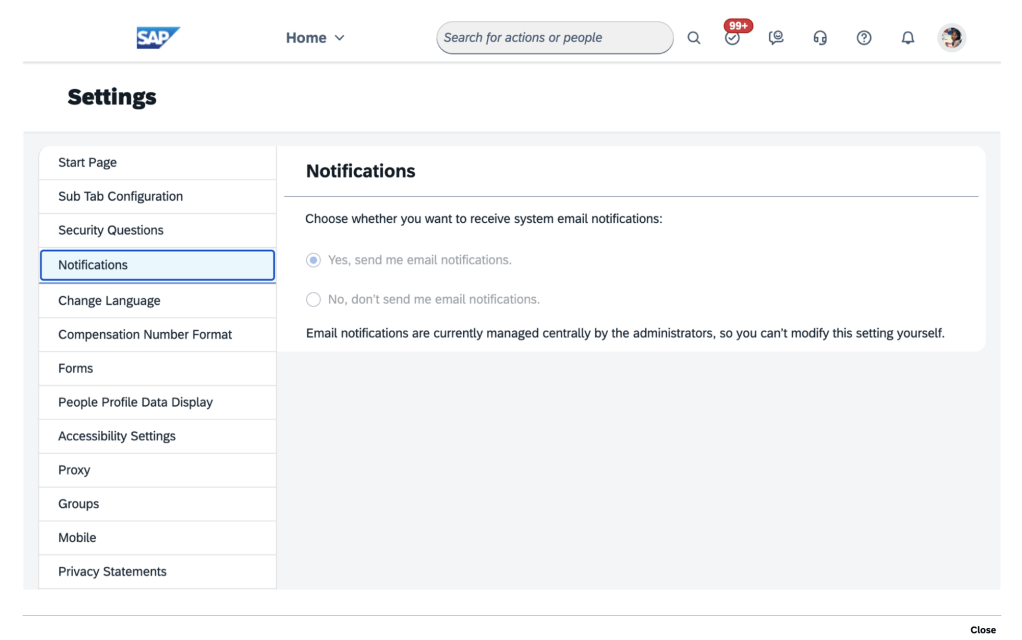
    System Email Notifications
    • Team Members can be displayed for Active or Inactive employees
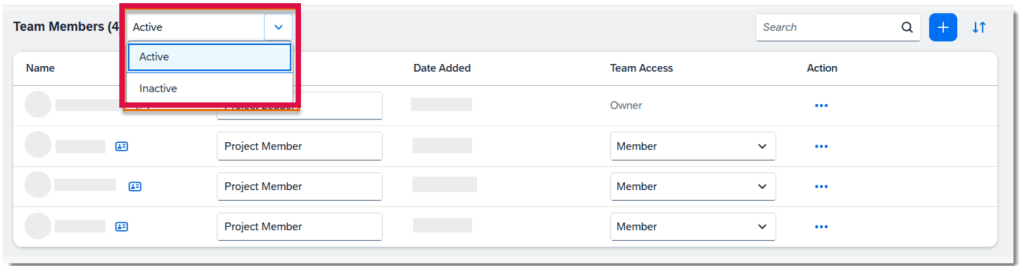
    Team Member Selection
    • Creating a Refresh RBP Model job request now has helpful information that this job will refresh all RBP permissions
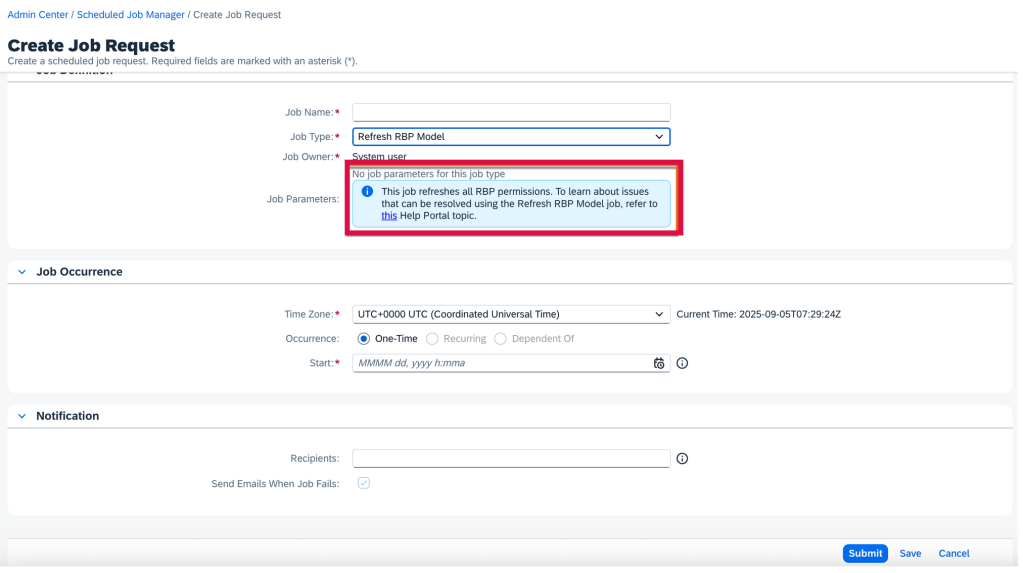
    Job Request Information
    • Using the Instance Refresh Tool, the instance refresh can now only be scheduled 3 months in advance, down from 6 months
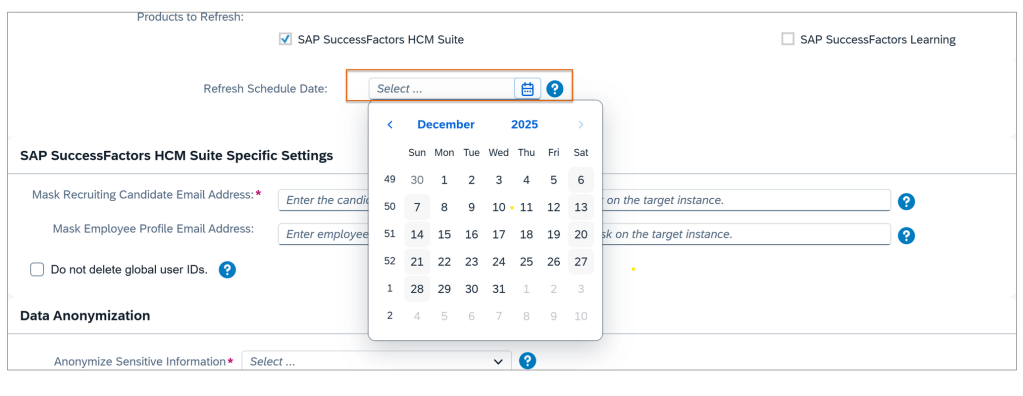
    System Refresh 3 Months in Advance
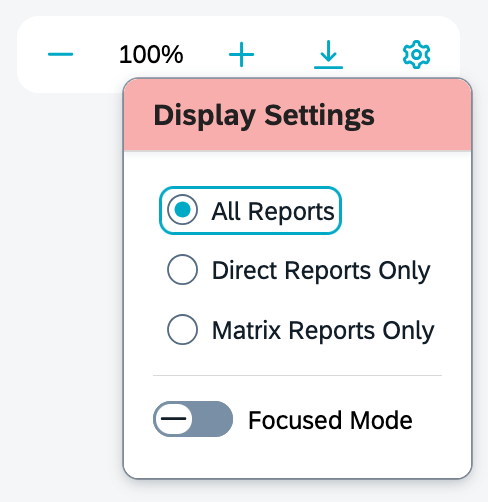
    • When viewing the Org Chart, the gear icon pop up now is labeled “Display Settings“. Previously it was labeled “Display Options
    New Label for Gear Icon

    Scheduled Job Manager Supports Time Zones

    A time zone may be selected when creating a job request in the Scheduled Job Manager admin tool. A new field, Time Zone, has been added to the Job Occurrence section on the Create Job Request page.
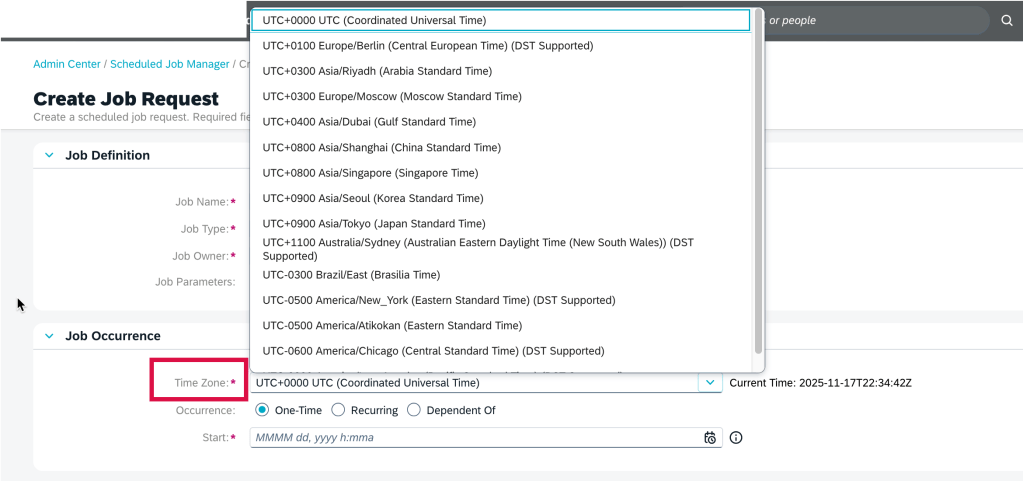
    Time Zone Selection when Scheduling Job

    New Deeplink Parameters for Full Profile Navigation

    There are more parameters in deep links to directly access the Full Profile cards.

    • cardId=<card Id>: link to go directly to a card’s detail page
    • mdfObjectType=<custom MDF object type, to access a custom MDF object card
    • backgroundElementId=<custom Background Element Id>to go to a Background Information card’s details page

    Delegation Request Card on Home Page

    When using the latest home page experience, delegatees can now manage delegation requests directly from the Home Page with a new to-do card feature.
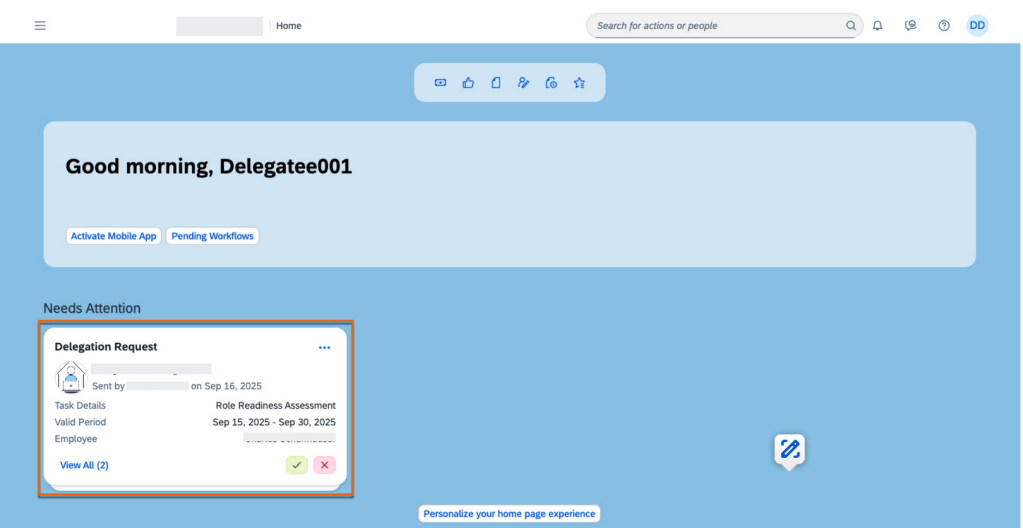
    Delegation Requests on Home Page

    The Delegation Request card contains details of the delegation request, including the delegator’s profile picture, the name of the performance form, the valid period of the task, and the employee’s name whose form needs review. A request can be accepted or rejected directly from the card.

    To learn more and get more details about the updates, see the full set of documentation in the What’s New Viewer here.

    Do you need help implementing or supporting your SAP SuccessFactors system?  Contact info@worklogix.com for assistance, download our support services brochure, or visit https://www.worklogix.com/implementation.html for additional information.

  • SAP SuccessFactors Platform H1 2022 Release Updates

    SAP SuccessFactors Platform H1 2022 Release Updates

    Photo by Kyle Tran on Unsplash

    SAP has announced the latest updates and changes for SuccessFactors for the first half of 2022.

    Preview release was on April 15 and production will be released May 20. You can view the full set of documentation in the What’s New Viewer here. For full details on the release cycle, check out the SAP SuccessFactors official product updates blog.

    For tips on how to manage a release, check out our blog here

    For your convenience, we’ve summarized the highlights of what’s new in the 1H 2022 Platform release below.

    Overview

    SAP continues to invest in numerous updates into the platform, topping most of the other modules for the past few releases. Due to the large number of updates (89 in this release!), we’ve highlighted only some of the most significant changes below. We’ve categorized the updates based on who the affected audience for each change: User Experience Updates, Admin Updates, and System Updates.

    User Experience

    SAP continues to remind customers that the Universal release of the Latest Homepage will be in June 3rd for preview and June 24th for production environments. If you haven’t reviewed the changes and opted-in, you should do so now and plan your communication strategy so your users aren’t caught wondering why their homepage changed!

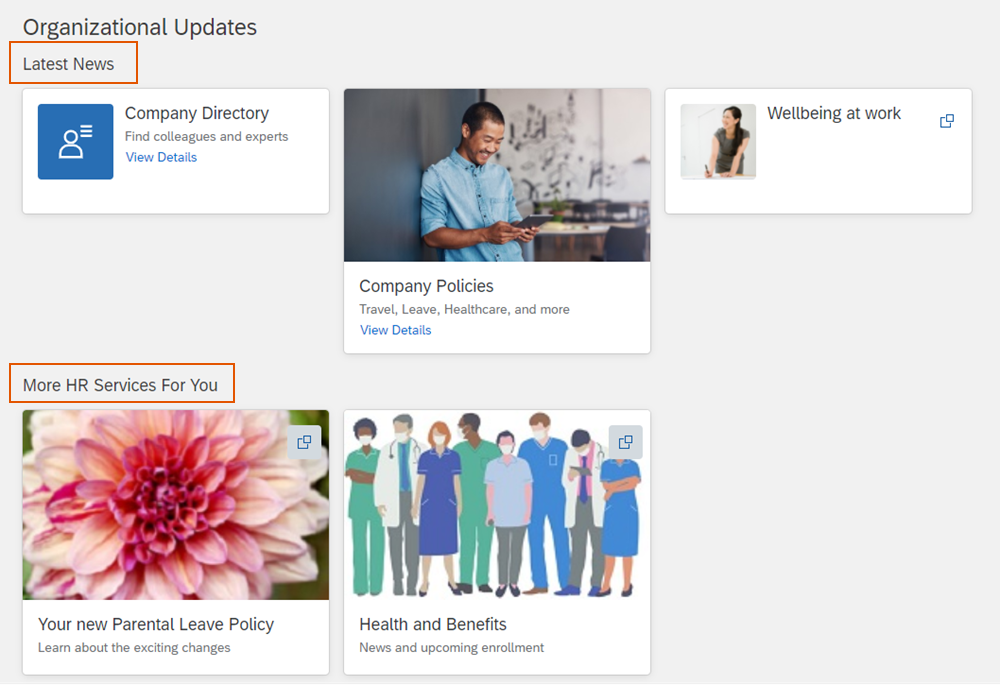
    SAP also continues to add more quick actions to the latest homepage, thus increase its usefulness as a quick way to access needed areas of the system without having to click through navigation. The actions added include “Candidate Talent Pools”, “Learning Administration”, “Mobile Activation”, “View Company Documents”, and “View Tile Reports”. The homepage also now allows for grouping of custom cards within the Organizational Updates section as seen in the screenshot below:

    Screenshot of Card Groupings within the Organizational Updates Section

    You can also see an example of the new half sized custom cards in the screenshot above.

    There are also various updates to the opportunity marketplace including allowing Assignment offer approvals, allowing assignment owners to see descriptions of capabilities including proficiency levels when creating assignments and applicants to see their own capability details. The capability picker also got updates you can read about in our blog here: https://worklogix.blog/2022/04/17/sap-successfactors-1h-2022-whats-new-in-succession-and-career-development/

    The org chart also got a nice update where you can change the order of direct reports below a manager. Check out the configuration steps here: https://help.sap.com/doc/62fddbd651204629b46bbccbabf886ba/cloud/en-US/780a0273693342c79ded9930b9057110.html

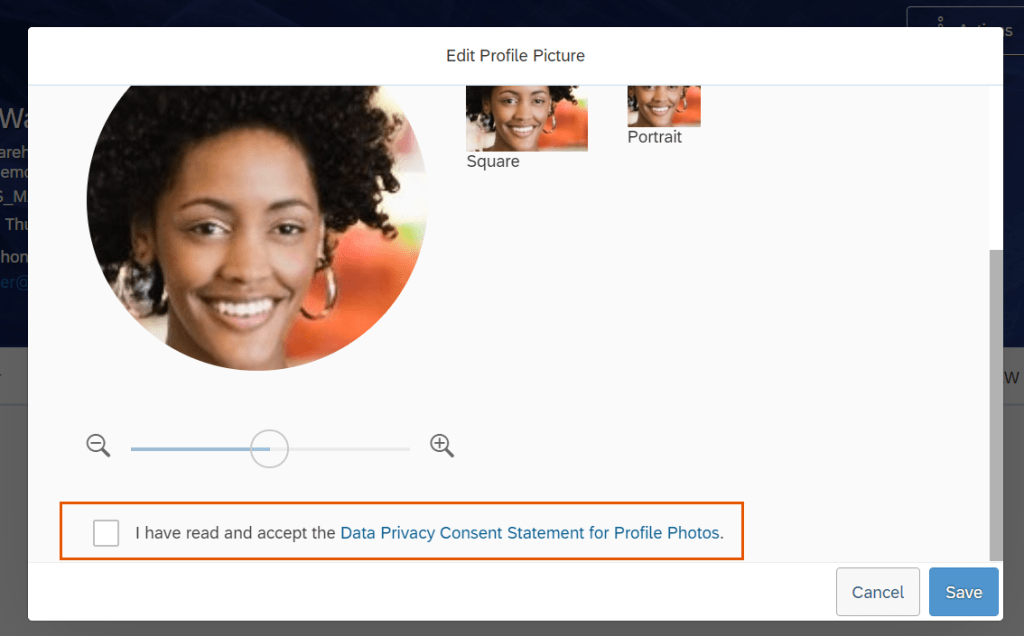
    You can also now turn on a data privacy consent form for uploading photos that is shown to users as in the example screenshot below:

    Screenshot of data privacy consent message for employee photos

    Also related to photos- you can now have just one photo for a person on global assignment with multiple employments.

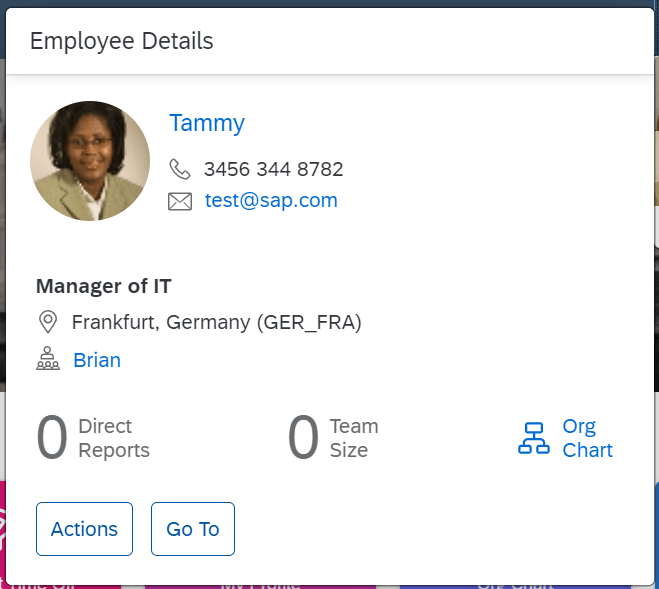
    After many years of service, quickcards have finally got an upgrade across the system. This gives a better look and feel consistent across the platform. An example is shown below:

    Updated Quickcard

    Admin Updates

    Do you still love to use the old admin page like me? I’m sorry to say the nostalgic use of the OneAdmin page will end on May 20th this year. Time to start using the NextGen admin page.

    SAP also continues to increase the list of jobs available to monitor in the Scheduled Job Manager. You can check out the list of jobs here: https://help.sap.com/doc/62fddbd651204629b46bbccbabf886ba/cloud/en-US/55e3deb65bf14190b102ff7ad1f803fc.html

    Are you an admin that loves unstucking stuck workflows or resolving HR data issues? You might be interested in the new custom fields you can add to admin alerts! Check out the list here: https://help.sap.com/doc/62fddbd651204629b46bbccbabf886ba/cloud/en-US/055e9cd78d2543d283fd556cbca2132d.html You can also now see the name of the current approver for stalled workflows within admin alerts.

    If you are a security or compliance admin, you’ll be happy to know you can now perform read and change audit reports on multiple users for up to 30 days now. The storage limit has also been increased from 1GB to 10GB.

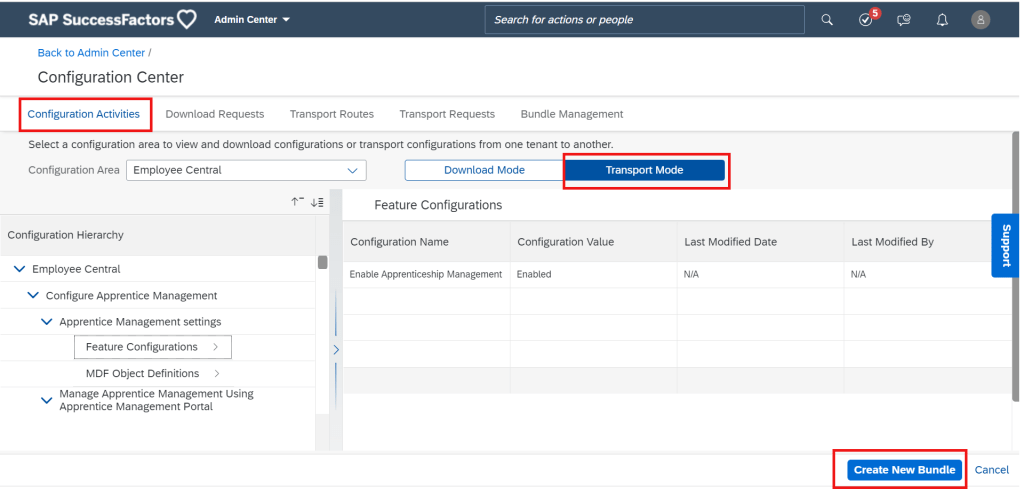
    The still evolving transport system in SuccessFactors also got an enhancement in the form of Bundle Management in Configuration Center. You can now create bundles, edit them, and even share them with others! Checkout the screenshot below:

    New Bundle Management Feature Screenshot

    There’s also now a handy import history report available for download in the Configuration Center as well!

    The Check tool has now been integrated into the instance refresh too. Admins will now get an email that includes a summary of check tool results when a refresh is processed and can also download an error log. The list of items the check tool checks has also been updated. The detailed list can be found here: https://help.sap.com/doc/62fddbd651204629b46bbccbabf886ba/cloud/en-US/354e3d1428d8493d89dfb7487e5dcedf.html

    Security admins will also be glad there’s a new potentially neck-saving notification when they change a role that impacts a large number of users. Don’t worry – you can select the threshold of users so you aren’t getting unwanted pop-ups! Checkout the configuration steps here: https://help.sap.com/doc/62fddbd651204629b46bbccbabf886ba/cloud/en-US/c7b923c87ca3494c8416349431fa8a49.html

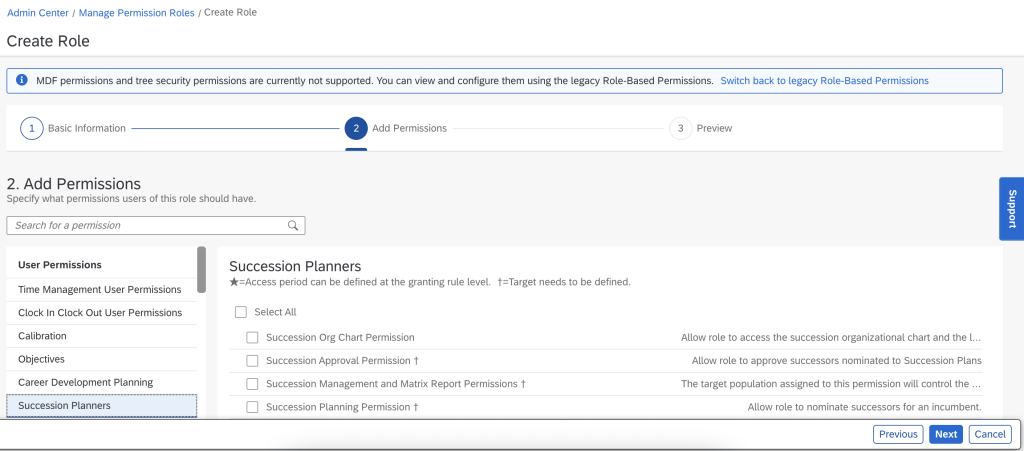
    The RBP admin screen also got a new facelift! You have the option to turn this one on by selecting the option on the old screen. Check it out below!

    New RBP Admin Screen

    System Updates

    Access to APIs based on HTTP Basic Authentication will no longer be supported on November 17 2023. This gives customers about a year and a half to adapt any existing interfaces that log on to the APIs directly to OAuth 2.0.

    The APIs will now also start to be throttled. Probably a smart move on the part of SAP to keep system stability, but but news if you have interfaces that make lots of calls. Don’t worry – the limit is now 40 requests per second so you’d have to be doing A LOT of calls to be affected.

    The APIs have also been enhanced with more linking between a variety of entities. Check the main What’s New Viewer page for specifics.

    Wrap Up

    We have now covered the Platform update highlights for 1H 2022! SAP continues to invest greatly in the platform to expand the overall capabilities of the system, concentrating on consistent and enhanced user experience while giving admins more helpful tools.

    Do you need help managing your SuccessFactors Release cycles?  Download our support services brochure or email info@worklogix.com to see how we can help!

  • What’s New in the SuccessFactors Platform for H2 2021

    What’s New in the SuccessFactors Platform for H2 2021

    Photo by W W from Pexels

    On October 9, 2021, SAP released documentation for the H2 2021 release.  Preview release is October 15 and production is November 19. In this article we take a quick look at the latest updates for SAP SuccessFactors Platform. It’s a huge list for Platform this release – so we’ve tried to summarize the most interesting items.   You can view the full set of documentation in the What’s New Viewer here. For full details on the release cycle, check out the SAP SuccessFactors official product updates blog here.  Let’s get started! We’ve categorized the enhancements below for you starting with the most compelling in our opinion!

    Of Special Interest

    What stood out to me as the most interesting part of this release is the introduction of a Digital Assistant! As with most digital assistants, the feature is basically a natural language processing program that appears in the form of a chat window. Right now SAP is reporting they have over 250 scenarios programmed on the web version and over 20 on the mobile app. This feature is currently only available to early adopters.

    The latest home page showing the Digital Assistant chatbot in action.

    What Everyone Needs to Know

    In this release, SAP announced a Tenant Preferred Time Zone feature. SAP is migrating servers to the UTC timezone. If you want to keep your server time zone where it is today, check out the link here: https://help.sap.com/doc/62fddbd651204629b46bbccbabf886ba/cloud/en-US/d5e86fa8bb564058820592217d3a21d4.html

    The Center of Capabilities continues to expand its functionality. There is now a proficiency rating scale available that allows you to quantify the skill level of employees in the skills within the Center of Capabilities. There are also a new Center of Capabilities Library Reports for Stories in People Analytics.

    The settings, such as providing a unique name to the rating scale, defining the number of proficiency levels, and assigning the numerical value as 0 or 1 for the lowest proficiency level are available on the Rating Scale page of the Capabilities Portfolio Settings wizard.

    There have also been some general UI Enhancements to the center of capabilities functionality overall. In addition, the capabilities portfolio is now available which is the main experience that shows the list of capabilities for a worker.

    The Capabilities Portfolio page provides information about the capabilities assigned to a user. This page also provides users the option to navigate to the Opportunities Marketplace.

    There are a large number of new To-Do Tasks across all modules available on the latest home page. Examples are shown below. Check out the full list here: https://help.sap.com/doc/62fddbd651204629b46bbccbabf886ba/cloud/en-US/34c3515e0de14431b35d76525dfb00df.html

    Example of the home page showing several pending tasks: approve job offers, approve job requisitions, approve time off requests, approve time sheets, complete calibration, and complete 360 evaluation.

    In addition, there are a lot more Quick Actions available on the latest homepage. For example, there is a My Team quick action for managers to review info and take actions on their team members. Clock Time lets you clock in and out. Complete Payroll tasks, Delegate Workflows, My Profile, Org Chart, View Admin Alerts, and View Team Absences all pretty much do exactly what you would expect them to do as well. You can check out the full details here: https://help.sap.com/doc/62fddbd651204629b46bbccbabf886ba/cloud/en-US/f6d92d1c4a834f29b8b1998c7b845d1b.html

    Also the header page now conforms to Fiori standards. This is always great news to me to see more and more parts of the system align with Fiori – have you notices how much better the web system looks on your mobile phone these days? That’s thanks to Fiori!

    If you are still on the V12 Employee Profile, its time to move to the latest employee profile! This functionality is finally deleted.

    Security

    Certificate-Based authentication is now supported for standard third party integration packages for Boomi and CPI. My sources inside SAP tell me that certificate-based authentication will be the preferred method of authentication going forward for interfaces in general. Aligned to this, SAP also announced the depication of HTTP Basic Authentication for APIs. End of maintenance is November 19, 2021 and deletion will be November 1, 2022! Get your certificates ready!

    You can also now Restrict API Access to Specific Users through OAuth 2.0. Additionally, you can now restrict individual user’s login to specific IP addresses. These allow for an extra layers of security in your integrations and general user access.

    IP restriction can be applied to individual users.

    Also of Note

    There were also some minor curiosities for me in this batch of platform enhancements that I thought were pretty…pretty good! For example, you can now provide a Zip file for the job that updates employee photos en masse. Before this was a bear for anyone who suffered through putting a bunch of uncompressed photos on an SFTP server and waited for the large data transfer!

    There’s also deep linking now available to go straight to someone’s employee profile. I could see this being useful for succession planners or managers talking about employees and wanting to share their profiles.

    The employee import email also now includes a new troubleshooting section to help you figure out what went wrong on the import. Nice!

    Conclusion

    The SAP SuccessFactors product continues to grow and become increasingly more robust! This does not represent all of the enhancements in the H2 2021 release – only the highlights we found most compelling. Check out the What’s New Viewer here for the complete list of enhancements.

    See this great article for useful information on how to prepare for a SAP SuccessFactors Regular Release.

    Contact info@worklogix.com for any assistance supporting and implementing your SAP SuccessFactors Modules, or download our support services brochure.