
Category: variable pay

  • Considerations when Implementing SuccessFactors Compensation or Variable Pay before Employee Central

    Considerations when Implementing SuccessFactors Compensation or Variable Pay before Employee Central

    Over the past few months, we have been asked from customers about considerations of going live with SuccessFactors Compensation (or SuccessFactors Variable Pay) before implementing Employee Central.

    Below are the main considerations when doing so:

    • Configuration –  The configuration of the module is largely the same whether implemented with EC or not.  That said, some retrofit would be needed if deployed earlier than EC.
    • Data –  Decisions on certain data definitions (e.g., Location, Division, and Department) are needed regardless of deployment.  If implemented within a non-EC environment first, those foundational decisions would need to be made at that time.
    • Automation – Components such as eligibility and manager changes are heavily dependent on data updates. If deployed as non-EC, automation may lag depending on the frequency of data update.  
    • Employee/Planner Experience – the employee experience will be the same to the end users regardless of deployment approach
    • “Publish” – At the end of the process, an EC-enabled template provides automatic updates to employees’ pay-related information.  For non-EC, the data would be exported to Excel/CSV for an upload/update to the source system. (If your HRIS system is SAP HCM, there are some standard integrations you can implement. Check out the SAP Help link here.
    • Compensation Statement – Compensation statements can be issued regardless of method. They will look-and-feel the same.

    Do you need help implementing or supporting your SAP SuccessFactors system?  Contact info@worklogix.com for assistance, download our support services brochure, or visit https://www.worklogix.com/implementation.html for additional information.

     Worklogix partners with clients to plan, configure, develop and integrate HR products and custom applications. We have assembled a global team with years of experience implementing HCM solutions. Our team is dedicated to understanding your business challenges, helping you leverage your technology and implement solutions that deliver results.

  • SAP SuccessFactors 1H 2023 What’s New in Compensation

    SAP SuccessFactors 1H 2023 What’s New in Compensation

    SAP SuccessFactors has released new features for your Compensation solution. They can be found in detail here (S-User ID required).  Filter on Solution for Compensation to review all the latest changes. Under the Description for each, you can click on ‘See More’ to see screenshots and detailed information.

    Preview release was available on April 28 with the production release scheduled for June 2. For full details on the release cycle, check out the SAP SuccessFactors official product updates blog here.  New to the release process? For tips on how to manage a release, check out our blog here

    After reviewing all of the changes in this release, we narrowed the list down to the 1H 2023 SAP SuccessFactors Compensation Top 5 Features:

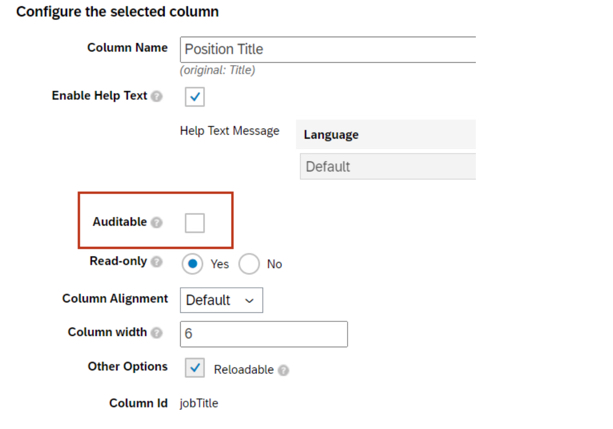
    • Planner Audit Feature for Compensation Planner
      • Compensation planners can now review field history changes made to compensation, variable pay, and total compensation worksheets.
      • Managers will be able to see changes to enabled fields on their worksheets via the link for Export Change History.
    To enable fields for Planner Audit, go to Compensation Home – Template Name – Plan Setup – Design Worksheet
    • Compensation Plan Template Versions
      • Admins can now view the change history including Modified Date and Modified By for Compensation, Variable Pay, and Total Compensation templates.
      • Admins can download previous versions of the templates to assist in troubleshooting issues.
    Role based permissions must be set in order to access export template history – Administrator – Manage Compensation and VarPay –  Enable Export of Plan Template Versions
    • Advanced Executive Review Filters Are Now on by Default
      • Users can now select which fields are included in the Executive Review filter. This includes the standard fields of department, division, and location, as well as the 15 custom fields.
      • Filters can be saved and shared with other users.
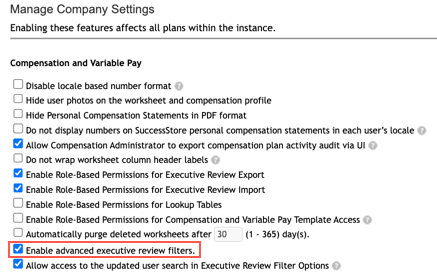
    Actions for all plans – Company Settings – Manage Company Settings – Enable advanced executive review filters is now checked by default
    • Recall Reward Statements When Worksheet Reverts
      • Statements are typically made visible when worksheets are in the Completed step of the route map. This enhancement automatically recalls generated statements when the worksheets are routed back from Completed Status.
      • This ensures that a statement is not viewed when it is not in Completed status as it may have needed to be updated with corrected information.
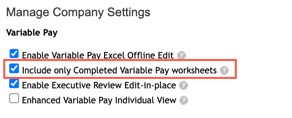
    In order for this functionality to work for Variable Pay, the Include only Completed Variable Pay worksheets setting must be checked
    • Assignment Details in Bonus Payment Detail Report on Executive View
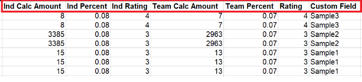
      • The Bonus Payout Detail Report download in the Executive Review now includes assignment level information for individual and team standard fields.
      • Assignment level custom fields are also included in the download.
    Bonus Payout Details export now contains assignment level fields

    Do you need help implementing or supporting your SAP SuccessFactors system?  Contact info@worklogix.com for assistance, download our support services brochure, or visit https://www.worklogix.com/implementation.html for additional information.