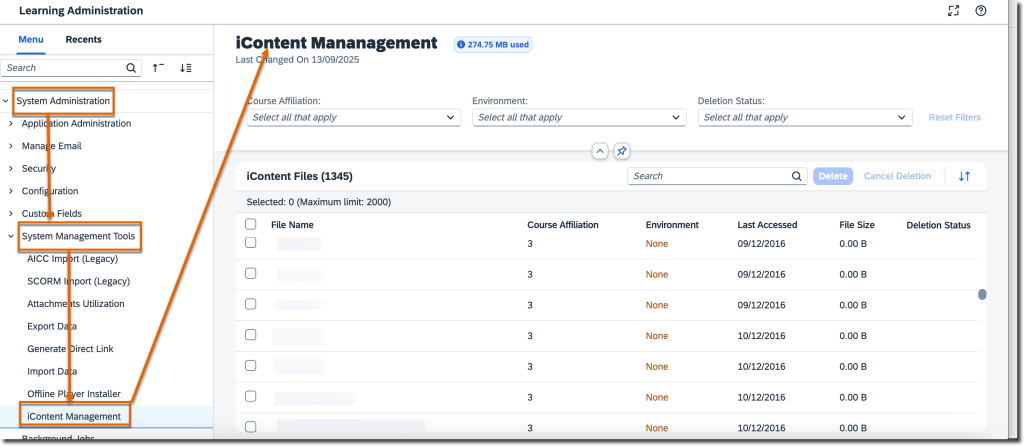
A new iContent Management page allows admins to identify and bulk delete unused files from iContent servers. You can schedule deletion jobs, view usage, and manage associated courses efficiently. Only one deletion job can be scheduled at a time and must be planned 30 days in advance. This helps optimize storage and maintain cleaner repositories while ensuring admins can revise or reactivate impacted courses as needed.
Change Assignment Due Dates from Team View
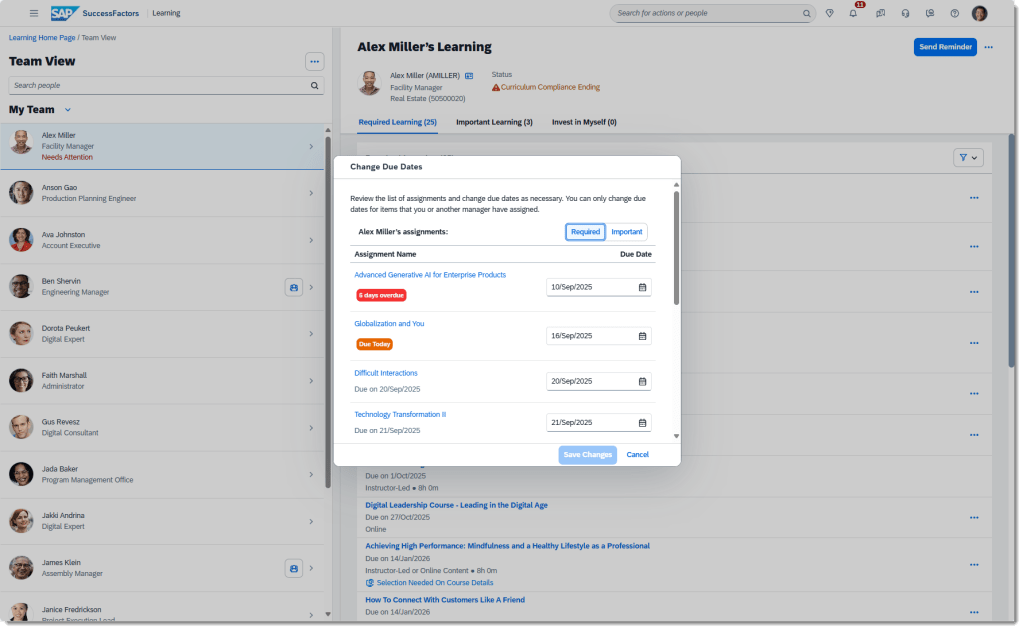
Managers can now change due dates for manager-assigned learning items directly from the Team View page—individually or in bulk. The new Change Due Dates dialog provides a quick way to update deadlines with real‑time status updates. This improvement streamlines manager oversight and supports better learner compliance.
Class Withdrawal from Team View
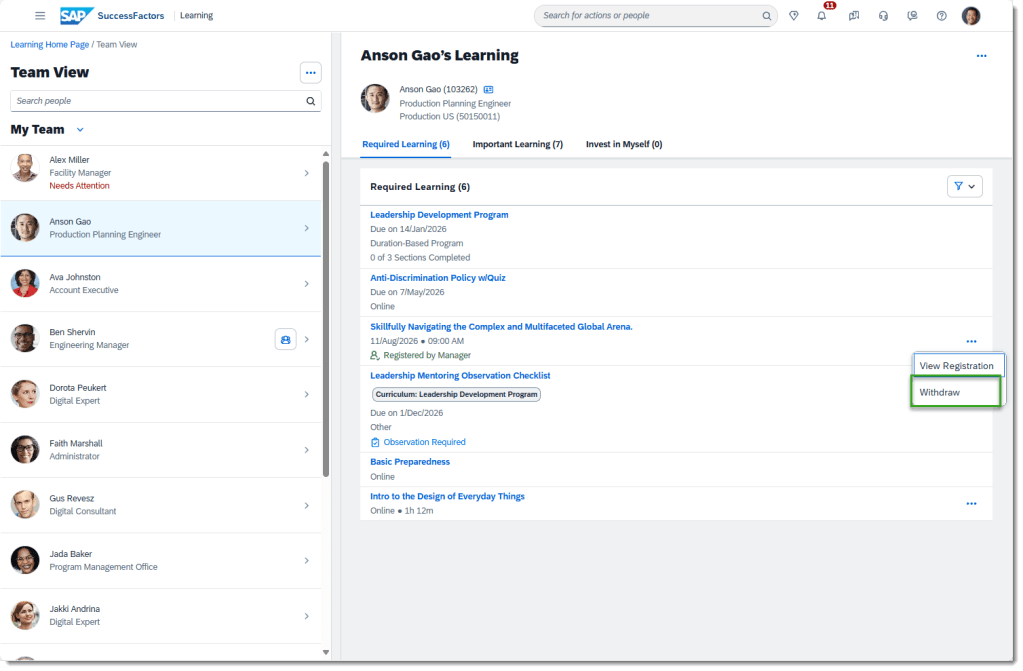
Managers can withdraw learners from classes seamlessly via Team View. Using the More Actions menu or directly on the Class Details page, managers can execute withdrawals without relying on bulk tools, improving flexibility and speed.
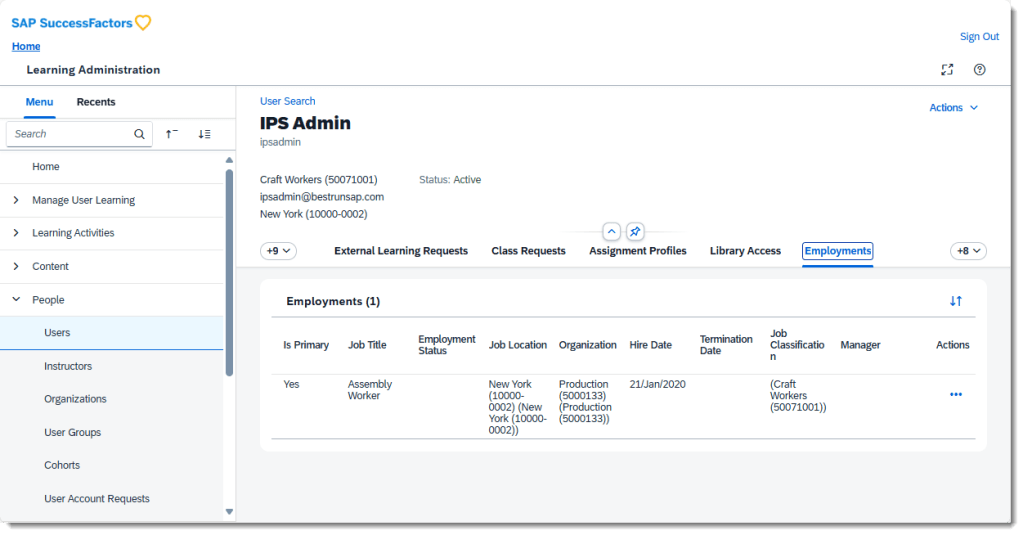
Employments Tab Visibility with System Default Role
The Employments tab is now visible on the User page when using system default roles that include the new View User Employment permission. This supports upcoming person‑centric experience enhancements. (Note: System default roles are for testing only.)
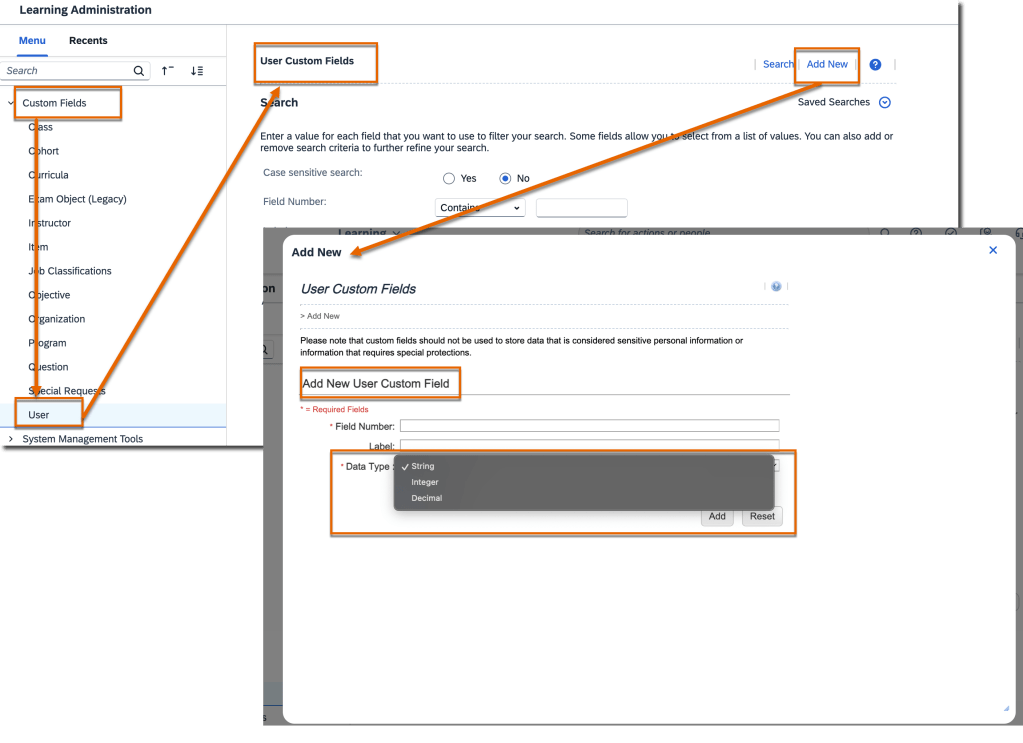
Integer & Decimal Custom Fields for User Entity
Admins can now create integer and decimal custom fields for the User entity, expanding options beyond string fields. These new types support assignment profiles, user search conditions, filters, and reporting—enabling more precise data management and dynamic rule configurations.
Universal Rollout of New Learning Home Page
The modern Learning home page is now mandatory for all customers. The legacy UI and toggle switch are fully retired, ensuring a unified, streamlined experience across all learners. vSaaS customers are excluded in this release and may continue using the toggle when enabled.
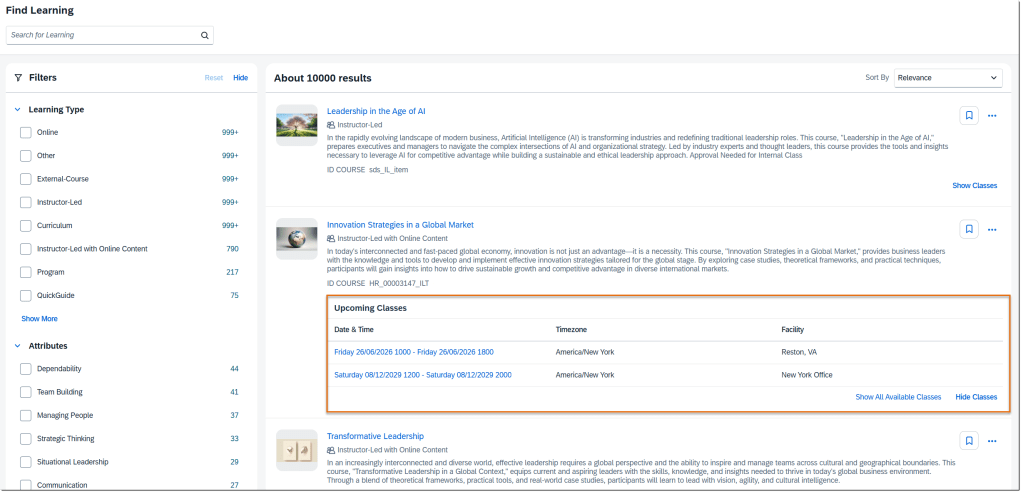
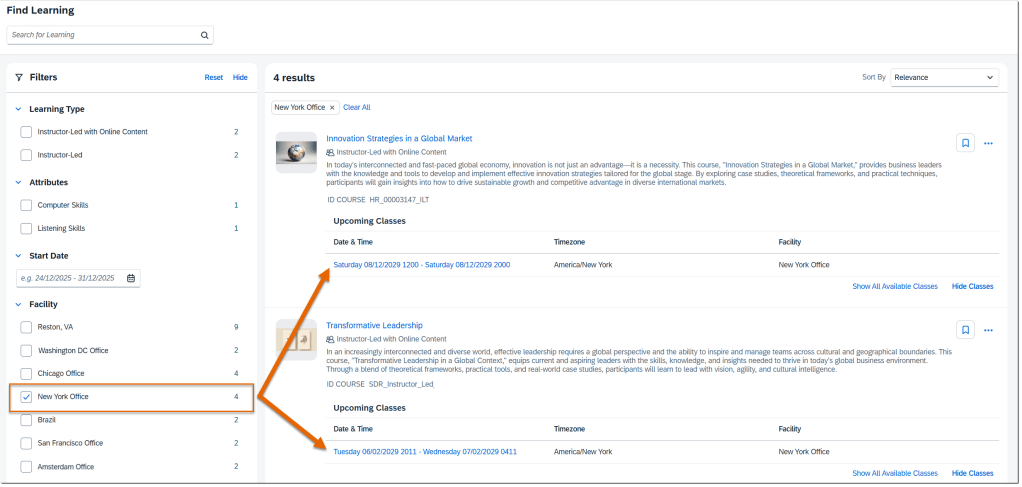
Upcoming Classes in Enhanced Search
Learners can now view and expand upcoming classes directly in enhanced search results. The list shows up to five classes sorted by date, updated dynamically when filters like Facility are applied. This replaces the old calendar view and allows quick comparison of class schedules and locations.
To Learn More
The 2H 2025 release for SAP SuccessFactors Learning includes 18 total enhancements, and this blog highlights only the most impactful updates. To explore the full list of changes—including technical notes, configuration details, and feature nuances—please visit the official release documentation using the link below:
Receive Reminders of Learning Assignments in Microsoft Teams
In Teams, the SAP SuccessFactors app sends adaptive cards to its bot chat on the following occasions:
Employees have learning assignments due in the next 30 days.
Managers have a learning assignment to approve.
On the cards, they can view details about the learning assignment or take quick actions of approving or declining.• Instructors Learning Administrators can make the rest of their necessary currency changes through the Admin UI. Learning objects with currencies that can be updated using the Admin UI, found under Finance: • Prepaid Accounts • Coupons Learning objects with currencies that can be updated using the Admin UI, found under References -> Physical Resources: • Materials • Custom Resources • Equipment • Facilities • Locations.
Learning Integration with Talent Intelligence Hub
A new automatic process job, Attributes Synchronization is scheduled to run daily to synchronize attributes from Talent Intelligence Hub to SAP SuccessFactors Learning. You can change this default schedule period only after the integration is complete.
Existing Capabilities Synchronization and Competency Connector – SF are disabled, and you can’t schedule recurring jobs.
You can use the new entity, Attributes from the Learning Activities menu to view the synced attributes and its associations.
In the Talent Intelligence Hub integrated tenant, the legacy Competencies entity doesn’t appear in the menu by default. However, if necessary you can edit the visibility of this entity.
You can refine your search using the new search field, Attributes on the items, programs, and tasks search pages.
If the proficiency rating scale isn’t configured in Center of Capabilities, rating in SAP SuccessFactors Learning receives a default five-point proficiency level scale. This configuration applies only to customers who are migrating from Center of Capabilities. The default proficiency level scale is configurable. However, you can’t modify this scale after you enable Growth Portfolio in your tenant.
Role-Based Permission Prerequisites
You have the Edit Competency and View Competency permissions to access the Attributes page.
You have the Edit Attributes Synchronization automatic process permission to access the Attributes Synchronization page.
You have the Search Security Domain permission to modify the security domain of the Attributes Synchronization job and the Edit Competency and View Competency permissions to run the job.
What’s Changed
How It Looks Now
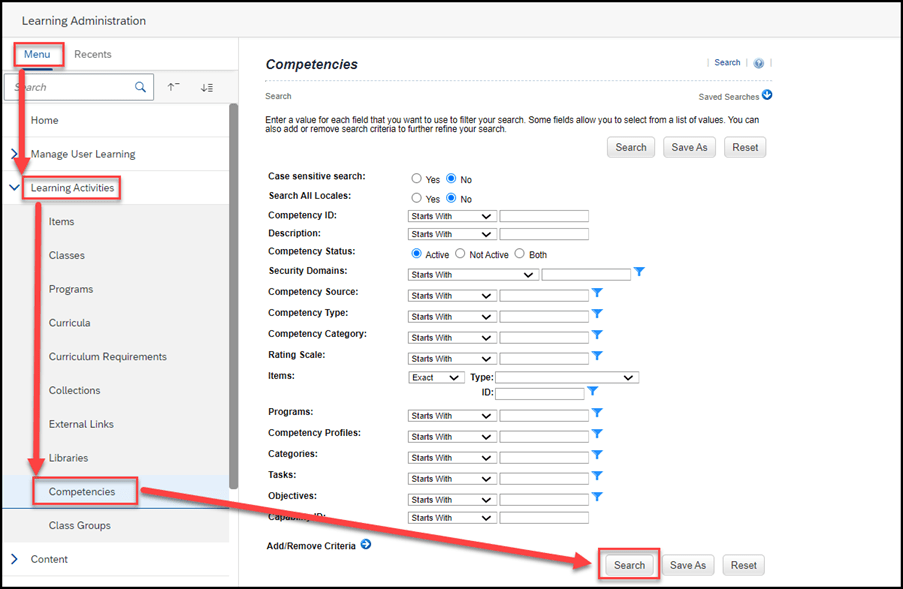
In an integrated tenant, the Learning Activities menu includes a new entity, Attributes.
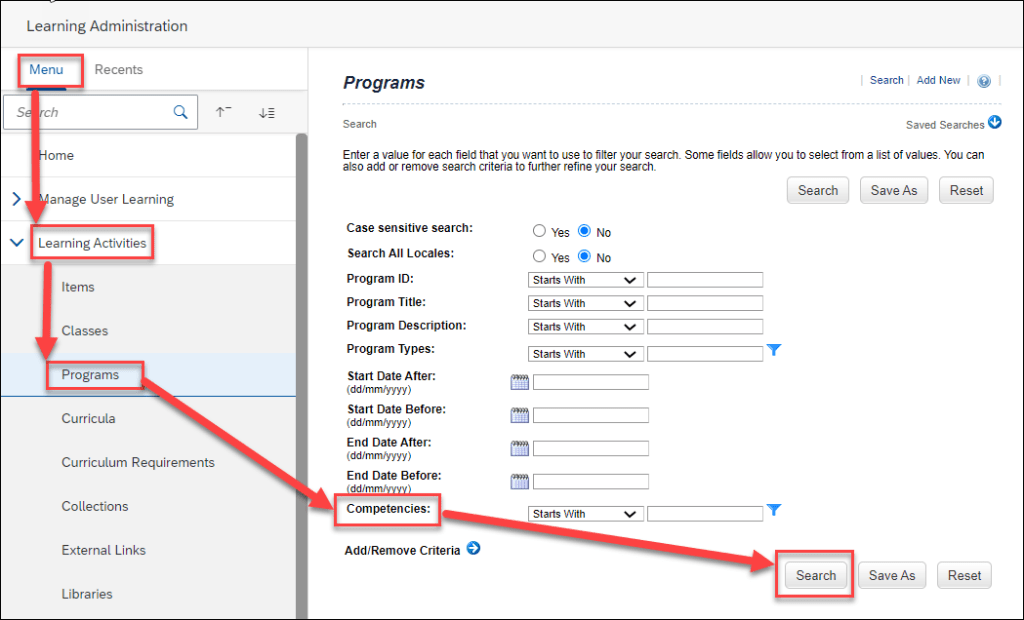
In an integrated tenant, a new search field, Attributes appears on the items, tasks, and programs search pages. We included only the program search page in this section.
How It Looked Before
In a preintegrated tenant, the Learning Activities menu had the Competencies entity.
In a preintegrated tenant, the Competencies field appeared on the items, programs, and tasks search pages. We included only the program search page in this section.
Enhanced Course Home
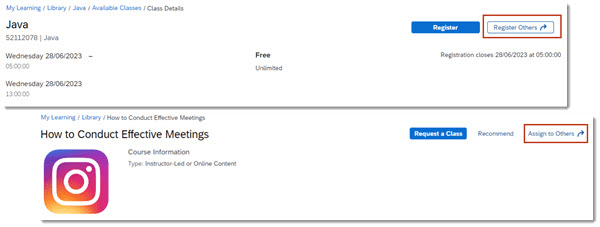
Managers can use the Register Others action on the Class Details page to register their employees for a class and they can use the Assign to Others action on the Item Details page to assign an item to their employees.
Managers can view Program details and Curricula requirements on the employee’s view. Viewing Item Details isn’t available to managers from the employee’s view.
Users can add a comment to the approver when submitting an approval request for a course that has an associated price.
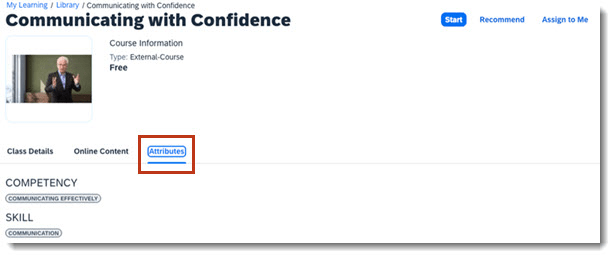
Administrators can associate attributes with items. Users will see a terminology change in the Course Home experience, the Competencies tab name is now updated to Attributes for all users. A link to details on this terminology change is provided in the Related Information section at the bottom of this page.
Users can edit Special Requests for a class registration until the registration closing date, or until the start date of the class if a registration closing date wasn’t defined.
Administrators can configure instructional messages that display when users register for a course that has a price.
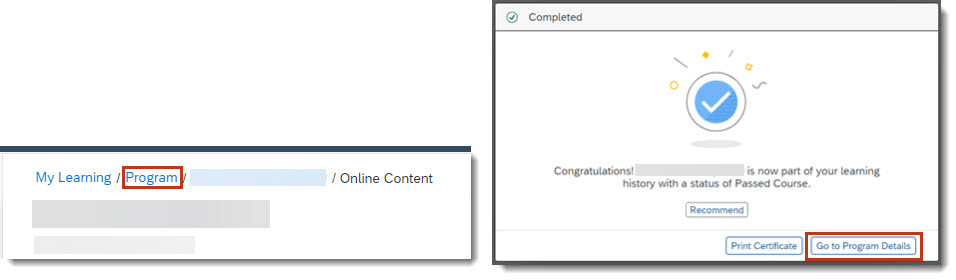
When a user launches a course from a program, they’re returned to the Program Details page after completing or closing the item. They can also navigate back to the program at any time by using the navigation at the top of the page. Users see Program instead of Library and can select the link to return to the Program Details page.
If a user chooses the Disagree option when viewing AICC content, a message displays to inform them that they won’t receive credit and provides the option to cancel and make a different selection or to continue and not receive credit.
Removal of Free-Form Email Sender From Send Email Notification
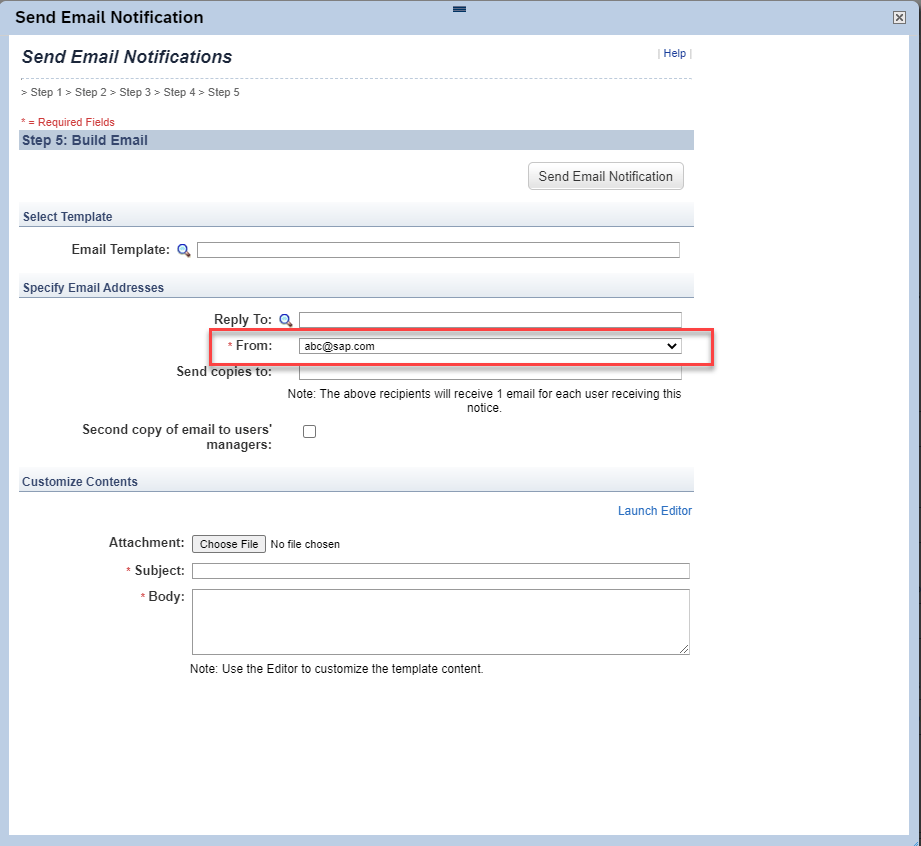
We’ve removed the Free-form option from the Send email notification from field for the Send Email Notification Tool on the Application Administration page. If your environment was configured to use the Free-form option, it has been updated to the default Admin option. As a result of this change, administrators can no longer enter an ad hoc email address in the From field of the Send Email Notification page.
For the Send Email Notification Tool, the Free-form sender option has been removed from Learning AdministrationSystem AdministrationConfigurationGlobal Application SettingsMail.
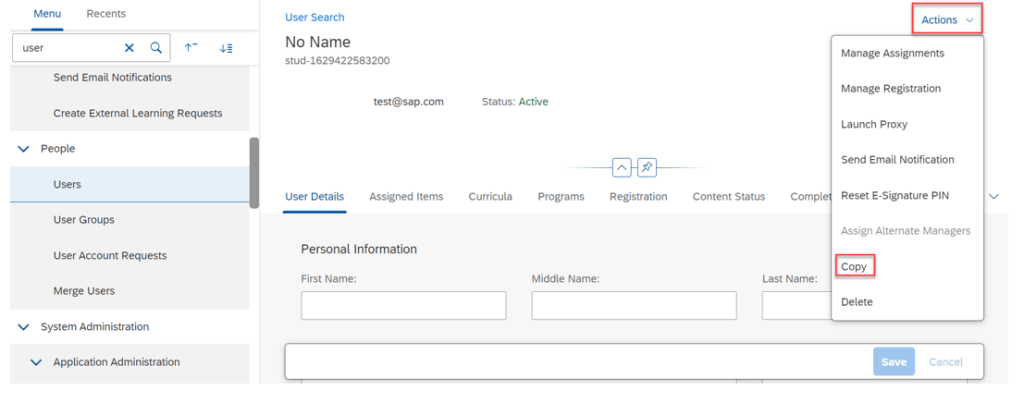
As a result of this change, you can no longer enter an ad hoc email address in the From field of the Send Email Notifications page. You can access this page from several places in the application, for example: Learning AdministrationPeopleUsersActionsSend Email Notification.
We’ve removed the ability for administrators to send email notifications from ad hoc email addresses to enhance system security.
Unsupported Platform Native Logins Warning and Report
We added a monthly warning message for administrators that appears when a platform user native login has occurred during the last thirty days. To help identify platform user native logins, we also added the ability to download the Unsupported Platform Native Logins Report from the Environment page in SuccessFactors Learning.
The warning message (outlined in red below) now appears to administrators monthly upon login if a platform user native login has occurred during the last thirty days. The new warning will appear in addition to the Native Login Deprecation warning if applicable.
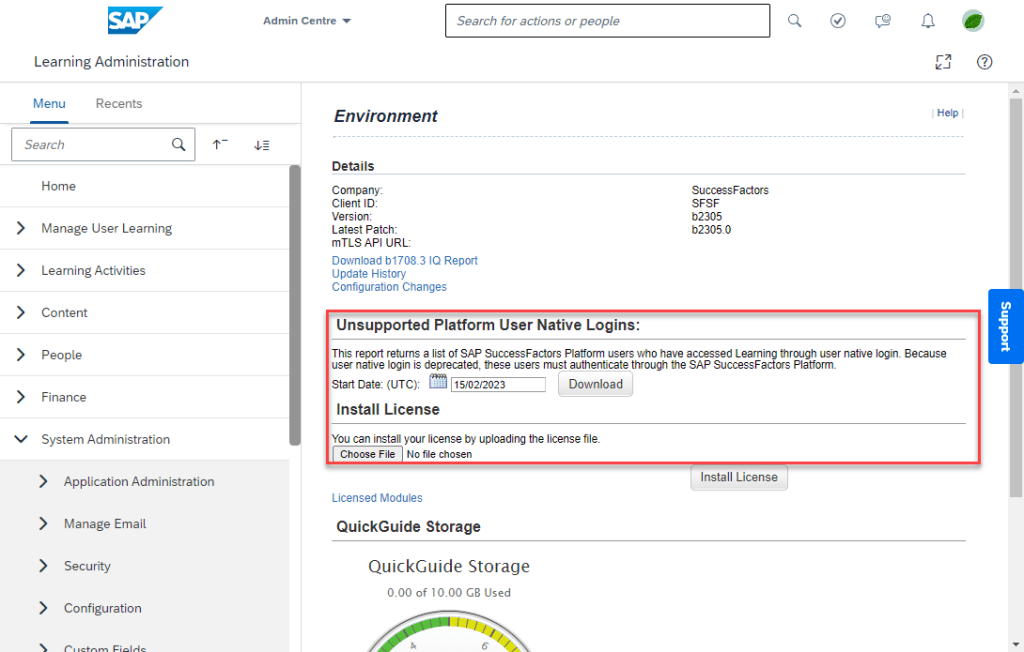
To help identify native logins, we’ve added the Unsupported Platform Native Logins Report, which returns a list of Platform users who have accessed Learning through Native Login. You can download this report from System AdministrationEnvironmentDownloadUnsupported Platform Native Logins.
We added the Unsupported Platform Native Logins Report and warning message so you can identify users who are authenticating through native login instead of Platform.
Audit Information For Assessments
We’ve added audit information for user-taken assessments. You can now create change audit reports that include create, update, and delete audit information for the following:
Quizzes
Quiz Answer Choices
Quiz Questions
Quiz Objectives
Exam Settings
We’ve added audit information for assessments to meet compliance requirements for our customers.
Deprecation of Copy User
Deprecation Details
The Copy User menu item will be removed from the following page: Learning AdministrationPeopleUsersActionsCopy.
The copy user functionality will be deprecated because it is an artifact of Plateau products and does not work correctly in SAP SuccessFactors Learning.
Webex Meeting Center REST API Support for Virtual Learning
SAP SuccessFactors Learning now supports REST APIs for Webex Meeting Center. We also now support Webex Control Hub.
Webex has deprecated their XML-based API solution for Webex Meeting Center. We delivered these features in order to continue providing virtual learning capabilities for our customers who use Webex as a VLS vendor.
Configuration Requirements
You have enabled the vleEnabled setting(Learning AdministrationSystem AdministrationConfigurationSystem ConfigurationLMS_ADMINvleEnabled=true).
You have downloaded the webex_rest configuration file in Support Downloads.
With this update, your existing Webex configuration file can no longer be used for virtual learning sessions where Webex Meeting Center is the vendor. In order to continue using Webex Meeting Center, you must create a new VLS configuration file in Learning (System AdministrationConfiguration VLS Configuration).
Purge Data of Integrated External Learners from HXM Suite
You can now purge data of all integrated external learners from HXM Suite using the Upgrade Center after the migration to SAP Cloud Platform Identity Authentication Service (IAS) is complete.
If you perform the Purge Integrated External Learners upgrade from Upgrade Center, all integrated external learners and their associated data are permanently removed from the system and cannot be recovered.
Here is a screenshot where you can perform the upgrade.
We provided this upgrade so that customers can run a full purge of all integrated external learners data.
To Learn More
Overall there are 35 items being changed or enhanced in this release for LMS and we didn’t cover every detail here. For more information, What’s New Viewer here.
New minor & major updates in Admin Opt-in Configuration Type
Country Currency Changed to EURO for Croatia
The local currency in Croatia, HRK (Croatian Kuna) will be changed to the euro on January 1, 2023.
Learning Administrators can use various tools to update data due to currency changeover:
Learning connectors
Import Data tool
Admin UI SAP SuccessFactors Learning connectors will enable Learning Administrators to update their data to reflect currency changes
Learning objects with currencies that can be updated using the import tool: • Instructors Learning Administrators can make the rest of their necessary currency changes through the Admin UI. Learning objects with currencies that can be updated using the Admin UI, found under Finance: • Prepaid Accounts • Coupons Learning objects with currencies that can be updated using the Admin UI, found under References -> Physical Resources: • Materials • Custom Resources • Equipment • Facilities • Locations.
Enhanced Course Home
The new Course Home experience now supports items with a classification of Other, such as task checklists. In addition, the following features are supported for all applicable item classifications:
Jam integration
Selection of missing approvers when registering
We also updated behavior for previously released item classifications. For instructor-led training, the class details now display the timezone. For online courses that are launched in a new window, the Refresh after done button no longer displays.
The complete list of supported features by item classification is available on the SAP SuccessFactors Learning Course Home page. A link is provided in the Related Information section at the bottom of this page.
The remaining features required to achieve parity are as follows:
Government reporting
Users with an external shopping cart
Associated competencies
Manager view
Approval comments when registering for a class
If you don’t use one of those features, the new Course Home experience is considered to have parity.
We’re continuing to add functionality to the new Course Home experience because our customers have asked for an updated user experience.
In the current version, setting enableCourseHomeBlended=true provides the new Course Home experience for external courses, online courses, instructor-led training, courses that are instructor-led with online content (blended), and items with a classification of Other. The enableCourseHome setting is no longer available.
Certificate-Based Authentication for Learning APIs (Inbound mTLS)
In order to support this change the security certificate now displays for Technical Adminstrators on the System Administration > Security > Adminstrators > Certificate tab. The certificate information displayed here is only used for SAP Cloud Identity Services API based integrations.
We also added the Learning URL for mTLS communication to the System Administration > Environment page.
We provided certificate-based authentication to support a more secure method for our API integrations.
Custom Field in User Profile for Alternate Microsoft Azure Email Address
Administrators can now add an alternate Microsoft Azure email address to a custom field in the user profile.
We configured the custom fields in user profiles so they now recognize an alternate Microsoft Azure email address. This enhancement ensures attendance is properly processed for virtual time slots where Microsoft Teams is the vendor.
Configuration Requirements
If users have an alternate email address in Microsoft Azure, administrators must provide it in the user profile for Microsoft Teams virtual time slot attendance to be properly processed. You don’t need to provide any additional information if the user’s Microsoft Azure email address matches the one in their SuccessFactors Learning user profile.
You can add an alternate Microsoft Azure email address to any unused custom field in the user profile, but you must use the same custom field in every user profile (Learning AdministrationUsersCustom Fields). For example, if you designate custom field number 10 for one user’s Microsoft Azure email address, you must also use custom field number 10 for the same purpose in all other user profiles.
You need to specify which custom field contains the alternate email address in the VLS configuration for Microsoft Teams (Learning AdministrationSystem AdministrationConfigurationVLS Configuration).
Enhanced Qualtrics Feedback Opportunity for Learning Assignment Completion
In addition to the User ID field , the Learning integration now sends data from the following fields to Qualtrics.
In the current version, Intelligent Services Center automatically submits additional data from Learning to Qualtrics that includes fields such as completion status (to indicate whether the learner passed or failed an assignment). It also sends the Learning Item ID, which allows admins to create surveys for specific courses.
Email Survey Settings for Learning
This integration sends email to employees to obtain feedback through a Qualtrics survey when they complete an assignment in SAP SuccessFactors Learning.
Qualtrics Email Feedback for Learning Completion
Configure SAP SuccessFactors Learning and Intelligent Services to send employee information to Qualtrics, so that you can send employees surveys in email to find out how they feel a Learning assignment they just completed.
Creating this integration requires:
SAP SuccessFactors Learning.
A Qualtrics account that includes a Employee Experience license for Lifecycle projects.
Enabling Intelligent Services.
Enabling Integration Service Registration Center.
You use your Qualtrics account to create surveys and view their results. All the settings to configure the contents and schedule for the email survey are performed in Qualtrics.
To add Qualtrics feedback opportunities, enable and integrate Qualtrics with your SAP SuccessFactors system. Refer to Integrating SAP SuccessFactors with Qualtrics for details.
New minor & major updates in Universal Configuration Type
SuccessFactors Platform Token Server Support for Public Learning APIs
Learning-only users authenticated by Identity Authentication can now use the SuccessFactors platform token server to validate authentication for public APIs.
This enhancement improves API support by enabling user migration from the SuccessFactors Learning token server to the platform token server.
Requesting an Access Token
With a SAML assertion, you can now call API /oauth/token to request an access token for authentication with the API server.
If both instance-level and user-level IP restrictions are set, a user can access these APIs if either condition is met.
The API returns the token type, expiration time in seconds, and the token value you can use to authorize API requests. An access token expires in 24 hours after it’s generated.
Automatic Updates for Learning Assignments and Approvals on the Latest Home Page
Whenever you change the successFactorsLearningEnabled, baseURL, or successFactorsCompanyID settings in the BizX Configuration file, the system triggers a background job to update the learning assignments and learning approvals cards on the latest home page.
If change the integration, the new data may take up to a few hours to update. The cards are updated when the job is completed.
In the current version, when you change the integration, a background job runs automatically to display learning assignments and learning approvals on the latest home page.
Global User ID Display on User Details Page
To have the Global User ID display on the User Details page you need to select the System AdministrationConfigurationEntity ConfigurationSelect EntityUserGlobal User ID checkbox on the Entity Configuration page. This field displays on the User Details page as read-only.
We added the ability to display the Global User ID so you can verify if a user is created in SuccessFactors platform at the same time they are created in Learning.
Learning Integration Status Confirmation
Learning and platform systems are on the same data center. The only exceptions are when the platform tenant is in DC04 and the Learning tenant is in DC08, or when the Learning tenant is a validated tenant.
The existing configuration values on the System Administration > Configuration > System Configuration > BIZX page are valid.
When updating an existing integration, SuccessFactors platform Provisioning has Enable SuccessFactors Learning integration available.
We streamlined the application for clearer usability by enabling you to update the integration configurations in SuccessFactors Learning.
Configuration Requirements
Enable SuccessFactors Learning integration in Provisioning should be enabled only after updating the integration from the Learning Administrator. We added this guardrail to ensure that a currently enabled integration in SuccessFactors platform is not inadvertently changed.
Learning Assessments for Content Packages
You can now select an assessment in the Exam field on the ContentContent PackagesContent TabEdit page. This replaces the legacy exam functionality for content packages that was previously removed. Previous legacy exam associations are preserved, and can be used as a point of reference for new assessment associations.
In SAP SuccessFactors Learning, an assessment is a generic term for measuring users’ understanding or mastery of content. We offer different kinds of assessments for different purposes. When you choose the right assessment, you can do a better job of measuring users’ mastery while doing less work to manage the assessment.
Using Quiz Assessments to Easily Create a Simple Test of Users’ Knowledge
Features of quizzes:
Multiple question types:
True/False
Multiple choice – Single Answer and Multiple Answer
Drag and drop ordering
Fill in the blank (free text)
Translation support with ability for users to take a quiz in their language of preference
Import/Export of quizzes and quiz questions
Feedback to users based on correct/incorrect responses to questions
Pretest and post-test messages for test takers
Reporting on quiz results and usage
Using Exam Assessments to Create Powerful Tests of Users’ Knowledge
Features of Exams:
Exams have all quiz features in terms of support for question types, images, translations, feedback, pretest and posttest messages.
Exam questions are shared among exams. If you create a question in the question library, it can be used in any exam in your system; conversely, exam questions automatically become part of the question library, allowing for centralized question management.
Questions have revisions to keep up with changing standards. For example, if a governing body changes regulations and you need to keep up with the change, you can revise the question to keep pace. We support reporting at the version level.
Question variants test the same knowledge in different ways from user to user (to prevent cheating) or in repeated exam attempts by the same user (to eliminate guessing and ensure learning effectiveness). For example, a question can be asked with a true/false question or with a fill in the blank question.
Objective pools enable testing for specific learning objectives and analyzing learning effectiveness (Kirkpatrick Level 2 Evaluations). For example, you might want to test financial regulations as a whole, but you might also want to know how well users met an ethics objective. This feature, along with variants, enhances the randomization capabilities of exams.
To Learn More
Overall there are 17 items being changed or enhanced in this release for LMS and we didn’t cover every detail here. For more information, What’s New Viewer here.
New major updates in Admin Opt-in Configuration Type
Stories in People Analytics for SAP SuccessFactors Learning
As a report designer, you can create, access, and share Learning stories in People Analytics for generating custom Learning reports. You can also have the data of SAP SuccessFactors Learning and other modules side-by-side in the same story, and link them to apply common filters on them. Extending the capabilities of Stories in People Analytics to Learning improves the experience of creating Learning reports by making the process intuitive, easy, and technically simple.
Enhanced Course Home for Instructor-Led with Online Content Courses
The Course Home User Experience (UX) includes new behaviors when the feature is enabled for courses that are instructor-led with online content. The following table describes the UX behavior changes when the feature is enabled (enableCourseHomeBlended=true) or disabled (enableCourseHomeBlended=false)
Impact Area
Summary
Behavior with enableCourseHomeBlended=true
Behavior with enableCourseHomeBlended=false
E-Signature
E-Signature pages support the Show Revision Information setting.
When the Show Revision Information setting (System Administration Application Administration User Settings) is disabled, revision information isn’t displayed during history verification through the content player.
Regardless of the Show Revision Information setting, revision information displays to the user during history verification.
E-Signature
No limit to e-signature verification attempts.
The user has unlimited attempts to enter their user name and PIN on the entry page.
After three failed attempts to enter their user name and PIN, the user is forced to leave the page and come back to re-enter their credentials.
E-Signature
Notification of unverified history records.
On a user’s learning plan and within the content player, users are notified if they have any unverified history records. When viewing item details, users are notified if there’s an unverified history record for that course.
On a user’s learning plan, within the content player, and on the item details page, users are notified if they have any unverified history records.
E-Signature
User can view the e-signature approval status.
Users can view the approval steps, approvers, and the status of each step in the approval process when verifying history records.
When verifying history records, approval information and status is provided to users through email notifications.
Online Content
Content structure includes e-signature and required survey.
Separate content items display for e-signature and survey within the content structure.
E-Signature and required surveys aren’t included in the content structure.
Online Content
Document Type content can be configured to launch inline, for specific types of files.
For Document Type content, certain file types can be configured to launch inline, such as PDF or HTML.
For Document Type content, all file types are launched in a new browser window.
Online Content
Revised the conditions that trigger a warning to users if they aren’t launching the current revision of a course.
When users launch an old revision, they’re warned that there’s a new revision and prompted to launch that revision, with three exceptions. The user isn’t warned when:The old revision is a prerequisite to the new revision and the user hasn’t completed that prerequisite.The old revision is required and the new revision isn’t a substitute.The new revision requires registration in order to take the online content and the user hasn’t already registered.
When users launch an old revision, they’re warned that there’s a new revision and prompted to launch that revision.
Online Content
Users can review any content type from history when Users can Review Completed Content from History is enabled (Learning Activities Item Online Content Settings).
Unless the content is locked due to failure, users can launch any content type except assessment from history. The content can be launched in any order and launches inline or in a new window, based on the content object configuration.
Unless the content is locked due to failure, users can launch AICC or SCORM content from history.
Online Content
Users can review or retake content before the course is complete.
In the content player, a user can choose to review completed content or to retake content. Retaking content clears the completion and forces the user to complete the course again. Reviewing has no impact on completion status.
In the content player, a user can choose to retake content. Retaking content clears the completion and forces the user to complete the course again.
Post Completion
Post completion actions aren’t immediately available if a user fails a course.
Upon failure, the user is informed that they didn’t pass and is offered options to retake, if permitted. Additional post-completion actions are available from learning history, based on permissions.
Upon failure, it can be unclear to the user that they didn’t pass. The same post-completion actions are available when users fail as when they pass.
Registration
Improved processing for courses that require approval and have an associated cost.
For courses that are instructor-led with online content, if approval is required before purchase, the user provides account information when requesting approval. When approved, the payment is processed and the user can start the course.
When a course requires approval and has an associated cost, the user first requests approval. After approval, when the user starts the course they’re prompted to provide account information.
Updated Learning Cross-Domain Proxlet
Users can complete courses without issues when using SCORM 1.2 or SCORM 2004 content with the legacy inline content player
New Guided Experience for Employees Returning to Office
Return to Workplace (Employee) is a supplement to the Return to Workplace (Admin) guided experience. When HR or administrators finalize the list of returning employees in the admin guided experience, the selected employees need to complete the employee guided experience, including:
Taking pre-return surveys
Reviewing office readiness
Completing learning courses
Reporting vaccination status (this step is available when configured by the administrator)
New UI Integration Cards
Added the following UI integration cards:
Development Goals: View and update your development goals.
Learning Approval: Manage learning requests pending your approval.
Curricula Status: View the overall status of learning curricula assigned to you.
Vaccination Status: Track the current status of employee vaccination.
NEW MAJOR UPDATES IN Universal CONFIGURATION TYPE
Additional Language Support for Personalized Recommendations
The newly supported languages are:
Arabic
Simplified Chinese
Hebrew
Hindi
Vietnamese
Thai
Supporting additional languages in recommendations meets the requirements of customers for whom English isn’t the primary language.
Assignment Profile Enhancements
We no longer support adding or viewing 2000 attributes values. We also now support comma separated values and line breaks.
Curricula Jobs Scheduling Independent of onlineOperationMaxRecordsCount Configuration
Curricula jobs run now system-controlled, All other jobs continue to be governed by the onlineOperationMaxRecordsCount configuration. This change improves the system performance with optimum usage of resources.
New Session Timeout Behavior in SAP SuccessFactors Learning
SAP SuccessFactors Learning session timeout is aligned with the timeout behavior of SAP SuccessFactors platform
Updated Processing Logic for User Connector
if the user record has changes only to the Manager, then such records aren’t considered for processing. In such cases, the Manager changes are carried out as part of Manager post processing.
There’s an additional row for Managers in the User Connector run report to give a count of the Manager changes.
Item Connector Support for Assessments
The item connector Module Type field now contains the following option: Assessment (Exam and quiz).
We wanted customers to be able to associate several exams and quizzes to items in a single action. This functionality helps with the transition from the Plateau Question Editor (PQE) to the assessments module.
Migrate Legacy Exams to Assessments
You can now export legacy (PQE) exams to a Microsoft Excel template, which you can then import as learning assessments. You may export and import multiple exams at once using the same template. The exams appear as assessments in the locale that you choose during export.
The System Administration > System Management Tools > Export Data > Record Type field now contains the following option: Exam (Legacy). You can import the exam using System Administration > System Management Tools > Import Data > Record Type > Exam.
Removal of Certain Permissions for Legacy Exams and Future Association to Items
The following permissions are no longer available:
Add Exam Object (Legacy)
Copy Exam Object (Legacy)
Add Question
Copy Question
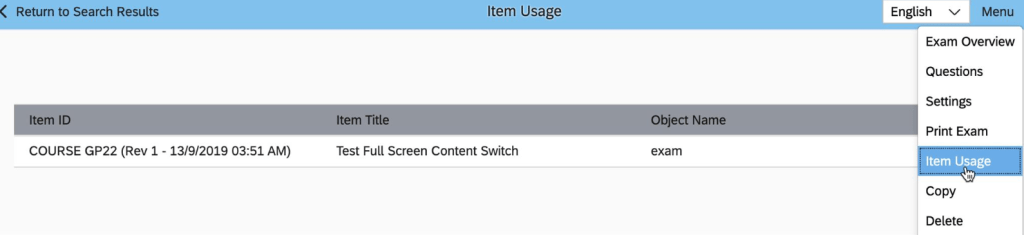
The Edit action for legacy exams on the Item Usage page is no longer available.
Viewing Items Associated to Assessments from the Assessments Menu
Added the Item Usage menu item on the Assessments page so you can see the items associated with an assessment.
Select the Item Classification While Creating New Items
You can now select an item classification when you create a new item.The following classifications are available:
Online
Instructor-led
Instructor-led with online content
Other
When you select Instructor-led, after the item is created the Agenda Template tab displays. When you select Online or Online with Instructor-led, the Online Content tab displays so you can add content. When you select Instructor-led, after the item is created, you’ll be taken to the Agenda Template tab. When you select Online or Online with Instructor-led, you’ll be taken to the Online Content tab to add content.
Right-to-Left Support in SAP SuccessFactors Learning Administration
Languages with RTL writing system are supported in the SAP SuccessFactors Learning Administration UI.
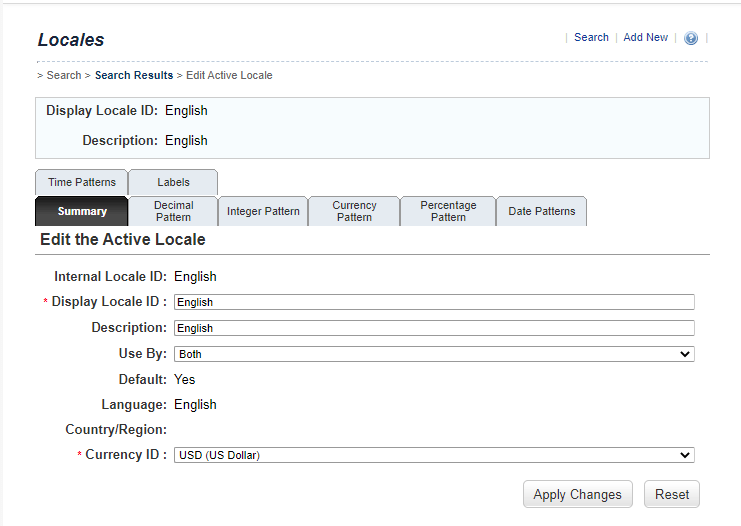
Support for Display Locale ID
You can now define a Display Locale ID on the Locale page to display a different locale value in the application. The Internal Locale ID remains unchanged and continues to be used for Data Import, Connector, and API tasks.
The Learning Administration References Manage Labels Locales Summary tab now contains the following fields: Display Locale ID and Internal Locale ID.
Content Security Policy Header Support
If the new content security policy header causes desired items to be blocked, you can navigate to System Administration Configuration System Configuration Web Security to exclude file types from the security policy.
The content security policy header is included on all outgoing network page responses
To Learn More
Overall there are 35 items being changed or enhanced in this release for LMS and we didn’t cover every detail here. For more information, check out the What’s New Viewer here.
New major updates in Admin Opt-in Configuration Type
Reply-To Email Address Change Option
New Reply-To email address field, which lets you enter an e-mail address different from the administrator and user e-mail addresses. It is populated based on the data configured in the Application Notification Admin Email, or the Application Notification User Email fields.
Support for IAS Identity Management
IAS Identity Management authentication is in limited availability, only to customers who sign up for the early adopter program. Native logon, and BizX platform authentication for external users will be migrated to IAS authentication in upcoming releases.
Course Home Redesign for Blended Content
Blended content for course home is enabled by selecting Admin System Administration Configuration System Configuration LMS Admin EnableCourseHomeBlended=true
NEW MAJOR UPDATES IN Universal CONFIGURATION TYPE
Language Support for Personalized Recommendations
The newly supported languages are:
Bulgarian
Catalan
Croatian
Danish
Finnish
Greek
Hungarian
Italian
Japanese
Korean
Malay
Norwegian
Polish
Romanian
Serbian
Slovak
Slovenian
Swedish
Turkish
Ukrainian
Supporting additional languages in recommendations meets the requirements of customers for whom English isn’t the primary language. This leads to a better adoption of Learning as well.
Add New Items
Add New for learning items has been incorporated in the new UI along with improved user experience and brings parity between the functionalities of the old UI and the new one.
Some of its highlights are:
All the fields in Add New of Items including custom fields reflect the settings done in Entity Configuration.
The settings done in User Settings reflect in the New Item page.
All the required data are validated before the item is created.
The Revision Number field can accept values that are up to 90 characters long.
Virus Scan for .zip Connector Files
.zip connector files are scanned for viruses before they’re processed and file will be rejected or delete if a virus is detected and it is the security enhancement feature.
Sensitive Data Safeguards
Currently, if custom fields are mapped to SPD fields in SAP SuccessFactors Learning, a designated administrator or group of administrators are notified. And when the SAP SuccessFactors User Connector or User Sync is run, no new data is saved, and the existing data is deleted after seven days.
Limit for Maximum Report Runtime
Maximum time for a report to run has been set to 24 hours. By setting a limit, customers can fairly use their reporting resources. The selected values enable reports to run for a definite amount of time and to block reports that can cause system instability, or waste system resources by running indefinitely.
Enhanced Security for Plateau Report Designer
Users can access PRD from Learning Administration in Admin Center of SAP SuccessFactors, and generate a new password to log in to the tool.
Printed Exams in Assessments
Administrators can select Menu Print Exam to configure assessments for printing, so that the student can be administered the exam in hard copy format, and their scores can be entered manually by the administrator using the scoring interface.
Multiple Contents for Imported Open Content Network Course
The OCN Synchronization is an existing job that periodically updates OCN courses with newly added content. Once the course is updated, the ReassignOCNCourseItemToStudentApmJob runs and assigns the new content to the learners of the course. The system notifies the learners through email about the assignment of newly added content. Multiple contents can be added to an OCN course and these contents are automatically assigned to the assigned learners of the OCN course.
Removal of Flash-Based Administration User Interface
Adobe Flash-based administration user interface is no longer available and administrator experience offered by the SAP Fiori interface is now consistant with the rest of the SAP SuccessFactors product suite.
To Learn More
Overall there are 34 items being changed or enhanced in this release for LMS and we didn’t cover every detail here. For more information, check out the What’s New Viewer here.











 Worklogix Blog