On October 9, 2021, SAP released documentation for the H2 2021 release. Preview release is October 15 and production is November 19. In this article we take a quick look at the latest updates for SAP SuccessFactors Platform. It’s a huge list for Platform this release – so we’ve tried to summarize the most interesting items. You can view the full set of documentation in the What’s New Viewer here. For full details on the release cycle, check out the SAP SuccessFactors official product updates blog here. Let’s get started! We’ve categorized the enhancements below for you starting with the most compelling in our opinion!
Of Special Interest
What stood out to me as the most interesting part of this release is the introduction of a Digital Assistant! As with most digital assistants, the feature is basically a natural language processing program that appears in the form of a chat window. Right now SAP is reporting they have over 250 scenarios programmed on the web version and over 20 on the mobile app. This feature is currently only available to early adopters.
The Center of Capabilities continues to expand its functionality. There is now a proficiency rating scale available that allows you to quantify the skill level of employees in the skills within the Center of Capabilities. There are also a new Center of Capabilities Library Reports for Stories in People Analytics.
There have also been some general UI Enhancements to the center of capabilities functionality overall. In addition, the capabilities portfolio is now available which is the main experience that shows the list of capabilities for a worker.
In addition, there are a lot more Quick Actions available on the latest homepage. For example, there is a My Team quick action for managers to review info and take actions on their team members. Clock Time lets you clock in and out. Complete Payroll tasks, Delegate Workflows, My Profile, Org Chart, View Admin Alerts, and View Team Absences all pretty much do exactly what you would expect them to do as well. You can check out the full details here: https://help.sap.com/doc/62fddbd651204629b46bbccbabf886ba/cloud/en-US/f6d92d1c4a834f29b8b1998c7b845d1b.html
Also the header page now conforms to Fiori standards. This is always great news to me to see more and more parts of the system align with Fiori – have you notices how much better the web system looks on your mobile phone these days? That’s thanks to Fiori!
If you are still on the V12 Employee Profile, its time to move to the latest employee profile! This functionality is finally deleted.
Security
Certificate-Based authentication is now supported for standard third party integration packages for Boomi and CPI. My sources inside SAP tell me that certificate-based authentication will be the preferred method of authentication going forward for interfaces in general. Aligned to this, SAP also announced the depication of HTTP Basic Authentication for APIs. End of maintenance is November 19, 2021 and deletion will be November 1, 2022! Get your certificates ready!
You can also now Restrict API Access to Specific Users through OAuth 2.0. Additionally, you can now restrictindividual user’s login to specific IP addresses. These allow for an extra layers of security in your integrations and general user access.
Also of Note
There were also some minor curiosities for me in this batch of platform enhancements that I thought were pretty…pretty good! For example, you can now provide a Zip file for the job that updates employee photos en masse. Before this was a bear for anyone who suffered through putting a bunch of uncompressed photos on an SFTP server and waited for the large data transfer!
There’s also deep linking now available to go straight to someone’s employee profile. I could see this being useful for succession planners or managers talking about employees and wanting to share their profiles.
The employee import email also now includes a new troubleshooting section to help you figure out what went wrong on the import. Nice!
Conclusion
The SAP SuccessFactors product continues to grow and become increasingly more robust! This does not represent all of the enhancements in the H2 2021 release – only the highlights we found most compelling. Check out the What’s New Viewer here for the complete list of enhancements.
See this great article for useful information on how to prepare for a SAP SuccessFactors Regular Release.
As of October 9, 2021, SAP has released their documentation for the H2 2020 release. In this article we take a quick look at the latest updates for SAP SuccessFactors Recruiting. Preview release is October 15 and production is November 19. You can view the full set of documentation in the What’s New Viewer here. For full details on the release cycle, check out the SAP SuccessFactors official product updates blog here. Let’s get started! We’ve categorized the enhancements below for you starting with what is deprecated with this release.
Deprecation of Data Privacy Consent Statement 1.0
Data Privacy Consent Statement 1.0 will reach End of Maintenance on November 19, 2021 and will be deleted on May 20, 2022.
You must replace the Data Privacy Consent Statement 1.0 with Data Privacy Consent Statement 2.0 to avoid confusion because of parallel or competing features.
Marketing Central reached end of development and end of maintence on November 20, 2020 and will be deleted on November 19,2021.
Deprecation Details
The deprecation of Marketing Central includes the end of the ability to post jobs using eQuest, Solique, Broadbean, and a version of Recruiting Posting that was accessible from Marketing Central. The Market Job link that was available on the action menu of the selected job requisition is now called Campaign URL Builder.
Deprecation of Job Classification Data Usage from Foundation Objects
Recruiting will no longer refer to Job Classification data from Foundation Objects.
Deprecation Details
Recruiting will now utilize Job Classification data only from Generic Objects. This deprecation will only impact the customers who hadn’t migrated to Generic Objects in the previous releases. The following pages, which were used only for supporting Job Classification Foundation Objects are removed:
Job Code Export page in Admin Center.
Migrate Job Code Related Picklist page in Provisioning Company Settings Manage Recruiting.
Deprecation of Requisition Reports
The Requisition Reports will reach the end of maintenance on November 19, 2021, and will be deleted on May 20, 2022
Deprecation Details
To avoid identical or competing features, SAP SuccessFactors plan to delete Requisition Reports by consolidating reporting capabilities through the Table Reports or Stories in People Analytics. Unlike the Requisition Reports, which can report on job requisitions alone, the Table Reports or Stories in People Analytics allows you to report across job requisitions, applications, candidates, offers, and other recruiting data. Additionally, you can configure the field-level permissions using the Table Reports or Stories in People Analytics, thus making the reports more secure. Therefore, SAP SuccessFactors is deprecating the Reports tab from the View Reports page:
Support for Country/Region Generic Object in Recruiting
SAP SuccessFactors Recruiting customers must now maintain country/region data in the Country/Region Generic Object. The country/region data is used in the backend processing of the two or three letter country codes in the ISO codes list. There is no UI impact for this feature.
For existing customers,
If you haven’t maintained the country/region data in the Country/Region Generic Object, the data is auto-populated.
If you’ve maintained some or all the country/region information, we aren’t going to add or update any entries. You have to manually add the missing country codes to your instance from the Manage Data page in Admin Center.
For new customers, the country/region data is auto-populated in the Country/Region Generic Object. The data is populated only when the Recruiting , Role-Based Permission, and Enable Generic Objects options are collectively enabled.
Addition of Time Zone Resilient Date Fields
A new version of some date fields (columns) for Table, Tile, Canvas, and Story reports is available, suffixed with either (Timestamp) or (Date).The suffix in the new fields indicates that the fields are resilient to time zone changes. The fields suffixed with (Timestamp) display a transaction date as per the tenant preferred timezone (or as per the logged in user’s timezone), whereas the fields suffixed with (Date) are independent of time zone and always display the same values. To know more about tenant preferred time zone, refer to the Tenant Preferred Time Zone Available in Admin Center topic.
SAP recommends that the older date columns in your Table, Tile, Canvas, and Story reports be replaced with their newer version, which are time zone resilient. Additionally, you must use only the newer version of the date fields in all your future reports.
Tenant Preferred Time Zone Available in Admin Center
Tenant preferred time zone is the server time zone before servers are migrated to the UTC time zone. You can access it in Admin Center Company Settings Platform Feature Settings.Different time zones are used in the system to present date and time information based on business scenarios, including logged in user time zone, browser time zone, tenant preferred time zone, and UTC time zone. In places where server time zone was used, tenant preferred time zone is now used to keep the date and time information unchanged after the server migrates to UTC. However, there are occurrences of date and time information in the system where the behavior changes after the tenant preferred time zone is introduced.
This enhancement is available in the following recruiting area:
Posting start and end date in Job Req Audit trail
Posted on date on career page
Posted date on job listing page
Status Date and Date Applied fields in the Jobs Applied page for External Career Site
Created date and Last modified date for job req status audit and Job requisition.
Career Site Builder Functions Viewer
The Functions Viewer in Career Site Builder lets you see existing functions that may be in your implementation, and delete them. The functions transform strings in SAP SuccessFactors Recruiting job posting data before they’re forwarded to your career site.
By transforming strings, functions address things such as misconfigurations or style changes. If the Functions Viewer page is blank, this means that your implementation partner didn’t create any functions for your career site in the legacy Command Center.
This enhancement now gives the ability to the Career Site Builder administrators access to view all functions for the career site.
These functions continue to replace misconfigured strings. We created the Functions Viewer so that you could fix the original strings that are coming from the source in SAP SuccessFactors Recruiting.
Self-Service Support for Career Site SSL Certificates
Career Site Builder now has a new feature that lets organizations manage their SSL certificates for the public career sites on their production environments, without the need for Product Support assistance.
The SSL Certificates page in Career Site Builder lets organizations generate their own certificate signing requests, and upload and install both initial as well as renewal SSL certificates directly. Beginning on December 1, 2021, Product Support will recommend the use of the SSL Certificates page for organizations that file tickets for SSL certificate requests. Implementation partners can also use this tool to add or renew an SSL certificate for a customer career site through Career Site Builder.
If you use the role-based permissions available within Career Site Builder, you need to enable the “SSL Certificates” permission
Updates to Email Reminder for SSL Certificate Renewals
Career Site Builder administrators get email reminders automatically 90 days before a certificate expires. The content of the email also refers to the new SSL Certificates feature.
If you are currently using job board or planning to in the future. Here are additional job boards in the Job Board Market Place that you can link to the Recruiting Posting interfaces:
SAP SuccessFactors has some exciting new features for your Analytics & Reporting solutions. They can be found in detail here (S-User ID required). Filter on Solutions for Analytics to review all the latest changes. Under the Description for each, you can click on ‘See More’ to see screenshots and detailed information.
As a reminder, preview release was on October 15 and production will be released November 19. For full details on the release cycle, check out the SAP SuccessFactors official product updates blog here. New to the release process? For tips on how to manage a release, check out our blog here.
After reviewing all the changes, we narrowed the list down to the Highlights for H2 2021SAP SuccessFactors Analytics/Reporting Features:
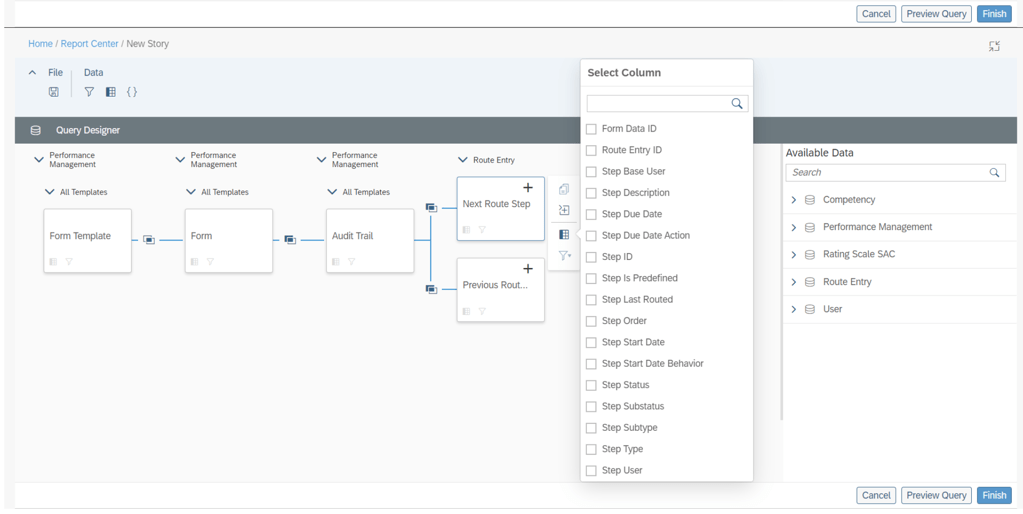
Audit Trail Now Reportable in Stories in People Analytics
Users can now use Stories in People Analytics to report the audit trail records of form completed steps, including step owner and step action.
This new feature allows you to track the routing details of Performance Management forms in a consolidated report.
Additional columns available to report on step details
Increase in the Number of Columns Supported for Learning Queries in Story Reports
The number of columns that you can select while creating a Learning query has been increased from 30 to 120.
You can now create more complex queries due to the increase in number of columns.
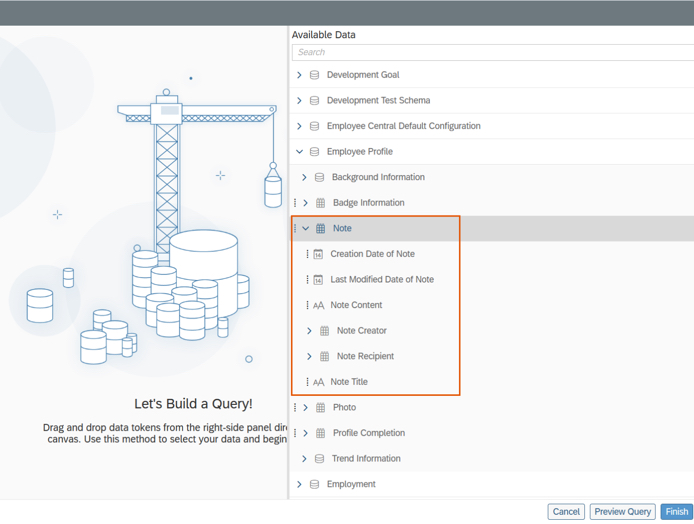
Notes of People Profile Now Reportable in Stories in People Analytics
Users can now use Stories in People Analytics to report the notes of People Profile. Information about notes that can be reported includes:
Note content
Note titles
Note creators
Note recipients
Last modified dates
Creation dates
Notes of People Profile are now reportable
Query Validation for Story Reports
The queries in Story reports are now checked for errors whenever you choose Preview or Finish on the Query Designer page.
The validation checks return a list of missing or erroneous columns, calculations, and filters used in the query.
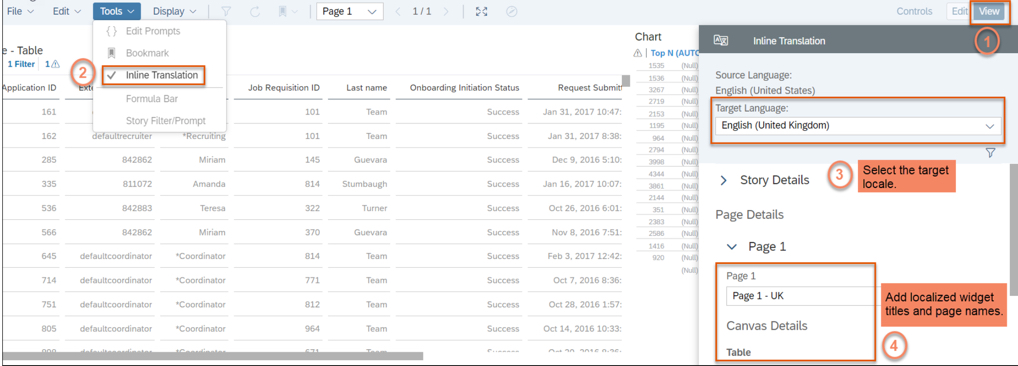
Inline Translation for Story Reports
You can now add localized values for widget titles and page names in Story reports.
Note: After you enable inline translation in a story, you can edit it only in the source language. When you enable inline translation in the story, your current locale becomes the source language for the story.
The ability to add localized widget titles and page names enhances the user experience for Story reports.
The latest release updates are here! In this article we take a quick look at the latest updates for SAP SuccessFactors Onboarding 2.0. Preview release is October 15 and production is November 19. You can view the full set of documentation in the What’s New Viewer here. For full details on the release cycle, check out the SAP SuccessFactors official product updates blog here. Let’s get started! We’ve categorized the enhancements below for you!
Security Enhancements
In the category of security, there’s been an enhancement to proxy where you now have more granular control over whether or not a person who can proxy has access to onboarding. You can select the check box on the Proxy Management screen.
In addition to US I-9, the Canadian TD1form for all provinces is now supported. The New Zealand KS2 KiwiSaver deduction form, Tax code Declaration, and Tax rate notification for contractor forms are now supported.
Qualtrics Integration
SAP continues to further their integrations with Qualtrics across the board. There’s now a new Intelligent Services event to send internal hire information to Qualtrics. This allows you to send email surveys to employees when the internal hire step is completed. There is a new configuration screen that makes this setup easy! It is shown below:
New Hire Enhancements
A few enhancements have been made to the new hire experience. New Hires can now complete the onboarding process on the homepage. There’s new “To Do” tasks that show up for onboarding here for the new hires such as compliance tasks and completing personal data collection.
New hires can also now access LMS courses before their first day of work as shown below!
The complete new hire experience for the home page can now be done on the latest version of the homepage.
Hiring Manager / Admin Enhancements
In addition to new hire experience, the hiring manager and admin experiences have seen some updates as well. Future Managers can also now access information about their new hires in the onboarding dashboard and “To Do” tasks. Role-based permissions also now allow you to assign based on this new future manager relationship.
The Restart process for onboarding has also been enhanced so that you can choose whether or not to retain data or instead reload from recruiting.
General Process Enhancements / Behind The Scenes Enhancements
Behind the scenes, there’s been some other updates as well!
When it comes to picklists, the mapping from recruiting to employee central can be a pain. The system has now been updated to map based on a series of potential exact matches rather than just on labels. First, the system will attempt to map based on the option id since this is the most unique identifier. If no exact match is found, then mapping is performed via label using the external code value. If no external code is available, then the label alone is used.
Also behind the scenes, when a major patch/release is deployed to the system, the default onboarding process in the Business Process Engine is now automatically upgraded. Previously, an admin had to manually upgrade the flow.
The rehire process has also been enhanced to make life easier for admins managing this process. Values such as date of birth, national id, legal entity, and user records can now be seen as shown below:
No shows and rehires are handled better as ell. The value “No Show” has been added as an event reason for cancelling the second rehire check. There is also a new welcome email template specifically designed for rehires.
Conclusion
The SAP SuccessFactors Onboarding product continues to grow and become increasingly more robust! This does not represent all of the enhancements in the H2 2021 release – only the highlights we found most compelling. Check out the What’s New Viewer here for the complete list of enhancements.
See this great article for useful information on how to prepare for a SAP SuccessFactors Regular Release.
For your convenience, we’ve summarized the highlights of what’s new for 2021 Performance Management below.
The updates for Performance Management are primarily targeted for 360 Reviews so we will start with those. The PM form updates will be discussed after these features have been reviewed. Calibration updates can be found in our separate blog here.
What’s New for 360 Forms – Fiori Version
Here are the 10 universal updates made for the Fiori version of 360 forms to provide the same features that are available 360 Reviews v11.
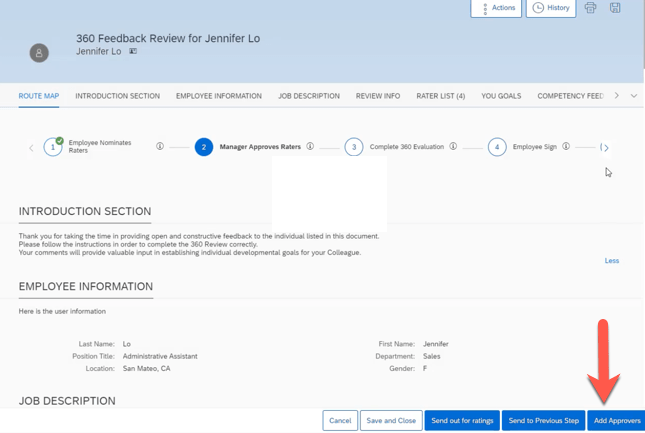
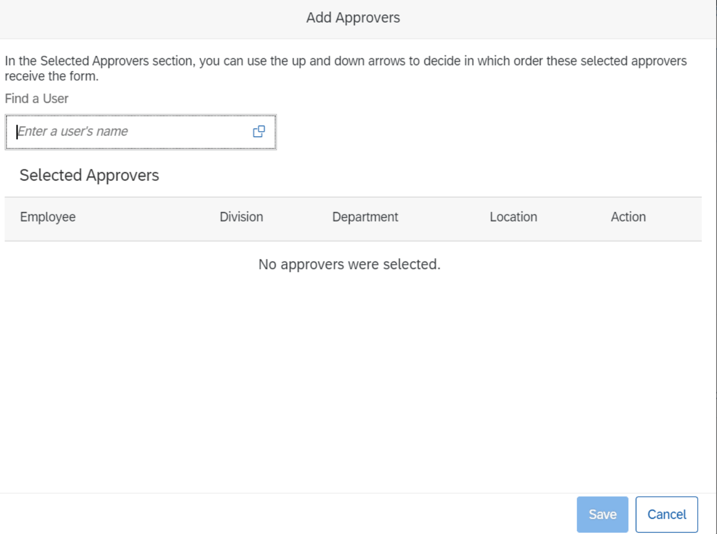
Add Approvers in 360 Reviews
Approvers may now be added in the Modify stage.
Development Goal Section Available in 360 Reviews
A development goal section may be added to a 360 Review form template. These enables employees the opportunity to add and edit development goals.
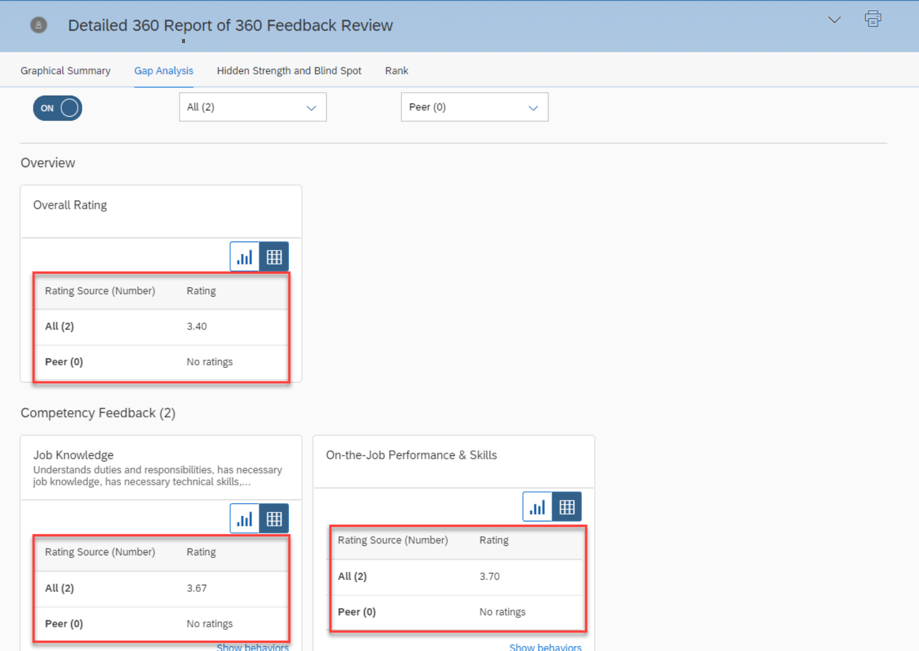
Display a Data Table for a Chart
Within a 360 Executive Review and Detailed 360 Report, a user may select the table icon on a chart to see a data table. This provides text equivalents for non-text content.
Display External Users in Search Results When Adding Participants
It is now possible to add external users as participants without having to disable the system setting Hide External Users from search results.
EZ Rater Available in 360 Reviews
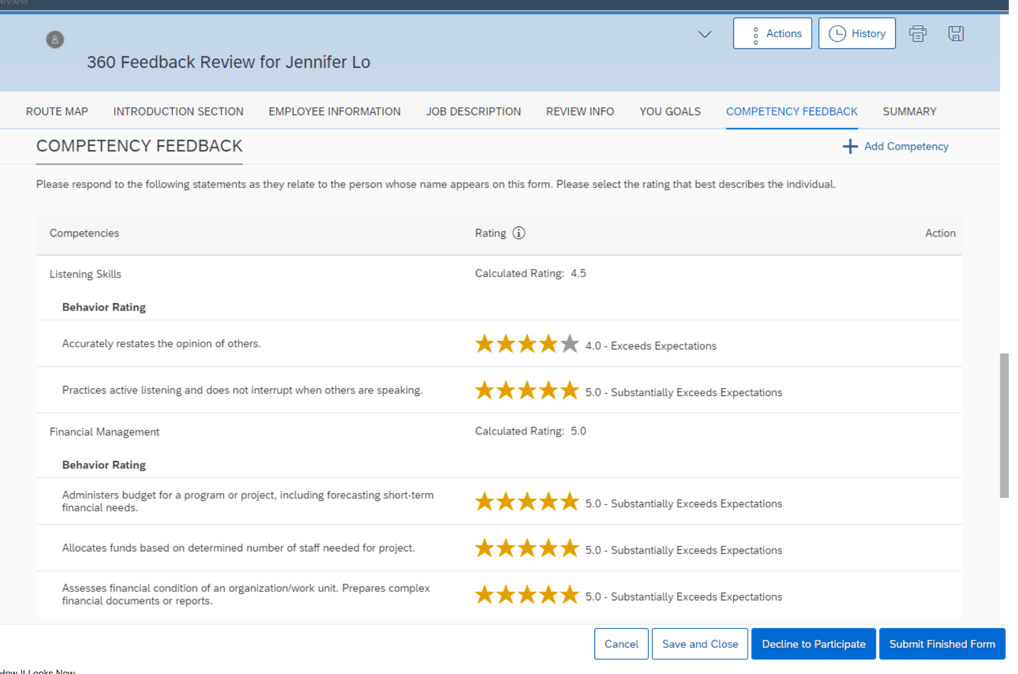
When enabled, the EZ Rater option provides a more condensed list view for rating goal and competencies.
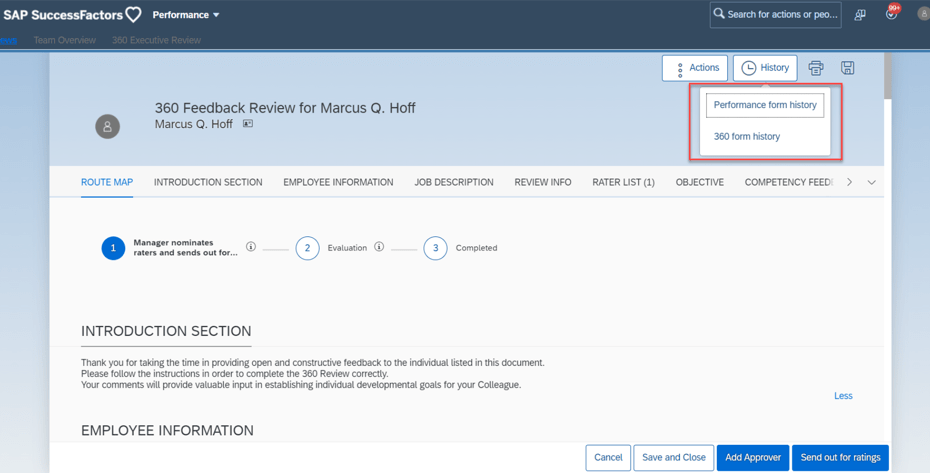
Form History Available in 360 Reviews
Prior performance and 360 forms are now available within a 360 Review. The History button will display options to view either form type if available.
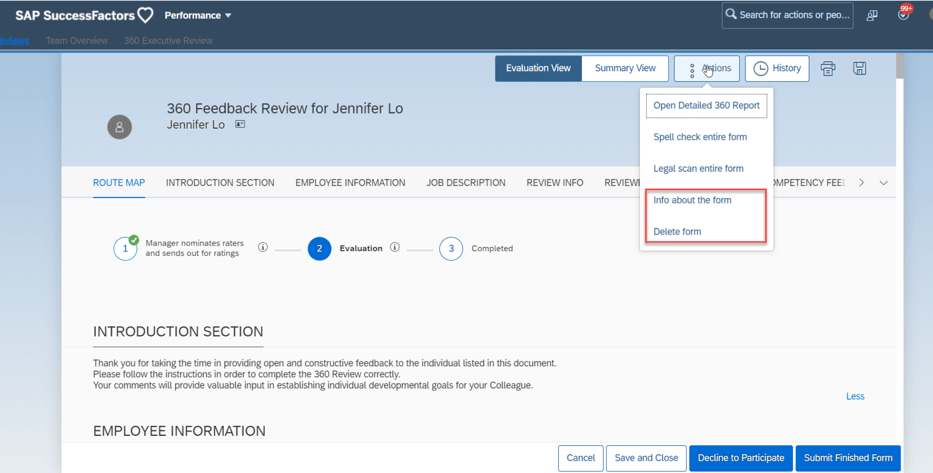
More Form Actions Available in 360 Reviews
Additional action options are now available for 360 forms. Information about the form may be viewed and the form may be deleted.
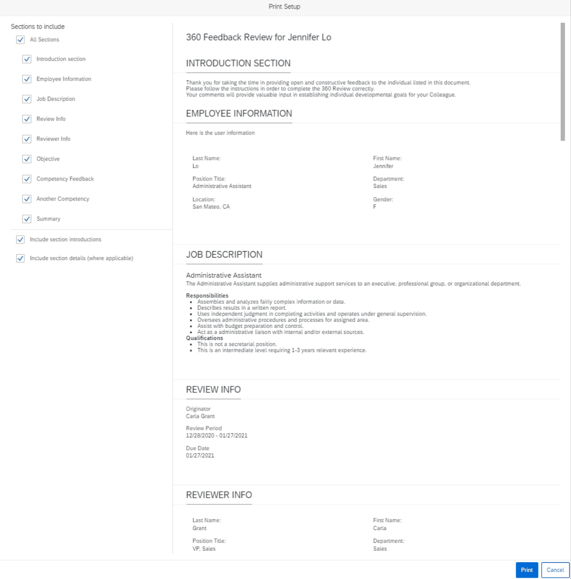
Print Preview Available in 360 Reviews
When the user clicks the Print button, a popup displays a preview of the form. This provides the user the opportunity to select the entire form or selected sections to print.
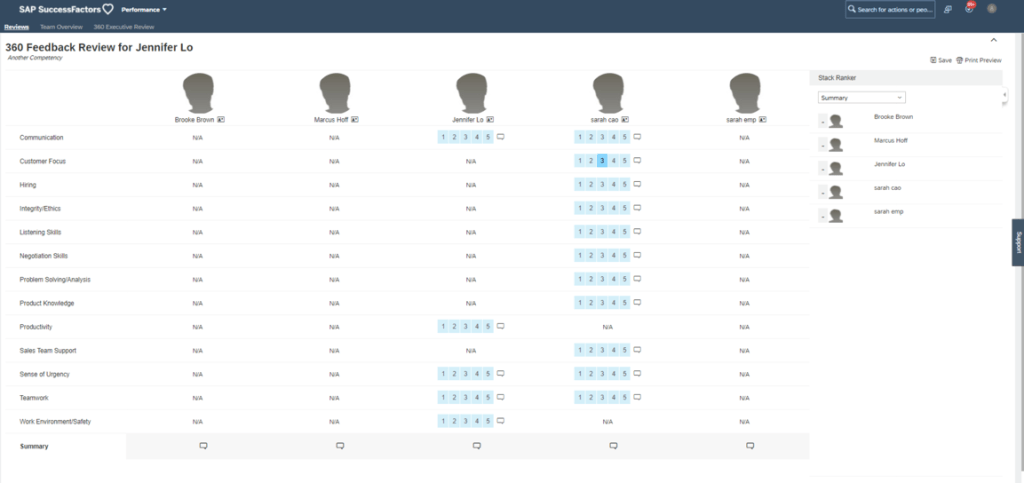
Stack Ranker Available in 360 Reviews
Stack Ranker can be enabled which allows side by side ranking of employee competencies. Ratings may be modified and comments added.
Section Descriptions Fully Displayed by Default
Now section descriptions are fully displayed by default and can be collapsed. Clicking Show Less to hide content. Previously sections were collapsed and the user had to click Show More to see the content.
What’s New for PM Forms
There are 5 universal updates for PM forms.
Customized Weighted Rating Supported in Import Overall Scores
Previously it was only possible to import overall scores into the Objective Competency Summary, and Performance Potential Summary, and Summary sections. The new release enables you to update overall scores for the Customized Weighted Rating section.
On the import file, use <PERFORMANCE> rating in the CSV file. The rating field is also used to update the Summary and Performance Potential section overall rating. If there is more than one PERFORMANCE rating, there is a priority for updating. The section order for uploading from high to low is:
Customized Weighted Rating
Performance Potential Summary
Summary
Deep Link to Performance Management Forms
There is now a deeplink available to access a performance form: /sf/openFormByDocId
New OData V2 API Entity FormCustomizedWeightedRatingSection
There is a new OData V2 API Entity: FormCustomizedWeightedRatingSection. It can be used to get the Customized Weighted Rating section details of a performance form in order to update the manual ratings section of the performance form.
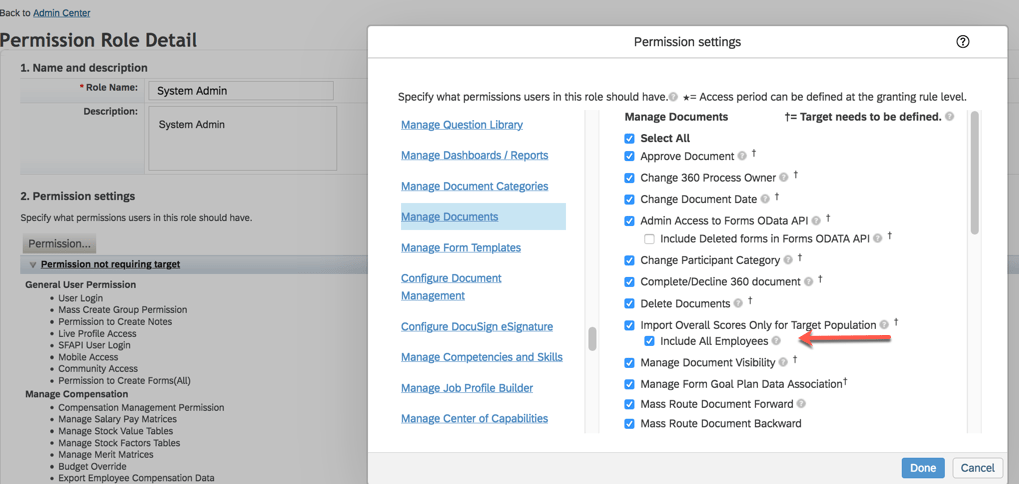
Target Population in Role-Based Permissions for Import Overall Scores
This update pertains to the Customized Weighting Rating import that we just covered. Role based permissions may now be used to restrict users to importing scores for only their target population.
Select a role in Manage Permission Roles. Go to Permission>Administrator Permissions>Manage Document and select “Import Overall Scores Only for Target Population” and “Include All Employees” which allows granted users to update manual overall scores for all employees.
Live Profile Section Deleted
A Live Profile section can no longer be added to PM forms. Information in the existing section is no longer available. A link to People Profile can be used on the form instead.
What’s New in Continuous Performance Management (CPM)
There are some new early adapter features for the latest version of Continuous Performance Management (CPM). They are admin opt-in or opt-out features. We won’t cover these here since the latest version is not widely enabled. When the latest version of CPM is enabled, these email reminder notifications will become obsolete: Conduct 1:1 Meeting, Update Status, along with Activity and Achievement reminder notifications.
The latest version will handle notifications differently since multiple roles can be used and meeting channels can be created. Requests and meeting notifications can be created for anyone in the user’s meeting channel.
We have now covered the highlights of the PM related updates for H1 2021. See our blog for Calibration release features.
Highlights are identified by module and the type of change.
Universal- for modules enabled, universal means no steps are required to have access to the new functionality. These features are automatically made available.
Admin Opt-In – the admin must enable the new feature, usually in Admin Tools
Admin Opt-Out – the admin must disable the new feature, usually in Admin Tools
Provisioning Opt-In and Opt-Out require a Partner or Product Support request
For your convenience, we’ve summarized the highlights of what’s new for 2H 2021 Performance Management below.
Performance Management
There is not much in the way of new functionality, just one universal update.
General Availability – Universal Updates
Configuration Center Support For Performance Management Form Templates
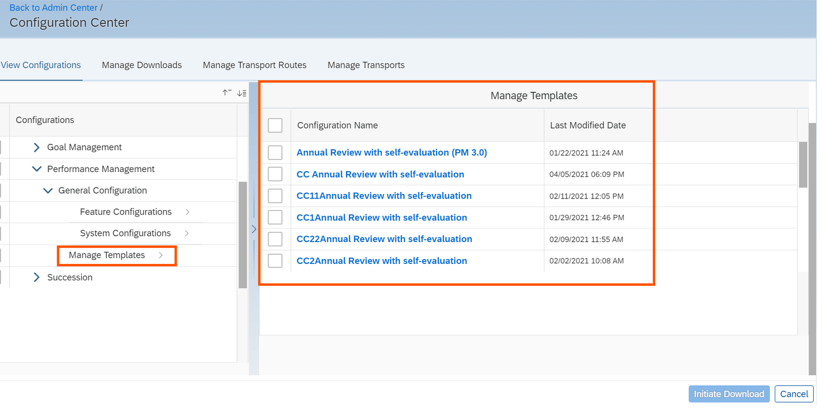
You can now view, download, and transport Performance Management form templates across tenants using Configuration Center. Prior to this release, only Feature Configuration was available under General Configuration for Performance Management. Now System Configuration and Manage Templates are available.
New PM Configuration In Configuration Center
General Availability – Admin Opt-Ins
The admin opt-ins require the latest version of the home page.
PM Related Updates “For You Today” Section of the Latest Home Page
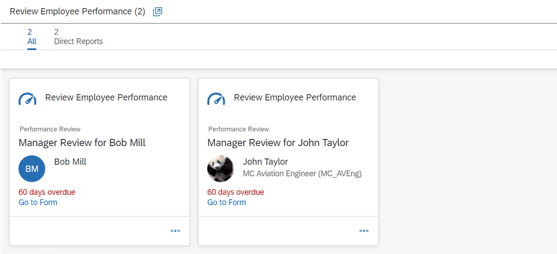
When the latest home page is used, a “For You Today’ card will appear for PM tasks.
You can enable to-do tasks on the latest home page in the Upgrade Center.
The tasks are:
“Review Employee Performance” task available for managers
“Review Employee Performance” task available for employees
To give managers a view of the form that need their review, cards are grouped into Direct Reports, Matrix Reports, and Other on the stack view. An example is shown below.
For You Today Performance Tasks
Users can go directly to the performance review forms from this card to complete the tasks.
Goal Management
There is one universal update for Goal Management. The majority of the new functionality is for the latest version of Goal Management. With each release more and more features become available.
General Availability – Universal Updates
View, download, and transport Goal Management configurations using Configuration Center.
It is now possible to use ConfigurationCenter for Goal Management to view configurations, download configurations, and transport configurations across tenants. Configuration Center permission is required.
The view feature enables the admin to view configuration as well as see the username who made changes with a date and timestamp.
The download feature is useful to take a backup of your application’s configurations as well as for troubleshooting by an Implementation Partner or Customer Support.
The export feature can be used to export configuration in order to copy from the preview system to production.
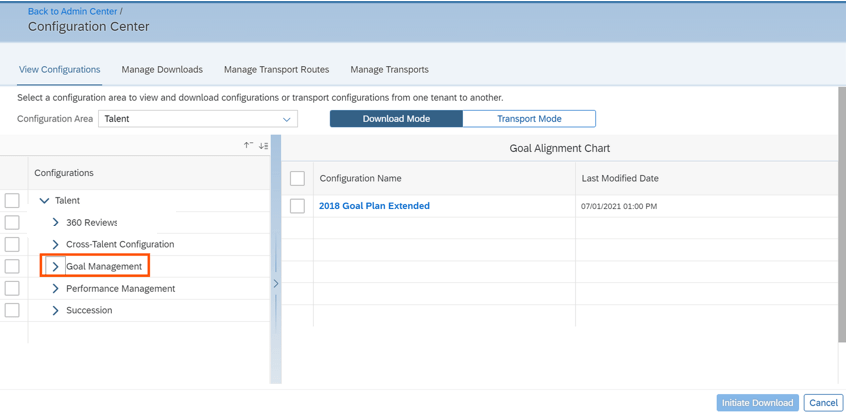
With this release, after selecting the Talent configuration area, Goal Management is visible. The admin can then select the features to download.
Goal Management in Configuration Center
After selection, the admin goes to the “Transport Mode” tab to initiate the download process.
Upon completion, the configuration bundles is downloaded in ZIP format. Configuration types are available as separate files.
Latest Goal Management
With each release, the latest version of Goal Management has functionality added that is already available in the current version,
Now supported in the latest version of Goal Management:
Beta Goal Import
Changing goal plan states in Goals
User search
Matrix relationships
Now available in the latest version of Goal Management:
Spell Check
Legal Scan
Advanced user search by criteria
We will look at the new supported functions that are available for those using the latest Goal Management. We will start with the universal updates.
Early Adopters – Universal Updates
Mass Import Personal Goals in Latest Goal Management
It is now possible to use the “Import Performance Goals” for the latest version of Goal Management.
Change Goal Plan States in Latest Goal Management
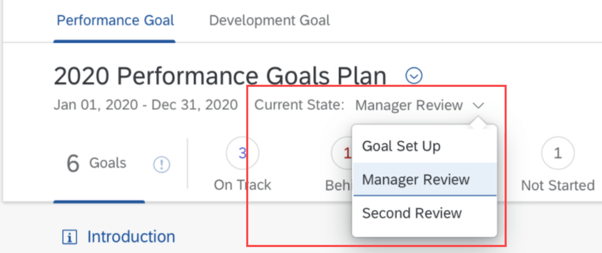
It is now possible to update the goal plan state in the latest version of Goal Management. The ability to lock and unlock goal plans will be available and provides visibility of the goal plan state using the latest version of GM.
Goal plan states are used to control the action and field permissions before and after a goal plan is approved. Users with the “change-state” permission in the goal plan XML can now change the goal plan state in a more straightforward manner.
An example using goal plan states in the latest version of a goal plan is shown below. The current state has a dropdown list.
Latest Goal Management Goal Plan Current State
In addition, employees will be able to receive email notifications when their goal plan state changes. The notifications will include who changed the goal plan state and what the current goal plan state is.
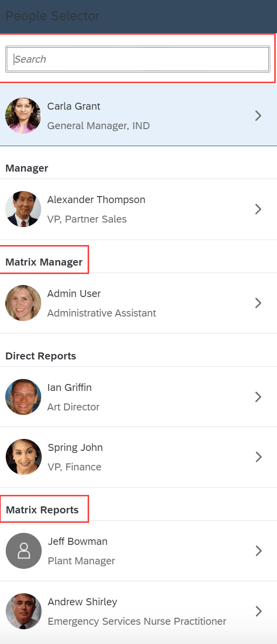
Enhanced People Selector in Latest Goal Management
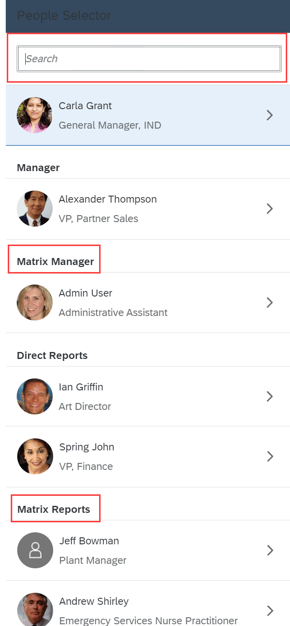
When using the latest version of goals management, the people selector will include matrix manager and matrix reports. If these matrix roles have permission, they will have access to view goal plans.
An example of the people selector in a goal plan is shown below.
People Selector with Matrix Manager and Reports
If these matrix roles have permission, they will have access to view goal plans.
360 Reviews
General Availability – Universal Updates
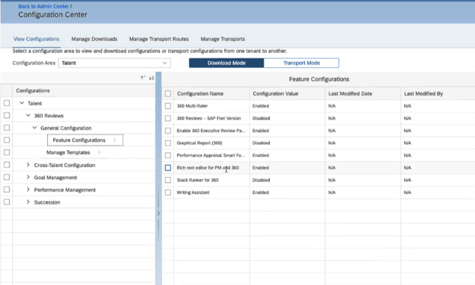
View, download, and transport 360 Reviews configurations using Configuration Center
Similar to the Goal Management being available in Configuration Center, it is now possible to use ConfigurationCenter for 360 Reviews to view configurations, download configurations, and transport configurations across tenants. Configuration Center permission is required cross tenants.
Before this release, 360 was not available in Configuration Center Now when selecting the Talent configuration area, 360 is visible. The admin can then select the features to download fro the Transport Mode tab.
360 in Configuration Center
Add External Participants When Users Have No Search Permissions
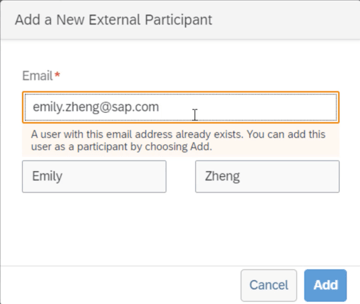
Users without permission to search for external users may now add them as form participants by email address. Users can enter the email address of an external user in the “Add a New External Participant” dialog box.
If the external user already exists in the system, the First Name and Last Name fields are automatically filled and users can select “Add” to add the external user as a participant.
An example is shown below.
Add External Participant
General Availability – Admin Opt-Ins
360 Reviews Tasks on the Latest Home Page
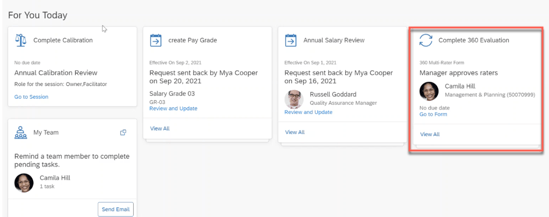
When the latest home page is used, a “For You Today’ card will appear for 360 Review tasks:
“Complete 360 Evaluation task” available for managers
“Complete Your 360 Evaluation task” available for employees
Found on the latest Home Page, for any 360 forms for an employee, manager or raters, there is a card to prompt the user to review and complete the 360 Reviews form in the Performance inbox.
For You Today Card for 360
Users can go directly to the 360 review form from this card.
Calibration
General Availability – Universal Updates
There is a universal update for a calibration session.
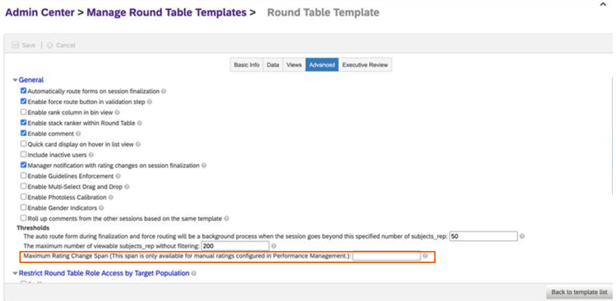
Set max rating change span
In “Manage Calibration Templates”, if your data source is “Performance”, it is now possible to set a maximum rating change span. This setting can be found on the “Advanced” tab.
Once the span is set, if you make rating changes in the session, the following rules apply:
If the rating change made doesn’t exceed the maximum rating change span, the rating will be changed
If the rating change exceeds the maximum rating change span, an error message displays and the rating reverts to the original rating.
Shown below is the Calibration Template “Advanced Settings” tab.
Set Maximum Rating Change Span
Continuous Performance Management (CPM)
There are only admin opt-ins for this release of Continuous Performance Management.
General Availability – Admin Opt-Ins
New Qualtrics Survey for Continuous Performance Management
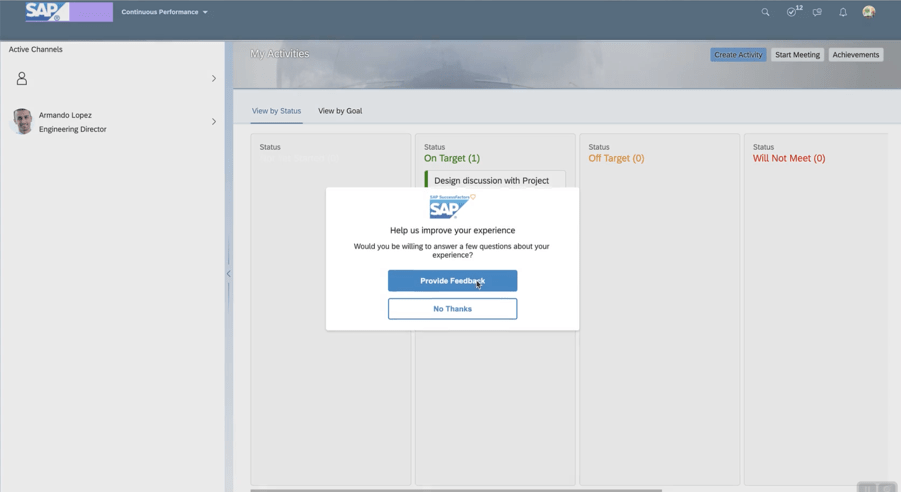
It is possible to integrate Qualtrics surveys with Continuous Performance Management. This integration allows you to collect feedback from employees after 1:1 sessions with their managers.
To use this feature:
CPM must be enabled
Qualtrics license for website and app feedback projects required
“Manage Qualtrics Integrations” feature is enabled in Upgrade Center
The Qualtrics account is used to create the survey and view survey feedback.
An employee will be prompted to complete the survey. An example is shown below.
Start Survey within CPM
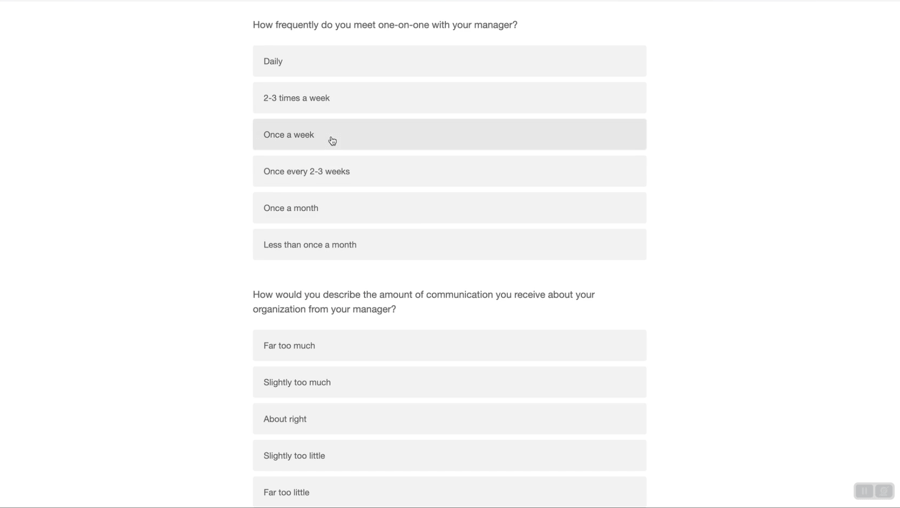
The user will see questions to answer.
Survey Questions
Once completed, the admin may view the survey feedback.
Early Adopter – Admin Add -Ins
Enhanced Achievement Experience for Continuous Performance Management
This feature is only available if the latest version of CPM is used.
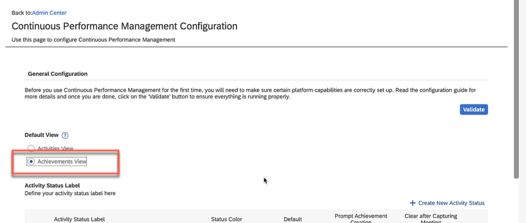
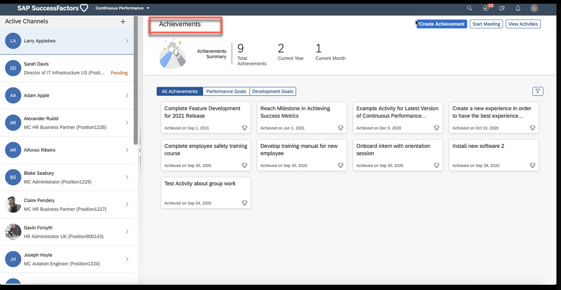
Achievements can be the default view on the CPM landing page, which enables quick access to achievements. The admin would have to select “Achievements view” as the default on the “Continuous Performance Management Configuration” page. An example is shown below.
Set Default View
When a user accesses CPM, the default view will now be the Achievements tab.
Achievements tab default view
Feedback Integration with Microsoft Outlook
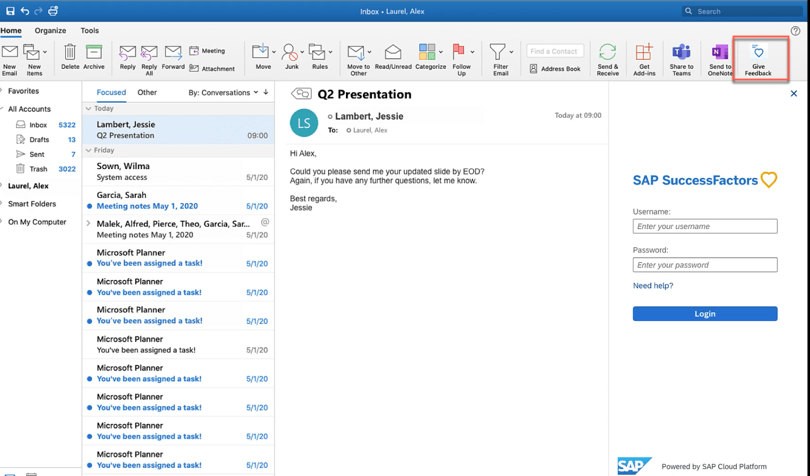
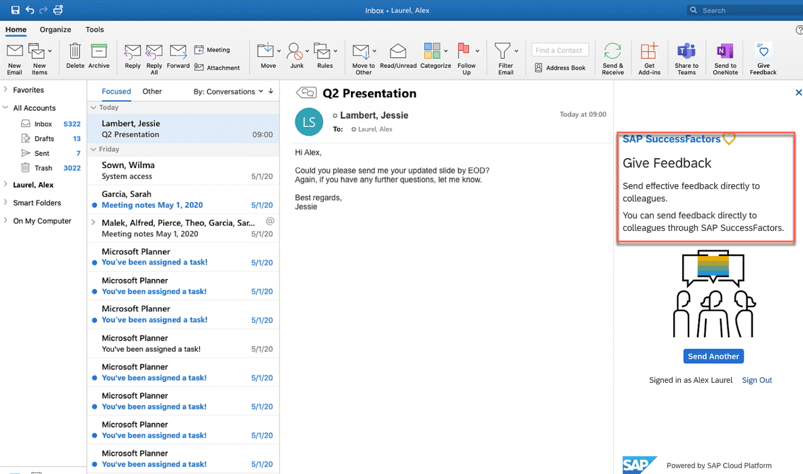
Continuous feedback may be enabled from a Microsoft Outlook add-in to make giving feedback easier.
In order to use this feature:
Latest version of CPM must be enabled
SAP SuccessFactors user attributes are mapped to Microsoft Active Directory
Continuous Feedback outlook integration is enabled and the manifest file downloaded
SAP SuccessFactors user attributes mapped to Microsoft Active Directory.
The employee will see an option to give feedback.
CPM Feedback within OutlookStart Giving Feedback
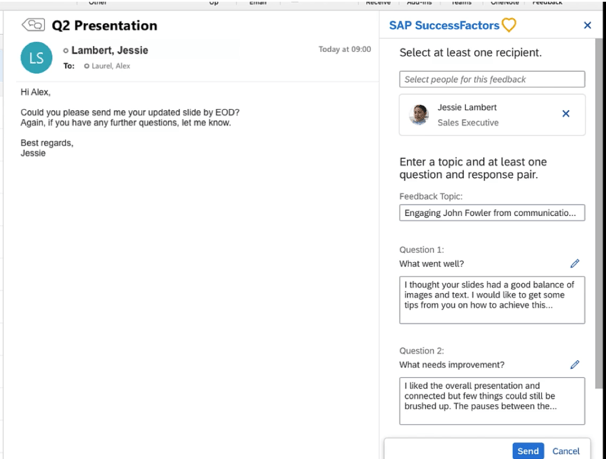
The feedback questions display and enable the employee to provide feedback.
Feedback Questions
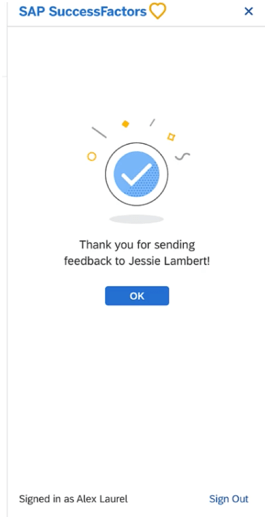
Upon submission, a confirmation message displays. An example is shown below.
Completion of Providing Feedback
Depreciation
Deprecation of 360 Reviews v11 Version
November 18, 2022 is the end of maintenance for 360 Reviews v11 and will be deleted on May 20, 2023.
We have now covered the highlights of the PM related updates for 2H 2021. See our blogfor 2H 2021 Career Development release features.
There are not a lot of new features for Career Development in this release. There are some updates for Mentoring and for early adopters, the latest version of Goal Management and Career Explorer have new functionality.
For your convenience, we’ve summarized the highlights of what’s new for 2H 2021 Career Development below.
Mentoring
General Availability – Universal Updates
The universal updates for Mentoring relate to mentoring email notifications.
Improved Email Notifications
With the new release, there are changes to some of the mentoring email notifications. Some links have been added or removed and some of the messages have been made more concise.
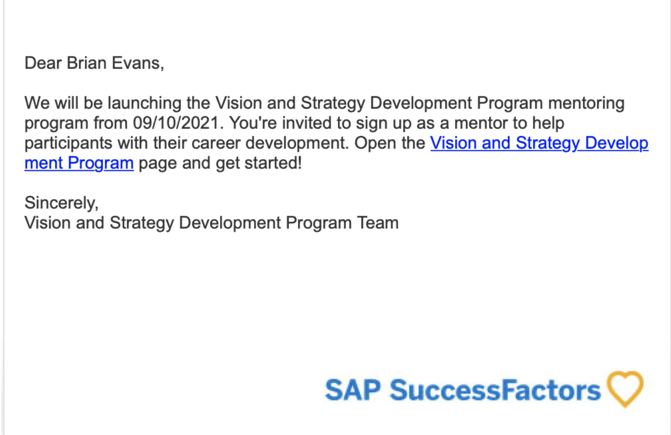
The mentor invitation email notification has been updated. Now there is a link that goes directly to the mentoring program to accept the invitation to participate. An example is shown below.
Mentor Invitation to Participate
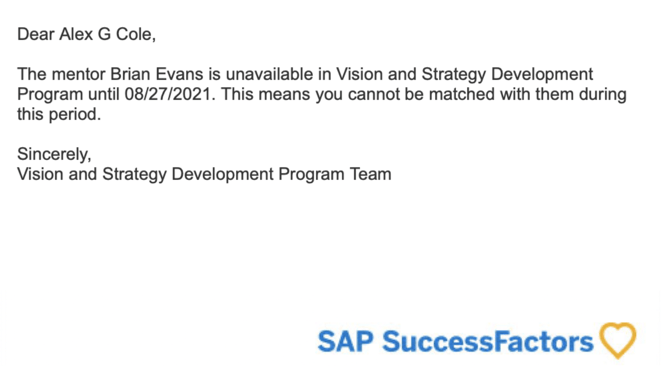
The program link has been removed from the email notification that goes out to pending mentees when their requested mentor becomes unavailable. Here is an example of the new email notification.
Mentor Unavailable Notification
Stop Email Notifications to Matched Mentees About Mentor Availability
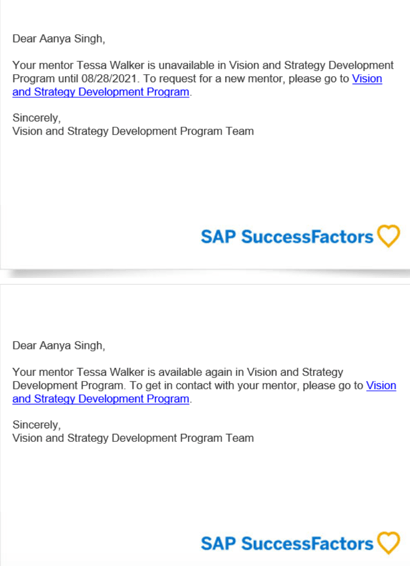
Currently any mentee that is linked to a mentor will received an email notification when the mentor becomes unavailable as a recommended mentor for new mentees.
Similarly, when the mentor becomes available again, the mentees already in a relationship with a mentor would be notified. An example is shown below.
Emails to Current Mentees regarding Mentor Availability
Sending a notification to existing mentees when their mentor becomes unavailable caused confusion. It was not clear to existing mentees that their mentor was still available to them.
Mentees already accepted by a mentor will no longer be notified when the mentor becomes available or unavailable as a recommended mentor to others joining the program. The existing mentees will still have the mentor relationship but any employees searching for a mentor will not see the unavailable mentor to select from.
General Availability – Admin Opt-Ins
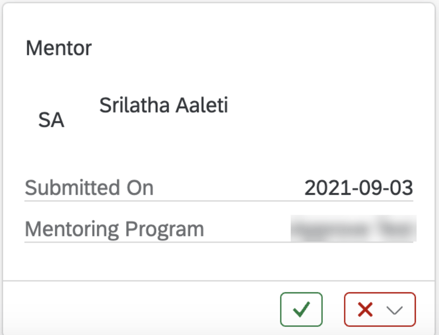
If you are using the latest Home Page, managers will be able to approve or decline employee requests to be a mentor. A new approval card will show on the home page which identifies when the request was submitted and identifies the mentoring program. The manager can approve or reject the request directly from this card.
An example is shown below.
Mentor Approval Card
Latest Version Development Goal Plan
Early Adopter – Universal Updates
For early adopters using the latest version of Goal Management there a few new features that we will discuss briefly.
Mass Import Personal Goals
For early adopters using the Latest Goal Management, it is now possible to mass import personal goals into development plan through Admin Center. This functionality was not available previously for the latest version of goal management.
Improved People Selector
Users with the appropriate role based permissions will be able to search for people by name and access their goal plans.
People Selector will now include additional hierarchical relationships: a user’s matrix manager and matrix reports.
Improved People Selector
Career Explorer
Early Adopter – Universal Updates
Career Explorer is only available for customers in an Early Adopter Care (EAC) program.
Exclude Job Roles from Data Sync
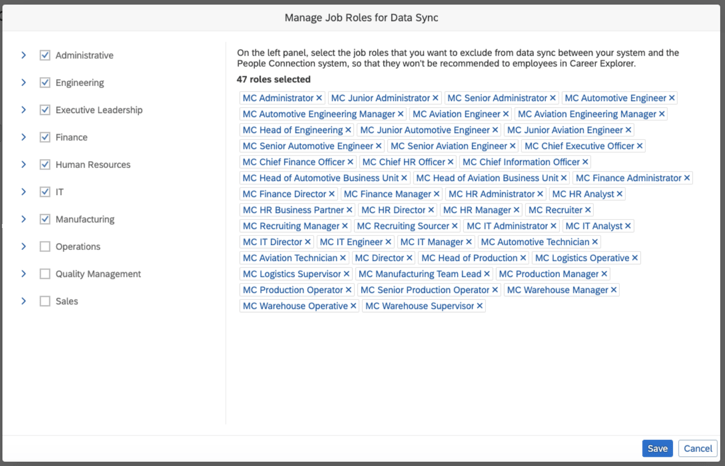
With the new release, there is a universal feature that allows job roles to be excluded from data sync between your system and the People Connection. This means those job roles will not be recommended to employees in Career Explorer.
Accessed from Admin Center, go to “Manage People Connection Integration”. Select “Manage Job Roles for Data Sync”.
The new “Manage Job Roles for Data Sync” screen is seen below.
Select Job Roles to Exclude
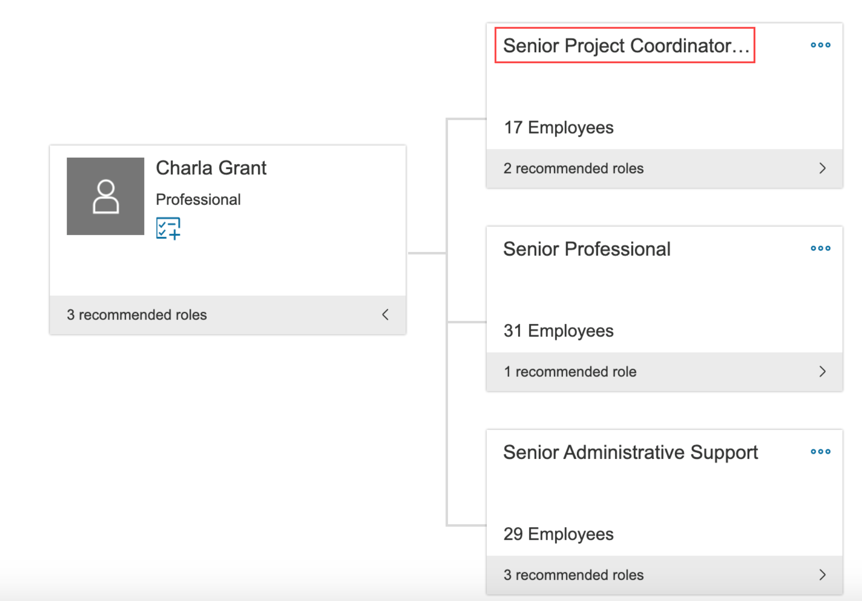
Display Long Job Role Names in Recommended Role Card
Currently, long job role names will truncate in the recommended role card as seen below.
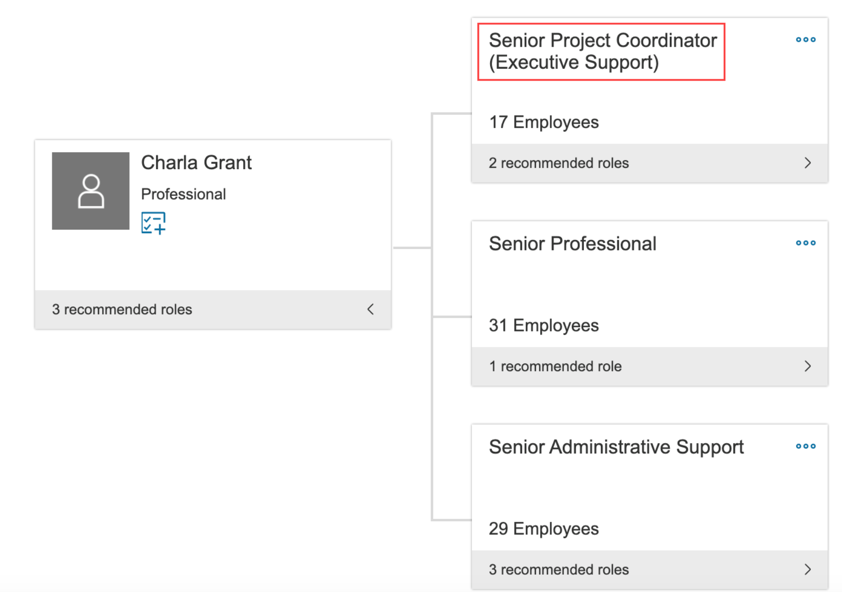
Truncate Job Role Names
With the new release, longer names of job roles can be displayed in full using two lines as seen below.
Complete Job Role Names
We have now covered the highlights of the Career Development related updates for 2H 2021. See our blog for 2H 2021 PM release features.

















 Worklogix Blog