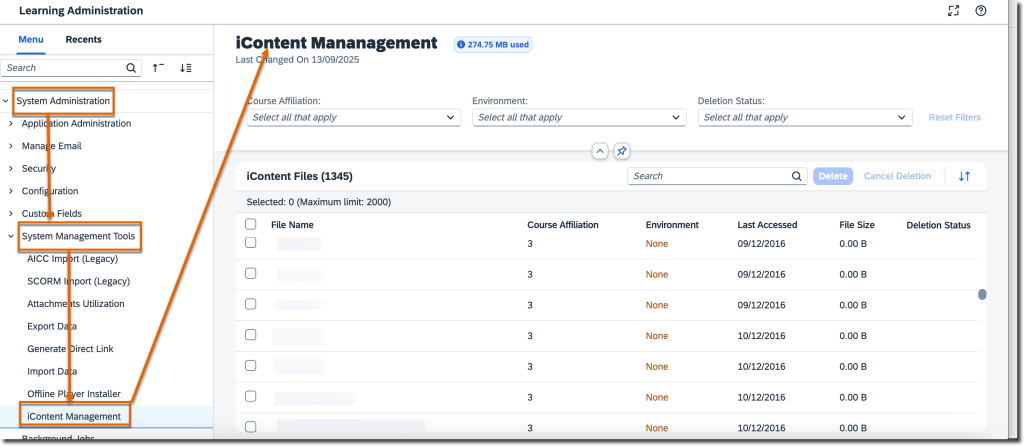
A new iContent Management page allows admins to identify and bulk delete unused files from iContent servers. You can schedule deletion jobs, view usage, and manage associated courses efficiently. Only one deletion job can be scheduled at a time and must be planned 30 days in advance. This helps optimize storage and maintain cleaner repositories while ensuring admins can revise or reactivate impacted courses as needed.
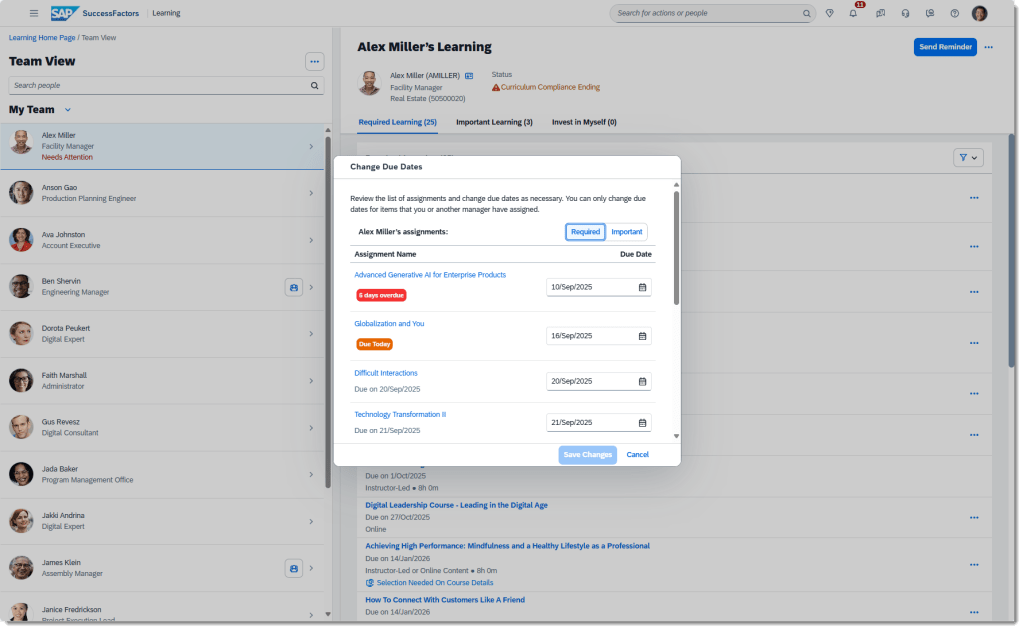
Change Assignment Due Dates from Team View
Managers can now change due dates for manager-assigned learning items directly from the Team View page—individually or in bulk. The new Change Due Dates dialog provides a quick way to update deadlines with real‑time status updates. This improvement streamlines manager oversight and supports better learner compliance.
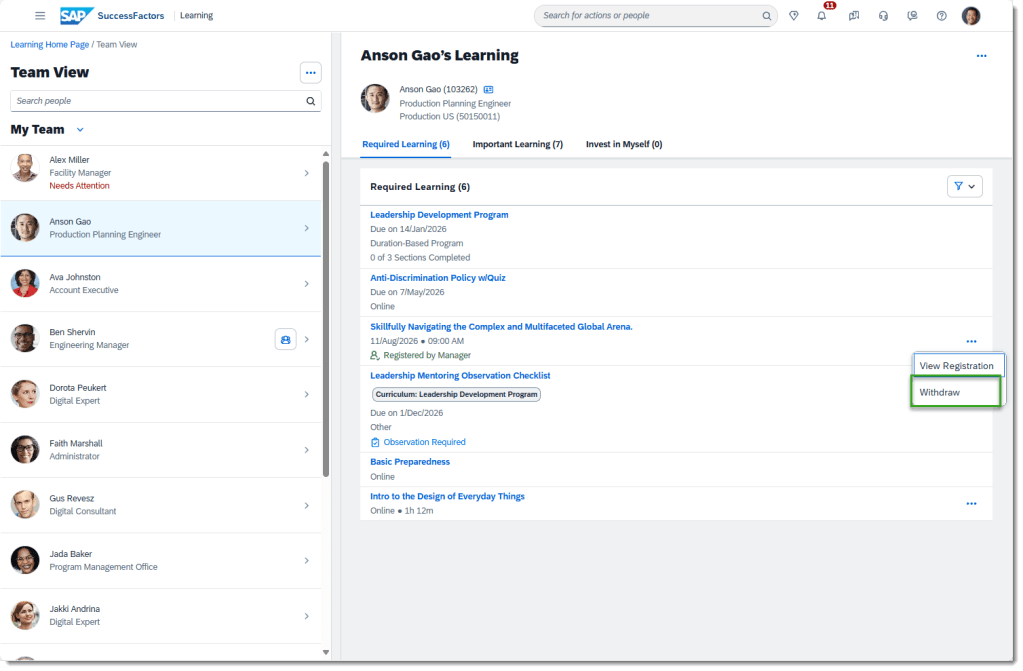
Class Withdrawal from Team View
Managers can withdraw learners from classes seamlessly via Team View. Using the More Actions menu or directly on the Class Details page, managers can execute withdrawals without relying on bulk tools, improving flexibility and speed.
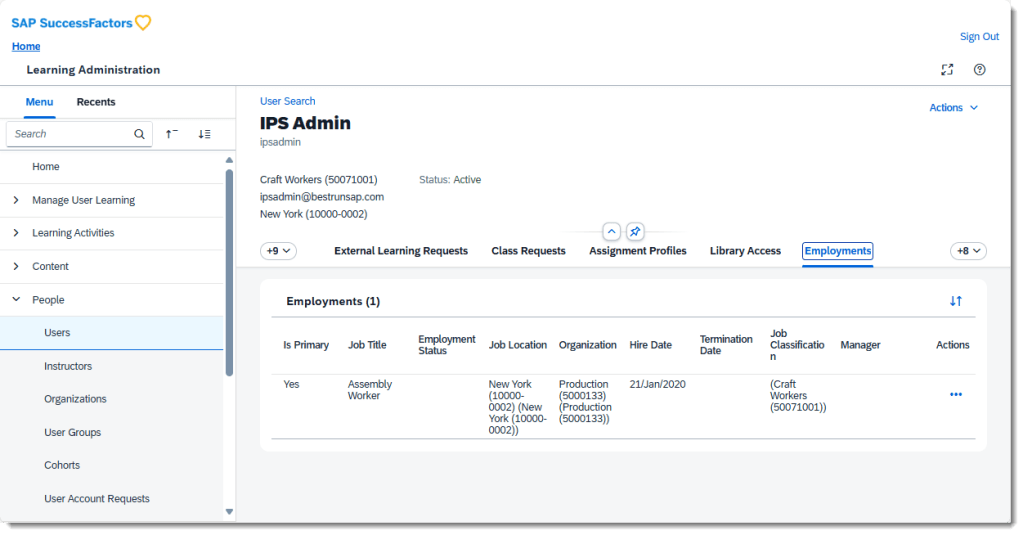
Employments Tab Visibility with System Default Role
The Employments tab is now visible on the User page when using system default roles that include the new View User Employment permission. This supports upcoming person‑centric experience enhancements. (Note: System default roles are for testing only.)
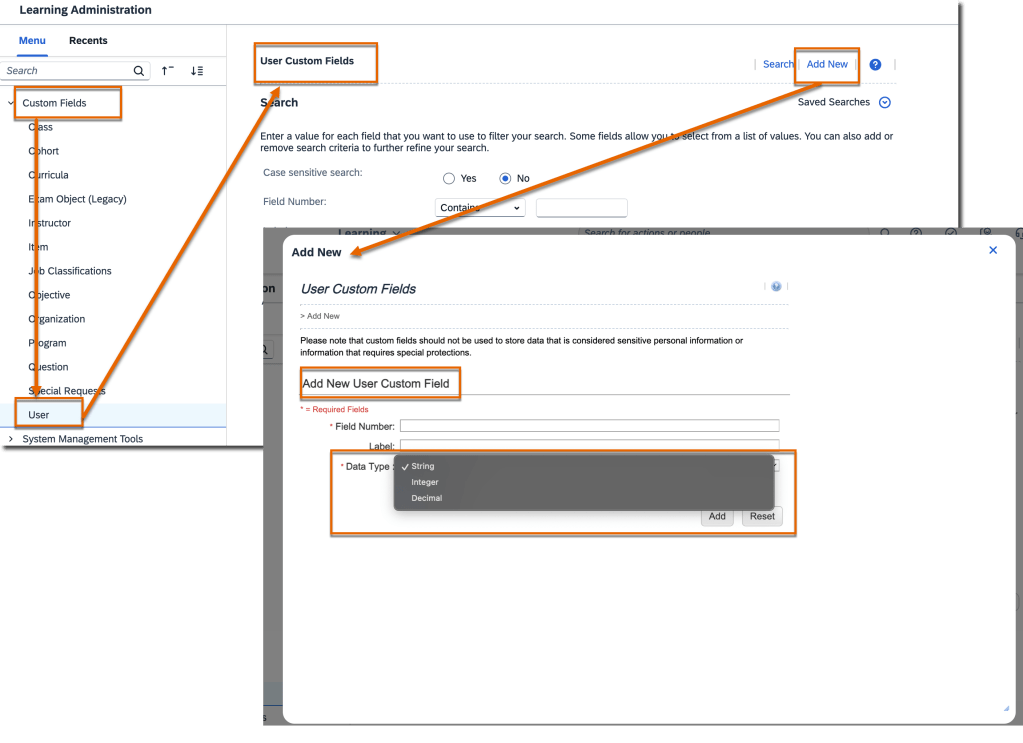
Integer & Decimal Custom Fields for User Entity
Admins can now create integer and decimal custom fields for the User entity, expanding options beyond string fields. These new types support assignment profiles, user search conditions, filters, and reporting—enabling more precise data management and dynamic rule configurations.
Universal Rollout of New Learning Home Page
The modern Learning home page is now mandatory for all customers. The legacy UI and toggle switch are fully retired, ensuring a unified, streamlined experience across all learners. vSaaS customers are excluded in this release and may continue using the toggle when enabled.
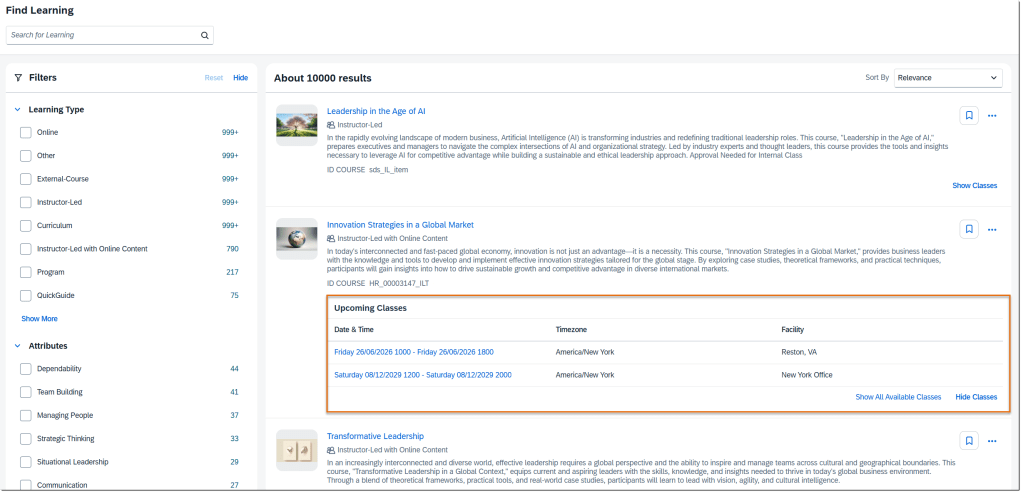
Upcoming Classes in Enhanced Search
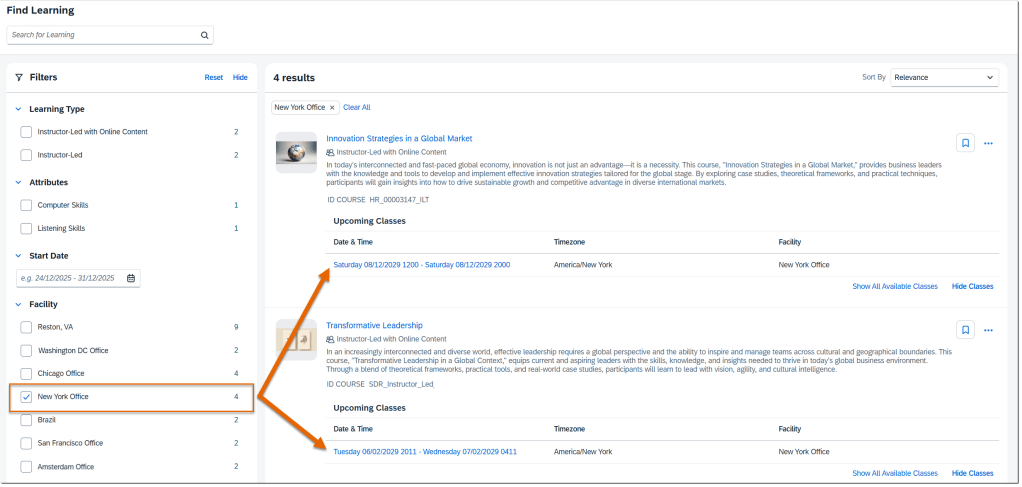
Learners can now view and expand upcoming classes directly in enhanced search results. The list shows up to five classes sorted by date, updated dynamically when filters like Facility are applied. This replaces the old calendar view and allows quick comparison of class schedules and locations.
To Learn More
The 2H 2025 release for SAP SuccessFactors Learning includes 18 total enhancements, and this blog highlights only the most impactful updates. To explore the full list of changes—including technical notes, configuration details, and feature nuances—please visit the official release documentation using the link below:
SAP SuccessFactors brings updates twice a year, and the 2025 releases include several improvements across different modules, including Compensation. If your organization uses the Compensation module, you’ll notice changes in areas like worksheets, statements, and integrations. In this blog, I’ll explain the key updates from the 1H 2025 release and what we know so far about the 2H updates.
The 1H 2025 release – April 2025 includes the first set of changes.
The 2H 2025 release – October/November builds on that.
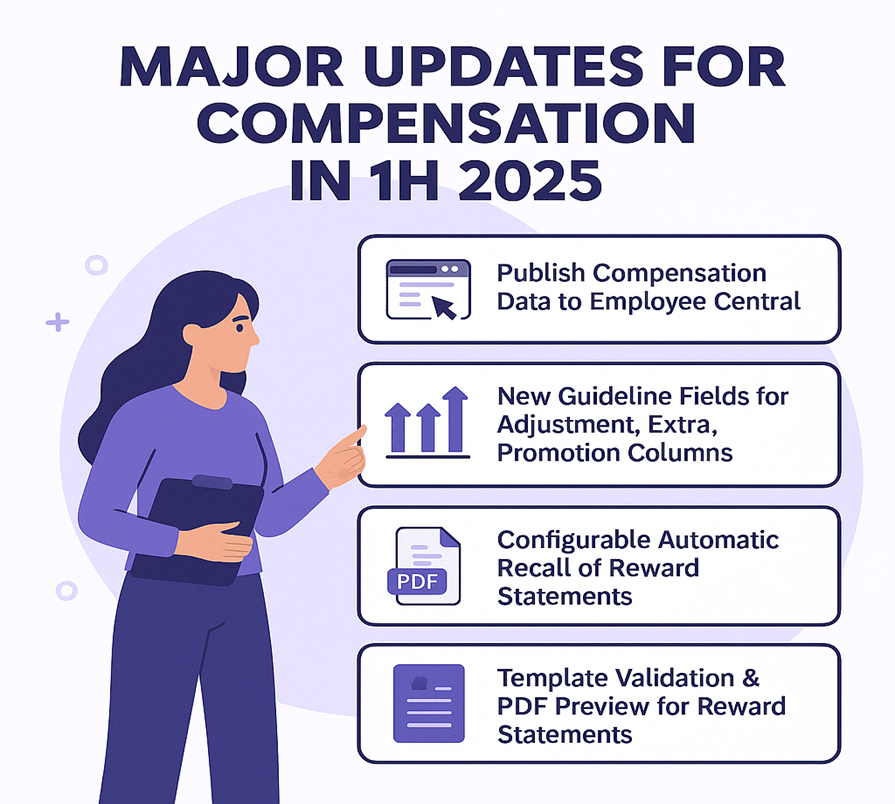
Here are the significant enhancements for the Compensation module identified in the 1H 2025 release.
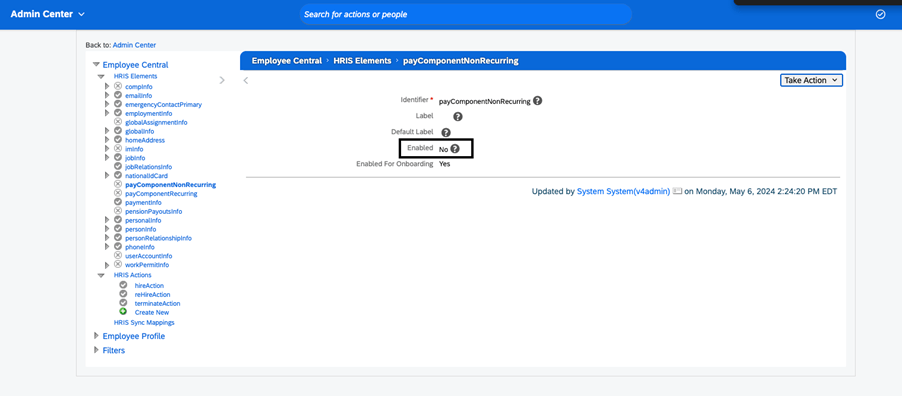
Publish Compensation Data to Employee Central without PCNR
Previously: If you wanted to publish compensation plan data into SAP SuccessFactors Employee Central (EC), you needed the HRIS element payComponentNonRecurring enabled in your configuration.
New: You can now publish compensation data to Employee Central without enabling the payComponentNonRecurring HRIS element. This simplifies configuration and gives more flexibility on your side.
Why it matters: If you enable that HRIS element (for example, due to complexity or control reasons), this change reduces a barrier and broadens options for integration.
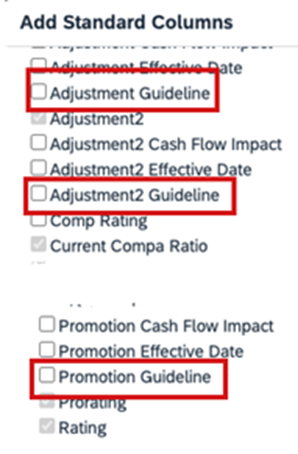
New Guideline Fields for Adjustment, Extra, Promotion Columns
Previously: Compensation worksheets had guideline fields for standard columns like Merit or Lump Sum, but not all columns had guideline-support.
New: The update introduces additional standard guideline fields for columns such as Extra, Extra2, and Promo (via new field IDs: extraGuideline, extra2Guideline, promoGuidelie).
Why it matters: It gives planners more visibility and control. For example, you can set guidelines around “Promotion” adjustments the same way you had for merit increases, and surface warnings or rules when planners exceed or ignore those guideline values.
Configurable Automatic Recall of Reward Statements
Previously: If you completed a compensation worksheet and generated corresponding reward statements, and then later moved the worksheet back to “In Progress”, the system would automatically recall those reward statements.
New: You now have a setting that allows preventing automatic recall of reward statements when worksheets are moved back to In Progress status.
Why it matters: In some use-cases you want to preserve the generated statements (for audit/tracking) even if the worksheet is reopened. This change adds flexibility around your workflow.
Template Validation & PDF Preview for Reward Statements
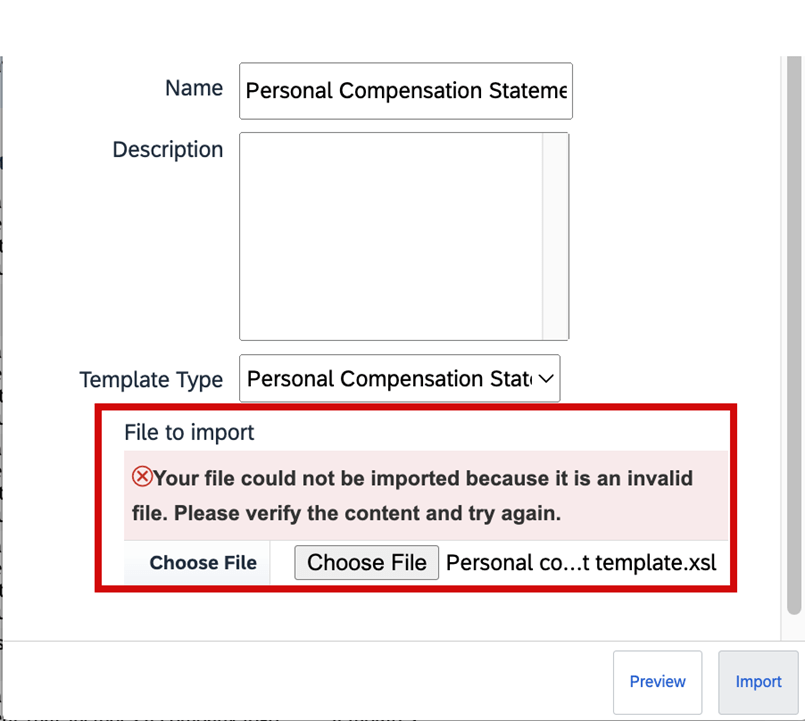
Previously: When importing custom XSL templates for reward statements, the system had limited validation. Also you didn’t always have a full preview of what the generated PDF-statement would look like before production generation.
New: The system now validates the XSL file when importing templates. You can now preview sample PDFs of statement templates before generating them for employees (via a “Download Sample PDF” / “Preview Sample HTML” action).
Why it matters: Improves the quality of end-user statements, reduces surprises or formatting issues, and supports smoother rollout of statement templates.
1H 2025 Changes You Can Disable
Change You Can Disable
Short Description of Change
Automatic Recall of Compensation Statements Now Configurable
Sometimes, your company must move completed compensation worksheets back to in progress status. In the previous version, if you had generated the reward statements already, the system automatically recalls the statements. You can now set up your system to prevent this automatic recall of the statements when the worksheets are moved back to in progress.
Enforce User Account Upgrade for Consistent Login Experience
If you have users with employment-based logins, SAP SuccessFactors upgrades them to account-based logins. Additionally, profiles show login names instead of user names.
Latest Experience of Performance Management Forms
We redesigned the user interface of the Performance Management form, introducing a streamlined, flexible layout along with many other user experience enhancements.
Advanced Filters on Worksheets
Previously: You see the legacy filter functionality in case you don’t enable the advanced filters on the worksheet where you’re only able to filter based on certain pre-selected criteria.
New: On a worksheet, select the Filter button to access the Create Filter button. Once Create Filter is selected, you see the dialog for creating filter open up. On the popup, you’re able to set conditions and criteria for your filters. Also, you can select if you want All (and) or Any (or) operators to be applied to the conditions when applying the filters.
Why it matters: We now support advanced filtering capabilities on worksheets for compensation, variable pay, and total compensation plans. To enable advanced filters on worksheets, go to Compensation Home Actions for all Plans Company Settings Manage Company Settings and enable the Enable advanced filters on worksheets checkbox. You can have up to 30 criteria per filter spread across one or multiple conditions. The advanced filtering capabilities on the executive review are now extended to the worksheets.
Custom Field Visibility on the Compensation Profile
Previously:Earlier you could hide a column entirely. You didn’t have the options to show a field on the profile or the worksheet selectively.
New: Additional options to configure visibility of custom fields for the Compensation Profile and the worksheet in the Design Worksheet tool when configuring columns for a worksheet. These options apply to the Compensation module for the worksheets and the executive review.
Why it matters: You now have additional options to configure visibility of custom fields for the Compensation Profile and the worksheet in the Design Worksheet tool when configuring columns for a worksheet. These options apply to the Compensation module for the worksheets and the executive review.
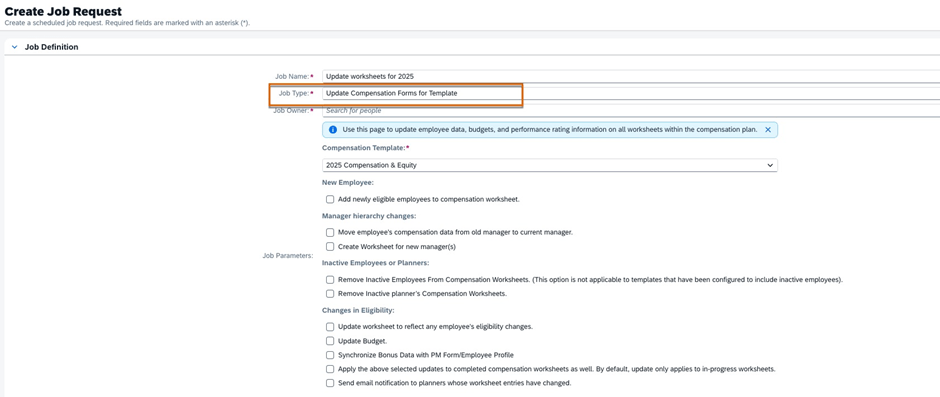
Update Compensation Forms for Template Now in the Job Scheduler
Previously: In the previous version, you opened a support ticket to configure and schedule the job in Provisioning. You could and can still run the job in Compensation Home <Template Name> Manage Worksheets Update all worksheets right away. However, if you must run the job later or on a schedule, you can now configure the job on your own in Job Scheduler. Parameters for the job are the same as those for Update all worksheets.
New: You can configure and monitor the job in the Job Scheduler and Job Monitor for compensation worksheets. The parameters for the job are the same as those parameters for the Update all worksheets tool.
Why it matters: In the current version, if you must run the job later or on a schedule, you can now configure the Update Compensation Forms for Template job yourself in Job Scheduler.
Integration changes
The 2H 2025 release mentions updated integration-capabilities for the suite, which will impact Compensation where data flows to/from other modules.
Known issues tracker
There is a published “Known Issues” list for 2H 2025 for the Compensation module (among others) — it’s advisable your team monitors this to identify any regression or hot-fixes required.
Planning tip
Because features introduced in 1H may wave into 2H (or require follow-on steps), ensure your roadmap includes review of the 2H enhancements and impacted processes.
Here are some steps and considerations for Compensation teams as you approach or implement the 2025 delta release updates:
Review your current configuration
Take inventory of what modules/configurations you currently use in Compensation (worksheets, statements, integrations to EC, guideline fields, statement templates).
Identify which of the 1H 2025 features apply to you (e.g., are you publishing compensation data to EC? Do you use extra/extra2/promo guideline fields? Do you generate reward statements with custom templates?).
For any upcoming 2H updates, map whether your integration architecture or processes will need review.
Activate and test selectively
Features like “Publish to EC without PCNR” may simplify your configuration, but still test in a non-prod instance before moving to production.
For new guideline fields (extraGuideline etc), update your worksheet template and test planner experience: how does the warning/goal behave? Does the UI display as expected?
For statement template validation and PDF preview: have your template-owners/import team test custom templates, validate XSL import, preview PDFs, and confirm the end-user experience.
For automatic recall setting: review your workflow. Do you want the old behaviour (automatic recall) or the new flexibility? Ensure stakeholders agree and you test the setting.
Change management & communication
For planners and managers: inform them of new guideline fields and any changed worksheet behaviour (e.g., warnings/out-of-guideline alerts).
For reward statements: communicate to recipients that the statement format may change slightly (because of improved templates/preview).
For HR/Comp Ops team: update your release checklist and regression test plans to include the new features. Also monitor the 2H 2025 Known Issues list for Compensation to catch any issues early.
Roadmap your 2H 2025 actions
Even if you don’t immediately activate all features, include in your roadmap: review the integration changes, check whether any features become auto-on (i.e., you cannot opt-out), and plan workload around testing.
Use the “What’s New” viewer or release documentation at SAP or the SAP SuccessFactors Community to capture all release items and filter for Compensation.
Prioritize features by business impact, implementation effort, and configuration complexity.
Summary
In short, the 2025 delta releases for the Compensation module in SAP SuccessFactors provide meaningful enhancements especially around integration for Employee Central publishing, advanced filters, worksheet guideline flexibility, statement template improvements for validation & preview, and automatic recall setting. These changes enhance configurability, user experience and governance around compensation planning cycles.
If you’re planning your next compensation cycle (worksheet rollout, statement generation, integration to EC), now is a good time to evaluate these updates, adjust your configuration or roadmap, and ensure you’re leveraging the new capabilities rather than being surprised by them.
SAP SuccessFactors released its 2H 2025 Delta Update with the introduction of a fresh wave of innovations and improvements across Employee Central. This release has focused majorly on data quality, workflow flexibility, localization expansion, position management clarity, and document generation enhancements—in order to strengthen HR operations and elevate the experience for employees, managers, and HR administrators.
In this blog, we run through the most impactful enhancements from the Employee Central (EC) 2H 2025 Delta Release.
🔍 1. Position Management Enhancements
Position Management remains as one of the most enhanced area in the 2H 2025 release, with several new ability that improve accuracy in workforce planning.
⭐ Key Highlights
✔ Expanded fields in the “To Be Hired” status change use case
The following fields are now supported when changing a position to “To Be Hired”:
multipleIncumbentsAllowed
standardHours
incumbent
company
targetFTE
This gives admins more precise control and ensures alignment between job, position, and hiring processes.
✔ Improved synchronization between Position and Job Info
Data consistency is strengthened through better propagation and validation rules.
✔ Cleaner audit trails
Event tracking for position changes is more transparent, improving governance.
👤 2. Employee Data & Employment Information Improvements
The 2H 2025 release intensify HR data reliability with several backend and UI upgrades.
⭐ What’s New
More accurate validation frameworks across Personal & Global Information sections
Enhancements in Employment Information to support changing labour regulations
Refined error-handling messages to minimise admin rework
Smarter country-specific rules for identifiers, addresses, and eligibility fields
Together, these updates improves global HR master data accuracy.
⏱️ 3. Time Management Enhancements
Time Management continues to progress with performance improvements and richer rule-based automation.
⭐ Key Enhancements
Improved absence request validations across multiple countries
Faster loading of daily, weekly, and monthly timesheet views
Strengthened calculation logic for overtime, breaks, and premiums
Better work schedule and public holiday configuration capabilities
These changes improve payroll readiness and simplify the daily experience for time-dependent roles.
🌏 4. Localization & Compliance Updates
Localization continues to be a core pillar of SuccessFactors strategy, and the 2H 2025 release extends this further.
⭐ Updates Include
New statutory fields across multiple countries
Country-specific data formats, regulation updates, and identification rules
Localization improvements in hire, termination, and job event workflows
Improved document templates for certain regions
This makes sure global companies stay compliant without relying on custom development.
📄 5. Document Generation Enhancements
Document Generation receives remarkable upgrades in this release and is one of the most prominent improvements.
⭐ New Capabilities
Support for expanded dynamic placeholders
Enhanced stability and formatting control
Greater compatibility with multilingual templates
Optimized merge performance for large document batches
This is specifically useful for generating contracts, letters, onboarding packs, and compliance forms at scale.
The 2H 2025 release sharpens EC’s integration framework, ensuring ideal connectivity across SAP and non-SAP systems.
⭐ Improvements Include
More resilient OData APIs
Enhanced support for future-dated events
Better coordination with SAP HCM Payroll and SAP ERP
More descriptive integration error messages
The improved event-handling logic makes downstream systems more consistent and reduces integration failures.
🎨 7. User Experience (UX) Enhancements
A modern UI remains central to SuccessFactors’ roadmap. This release introduces indefinite but impactful improvements.
⭐ UX Refinements
Clearer field grouping and section headers
Streamlined workflows with simplified approval screens
Better mobile responsiveness
Faster portlet rendering performance
These improvements provide a cleaner, more available experience for all users.
📌 Summary – Why the 2H 2025 Release Matters
The SAP SuccessFactors Employee Central 2H 2025 Delta Release is designed to help organizations:
✔ Intensify data quality and governance ✔ Enhance hiring alignment with enhanced Position Management ✔ Elevate efficiency through Time Management improvements ✔ Stay globally pilable with localization updates ✔ Deliver documents faster and with greater precision ✔ Achieve seemless system integrations ✔ Improve employee and HR admin experience
This release is not just an incremental update—it’s a strategic step toward a more rationalized and future-ready HR core system.
Please note: the opinions and comments expressed below are solely my own and do not reflect the views of SAP, SAP SuccessFactors, or the SAP Confidant Program.
In a few weeks, many colleagues and I within the HR Tech industry will attend SAP SuccessFactors’ annual conference, SuccessConnect 2025 in Las Vegas. This year will prove to be a good one, as there are several recent events that will shape the portfolio for years to come.
Selfie during this year’s SAPPHRIE conference in Orlando
I have listed some of my top curiosities below. Please feel free to add comments to indicate some of your own questions or expand on any of my thoughts.
Strategic direction of Talent Acquisition The acquisition of SmartRecruiters was recently closed, so how will this shape Talent Acquisition in the years to come for SuccessFactors customers? For those customers currently implementing SuccessFactors Recruiting or those who were looking to do so in the months to come, what will the guidance be from SAP? Certainly integrations will become a main discussion item, as pre-delivered integrations will need to be created and maintained in order for these two systems to sync. It will be interesting how these two solutions will co-exist within the SAP HCM eco-system… I feel like we are back 30 years ago, revisiting ‘best of breed’ vs ‘best-of-suite’, especially with all the recent acquisition news between SAP and Workday.
Talent Intelligence Hub (TIH) Over the last year, I have been fortunate to work with several customers on TIH scoping, visioning, and implementation. Still in its (relative) infancy, this framework is extremely important to support Talent processes across the SAP SuccessFactors suite. Since TIH stores/maintains the skill and competency catalogs for the organization, it’s critical to get TIH design correct from the start (e.g. ensuring that you choose your rating scale since it’s irreversible!). A few important holes remain in the solution including:
When will advanced permissions be added to make rolling out to employee self service and manager self service viable? I’ve seen 1H 2026 from community blogs but let’s hope we hear officially from Product Management soon. We need this improvement in order to make permissions more specific to a particular set of competencies / skills. Could we expect permissions to use the Tag as the way to discern? Let’s wait to see what Product comes up with.
When will custom attribute types (not just the standard ones, i.e., skills and competencies) be available throughout all functionalities in Talent (e.g. career worksheet). Custom attributes are already integrated into the Job Profile Builder (JPB) but only integrate to the Growth Portfolio and not many of the legacy features yet.
Onboarding 2.0 “Oh ONB 2.0, where shall I begin with thee?” This is a special module. Special kudos to the SAP Product Management team for delivering constant improvements in the recent years. This module has been a challenge to implement but features are slowly catching up with the ONB 1.0 offering.
Many are interested to see what’s in store over the next few releases, particularly in the US Compliance area (e.g. Form I-9, E-Verify WTPA for NY and CA).
User experience continues to be a challenge with this product but I understand improvements are on the way so we shall see!
How will SmartOnboard play into the onboarding space? Will be interesting, as ONB 2.0 is extremely tethered to Employee Central.
Report Stories continue to be a challenge for customers to adopt. Between issues with IAS syncing and overall end user experience, customers have been struggling to adopt. SAP has been offering training which I recommend for customers still needing assistance. FYI, People Intelligence in SAP Business Data Cloud (BDC) is not replacing Report Stories (or ad hoc, for that matter). We know Ad Hoc was resurrected but we can eventually expect a new date. I am interested to hear more about People Intelligence and BDC during the conference.
Can AI within SAP SuccessFactors gain traction in 2026? So far, AI use cases (for my implementations at least) have been discussed but not implemented. I believe 2026 will be the year where customers finally start moving the needle to use AI in SuccessFactors Talent Management. Currently, most customers are still trying to grapple with the foundational aspects of Talent with TIH, Opportunity Marketplace, and the rest of CTD (Career and Talent Development) and AI is mostly considered a “phase 2 item”. Let’s see if that changes in 2026.
Please let me know if you’ll be attending SAP Connect 2025 in person, send me an email info@worklogix.com and let me know!
Do you need help implementing or supporting your SAP SuccessFactors system? Contact info@worklogix.com for assistance, download our support services brochure, or visit our website for additional information.








 Worklogix Blog