For tips on how to manage a release, check out our blog here.
Continuous Performance Management
There are no major updates for Continuous Performance Management, they are generally available and require no additional updates. Here are a few notable updates.
All Responses shown on Feedback Given tab
The Feedback Given tab for Continuous Feedback page now shows all feedback given, both unsolicited feedback and responses to feedback requests, not just feedback response for the target population for their permission role.
Search for an activity and link to feedback
The word count for Continuous Performance fields is now based on characters instead of bytes.
In addition, several field lengths have been extended:
Users can request and review feedback on their activities in any channels where they are the participant
When a user is the participant in a channel, they can request and view feedback on all their activities. Previously, the feedback functionality was only available for activities recorded in channels between managers and direct reports.
Share Activities Across Channels on Continuous Performance Page
Users are now able to share their activities across channels where they participate, giving relevant users the ability to view and edit these activities for seamless collaboration. These activity sharing records are reportable with Story reports.
Only the channel participant, who is responsible for completing the activities within a channel, can share them with other channels in two ways. They can also control whether the target channel owners can view and add comments on each activity. This setting is pre-selected as the default.
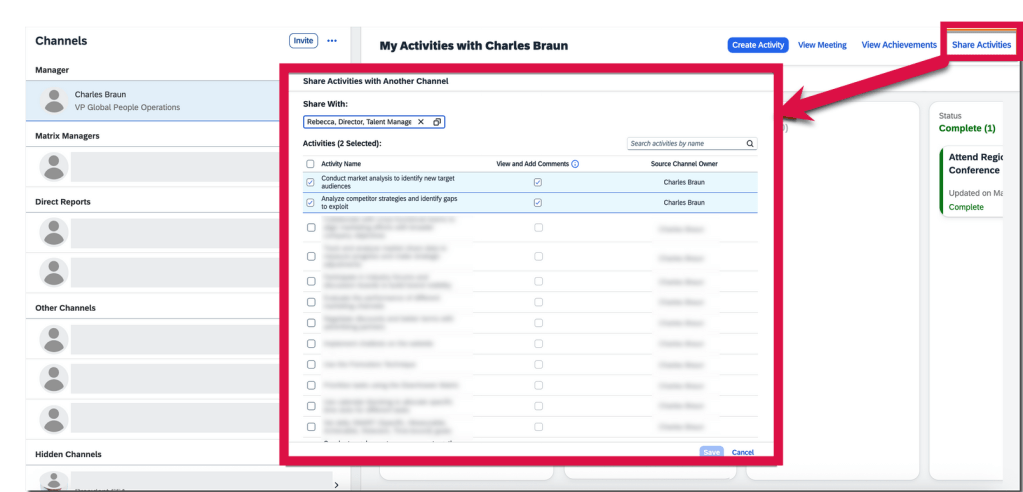
On My Activities with <channel owner’s name> page, select Share Activities button and choose activities that they want to share with another channel in the pop-up dialog.
Share Activity with Another Channel
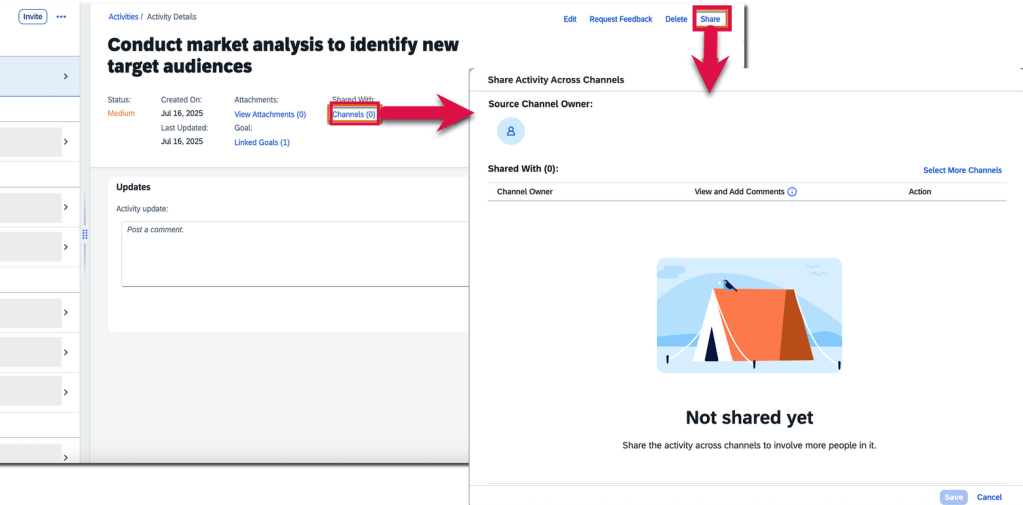
On the Activity Details page, users may choose channels that they want to share an activity with.
Share Activity within Activity Details
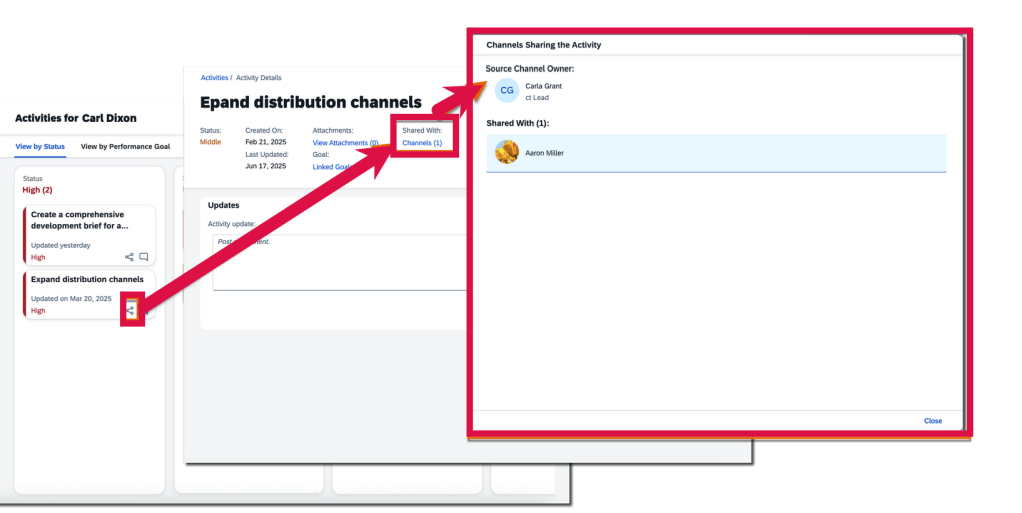
Channel owners can track the source and destination channels of a shared activity through the Channels link in the Shared With: field on the Activity Details page. However, the field and link are only available for activities shared across channels. On the activities overview page, channel owners and participants can see the “shared across channels” icon on the card of activities that have been shared, to distinguish them from those haven’t.
Share Icon Visible for Shared Activities
AI-assisted writing is now available in more text areas on Continuous Performance and Continuous Feedback pages
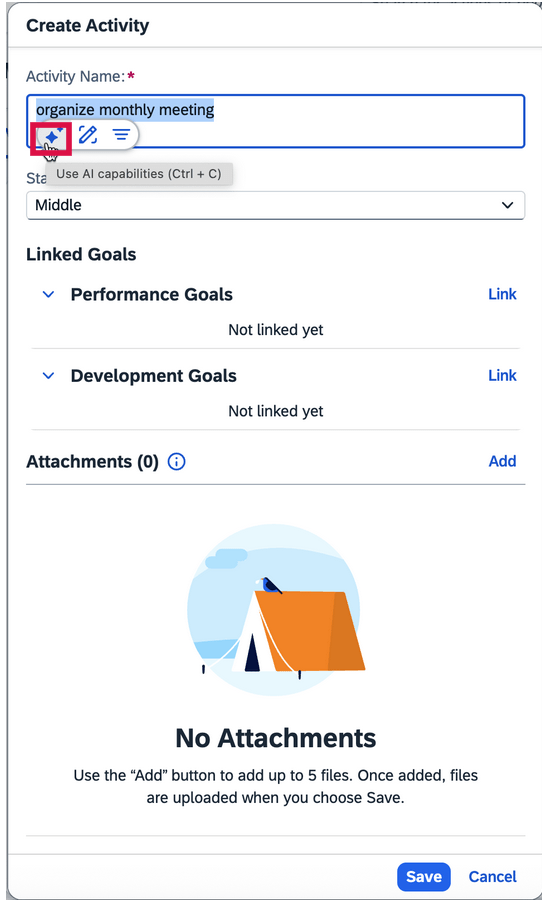
When the AI units license has been purchased, AI-assisted writing now includes feedback topics and feedback questions for Continuous Performance. All free text areas now support AI assistance. Text areas also include activity names, activity updates, achievement names, meeting notes, discussion topics, and channel invitation notes.
AI Assistance for Writing Tasks
To learn more and get more details, see the full set of documentation in the What’s New Viewer here.
Highlights are identified by module and the type of change.
Universal- for modules enabled, universal means no steps are required to have access to the new functionality. These features are automatically made available.
Admin Opt-In – the admin must enable the new feature, usually in Admin Tools
Admin Opt-Out – the admin must disable the new feature, usually in Admin Tools
Provisioning Opt-In and Opt-Out require a Partner or Product Support request For your convenience, we’ve summarized the highlights of what’s new for 1H 2022 Performance Management below.
Performance Management
The majority of the performance management updates involve Multi-Rater 360 forms and Calibration. However there are a few performance related updates that we will begin with.
General Availability – Universal Updates
Restrict Data Access of Inactive Users’ Forms
This enhanced was designed to comply with data privacy and protection standards.
Currently there is no way to limit a user’s access to inactive employee forms. With this release, there is a role permission that may be enabled which restricts the data in an inactive user’s PM form.
To set this up, open a permission role that should have the restriction.
Under User Permissions>Performance>Restrict Data Access of Inactive Users’ Forms
With this permission set, users with this permission role will not be able to access the data of inactive users’ forms in the following areas:
Home Page (only can review performance related To-Dos but not form pages)
Stack Ranker
Team Overview
Form OData APIs that include form subject information
Use Capability Picker in Performance & Goals
The previous “New Competency Picker”, now the Capability Picker, has a new UI which includes employees’ competencies, behaviors, and skills within an organization.
The Capability Picker can be used to add competencies in competency sections on PM forms.
To this use, Job Profile Builder must be enabled. In Performance Management Feature Settings in Admin Center, Enable Capability Picker must be selected.
New Columns for Performance Management in Story Reports
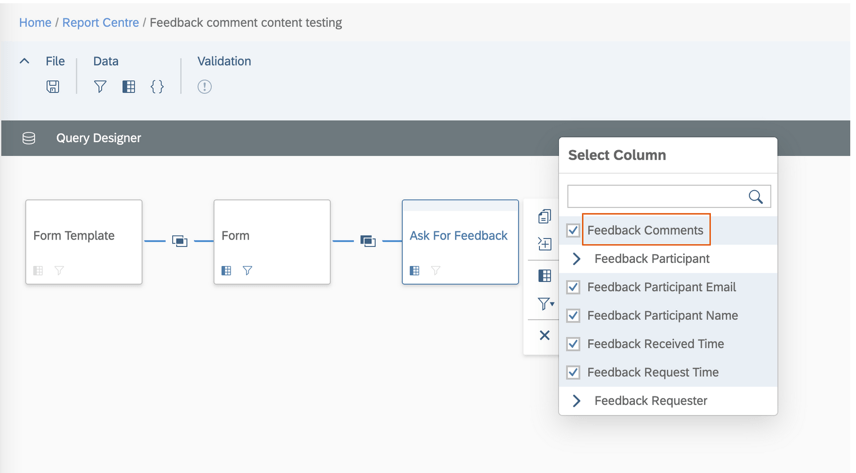
In Story reports for Performance Management, users can now include feedback comments in the Ask For Feedback table as seen below.
Ask For Feedback Comments Columns
These are the Ask for Feedback comments provided by internal and external users through emails.
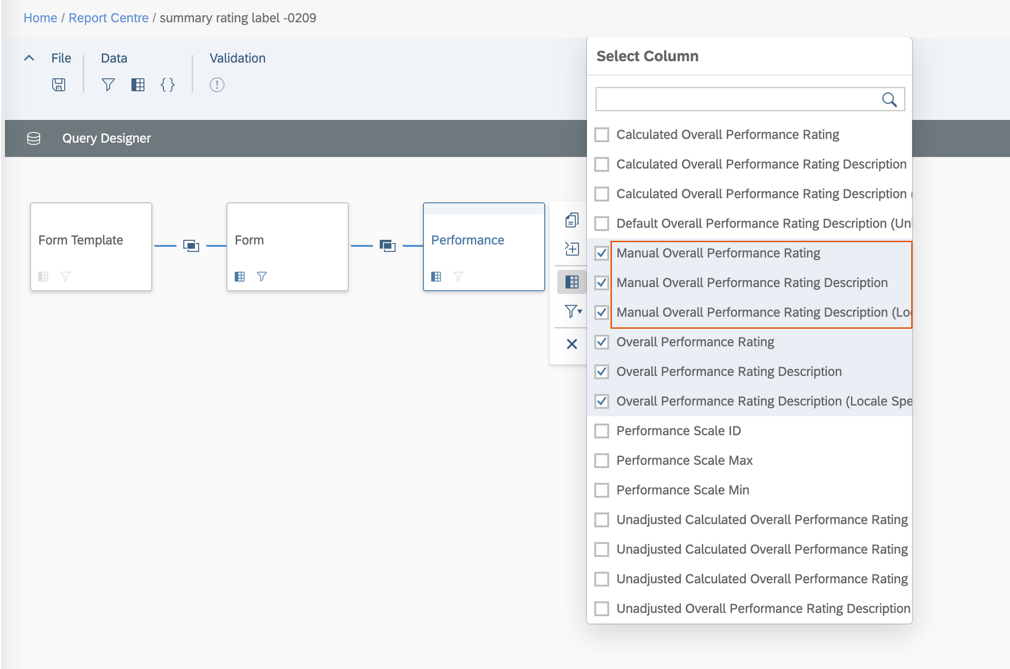
In addition, manual overall performance rating, manual overall performance rating description, and locale specific manual overall performance rating description are available in the Performance table.
Rating Columns
Enhanced Signed Date Column in Story Reports
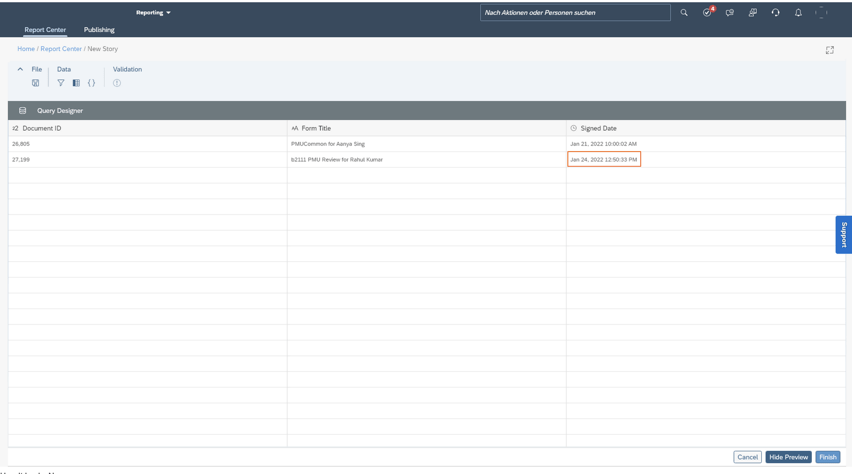
Signing a form using Route Form and Sign Form, the Signed Datecolumn in Story reports now shows the date and time when the form was signed using the time of tenant preferred time zones. Only the latest record is shown in the reports if users have signed the form multiple times.
Form Signed Date and Time
Enhanced OData Entity FormAuditTrail
The FormAuditTrail API has been updated with a permission check. This API can be used to access all audit trail records of forms in the system. Otherwise, users can only access audit trail records of forms in their folders.
Permission is needed to access all audit trail records of forms in the system and the permission role should include Administrator Permissions> Manage Documents>Admin Access to Forms OData API permission.
General Availability – Admin Opt-Ins
There is a performance management related admin opt-in that is applicable for CPM achievements and feedback on a performance form.
View Achievements and Feedback on Forms on iOS and Android Mobile Apps
Performance reviewers with iOS and Android SAP SuccessFactors mobile apps, achievements and feedback linked to employees’ goals on performance forms can now viewed.
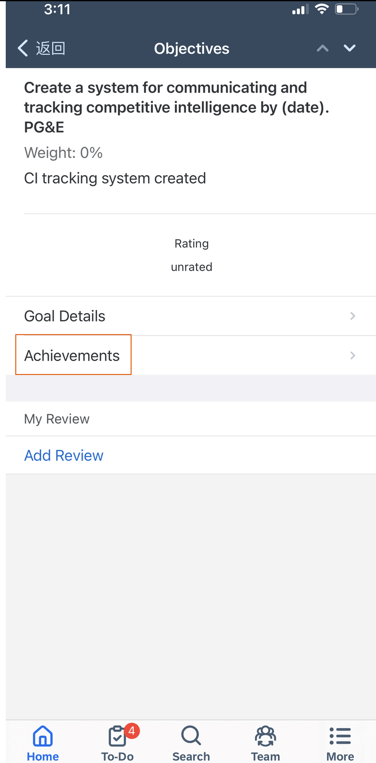
On the goal item page, there will be an Achievements row as seen in the example below.
Goal item on PM form
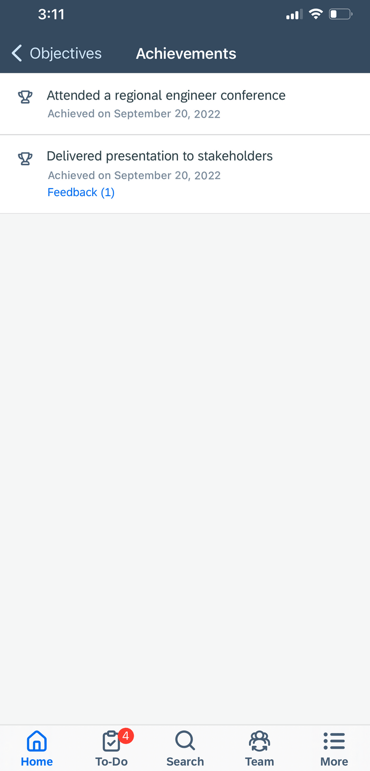
Achievement details may be viewed by clicking Achievements for the goal. If the employee had any achievements linked to a goal, they would appear as seen below.
Achievements linked to a goal
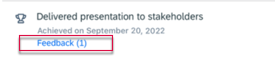
If there is any feedback for an achievement, it will noted with the number of feedback given.
Feedback Indicator for an Achievement
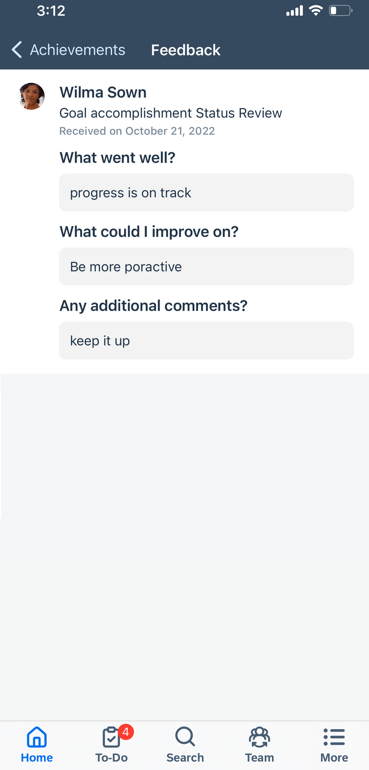
Clicking the feedback indicator, reviewers can view feedback for the achievement.
Feedback for an achievement
To take advantage of this feature, the latest version of CPM must be enabled.
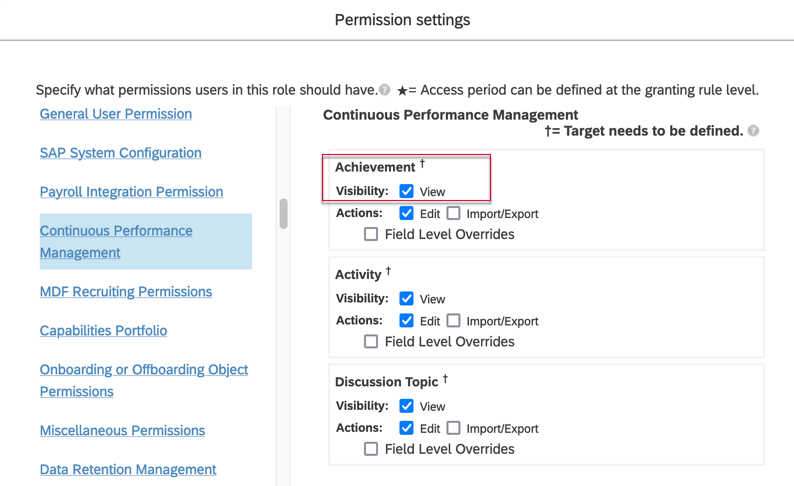
Reviewers will have to the View permission for User Continuous Performance Management Achievement in their permission role.
Permission to View Achievements
360 Reviews
There are several 360 Reviews – SAP Fiori Version updates. One is also applicable to 360 Reviews v11.
General Availability – Universal Updates
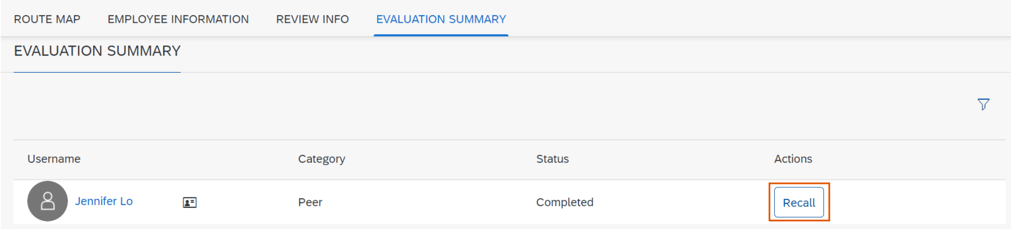
Participants Able to Recall Completed Forms
A participant may recall a 360 Reviews form after providing feedback and submitting it. However this recall feature available for raters but is not applicable to process owners, managers, employees, HR representatives, or approvers.
A Recall button will appear in the action column of the Evaluation Summary section of the form.
Recall 360 Form by Participant
Using the Recall button moves the form back to the participant’s inbox.
Select Multiple Employees on Advanced Search Dialog
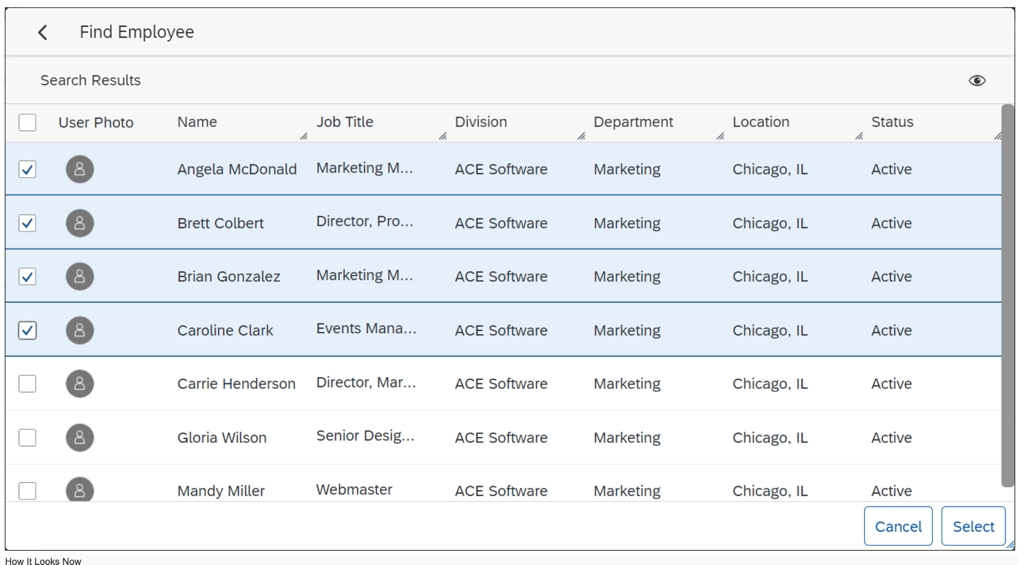
Previously, managers were only able to select/add one employee from the search results at a time. To add more, filters had to redefined for each selection.
Managers can now select multiple employees from a search done on the Advanced Search Dialog and add them all to the Participant List at once.
Multi select employees
Refill the Participant List After Declines Occur
Process owners may now add alternative participants to the participant list if some of the initially added participants have declined to evaluate. This helps ensure that process owners get enough feedback for evaluations.
In order to use this feature, in the advanced settings of the 360 form template, all check boxes should be deselected for the option Hide the Decline to Participate button on the 360 Form for as seen below.
Deselect Hide Button
In the advanced settings of the 360 form template, select at least one role for the option Enable Add New Participants after 360 Evaluation starts for. This allows the selected role to add participants after the evaluation has begun.
Enable adding a Participant
Form Titles Editable in 360 Reviews
It is now possible for users to edit titles of 360 Reviews forms received in their Performance Inbox folder. Already available in 360 Reviews v11, it is now available in the SAP Fiori Version as well.
In the advanced settings of the 360 form template, select the option Enable form title editability in Form info page (V10) or Enable form title editability in the Form (V10), depending on where you want to change titles.
Process Owners Able to See Participants on Anonymous Forms
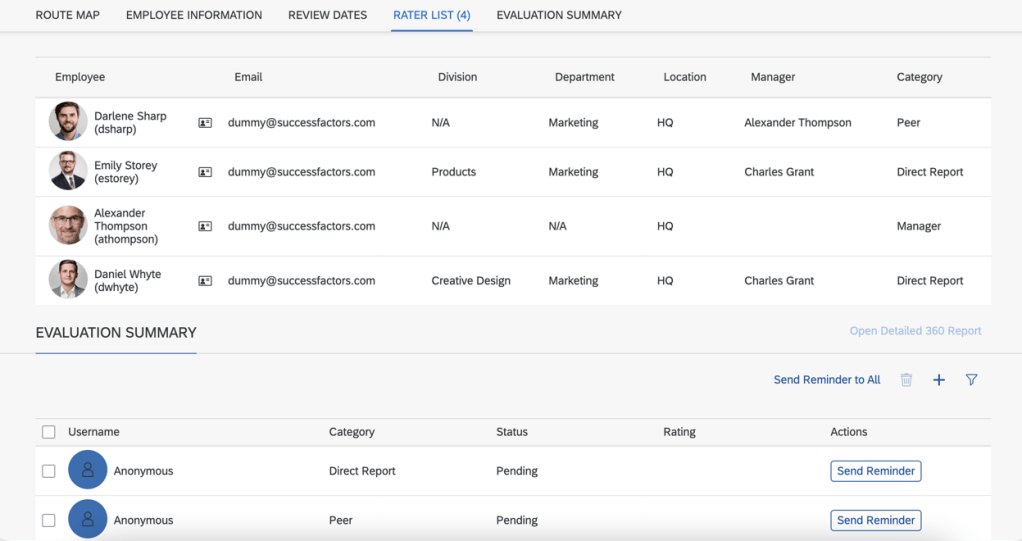
Process owners now can see the participants who have given evaluation feedback even on anonymous 360 Reviews forms. This provides participant information such as employee name, email, division, department, location, manager and category.
The Evaluation Summary will still show “anonymous” for each rater, but the Rater List will show rater names instead of “anonymous”.
Rater List with Names
In order to use this feature of a Multi-rater form, some set up is needed.
The 360 template to be used should have Anonymous 360 configured in Provisioning >Form Template Administration.
Anonymous 360 Form Attributes
Within Form Template Settings for the form, on Show Participants in Status Summary (Applicable to Anonymous 360’s only) needs to be enabled.
Enable Show Participants in Status Summary
Improved Reminders Buttons
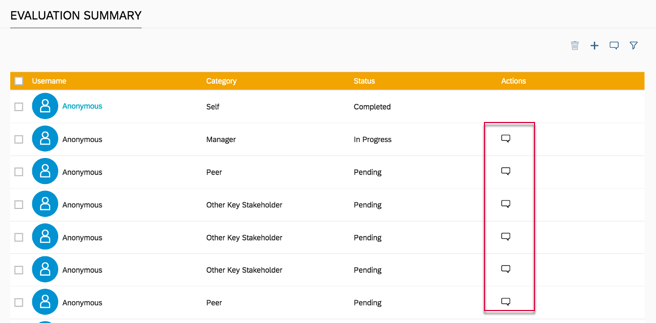
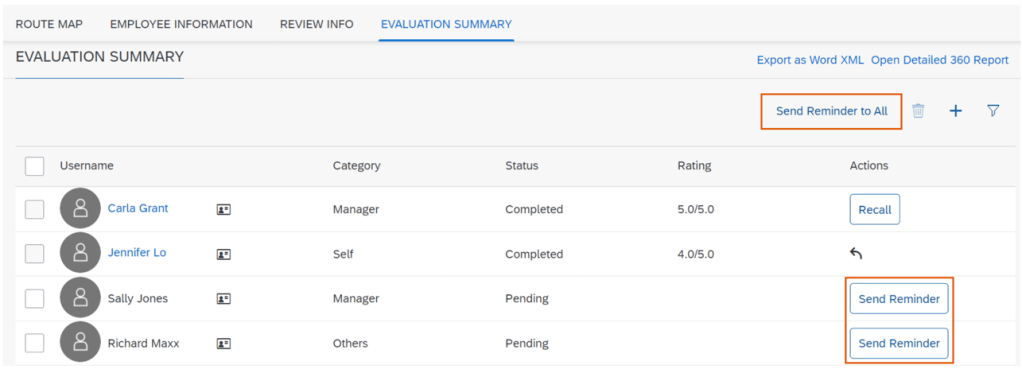
The Reminder icon in the Evaluation Summary section has been transformed into a button. Previously the Actions column contain a reminder icon as seen below.
Recall icon
This has been replaced with a Recall button in the Actions column. Users can now send reminders to those who have not given feedback yet; to a one or multiple participants. There is a new Send Reminder to All button will send a reminder to any rater that has not given feedback yet (a status of Pending). The user will also receive a confirmation of this action before reminders are sent.
Send Reminder Buttons
Add “First Matrix Manager” and “All Matrix Managers” as Default Rater Categories 360 Reviews v11 and 360 Reviews – SAP Fiori Version
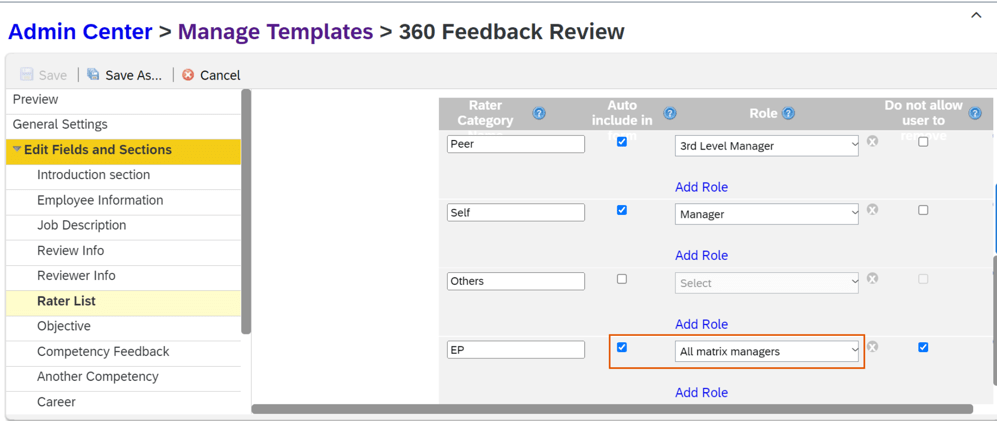
Within the Manage Templates tool or by editing the XML form template, First matrix manager and All matrix managers are now options as default rater categories in both 360 Reviews v11 and 360 Reviews – SAP Fiori Version. When selected, the employee’s first matrix manager or all matrix managers will then show on the rater list by default when a 360 Review form is launched.
All Matrix Managers Role
The feature saves users from manually adding a first matrix manager or all matrix managers as raters after the form is launched.
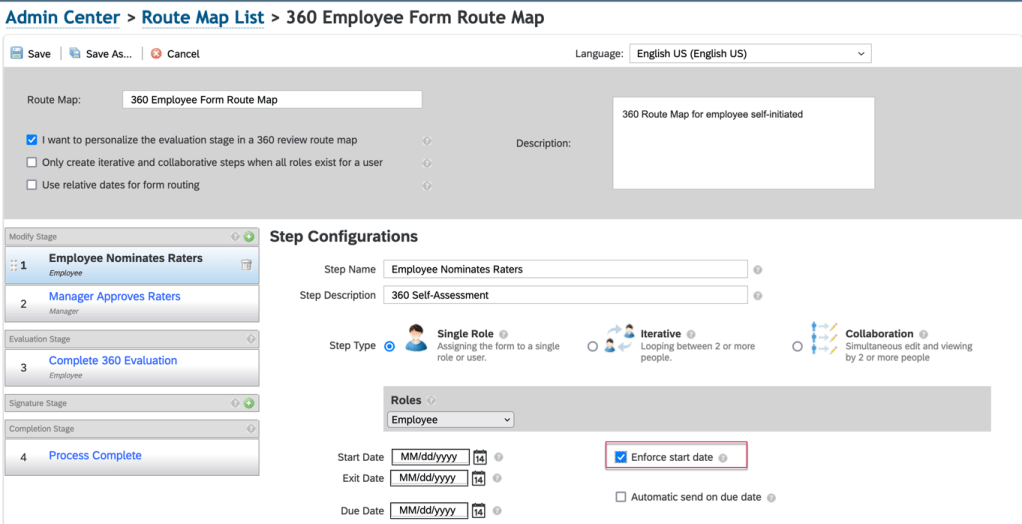
Enforce Start Date in Route Map
A feature currently available for PM forms is now available for 360 forms.
Within the route map associated with the 360 template, select the Enforce start date option and then enter the start date for the step. This may be done for any step in the Modify and Evaluation stages on the route map.
Before the step start date, forms are read-only, but participants can open the forms to check the details.
Support for Learning Activities in Development Goal Section in 360
It is now possible to use Learning activities in the Development Goal section of a 360 Review form. A user may view details of a learning activity, add LMS learning activities, and delete LMS learning activities or Transcript-enabled custom learning activities.
In Provisioning>Company Settings make sure to select the option: Transcript — requires “Version 11 UI framework (ULTRA)”.
Show Behavior Descriptions When Not Rating by Behavior
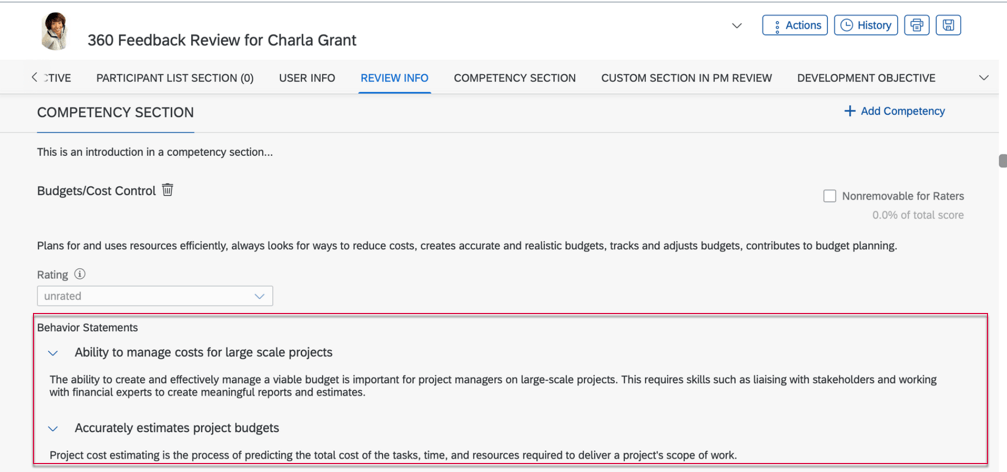
If competencies have behaviors associated with them, behavior descriptions may be included in the Competency section of a 360 multi-rater form, even if the behaviors are not being rated.
Competency Behaviors
When including behaviors, the behavior name displays but descriptions are hidden by default. Clicking the arrow button will show the behavior’s description.
In order to use behaviors on the form, the XML form template needs to have behavior-mode-opt in the competency-sect set to a non-zero value (1, 2, 4 or 5) and use-behavior should be false.
General Availability – Admin Opt-Ins
Hide the Nonremovable Checkbox in 360 Reviews – SAP Fiori Version
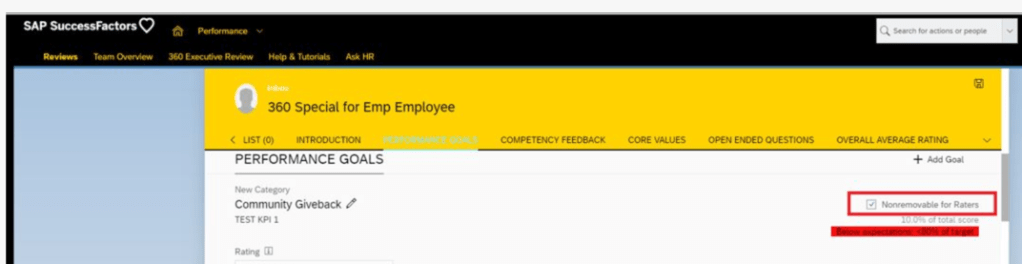
You can now hide the Nonremovable for Raters checkbox on a 360 Reviews form if it’s not needed.
Nonremovable by Raters Checkbox
In the advanced settings of the 360 form template, enable the Hide the Nonremovable checkbox on a form in the Modify stage.
Previously, the checkbox always appeared on a form, even if a rater was not permitted to use it for editing linked skills.
Deprecation of 360 Reviews v11 Version
November 18, 2022 is the end of maintenance for 360 Reviews v11 and will be deleted on May 20, 2023.
360 Reviews – SAP Fiori Version has been Generally Available and now includes the majority of features and functions that were available in 360 Reviews v11.
It is recommended if you’re using 360 Reviews v11 Version to migrate to 360 Reviews – SAP Fiori Version.
Goal Management
General Availability – Universal Updates
There are no universal updates for Goal Management.
General Availability – Admin Opt-Ins
Create and Edit Goals in Non-Goal Management Modules
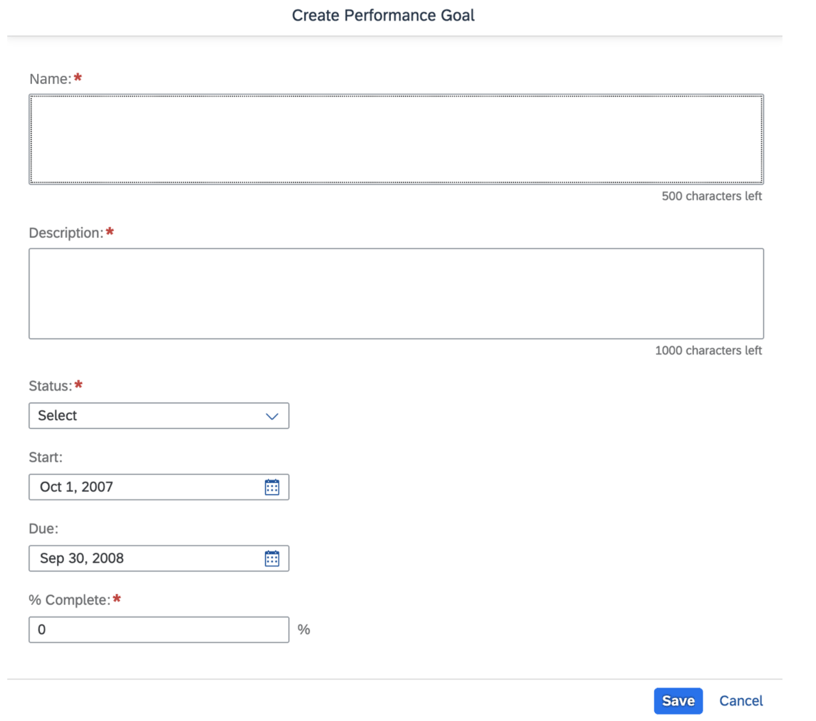
When the latest Goal Management is enabled, you can try out the latest Goal Management to create and edit goals through an embedded dialog.
When you create or edit a goal in the following modules, you’ll be prompted with a dialog with brand new UIs offered by the latest Goal Management:
Career Development
Continuous Performance Management
360- Multi-Rater
People Profile
Performance Management
Succession
Goal Creation
Calibration
General Availability – Universal Updates
There are several universal updates for a calibration session.
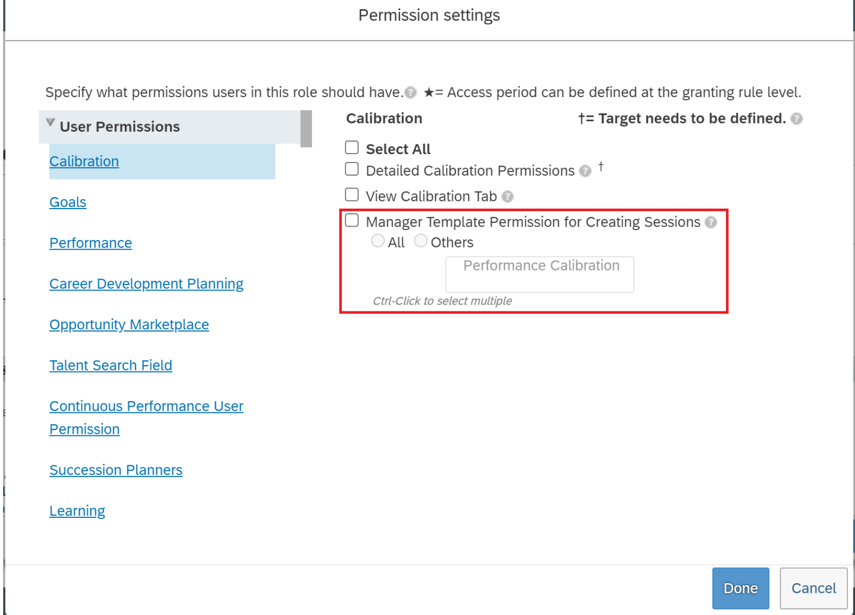
Manager Template Permission for Creating Calibration Sessions
It is now possible to identify which calibration templates managers can access when they create calibration sessions. The new permission, Manager Template Permission for Creating Sessions, is added under User Permissions >Calibration for a permission role.
Permission for Manager Calibration Sessions
Total of Expected Number of Subjects Equals Actual Number of Subjects
Logic has been enhanced for subject distribution in scenarios where the guidelines are defined with rating groups or when not all ratings have a distribution guideline.
When the guidelines are defined with rating groups or only part of the ratings have distribution guideline, but these are not met:
Ratings are included once in the guidelines
All guidelines are defined with “=” operator
Total of distribution guidelines is 100%
The system sums up the decimal parts and distributes the whole numbers to the ratings if there are decimal parts in the calculated results. This is done to ensure the total number of expected subjects for all ratings is equal to the actual number of subjects in the session.
Enhancement to Guidelines Enforcement
Distribution guidelines have been enhanced to support more guideline scenarios. Finalizing sessions individually, enforcement is now supported in three more guideline scenarios.
Distribution Guidelines are set in the Data tab of Manage Calibration Templates.
The enhancement only applies to finalizing sessions individually.
Guideline is defined in a rating group when there is one more than one rating
Guideline is defined with a rating range with an operator other than “=”
Not all ratings have a guideline
When the distribution of subjects doesn’t meet the guidelines for any these scenarios, the session cannot be finalized.
More User Information of Calibration Subject Available in Story Reports
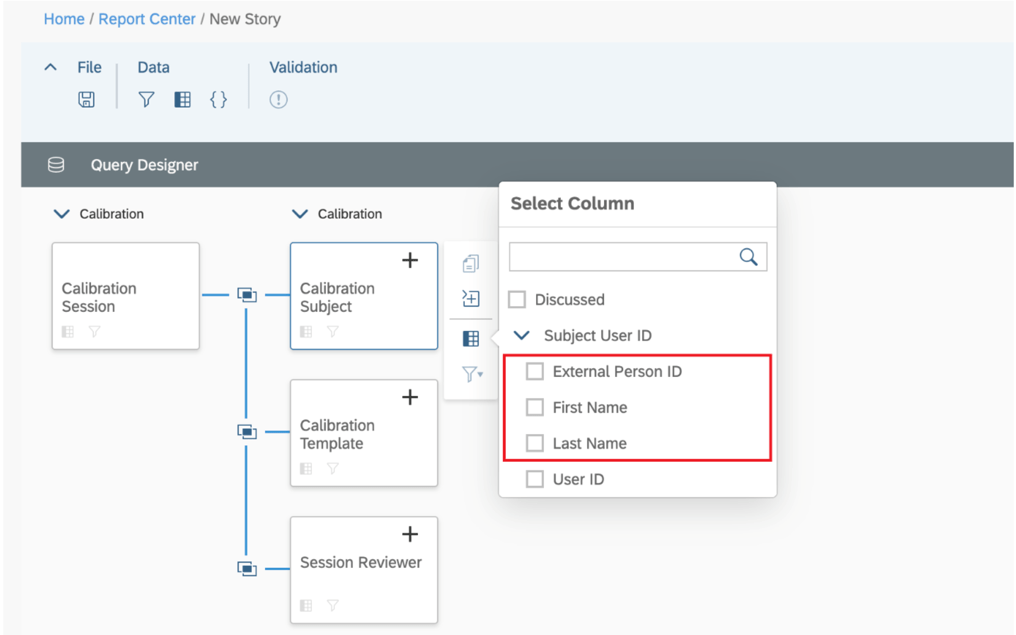
You can now include the name and external user ID of a session subject in a Story report. The first and last names and external user ID are supported in the auto-joins for calibration subjects. This makes it easier to get calibration subject information.
Subject Name Columns
General Availability – Admin Opt-Ins
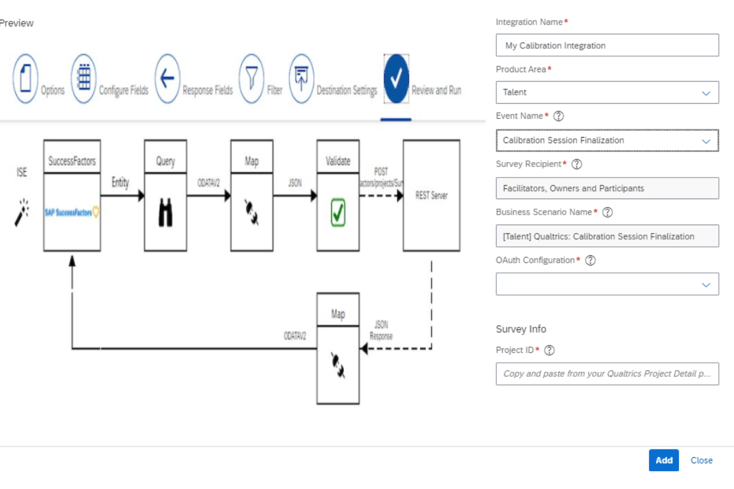
Qualtrics Feedback Opportunity for Calibration Session Finalization
Manage Qualtrics Integrations in the Admin Center now includes the Calibration Session Finalization option in the Event Name field’s drop-down list for Talent.
Calibration Session Finalization
Intelligent Services events can be used to send employee information to Qualtrics so when an employee finalizes a calibration session, a Qualtrics feedback survey may be sent via email.
Calibration, Intelligent Services and Integration Center must be enabled and a Qualtrics Employee Experience license for Lifecycle projects is required.
Continuous Performance Management (CPM)
The legacy version of Continuous Performance Management (CPM) will reach End of Maintenance on May 20, 2022 and will be retired as of May 19, 2023.
The latest version of CPM, initially released in 2H 2020 is available in the Upgrade Center. If no action is taken, your company will be automatically upgraded to the latest version after the retirement date.
In Conclusion
We have now covered the highlights of the PM related updates for 1H 2022. See our blog for 1H 2022 Career Development release features.
Highlights are identified by module and the type of change.
Universal- for modules enabled, universal means no steps are required to have access to the new functionality. These features are automatically made available.
Admin Opt-In – the admin must enable the new feature, usually in Admin Tools
Admin Opt-Out – the admin must disable the new feature, usually in Admin Tools
Provisioning Opt-In and Opt-Out require a Partner or Product Support request
For your convenience, we’ve summarized the highlights of what’s new for 2H 2021 Performance Management below.
Performance Management
There is not much in the way of new functionality, just one universal update.
General Availability – Universal Updates
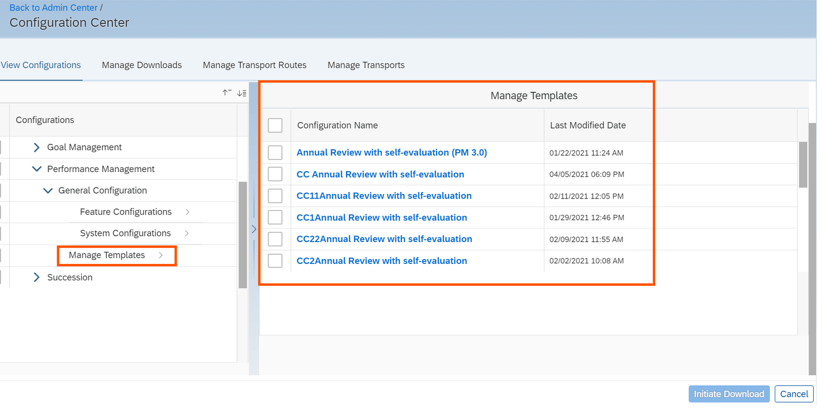
Configuration Center Support For Performance Management Form Templates
You can now view, download, and transport Performance Management form templates across tenants using Configuration Center. Prior to this release, only Feature Configuration was available under General Configuration for Performance Management. Now System Configuration and Manage Templates are available.
New PM Configuration In Configuration Center
General Availability – Admin Opt-Ins
The admin opt-ins require the latest version of the home page.
PM Related Updates “For You Today” Section of the Latest Home Page
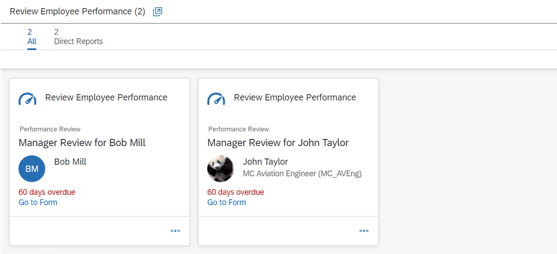
When the latest home page is used, a “For You Today’ card will appear for PM tasks.
You can enable to-do tasks on the latest home page in the Upgrade Center.
The tasks are:
“Review Employee Performance” task available for managers
“Review Employee Performance” task available for employees
To give managers a view of the form that need their review, cards are grouped into Direct Reports, Matrix Reports, and Other on the stack view. An example is shown below.
For You Today Performance Tasks
Users can go directly to the performance review forms from this card to complete the tasks.
Goal Management
There is one universal update for Goal Management. The majority of the new functionality is for the latest version of Goal Management. With each release more and more features become available.
General Availability – Universal Updates
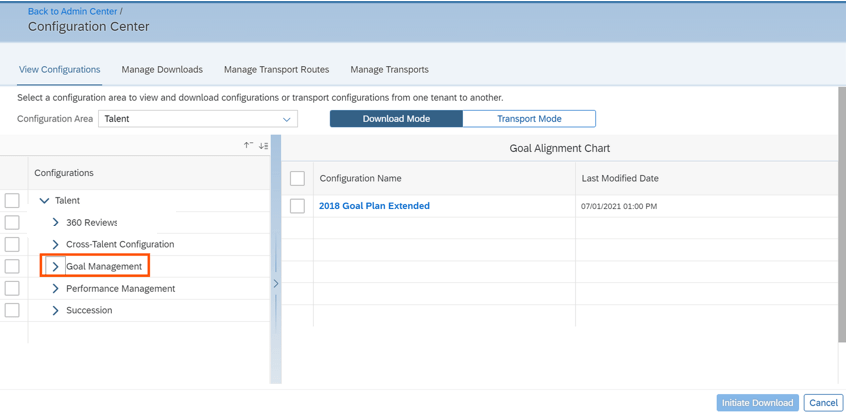
View, download, and transport Goal Management configurations using Configuration Center.
It is now possible to use ConfigurationCenter for Goal Management to view configurations, download configurations, and transport configurations across tenants. Configuration Center permission is required.
The view feature enables the admin to view configuration as well as see the username who made changes with a date and timestamp.
The download feature is useful to take a backup of your application’s configurations as well as for troubleshooting by an Implementation Partner or Customer Support.
The export feature can be used to export configuration in order to copy from the preview system to production.
With this release, after selecting the Talent configuration area, Goal Management is visible. The admin can then select the features to download.
Goal Management in Configuration Center
After selection, the admin goes to the “Transport Mode” tab to initiate the download process.
Upon completion, the configuration bundles is downloaded in ZIP format. Configuration types are available as separate files.
Latest Goal Management
With each release, the latest version of Goal Management has functionality added that is already available in the current version,
Now supported in the latest version of Goal Management:
Beta Goal Import
Changing goal plan states in Goals
User search
Matrix relationships
Now available in the latest version of Goal Management:
Spell Check
Legal Scan
Advanced user search by criteria
We will look at the new supported functions that are available for those using the latest Goal Management. We will start with the universal updates.
Early Adopters – Universal Updates
Mass Import Personal Goals in Latest Goal Management
It is now possible to use the “Import Performance Goals” for the latest version of Goal Management.
Change Goal Plan States in Latest Goal Management
It is now possible to update the goal plan state in the latest version of Goal Management. The ability to lock and unlock goal plans will be available and provides visibility of the goal plan state using the latest version of GM.
Goal plan states are used to control the action and field permissions before and after a goal plan is approved. Users with the “change-state” permission in the goal plan XML can now change the goal plan state in a more straightforward manner.
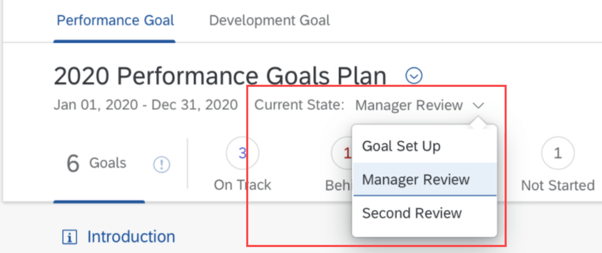
An example using goal plan states in the latest version of a goal plan is shown below. The current state has a dropdown list.
Latest Goal Management Goal Plan Current State
In addition, employees will be able to receive email notifications when their goal plan state changes. The notifications will include who changed the goal plan state and what the current goal plan state is.
Enhanced People Selector in Latest Goal Management
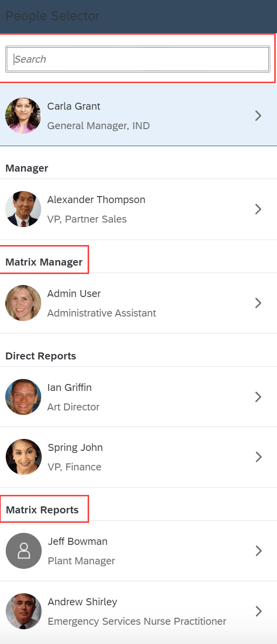
When using the latest version of goals management, the people selector will include matrix manager and matrix reports. If these matrix roles have permission, they will have access to view goal plans.
An example of the people selector in a goal plan is shown below.
People Selector with Matrix Manager and Reports
If these matrix roles have permission, they will have access to view goal plans.
360 Reviews
General Availability – Universal Updates
View, download, and transport 360 Reviews configurations using Configuration Center
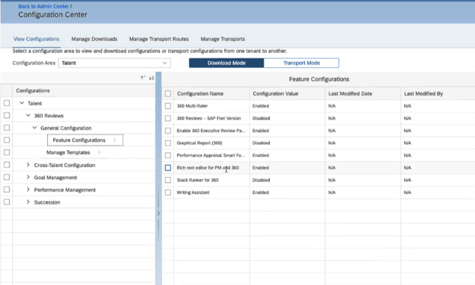
Similar to the Goal Management being available in Configuration Center, it is now possible to use ConfigurationCenter for 360 Reviews to view configurations, download configurations, and transport configurations across tenants. Configuration Center permission is required cross tenants.
Before this release, 360 was not available in Configuration Center Now when selecting the Talent configuration area, 360 is visible. The admin can then select the features to download fro the Transport Mode tab.
360 in Configuration Center
Add External Participants When Users Have No Search Permissions
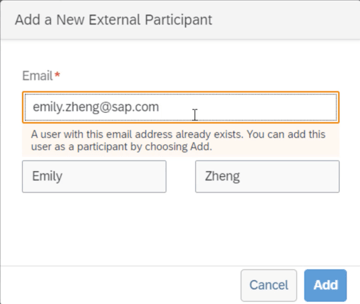
Users without permission to search for external users may now add them as form participants by email address. Users can enter the email address of an external user in the “Add a New External Participant” dialog box.
If the external user already exists in the system, the First Name and Last Name fields are automatically filled and users can select “Add” to add the external user as a participant.
An example is shown below.
Add External Participant
General Availability – Admin Opt-Ins
360 Reviews Tasks on the Latest Home Page
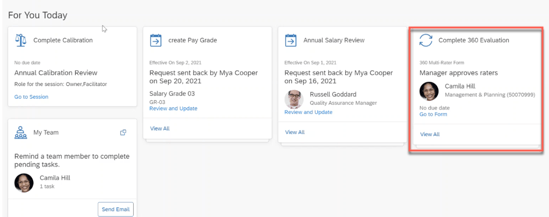
When the latest home page is used, a “For You Today’ card will appear for 360 Review tasks:
“Complete 360 Evaluation task” available for managers
“Complete Your 360 Evaluation task” available for employees
Found on the latest Home Page, for any 360 forms for an employee, manager or raters, there is a card to prompt the user to review and complete the 360 Reviews form in the Performance inbox.
For You Today Card for 360
Users can go directly to the 360 review form from this card.
Calibration
General Availability – Universal Updates
There is a universal update for a calibration session.
Set max rating change span
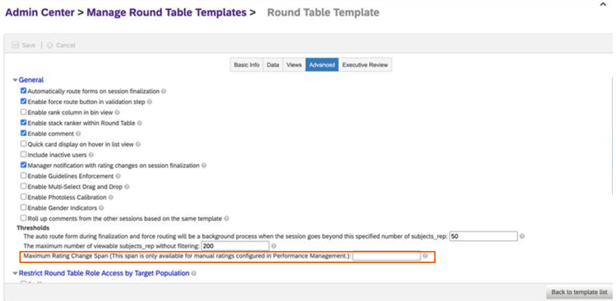
In “Manage Calibration Templates”, if your data source is “Performance”, it is now possible to set a maximum rating change span. This setting can be found on the “Advanced” tab.
Once the span is set, if you make rating changes in the session, the following rules apply:
If the rating change made doesn’t exceed the maximum rating change span, the rating will be changed
If the rating change exceeds the maximum rating change span, an error message displays and the rating reverts to the original rating.
Shown below is the Calibration Template “Advanced Settings” tab.
Set Maximum Rating Change Span
Continuous Performance Management (CPM)
There are only admin opt-ins for this release of Continuous Performance Management.
General Availability – Admin Opt-Ins
New Qualtrics Survey for Continuous Performance Management
It is possible to integrate Qualtrics surveys with Continuous Performance Management. This integration allows you to collect feedback from employees after 1:1 sessions with their managers.
To use this feature:
CPM must be enabled
Qualtrics license for website and app feedback projects required
“Manage Qualtrics Integrations” feature is enabled in Upgrade Center
The Qualtrics account is used to create the survey and view survey feedback.
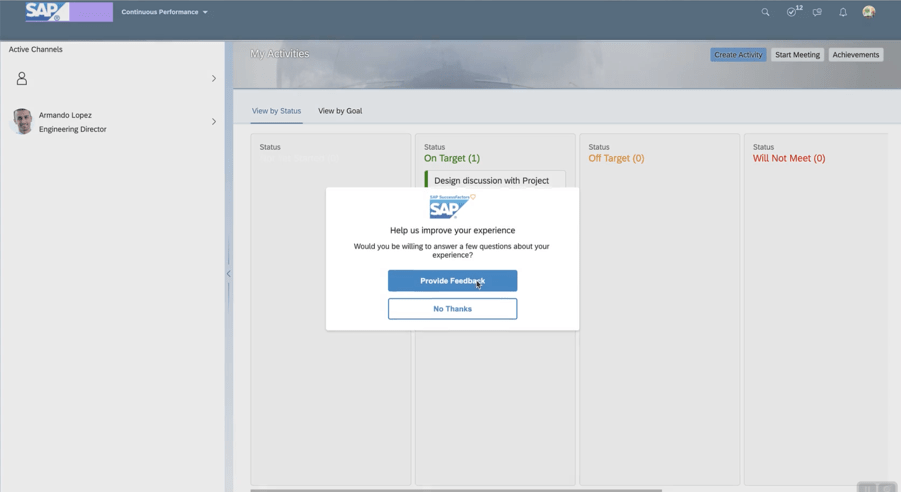
An employee will be prompted to complete the survey. An example is shown below.
Start Survey within CPM
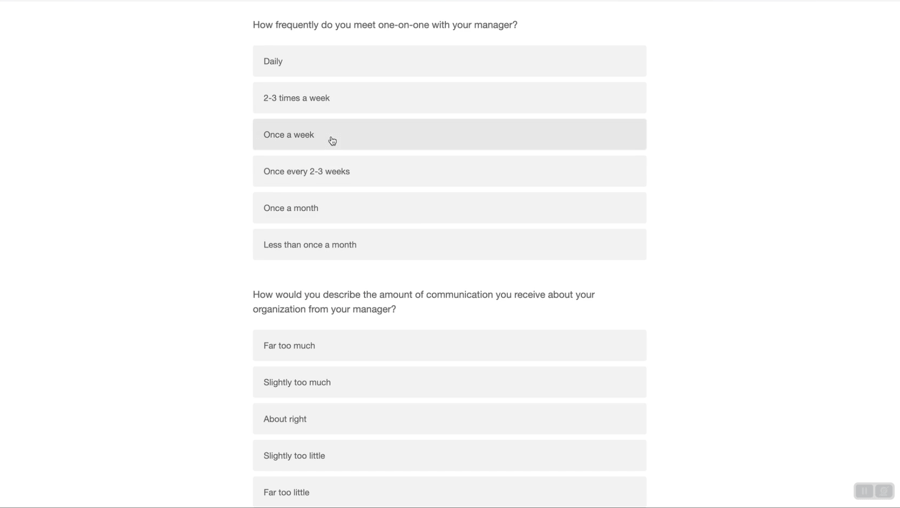
The user will see questions to answer.
Survey Questions
Once completed, the admin may view the survey feedback.
Early Adopter – Admin Add -Ins
Enhanced Achievement Experience for Continuous Performance Management
This feature is only available if the latest version of CPM is used.
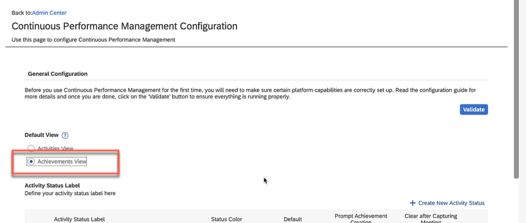
Achievements can be the default view on the CPM landing page, which enables quick access to achievements. The admin would have to select “Achievements view” as the default on the “Continuous Performance Management Configuration” page. An example is shown below.
Set Default View
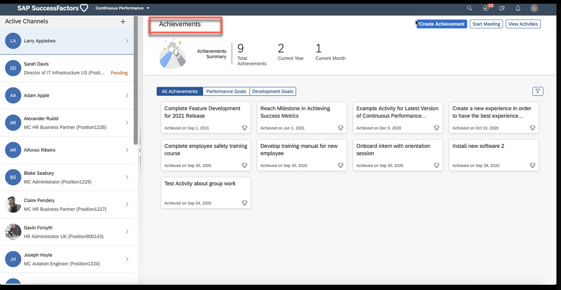
When a user accesses CPM, the default view will now be the Achievements tab.
Achievements tab default view
Feedback Integration with Microsoft Outlook
Continuous feedback may be enabled from a Microsoft Outlook add-in to make giving feedback easier.
In order to use this feature:
Latest version of CPM must be enabled
SAP SuccessFactors user attributes are mapped to Microsoft Active Directory
Continuous Feedback outlook integration is enabled and the manifest file downloaded
SAP SuccessFactors user attributes mapped to Microsoft Active Directory.
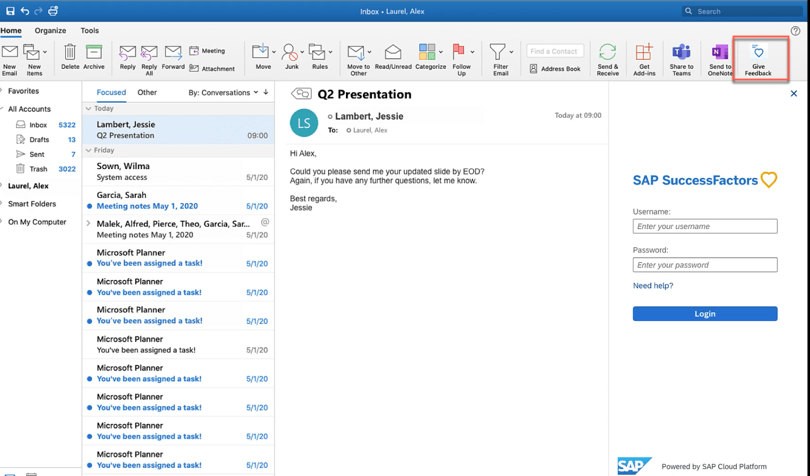
The employee will see an option to give feedback.
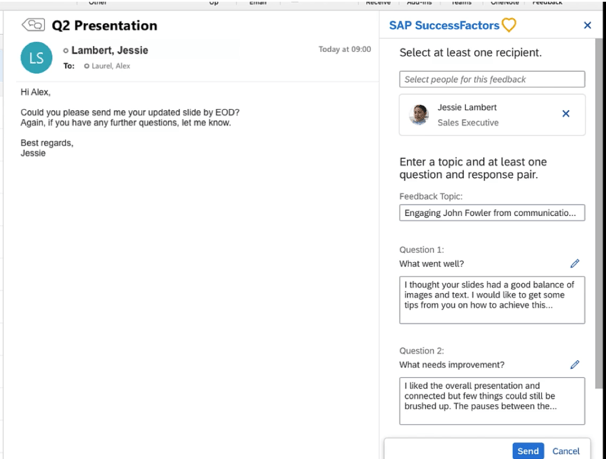
CPM Feedback within OutlookStart Giving Feedback
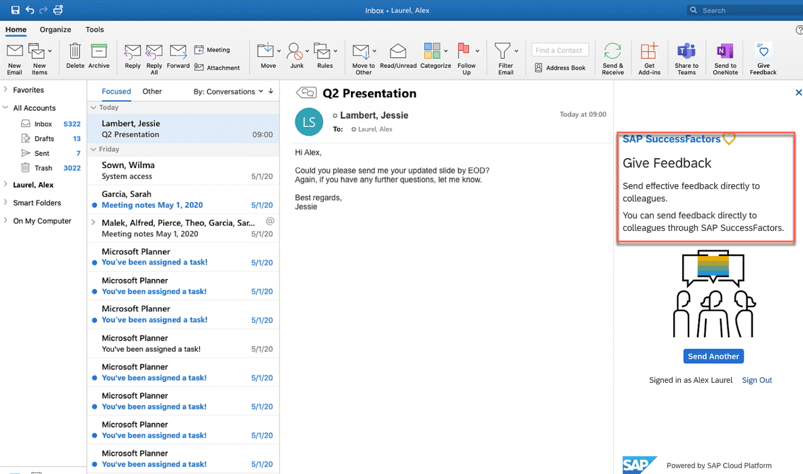
The feedback questions display and enable the employee to provide feedback.
Feedback Questions
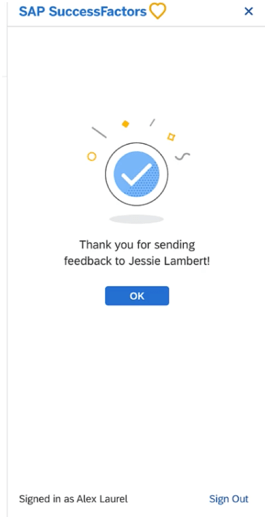
Upon submission, a confirmation message displays. An example is shown below.
Completion of Providing Feedback
Depreciation
Deprecation of 360 Reviews v11 Version
November 18, 2022 is the end of maintenance for 360 Reviews v11 and will be deleted on May 20, 2023.
We have now covered the highlights of the PM related updates for 2H 2021. See our blogfor 2H 2021 Career Development release features.








 Worklogix Blog