Tag: Human Resources

  • SAP SuccessFactors:  Performance Form Design Flaws and How to Avoid Them

    SAP SuccessFactors: Performance Form Design Flaws and How to Avoid Them

    Learn the pitfalls to avoid in order to create a performance form that is impactful and provides clarity, evidence, balance, and has a future focus.

    Here are some of the ways forms measure the wrong things and here are some tips to improve the performance review process.

    What Not to Do #1

    Measure behavior not results. Typically attendance, compliance, and soft competencies are scored. Responses are vague and do not provide guidance on what to continue to do and what to work on to improve.

    What to Do Instead #1

    Connect measures to business outcomes. Do not rate just easily observable behaviors.  Include rating for strategic impact, customer value deliverance, growth in role.

    What Not to Do #2

    Use vague ratings.

    Ratings of Does Not Meet Expectations, Meets Expectations and Exceeds Expectations are vague and subjective at best. Two managers could rate an employee completely different using this rating scale.

    What to Do Instead #2

    Create a scoring system that is well defined with examples for each score. Also provide calibration rules. Tie ratings to business impact and not on personal opinion.

    What Not to Do #3

    One Size Fits All Form

    An organization with sales, marketing, research, and manufacturing cannot rate the varied roles using the same form. Each drives values in a different way. Customize role-specific scorecards based on the work that produces value.

    What to Do Instead #3

    Use a shared framework that stresses company-wide values, and standards. Have one form style but use different measures per job family.

    What Not to Do #4

    Make form too long and have too many steps

    Some forms ask too many questions and have crazy workflows. This causes employees and managers to feel pressure to complete the forms under tight deadlines which leads to rushed and low quality responses.

    What to Do Instead #4

    Ask fewer and better questions. Use evidence-based assessment using metrics and outcomes, anything to remove ambiguity. If a question adds no decision making value, it doesn’t belong on the form.

    What Not to Do #5

    Use of Generic Competency Frameworks

    While competencies such as “embraces change”, or “drives innovation” are aspirational, they are hard to rate objectively.

    What to Do Instead #5

    Competencies should be observable, job-relevant, linked to business outcomes and have defined behaviors for each level.

    What Not to Do #6

    Have Forms Built for HR

    Forms that allow box checking, reporting, and legal defense are great for HR but are not tailored to the manager and employee.

    What to Do Instead #6

    Optimize form with clear feedback, meaningful coaching conversation and have to have better performance in the next go round with no surprises.

    What Not to Do #7

    Have Unusable Output

    Weak performance forms don’t tie into development plans, pay decisions, drive staffing decisions or shape promotion paths. Don’t heavily lean towards rating subjective skills.

    What to Do Instead #7

    A well-designed form is operational, in that leaders use the output to allocate talent, managers use it to coach and employees use it to grow.

    Overall Tips for a Better From

    Make the form operational:

    • Provide clear, concise feedback
    • Have a balanced discussion: talk about strengths, but don’t neglect areas that are opportunities for growth
    • Create a path forward which identifies clear expectations, of view of what success looks like and how it is measured
    • Be fair and consistent in the assessment; avoid bias, assumptions, and judgments
    • Have a two way dialog with opportunity to ask questions, discuss challenges, invite reflection

    You should now be on your way to crafting a well created performance form. Just remember that it should be comprehensive in that it assess an employee’s performance, encourages their growth, and support the organization’s mission.

    Do you need help implementing or supporting your SAP SuccessFactors system?  Contact info@worklogix.com for assistance, download our support services brochure, or visit https://www.worklogix.com/implementation.html for additional information.

  • What’s New in Onboarding H1 2021

    What’s New in Onboarding H1 2021

    It’s that time of year! As of April 9, 2021, SAP has released the documentation for the H1 2021 release.  The preview release will be April 16 and the move to production will be May 21st.  You can view the full set of documentation in the What’s New Viewer here. For full details on the release cycle, check out the SAP SuccessFactors official product updates blog here.  New to the release process? For tips on how to manage a release, check out our blog here

    In the SAP SuccessFactors Onboarding H1 2021 release, we’ve mainly seen updates to compliance forms and processes as well as some user experience enhancements and security Features. Let’s take a look at what’s new in the Onboarding module below!

    Compliance Forms & Processes

    As expected, SAP continues to expand the number of compliance forms supported. In this release SAP has included these forms:

    In addition, reporting information is also now available for I-9 and E-Verify data so that you can create Stories in in People Analytics using the information.

    Also important on the compliance front: Russian Personally Identifiable Information (PII) data will also now be stored in the Russian data center from Day 1. For more details, take a look at the help guide here: https://help.sap.com/viewer/c94ed5fcb5fe4e0281f396556743812c/2105/en-US/d9e6b7923a9049a6a742f13d05b28d5a.html

    User Experience

    In addition to compliance features, there’s some nice enhancements to user experience. Of all the modules, I think onboarding is one of the more confusing to navigate as an admin user and these enhancements help address this issue. Let’s take a look!

    First, users can now navigate directly to the onboarding dashboard from the global navigation (early adoption feature). I personally liked this one because when I first started with Onboarding, I was used to the main page of every module being accessible through the navigation menu – onboarding was the only one where you had to click on a home page tile instead. I think this will provide some nice consistency for users.

    In addition to easier navigation to the dashboard, its features have also been enhanced. Here’s a list of the new feaures:

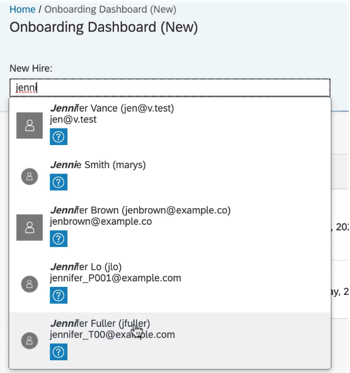
    • New Hire Search – allows onboarding users to type a name to search through new hires
    • Checklist Task – can now be viewed under “New Hire Tasks”, items can be added for a specific user using the “Delegated” drop down (delegates can also be notified via email when the task is assigned to them), and under “View Details” users can edit the checklist tasks,
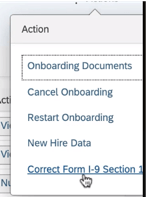
    • I-9 – corrections to section 1 can now be initiated from the “New Hire Details” action menu
    • E-Verify – view details from the “E-Verify Case Details” link on the “New Hire Details” screen
    User Search
    Correct I-9 from the Action Menu

    Its great to see the dashboard getting some new features to make transitioning between screens easier!

    Next, the locale for external users of Onboarding will now be updated automatically based on their recruiting settings. This is a common sense win. Locale can also be set when manually adding users via the “Add New Hire to Onboarding” screen. If no value is specified in either scenario, the locale will default to the default language set in provisioning.

    Security Features

    In addition to compliance enhancements and improvements to usability, there’s a few cool security features worth mentioning.

    First, the target population for the external user target population can now be based on the division, department, and location of the user. This allows organizations to have multiple admins specific to division, department, and/or location rather than just admins who can see the whole new user population.

    Next, on the new hire side, the external user visibility tool lets you make objects visible to new hires. This gives a level of flexibility to administrators they previously had to contact SAP to modify. For a full list of objects and how to configure, check out this link: https://help.sap.com/viewer/c94ed5fcb5fe4e0281f396556743812c/2105/en-US/5df8a72caabf4848a145b74f0516cff8.html

    Last, read access audit logs for onboarding have been enhanced to show context and reason why sensitive fields were accessed (e.g. through the UI, or APIs, or a downloaded document). This is designed to give auditors better understanding of why data was accessed.

    Wrap up

    I hope you’ve enjoyed this quick review of the latest Onboarding features available in the H1 2021 release! Do you need help managing your SuccessFactors Release cycles?  Download our support services brochure or email info@worklogix.com to see how we can help!