Tag: Employee Central

  • SAP SuccessFactors Compensation 1H/2H 2025: Key Enhancements Explained

    Introduction

    SAP SuccessFactors brings updates twice a year, and the 2025 releases include several improvements across different modules, including Compensation. If your organization uses the Compensation module, you’ll notice changes in areas like worksheets, statements, and integrations. In this blog, I’ll explain the key updates from the 1H 2025 release and what we know so far about the 2H updates.

    • The 1H 2025 release – April 2025 includes the first set of changes. 
    • The 2H 2025 release – October/November builds on that.
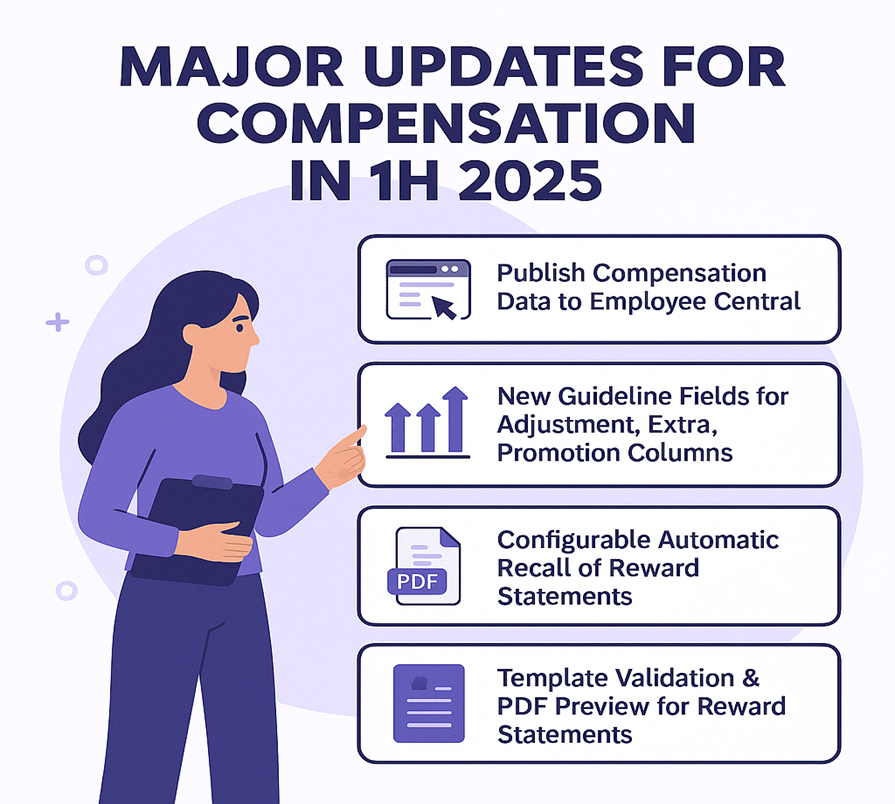
    Here are the significant enhancements for the Compensation module identified in the 1H 2025 release.

    Publish Compensation Data to Employee Central without PCNR
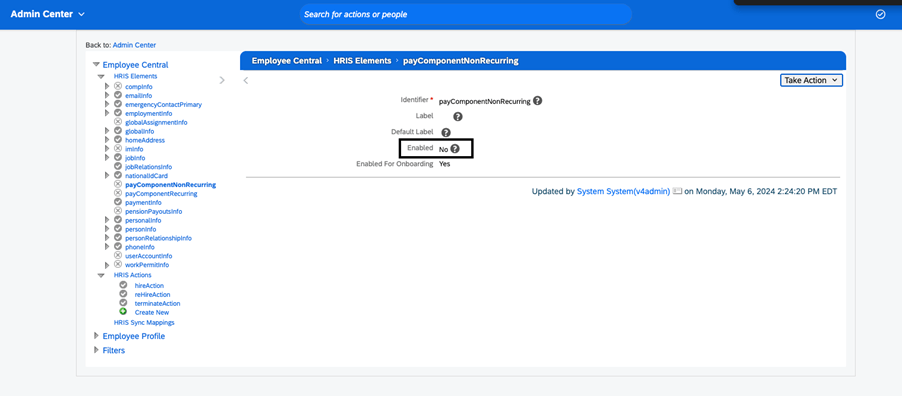
    Previously: If you wanted to publish compensation plan data into SAP SuccessFactors Employee Central (EC), you needed the HRIS element payComponentNonRecurring enabled in your configuration. 

    New: You can now publish compensation data to Employee Central without enabling the payComponentNonRecurring HRIS element. This simplifies configuration and gives more flexibility on your side. 

    Why it matters: If you enable that HRIS element (for example, due to complexity or control reasons), this change reduces a barrier and broadens options for integration.

    New Guideline Fields for Adjustment, Extra, Promotion Columns
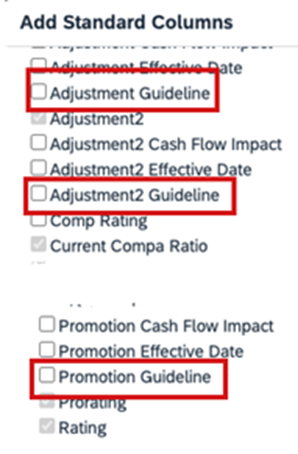
    Previously: Compensation worksheets had guideline fields for standard columns like Merit or Lump Sum, but not all columns had guideline-support.

    New: The update introduces additional standard guideline fields for columns such as Extra, Extra2, and Promo (via new field IDs: extraGuideline, extra2Guideline, promoGuidelie).

    Why it matters: It gives planners more visibility and control. For example, you can set guidelines around “Promotion” adjustments the same way you had for merit increases, and surface warnings or rules when planners exceed or ignore those guideline values.

    Configurable Automatic Recall of Reward Statements

    Previously: If you completed a compensation worksheet and generated corresponding reward statements, and then later moved the worksheet back to “In Progress”, the system would automatically recall those reward statements.

    New: You now have a setting that allows preventing automatic recall of reward statements when worksheets are moved back to In Progress status. 

    Why it matters: In some use-cases you want to preserve the generated statements (for audit/tracking) even if the worksheet is reopened. This change adds flexibility around your workflow.

    Template Validation & PDF Preview for Reward Statements
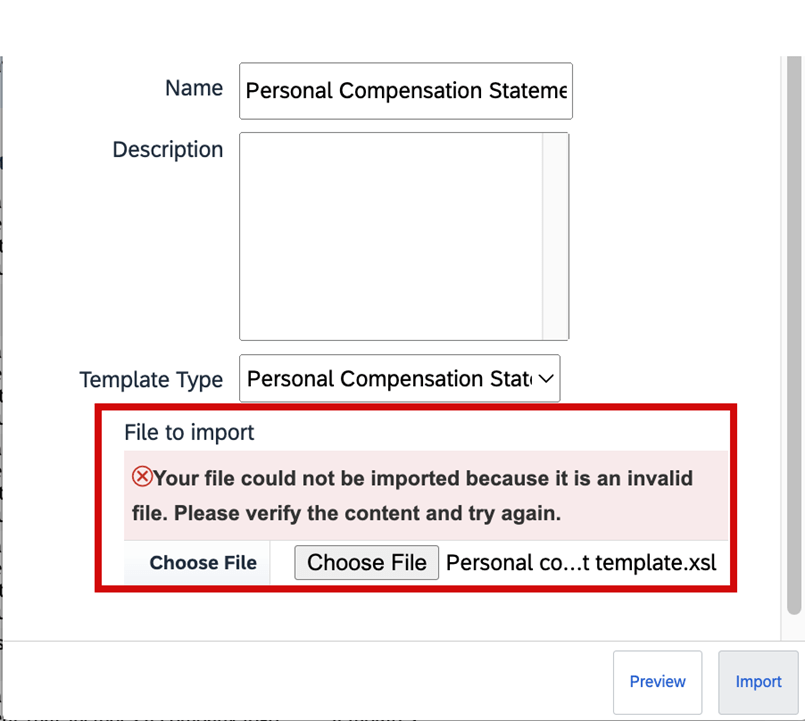
    Previously: When importing custom XSL templates for reward statements, the system had limited validation. Also you didn’t always have a full preview of what the generated PDF-statement would look like before production generation.

    New: The system now validates the XSL file when importing templates. You can now preview sample PDFs of statement templates before generating them for employees (via a “Download Sample PDF” / “Preview Sample HTML” action). 

    Why it matters: Improves the quality of end-user statements, reduces surprises or formatting issues, and supports smoother rollout of statement templates.

    1H 2025 Changes You Can Disable

    Change You Can DisableShort Description of Change
    Automatic Recall of Compensation Statements Now ConfigurableSometimes, your company must move completed compensation
    worksheets back to in progress status. In the previous version, if you had generated the
    reward statements already, the system automatically recalls the statements. You can now
    set up your system to prevent this automatic recall of the statements when the
    worksheets are moved back to in progress.
    Enforce User Account Upgrade for Consistent Login ExperienceIf you have users with employment-based logins, SAP SuccessFactors upgrades them to
    account-based logins. Additionally, profiles show login names instead of user
    names.
    Latest Experience of Performance Management FormsWe redesigned the user interface of the Performance Management
    form, introducing a streamlined, flexible layout along with many other user experience
    enhancements.

    Advanced Filters on Worksheets

    Previously: You see the legacy filter functionality in case you don’t enable the advanced filters on the worksheet where you’re only able to filter based on certain pre-selected criteria.

    New: On a worksheet, select the Filter button to access the Create Filter button. Once Create Filter is selected, you see the dialog for creating filter open up. On the popup, you’re able to set conditions and criteria for your filters. Also, you can select if you want All (and) or Any (or) operators to be applied to the conditions when applying the filters.

    Why it matters: We now support advanced filtering capabilities on worksheets for compensation, variable pay, and total compensation plans. To enable advanced filters on worksheets, go to Compensation Home Actions for all Plans Company Settings  Manage Company Settings and enable the Enable advanced filters on worksheets checkbox. You can have up to 30 criteria per filter spread across one or multiple conditions. The advanced filtering capabilities on the executive review are now extended to the worksheets.

    Custom Field Visibility on the Compensation Profile

    Previously: Earlier you could hide a column entirely. You didn’t have the options to show a field on the profile or the worksheet selectively.

    New: Additional options to configure visibility of custom fields for the Compensation Profile and the worksheet in the Design Worksheet tool when configuring columns for a worksheet. These options apply to the Compensation module for the worksheets and the executive review.

    Why it matters:  You now have additional options to configure visibility of custom fields for the Compensation Profile and the worksheet in the Design Worksheet tool when configuring columns for a worksheet. These options apply to the Compensation module for the worksheets and the executive review.

    Update Compensation Forms for Template Now in the Job Scheduler
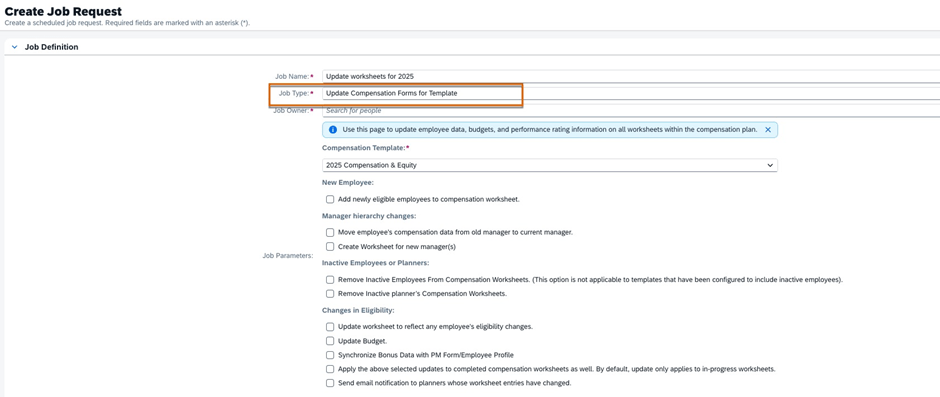
    Previously: In the previous version, you opened a support ticket to configure and schedule the job in Provisioning. You could and can still run the job in Compensation Home <Template Name> Manage Worksheets Update all worksheets right away. However, if you must run the job later or on a schedule, you can now configure the job on your own in Job Scheduler. Parameters for the job are the same as those for Update all worksheets.

    New: You can configure and monitor the job in the Job Scheduler and Job Monitor for compensation worksheets. The parameters for the job are the same as those parameters for the Update all worksheets tool.

    Why it matters: In the current version, if you must run the job later or on a schedule, you can now configure the Update Compensation Forms for Template job yourself in Job Scheduler.

    Integration changes

    The 2H 2025 release mentions updated integration-capabilities for the suite, which will impact Compensation where data flows to/from other modules.

    Known issues tracker

    There is a published “Known Issues” list for 2H 2025 for the Compensation module (among others) — it’s advisable your team monitors this to identify any regression or hot-fixes required.

    Planning tip

    Because features introduced in 1H may wave into 2H (or require follow-on steps), ensure your roadmap includes review of the 2H enhancements and impacted processes.
    Here are some steps and considerations for Compensation teams as you approach or implement the 2025 delta release updates:

    Review your current configuration

    • Take inventory of what modules/configurations you currently use in Compensation (worksheets, statements, integrations to EC, guideline fields, statement templates).
    • Identify which of the 1H 2025 features apply to you (e.g., are you publishing compensation data to EC? Do you use extra/extra2/promo guideline fields? Do you generate reward statements with custom templates?).
    • For any upcoming 2H updates, map whether your integration architecture or processes will need review.

    Activate and test selectively

    • Features like “Publish to EC without PCNR” may simplify your configuration, but still test in a non-prod instance before moving to production.
    • For new guideline fields (extraGuideline etc), update your worksheet template and test planner experience: how does the warning/goal behave? Does the UI display as expected?
    • For statement template validation and PDF preview: have your template-owners/import team test custom templates, validate XSL import, preview PDFs, and confirm the end-user experience.
    • For automatic recall setting: review your workflow. Do you want the old behaviour (automatic recall) or the new flexibility? Ensure stakeholders agree and you test the setting.

    Change management & communication

    • For planners and managers: inform them of new guideline fields and any changed worksheet behaviour (e.g., warnings/out-of-guideline alerts).
    • For reward statements: communicate to recipients that the statement format may change slightly (because of improved templates/preview).
    • For HR/Comp Ops team: update your release checklist and regression test plans to include the new features. Also monitor the 2H 2025 Known Issues list for Compensation to catch any issues early.

    Roadmap your 2H 2025 actions

    • Even if you don’t immediately activate all features, include in your roadmap: review the integration changes, check whether any features become auto-on (i.e., you cannot opt-out), and plan workload around testing.
    • Use the “What’s New” viewer or release documentation at SAP or the SAP SuccessFactors Community to capture all release items and filter for Compensation.
    • Prioritize features by business impact, implementation effort, and configuration complexity.

    Summary

    In short, the 2025 delta releases for the Compensation module in SAP SuccessFactors provide meaningful enhancements especially around integration for Employee Central publishing, advanced filters, worksheet guideline flexibility, statement template improvements for validation & preview, and automatic recall setting. These changes enhance configurability, user experience and governance around compensation planning cycles.

    If you’re planning your next compensation cycle (worksheet rollout, statement generation, integration to EC), now is a good time to evaluate these updates, adjust your configuration or roadmap, and ensure you’re leveraging the new capabilities rather than being surprised by them.


  • SAP SuccessFactors Employee Central – 2H 2025 Delta Release

    SAP SuccessFactors released its 2H 2025 Delta Update with the introduction of a fresh wave of innovations and improvements across Employee Central.
    This release has focused majorly on data quality, workflow flexibility, localization expansion, position management clarity, and document generation enhancements—in order to strengthen HR operations and elevate the experience for employees, managers, and HR administrators.

    In this blog, we run through the most impactful enhancements from the Employee Central (EC) 2H 2025 Delta Release.

    🔍 1. Position Management Enhancements

    Position Management remains as one of the most enhanced area in the 2H 2025 release, with several new ability that improve accuracy in workforce planning.

    ⭐ Key Highlights

    ✔ Expanded fields in the “To Be Hired” status change use case

    The following fields are now supported when changing a position to “To Be Hired”:

    • multipleIncumbentsAllowed
    • standardHours
    • incumbent
    • company
    • targetFTE

    This gives admins more precise control and ensures alignment between job, position, and hiring processes.

    ✔ Improved synchronization between Position and Job Info

    Data consistency is strengthened through better propagation and validation rules.

    ✔ Cleaner audit trails

    Event tracking for position changes is more transparent, improving governance.


    👤 2. Employee Data & Employment Information Improvements

    The 2H 2025 release intensify HR data reliability with several backend and UI upgrades.

    ⭐ What’s New

    • More accurate validation frameworks across Personal & Global Information sections
    • Enhancements in Employment Information to support changing labour regulations
    • Refined error-handling messages to minimise admin rework
    • Smarter country-specific rules for identifiers, addresses, and eligibility fields

    Together, these updates improves global HR master data accuracy.


    ⏱️ 3. Time Management Enhancements

    Time Management continues to progress with performance improvements and richer rule-based automation.

    ⭐ Key Enhancements

    • Improved absence request validations across multiple countries
    • Faster loading of daily, weekly, and monthly timesheet views
    • Strengthened calculation logic for overtime, breaks, and premiums
    • Better work schedule and public holiday configuration capabilities

    These changes improve payroll readiness and simplify the daily experience for time-dependent roles.


    🌏 4. Localization & Compliance Updates

    Localization continues to be a core pillar of SuccessFactors strategy, and the 2H 2025 release extends this further.

    ⭐ Updates Include

    • New statutory fields across multiple countries
    • Country-specific data formats, regulation updates, and identification rules
    • Localization improvements in hire, termination, and job event workflows
    • Improved document templates for certain regions

    This makes sure global companies stay compliant without relying on custom development.


    📄 5. Document Generation Enhancements

    Document Generation receives remarkable upgrades in this release and is one of the most prominent improvements.

    ⭐ New Capabilities

    • Support for expanded dynamic placeholders
    • Enhanced stability and formatting control
    • Greater compatibility with multilingual templates
    • Optimized merge performance for large document batches

    This is specifically useful for generating contracts, letters, onboarding packs, and compliance forms at scale.


    🔗 6. API, Integration & Event Handling Improvements

    The 2H 2025 release sharpens EC’s integration framework, ensuring ideal connectivity across SAP and non-SAP systems.

    ⭐ Improvements Include

    • More resilient OData APIs
    • Enhanced support for future-dated events
    • Better coordination with SAP HCM Payroll and SAP ERP
    • More descriptive integration error messages

    The improved event-handling logic makes downstream systems more consistent and reduces integration failures.


    🎨 7. User Experience (UX) Enhancements

    A modern UI remains central to SuccessFactors’ roadmap. This release introduces indefinite but impactful improvements.

    ⭐ UX Refinements

    • Clearer field grouping and section headers
    • Streamlined workflows with simplified approval screens
    • Better mobile responsiveness
    • Faster portlet rendering performance

    These improvements provide a cleaner, more available experience for all users.

    📌 Summary – Why the 2H 2025 Release Matters

    The SAP SuccessFactors Employee Central 2H 2025 Delta Release is designed to help organizations:

    ✔ Intensify data quality and governance
    ✔ Enhance hiring alignment with enhanced Position Management
    ✔ Elevate efficiency through Time Management improvements
    ✔ Stay globally pilable with localization updates
    ✔ Deliver documents faster and with greater precision
    ✔ Achieve seemless system integrations
    ✔ Improve employee and HR admin experience

    This release is not just an incremental update—it’s a strategic step toward a more rationalized and future-ready HR core system.

  • SAP SuccessFactors 2H 2022 What’s New in Employee Central

    SAP SuccessFactors 2H 2022 What’s New in Employee Central

    SAP has announced the latest updates and changes for SuccessFactors for the second half of 2022.

    Preview release was on October 28 and production will be released December 9th. You can view the full set of documentation in the What’s New Viewer here. For full details on the release cycle, check out the SAP SuccessFactors official product updates blog.

    For tips on how to manage a release, check out our blog here

    Let’s quickly take a glance on what’s there on 2H 2022 Employee Central.

    Configuration Type: Universal

    Full-Time Equivalent (FTE) validation.

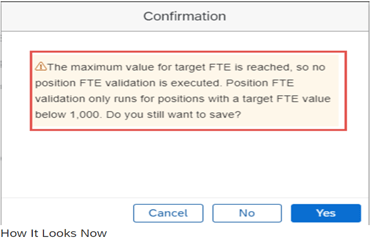
    Watch over on “Full-Time Equivalent (FTE)” validation because system is not going to perform a Full-Time Equivalent (FTE) validation check for positions that have more than 1000 target FTEs for the below scenarios.

    1. Save Job Information through Centralized services, either through import or on the Job Information history.
    2. Save a position target FTE with a value greater than 1000.

    Employee Central API Permissions are no longer required!

    Employee central entities “EmpEmployment and EmpJob” Permissions are only required to access the Employee Central Service Center.

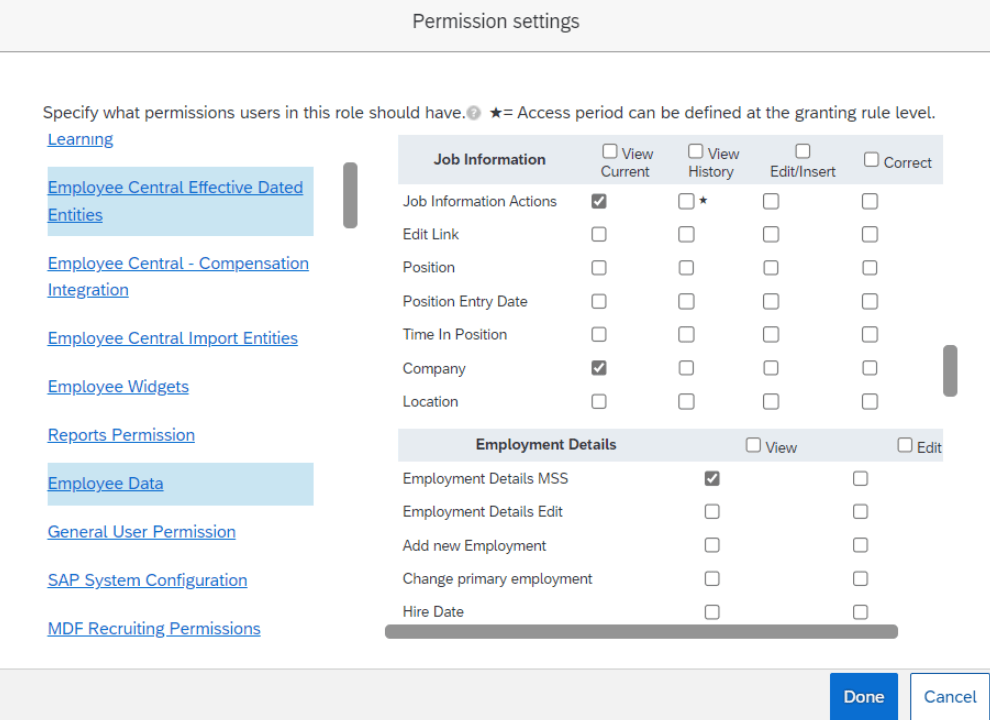
    Below Permissions settings will help to view a tickets in Ask HR.

    • User > Employee Central Effective Dated Entities > Job Information
      • Select permission View for items Job Information Actions and Company.
    • User > Employee Data >Employment Details
      • Select permission View for item Employment Details MSS.  

    Enhancement in Time Sheet UI required custom fields

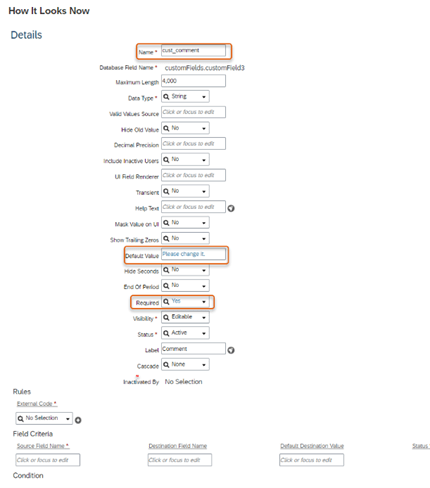
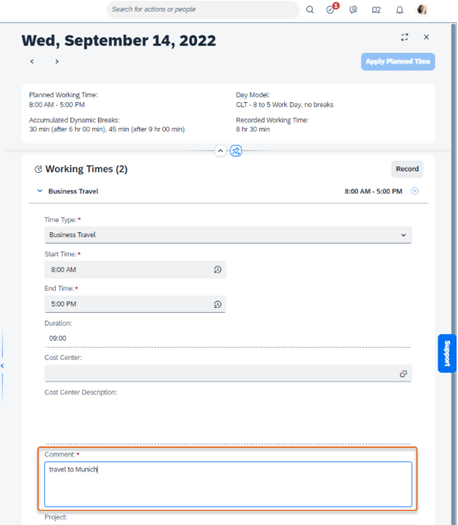
    Restrictions in creating required custom fields on the EmployeeTimeSheet and TimeSheetValuationResults objects

    Required custom fields on the EmployeeTimeSheetEntry and Allowance objects are restricted to the below primitive data types:

    • String
    • Number
    • Decimal
    • Time
    • DataTime
    • Date
    • Boolean

    End of Development Time

    • Benefits Auto Enrollment Job – End of development on May 20, 2022 and will be deleted on May 19, 2023.
    • Old time sheet – Maintenance end on December 9, 2022 and will be deleted on May 19, 2023.
    • Savings Plan related fields – End of Development on December 9, 2022 and will be removed on May 19, 2023. 
    • HTTP Basic authentication with SAP Cloud for Customer – End of Development on May 20, 2022 and will be Deleted on Nov 17, 2023.

    Employee Central Payroll endpoint URL subscriptions

    New Event Subscription Management tool supports the following events

    • Employee Hire
    • Employee Rehire
    • Employee Termination
    • Payroll Data Maintenance Task Configuration Change

    New subscriptions can no longer be created; Existing subscriptions related to Employee Central Payroll will be automatically migrated to Event Subscription Management.

    Configuration Type: Admin Opt-out

    Centralized Support on the UI action save.  

    Yeah!!! Now, Centralized Support has extended their hands on saving the following action on UI, based on role-based permission.

    Admin Center > Company System and Logo Settings >

    • History UI of Compensation Information and Recurring Pay Components
    • Global Assignments
    • Employment Details
    • Contact Information
    • Employment Details for a Higher Duty or Temporary Assignment

    By default, Saving changes on UI and data imports for Emergency Contacts are enabled. No role based permission required.

    Centralized Services Support through MSS.

    Using role-based permission, centralized services now support making changes to an employee’s records when changes are made in the Manager Self-Service (MSS).

    • Change Job and Compensation Info
      • Company System and Logo Settings > Enable Centralized Services to Save Changes on the Manager Self-Service UI for Change Job and Compensation Info.
    • Termination Information
      • Company System and Logo Settings > Enable Centralized Services to Save Changes on the Manager Self-Service UI for Termination Details.

    New Key Property in OData API EmpWorkPermit.

    In order to maintain multiple work permit of employee with same document details, the new composite business key ‘issueDate‘ has been introduced.

    Whenever the employee work permits is renewed, we can create a new record without touching the old one.

    Configuration Type: Admin Opt-in

    • We can validate employee’s and their dependents addresses using SAP DQM Microservices that is hosted on SAP BTP (SAP Cloud Platform) which requires X.509 Certificate authentication, that the customers would manually adopt.
      • The DQM Microservices in SAP BTP account must be configured on Cloud Foundry and download the X.509 Certificate.
      • The downloaded X.509 Certificate needs to be uploaded in .pem format in the Security Center.
      • Set up the OAuth Configuration in the Security Center against the OAuth Configuration tile.
      • Configure the Destination Settings in the Security Center.
    • WBS Element can be used as a standard field without having to maintain the WBS Element as a custom field. Using WBS Element as a standard field, you can replicate the complete WBS Element information from SAP S/4HANA to SAP SuccessFactors Employee Central. You can also migrate WBS Element from a custom field to the standard field.
      • Admin Center > Manage Permission Roles > Industry Features > Download Employee Cost Assignment Migration Data
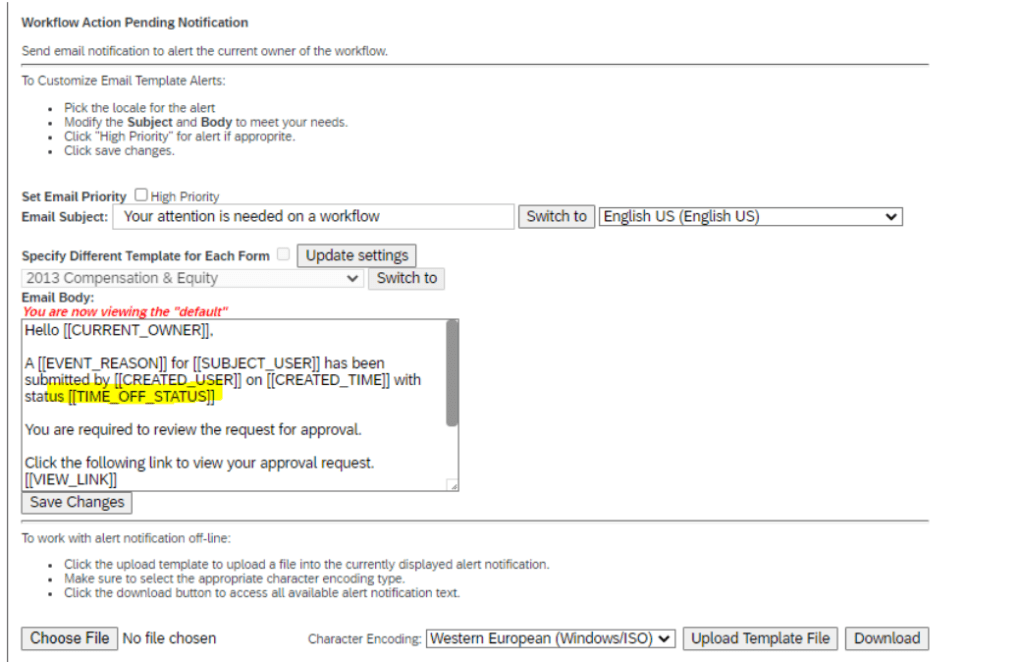
    • New token ‘TIME_OFF_STATUS’ is available for e-mail notifications on Time Off, which helps to differentiate the email notification by the status of the absence.

    In Conclusion

    We have now covered the highlights of the Employee Central related updates for 2H 2022.

    Do you need help managing your SuccessFactors Release cycles?  Download our support services brochure or email info@worklogix.com to see how we can help.

  • SAP SuccessFactors H1 2021 Employee Central Release Updates

    SAP SuccessFactors H1 2021 Employee Central Release Updates

    Interested in what’s new for Employee Central for H1 2021? There’s quite a few enhancements! In this quick blog we run through the major release updates that caught our attention the most.

    As of April 9, 2021, SAP has released the documentation for the H1 2021 release.  The preview release will be April 16 and the move to production will be May 21st.  You can view the full set of documentation in the What’s New Viewer here. For full details on the release cycle, check out the SAP SuccessFactors official product updates blog here.  New to the release process? For tips on how to manage a release, check out our blog here

    Qualtrics Integration

    Increasing the integration between Qualtrics and SuccessFactors has been a priority for SAP – we’ve seen multiple integrations across modules and now there’s a few more for EC. SAP has added 4 email survey integrations based on intelligent services to trigger in the below events:

    • Employee Rehire
    • First Time Manager
    • Transition from Individual Contributor to Manager
    • Transition from Manager to Individual Contributor

    These surveys can be very insightful to find out if employees are comfortable in their new roles and identify where they might need help!

    BizX Talent Integration / Succession Data Model

    Integration with the BizX Talent side of SuccessFactors has also been improved. In particular, SAP has made it possible to run a full HRIS sync (that pushes data from EC to BizX) based on individual user ids.

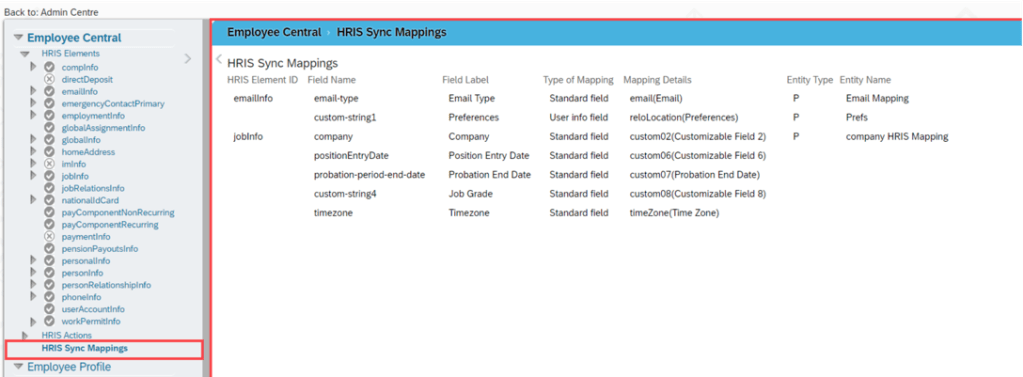
    In addition, they’ve made it easier to view what the HRIS mapping looks like in the Manage Business Configuration Screen with an overview screen of all of the mappings in one location. Previously you had to dig through all of the fields individually to find this information! Check out the screenshot below:

    Overview of HRIS Sync Mappings

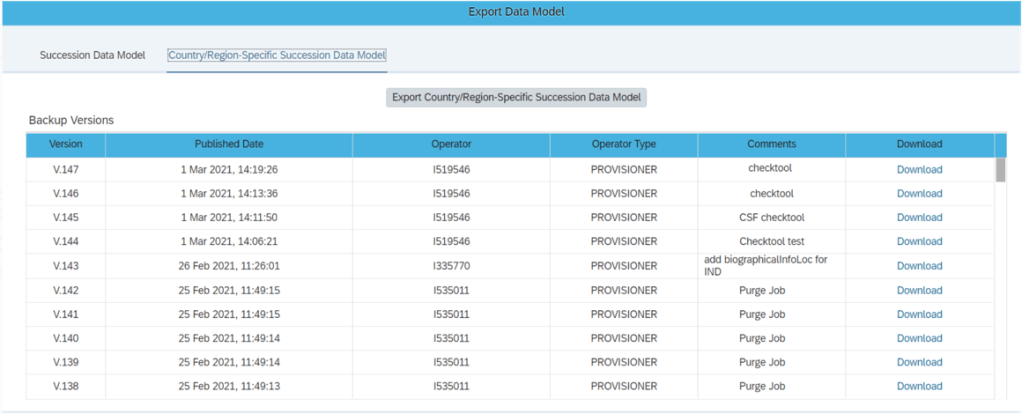
    Admins can also now export the Succession Data Model and Country/Region_specific Succession Data models from Admin Center (previously only partners could do this in provisioning). Simply give the new permission “Export Succession Data Model or Export Country-Specific Succession Data Model” permission and you’ll get access to the screen shown below:

    New Export Succession Data Model Screen

    These enhancements help make the integration between employee central and the talent modules more clear cut.

    Business Rule Scenarios

    Multiple new business rule scenarios are now available that allow you to:

    • Configure cross-entity rules triggered from a source entity with changes executed on the target entity
    • Calculate Full Time Equivalent for a user
    • Create business validations / raise alert messages for HRIS elements

    These enhancements contribute to the ongoing effort to increase the flexibility and robustness of business rules.

    SAP Integration

    If you sync your HRIS data with SAP, you’ll be happy to know there are 10 enhancements to this integration including:

    • A comparison tool that compares configuration between EC instances
    • An enhancement considering the purging status of ERP communication data while replicating employee communication data from EC
    • The ability to select specific foundation objects by object ID ad choose log or list view when viewing the Foundation Object Transfer Report
    • In Define Employee Data Settings for EC instance, the field names have been changes to “Standard Mapping (PERNR)” and “Standard Mapping (CP)” for clarity
    • The Enhanced Work Schedule Rule Transfer Report was updated with a new BAdi to maintain the external code of work schedule rules
    • Better data replication that considers purged data
    • Replication of inactive employees that were terminated in EC before the full transmission start date
    • Sample contract elements (IT0016) content
    • Replication of OM data infotypes even when relationship data (IT1001) can’t be replicated
    • Organizational assignment data that was marked as status “Failed” will change to “Outdated” once the next replication job runs

    These enhancements help to make the interface more robust and reliable for customers wishing to replicate employee data to on-premise SAP.

    Global Benefits

    Enhancements and automations came to the global benefits functionality as well. Let’s take a quick look at these:

    • When an employee has a job change that affects their benefits eligibility, this can now trigger an intelligent service event to create or update benefit enrollments
    • When benefit master data changes, a new automatic enrollment job now exists to handle creating and updating enrollments
    • A new pension / retirement savings plan type has been introduced called “Workplace” that offers additional contribution options

    Once again, we see how the system continues to provide helpful automations and features to make this functionality more simple and robust to use.

    Reporting

    Custom fields are now allowed in story reports. The fields can be seen within the query designer.

    Conclusion

    The SAP SuccessFactors Employee Central product continues to grow and become increasingly more robust! This does not represent all of the enhancements in the H1 2021 release – only the highlights we found most compelling. Check out the What’s New Viewer here for the complete list of enhancements.

    See this great article for useful information on how to prepare for a SAP SuccessFactors Regular Release.

    Contact info@worklogix.com for any assistance supporting and implementing your SAP SuccessFactors Modules, or download our support services brochure.

  • H2 2020 SAP SuccessFactors – Employee Central New Features and Enhancements.

    H2 2020 SAP SuccessFactors – Employee Central New Features and Enhancements.

    SAP SuccessFactors has some exciting new features for your Employee Central. They can be found in detail here (S-User ID required).  Filter on Solutions for Employee Central to review all of the latest changes. Under the Description for each, you can click on ‘See More’ to see screenshots and detailed information.

    Highlighting some of the interesting points on the new features and the Enhancements released in H2 2020 Employee Central.

    Lets drill down based on the configurational type Universal, Admin opt-in and Admin opt-out.

    New Features added with the configuration Type: Universal

    1. Using any mobile browser, Enrolments and claim employee benefits can be done.
    2. Using changeWfRequestApprover, you can change the approver of a workflow step through API, apart from the Manage Workflow Requests tool.
    3. The duration to pull the data from the Employee Central CompoundEmployee API fields last_modified_on or snapshot_date is limited to a maximum of 3 months.
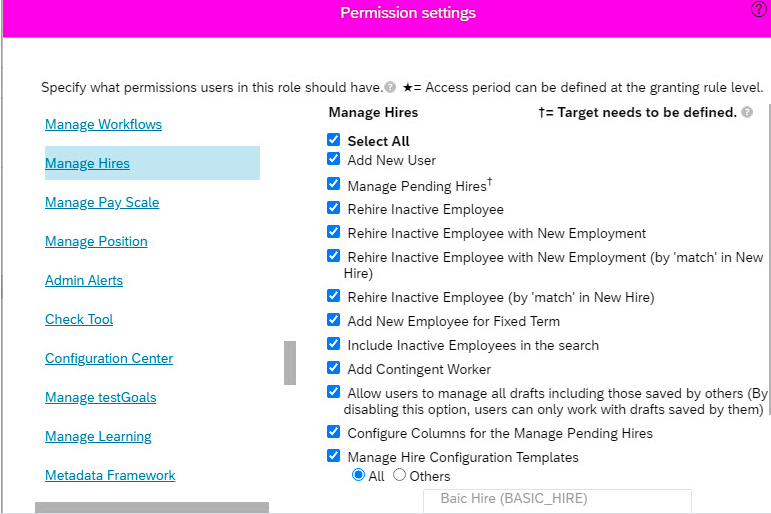
    4. Moving all the hire-related permission settings into one category “Manage Hires” is more efficient while granting access to HR admins and managers.3
    5. Delete assignments/ Edit dates within a temporary work schedule assignment is now available with regular work schedule pattern.
    6. To trigger the workflow, new business scenario: Trigger Workflows option is available under the Employee Central Core category on the Configure Business Rules page.
    7. New Day View includes cross-midnight absences and planned working times for Team Absence Calendar. Employees/ managers can view absences and planned working times. 45

      New Features added with the configuration Type: Admin Opt-in

      • Qualtrics surveys with Benefits to get feedback from your employees when they add a benefit during a cart-based enrollment action, such as for New Hires, Rehires, or the Company Open Enrollment process.
      • Simplified process for sending a survey in an email.
        • Intelligent Services events to send employee information to Qualtrics, so that you can send a Qualtrics survey via email to them when they are assigned to concurrent employment.
        • Intelligent Services events to send employee information to Qualtrics, so that you can send a Qualtrics survey via email to them when their manager changes.
        • Intelligent Services events to send employee information to Qualtrics, so that you can send a Qualtrics survey via email to them to find out why they’re leaving the organization.
      • Customized Configuration of New Hire:

      You can create templates where you specify only the blocks needed for the type of employment you are hiring for, meaning that you can add, remove, and rearrange the order  of the blocks as well as add standard and custom MDF objects to the configuration.

      https://help.sap.com/doc/62fddbd651204629b46bbccbabf886ba/2011/en-US/7c87858cc3384c67b5cb923587005502.html

      • New Job option ‘ Create or Update Benefit Enrollments for Employee Master Data Changes’ is available to process the records of the employees who have changes in their master data.  Existing ‘Benefits Auto Enrollment Job’ processes runs for all the employees even when there are no changes as per the eligibility rule.

      Rules must be configured for the master data objects maintained in the benefit eligibility.

        • Create Benefit Tracker for Employment Info Changes ()
        • Create Benefit Tracker for Employment Info Changes with Effective Date ()
        • Create Benefit Tracker for Personal Info Changes ()
        • Create Benefit Tracker for Personal Info Changes with Effective Date ()
      • Custom data block ” Live Profile User Information” can be added to your People Profile to display and manage additional information about contingent workers. Not required to import data using Employee Central Imports or OData APIs to modify information that’s not available on the contingent worker’s profile.
      • Address Validation: Added validation mapping for all address fields for Brazil and Belgium. Legal entities in Brazil and Belgium are required to store the addresses of employees and their dependents in a way that is legally compliant.
      • Local Version of Ghana and Suriname includes National ID, Personal Document Types, Personal Information, Job Information, Disability Information, Dependents Information, Home Address and Corporate Address.
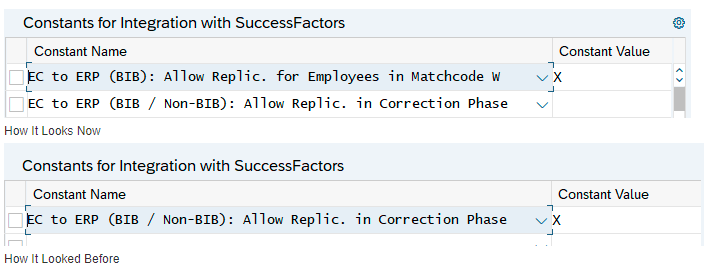
      • Added a new option to allow the data replication when employees are flagged for a payroll correction run (Matchcode W).

      2

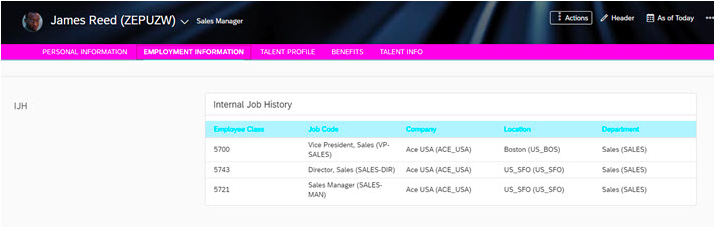
      • Now, configure the Internal Job History block in the People Profile as a read-only to view a summarized version of an employee’s job history at the company. Based on the rule scenario configured, job history for an employee will be displayed and only visible to the HR Admin.

      1

      • Accruals Transfer date can be adjusted automatically in the following scenarios:
        • Unauthorized leave
        • Leave without pay

      https://help.sap.com/doc/62fddbd651204629b46bbccbabf886ba/2011/en-US/50252735bfe84d8cbd606df49d604432.html

      New Features added with the configuration Type: Admin Opt-Out

      Work Permit Importing on Centralized Services – Now validation is based on the business keys to ensure their uniqueness, adopt the Full Purge mode, and import data based on user ID, instead of person ID. The shift from the legacy approach to this new one to importing work permits improves data quality and reduces maintenance costs.

      https://help.sap.com/doc/62fddbd651204629b46bbccbabf886ba/2011/en-US/47e77878716b49369d31534ca3c642bf.html

      Enhancements in H2 2020 Release:

      1. Filter option has been enhanced on the OData Entities: Custom string fields’ custom-string1, custom-string2, and custom-string3 can be included in the filter while querying the Employee Central OData APIs PerPerson and EmpEmployment.
      2. Integration of Position Management with SAP Fieldglass: No manual effort of creating and attaching a business rule to map fields. When you create an  Fieldglass requisition from position organization chart, the entire position object is now passed to SAP Fieldglass.
      3. Enhancements to the Deduction Start Date: Options in the Deduction Start Date field is changed across benefit types. The options available for the Deduction Start Date field are 
        1. As of Enrollment Effective Date
        2. Always Next Pay Period
        3. Next Pay Period Based on Pay Check Issue Date.
      4. Event Reason drop down field is introduced while Hiring or Rehiring Contingent Workers.
      5. ‘onChange Rules’ can be executed across blocks when an employee is transferred within your organization using the Manage Pending Hires tool. You can also trigger changes based on rules set for fields across blocks. For example, when there’s a transfer leading to a change in the company code, the pay group is changed based on ‘onChange’ rules in your instance.
      6. Scheduled job belonging to Off Cycle Event Batch and Employee Data Imports are cancelled if there are at least 100 failures reported within a span of 90 days.
      7. The rules ‘check_Bank_Uniqueness,  validateMainPaymentMethod_PaymentInfo and proposeIBAN_PaymentInfoDetails’ are being removed from the pre-delivered content for Payment Information. 
      8. To have more accurate address data for customers in Thailand, new fields are added and existing fields are modified.
      9. Administrators can configure a rule function to split advance leave payment across fiscal years.
      10. NAF Office Number Home Address information is removed due to a requirement change in Norway. Removed the <Region> field from the Home and Corporate Address content because this is not required in address content for Norway.

      See this great article for useful information on how to prepare for a SAP SuccessFactors Regular Release.

      Also, check out this interesting article about the Job Profile Builder. 

      Do you need help implementing or supporting your SAP SuccessFactors Modules?  Contact info@worklogix.com for assistance, download our support services brochure, or visit https://www.worklogix.com/implementation.html for additional information.


    1. 1H 2020 SAP SuccessFactors – Employee Central Features

      SAP SuccessFactors Employee Central has come out with several enhancements and features for 1H 2020. All of the latest enhancements can be found here (S-User ID required). Scroll down to the ‘What’s New Viewer’ to review the changes.

      Filter on Solutions for Employee Central to review all the latest changes. Under Description, click on ‘See More’ to see screenshots and detailed information.

      This post will be highlighting some of the top enhancements & features:

      1. Show Full Name in History Pages

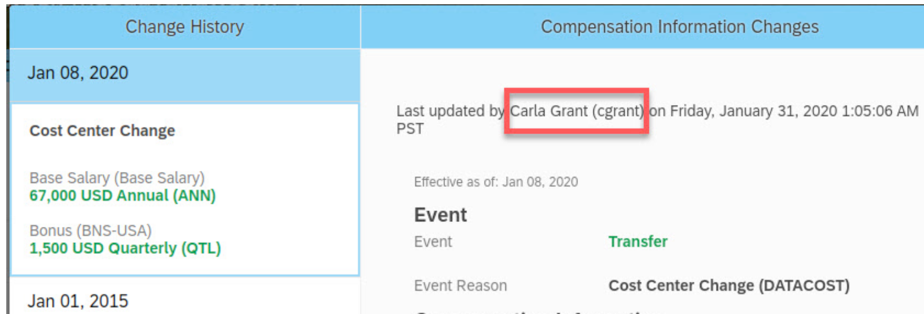
      Users previously had difficulty finding out who made the change solely by their user name in the History page. But now SuccessFactors has made it easy for users by showing the full name of the person who made the change along with the user name in the “Last modified” field of the “History section” for the below pages:

        • Job Information
        • Job Relationships
        • Compensation Information
        • Personal Information
        • Dependents
        • Addresses

                  image-5

      1. Synchronize Data from Work Order to Job Information

      Manual steps has been reduced – Yes!! Manual steps are no longer required in updating the job information of contingent workers when there is a change in their work order.

      Now Synchronization is automatic between the work order and job information for the common data of contingent workers.  This can be achieved by creating a business rule while adding a new work order or modifying an existing work order.

      Detailed Information can be found here: Click Here

      1. Check Tool for Contingent Workforce Management

      New checks have been created to help users identify and resolve potential configuration and data issues with the contingent workforce management application.

      To save time and effort, a few checks have been added to highlight issues related to application configuration and contingent worker data along with resolution tips to help users resolve them by themselves.

      Detailed Information can be found here: Click Here

      1. Export and Import of Corporate Data Model Information

      The Corporate Data Model can be now be imported and exported from the Admin center. Users can incorporate their changes in the exported XML and import them back in from the Admin Center.

      This includes Country or Region-Specific Corporate Data Model. This removes the need to do the Import/Export of the CDM on the provisioning side.

      Detailed information can be found here: Click Here

      1. Rule Contexts During Import

      Now while importing a data model, the original values of the rule contexts will be preserved. Previously when users imported a data model by default, all rule contexts were reset to Yes.

      Detailed information can be found here: Click Here

      1. Accept or Reject Auto Delegation Requests

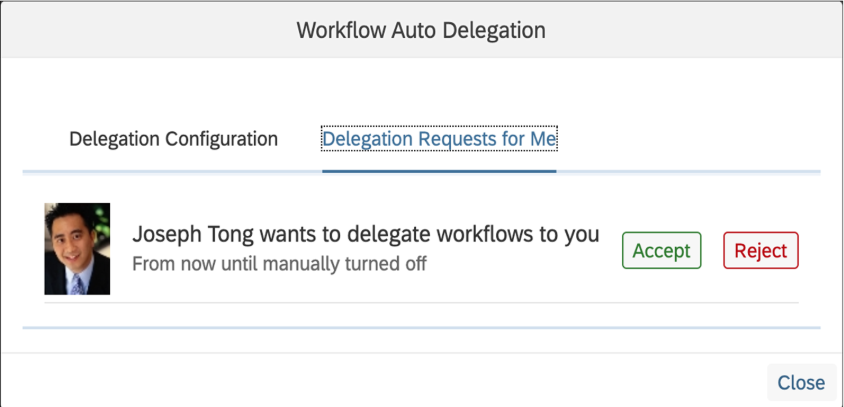
      SuccessFactors has now offered the chance to users whether they wish to accept or reject delegation request. Users can now respond to auto delegation requests on a new tab called “Delegation Requests for Me”. Workflows are delegated to them only when they have chosen to accept the request.

      Detailed information can be found here: Click Here

                       image-3

      1. Specify Start Time and End Time of Auto Delegation

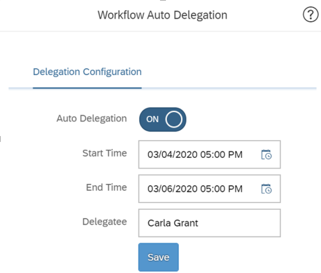
      Delegators will now be able to choose a period for the auto-delegate to remain effective. Users have the option to choose the start date and end date when they configure the delegation.

      During the specified period, the workflows will be triggered automatically for the delegates to approve. When the “end date” has been reached, the auto delegation feature will turn off automatically and hence no manual work is required to turn it off.

                                            27-08-2020 4-38-17 PM

      1. Customizable Key Details on the My Workflow Requests Page

      An enhancement has been made to include the custom key details for workflows in the “My Workflow Requests (Advanced To-do)” page.

      Now workflow decisions can be made by seeing the summary without having to open the workflow detail page for position workflows.

      Detailed information can be found here: Click Here

      1. Time Sheet Custom Fields are now supported for the iOS and Android Mobile Apps

      The SAP SuccessFactors Mobile apps now support the following Time Sheet custom fields: Date, Boolean, Number, Decimal, and String.

      This feature creates better alignment between the iOS and Android Mobile apps and the web application.

      1. New Rehire Event Reason for Replication of Employee Master Data

      A new event reason has been created that supports the scenario where an employee is rehired after termination. Job information records will be extracted from the rehire date with PSEUDO_REHIRE event reason.

      Do you need help implementing or supporting your SAP SuccessFactors Modules?  Please Contact info@worklogix.com for assistance, download our support services brochure, or visit https://www.worklogix.com/implementation.html for additional information.