Tag: business

  • SAP SuccessFactors Employee Central – 2H 2025 Delta Release

    SAP SuccessFactors released its 2H 2025 Delta Update with the introduction of a fresh wave of innovations and improvements across Employee Central.
    This release has focused majorly on data quality, workflow flexibility, localization expansion, position management clarity, and document generation enhancements—in order to strengthen HR operations and elevate the experience for employees, managers, and HR administrators.

    In this blog, we run through the most impactful enhancements from the Employee Central (EC) 2H 2025 Delta Release.

    🔍 1. Position Management Enhancements

    Position Management remains as one of the most enhanced area in the 2H 2025 release, with several new ability that improve accuracy in workforce planning.

    ⭐ Key Highlights

    ✔ Expanded fields in the “To Be Hired” status change use case

    The following fields are now supported when changing a position to “To Be Hired”:

    • multipleIncumbentsAllowed
    • standardHours
    • incumbent
    • company
    • targetFTE

    This gives admins more precise control and ensures alignment between job, position, and hiring processes.

    ✔ Improved synchronization between Position and Job Info

    Data consistency is strengthened through better propagation and validation rules.

    ✔ Cleaner audit trails

    Event tracking for position changes is more transparent, improving governance.


    👤 2. Employee Data & Employment Information Improvements

    The 2H 2025 release intensify HR data reliability with several backend and UI upgrades.

    ⭐ What’s New

    • More accurate validation frameworks across Personal & Global Information sections
    • Enhancements in Employment Information to support changing labour regulations
    • Refined error-handling messages to minimise admin rework
    • Smarter country-specific rules for identifiers, addresses, and eligibility fields

    Together, these updates improves global HR master data accuracy.


    ⏱️ 3. Time Management Enhancements

    Time Management continues to progress with performance improvements and richer rule-based automation.

    ⭐ Key Enhancements

    • Improved absence request validations across multiple countries
    • Faster loading of daily, weekly, and monthly timesheet views
    • Strengthened calculation logic for overtime, breaks, and premiums
    • Better work schedule and public holiday configuration capabilities

    These changes improve payroll readiness and simplify the daily experience for time-dependent roles.


    🌏 4. Localization & Compliance Updates

    Localization continues to be a core pillar of SuccessFactors strategy, and the 2H 2025 release extends this further.

    ⭐ Updates Include

    • New statutory fields across multiple countries
    • Country-specific data formats, regulation updates, and identification rules
    • Localization improvements in hire, termination, and job event workflows
    • Improved document templates for certain regions

    This makes sure global companies stay compliant without relying on custom development.


    📄 5. Document Generation Enhancements

    Document Generation receives remarkable upgrades in this release and is one of the most prominent improvements.

    ⭐ New Capabilities

    • Support for expanded dynamic placeholders
    • Enhanced stability and formatting control
    • Greater compatibility with multilingual templates
    • Optimized merge performance for large document batches

    This is specifically useful for generating contracts, letters, onboarding packs, and compliance forms at scale.


    🔗 6. API, Integration & Event Handling Improvements

    The 2H 2025 release sharpens EC’s integration framework, ensuring ideal connectivity across SAP and non-SAP systems.

    ⭐ Improvements Include

    • More resilient OData APIs
    • Enhanced support for future-dated events
    • Better coordination with SAP HCM Payroll and SAP ERP
    • More descriptive integration error messages

    The improved event-handling logic makes downstream systems more consistent and reduces integration failures.


    🎨 7. User Experience (UX) Enhancements

    A modern UI remains central to SuccessFactors’ roadmap. This release introduces indefinite but impactful improvements.

    ⭐ UX Refinements

    • Clearer field grouping and section headers
    • Streamlined workflows with simplified approval screens
    • Better mobile responsiveness
    • Faster portlet rendering performance

    These improvements provide a cleaner, more available experience for all users.

    📌 Summary – Why the 2H 2025 Release Matters

    The SAP SuccessFactors Employee Central 2H 2025 Delta Release is designed to help organizations:

    ✔ Intensify data quality and governance
    ✔ Enhance hiring alignment with enhanced Position Management
    ✔ Elevate efficiency through Time Management improvements
    ✔ Stay globally pilable with localization updates
    ✔ Deliver documents faster and with greater precision
    ✔ Achieve seemless system integrations
    ✔ Improve employee and HR admin experience

    This release is not just an incremental update—it’s a strategic step toward a more rationalized and future-ready HR core system.

  • My top curiosities going into SuccessConnect 2025

    My top curiosities going into SuccessConnect 2025

    Please note: the opinions and comments expressed below are solely my own and do not reflect the views of SAP, SAP SuccessFactors, or the SAP Confidant Program.

    In a few weeks, many colleagues and I within the HR Tech industry will attend SAP SuccessFactors’ annual conference, SuccessConnect 2025 in Las Vegas. This year will prove to be a good one, as there are several recent events that will shape the portfolio for years to come.

    Selfie during this year’s SAPPHRIE conference in Orlando

    I have listed some of my top curiosities below. Please feel free to add comments to indicate some of your own questions or expand on any of my thoughts.

    1. Strategic direction of Talent Acquisition The acquisition of SmartRecruiters was recently closed, so how will this shape Talent Acquisition in the years to come for SuccessFactors customers? For those customers currently implementing SuccessFactors Recruiting or those who were looking to do so in the months to come, what will the guidance be from SAP? Certainly integrations will become a main discussion item, as pre-delivered integrations will need to be created and maintained in order for these two systems to sync. It will be interesting how these two solutions will co-exist within the SAP HCM eco-system… I feel like we are back 30 years ago, revisiting ‘best of breed’ vs ‘best-of-suite’, especially with all the recent acquisition news between SAP and Workday.
    2. Talent Intelligence Hub (TIH) Over the last year, I have been fortunate to work with several customers on TIH scoping, visioning, and implementation. Still in its (relative) infancy, this framework is extremely important to support Talent processes across the SAP SuccessFactors suite. Since TIH stores/maintains the skill and competency catalogs for the organization, it’s critical to get TIH design correct from the start (e.g. ensuring that you choose your rating scale since it’s irreversible!). A few important holes remain in the solution including:
      • When will advanced permissions be added to make rolling out to employee self service and manager self service viable? I’ve seen 1H 2026 from community blogs but let’s hope we hear officially from Product Management soon. We need this improvement in order to make permissions more specific to a particular set of competencies / skills. Could we expect permissions to use the Tag as the way to discern? Let’s wait to see what Product comes up with.
      • When will custom attribute types (not just the standard ones, i.e., skills and competencies) be available throughout all functionalities in Talent (e.g. career worksheet). Custom attributes are already integrated into the Job Profile Builder (JPB) but only integrate to the Growth Portfolio and not many of the legacy features yet.
    3. Onboarding 2.0 Oh ONB 2.0, where shall I begin with thee?” This is a special module. Special kudos to the SAP Product Management team for delivering constant improvements in the recent years. This module has been a challenge to implement but features are slowly catching up with the ONB 1.0 offering.
      • Many are interested to see what’s in store over the next few releases, particularly in the US Compliance area (e.g. Form I-9, E-Verify WTPA for NY and CA).
      • User experience continues to be a challenge with this product but I understand improvements are on the way so we shall see!
      • How will SmartOnboard play into the onboarding space? Will be interesting, as ONB 2.0 is extremely tethered to Employee Central.
      • Earlier this year, I wrote a blog Top 5 tips when Implementing SAP SuccessFactors Onboarding 2.0 it’s a quick read and could help some out!
    4. Report Stories continue to be a challenge for customers to adopt. Between issues with IAS syncing and overall end user experience, customers have been struggling to adopt. SAP has been offering training which I recommend for customers still needing assistance. FYI, People Intelligence in SAP Business Data Cloud (BDC) is not replacing Report Stories (or ad hoc, for that matter). We know Ad Hoc was resurrected but we can eventually expect a new date. I am interested to hear more about People Intelligence and BDC during the conference.
    5. Can AI within SAP SuccessFactors gain traction in 2026? So far, AI use cases (for my implementations at least) have been discussed but not implemented. I believe 2026 will be the year where customers finally start moving the needle to use AI in SuccessFactors Talent Management. Currently, most customers are still trying to grapple with the foundational aspects of Talent with TIH, Opportunity Marketplace, and the rest of CTD (Career and Talent Development) and AI is mostly considered a “phase 2 item”. Let’s see if that changes in 2026.

    Please let me know if you’ll be attending SAP Connect 2025 in person, send me an email info@worklogix.com  and let me know!


    Do you need help implementing or supporting your SAP SuccessFactors system?  Contact info@worklogix.com for assistance, download our support services brochure, or visit our website for additional information.

    Worklogix
  • Highlights of SAP SuccessFactors Continuous Performance Management for 2H 2024

    Learn what’s currently available for Continuous Performance Management with the 2H 2024 SAP SuccessFactors Release.

    For greater details, you can view the full set of documentation in the What’s New Viewer here. For full details on the release cycle, check out the SAP SuccessFactors official product updates blog.

    For tips on how to manage a release, check out our blog here

    Automatic Channel Creation for Matrix Relationships

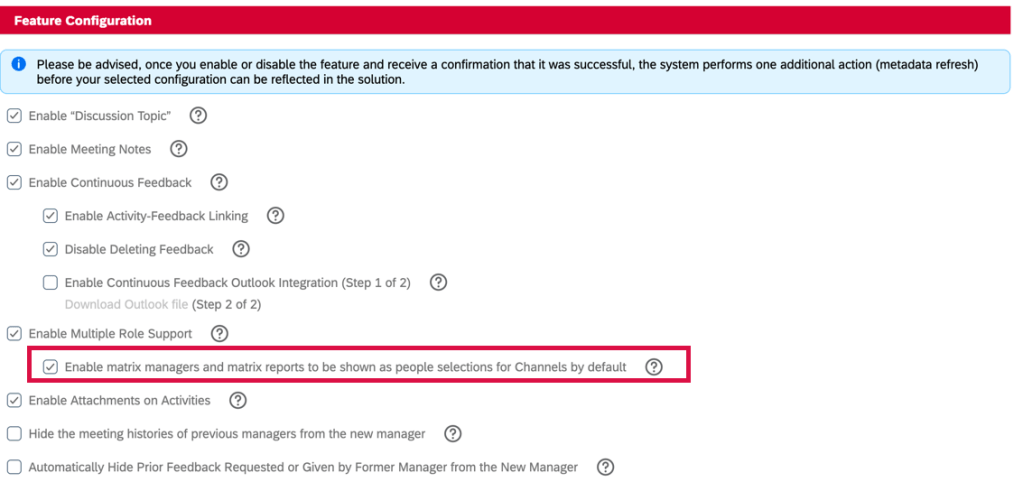
    There is a new option on the Continuous Performance Management Configuration admin page, Enable matrix managers and matrix reports to be shown as people selections for Channels by default. When enabled, users identified as matrix managers or matrix reports are automatically added to the Channels list in Continuous Performance Management for the user.

    Configuration Required

    Each matrix manager/matrix report will have a 1:1 channel automatically created. On the Continuous Performance page, these channels will be grouped into two new categories: Matrix Managers and Matrix Reports.

    Previously these channels were not automatically created nor categorized into groups.  This enhancement reduces manual work and makes matrix relationships easy to see and manage.

    Channel List

    Bulk Channel Invitations

    Users can now send bulk invitations for 1:1 meeting channels on the Continuous Performance page.

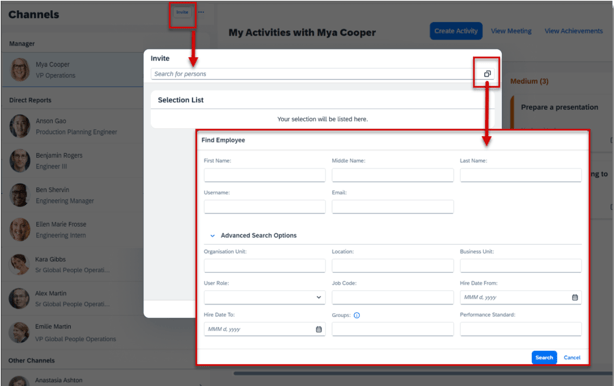
    The feedback requestor may use the basic search and now the advanced search to find and select multiple employees as invitation recipients, without a limit on the total number of selections. Previously, only certain basic search criteria were available and users could select only one feedback provider at a time.

    Advanced Search Options

    For this to work, the option Enable Multiple Role Support must be enabled in the Continuous Performance Management Configuration admin tool.

    There is also a new email notification, Delivery Status of Multiple Roles 1:1 Meeting Invitations, to update on the delivery status of each invitation. The feedback requestor receives the follow-up email if the results of the mass delivery can’t be immediately displayed in a pop-up message or if any delivery fails. This notification is enabled by default.


    Delete Channels

    Users and administrators are now able to delete channels as needed. There are new delete channel related email notifications are well.

    Users can now delete the channels that they own. However, channels involving a user’s current direct reports and matrix reports can’t be deleted.

    There are two options:

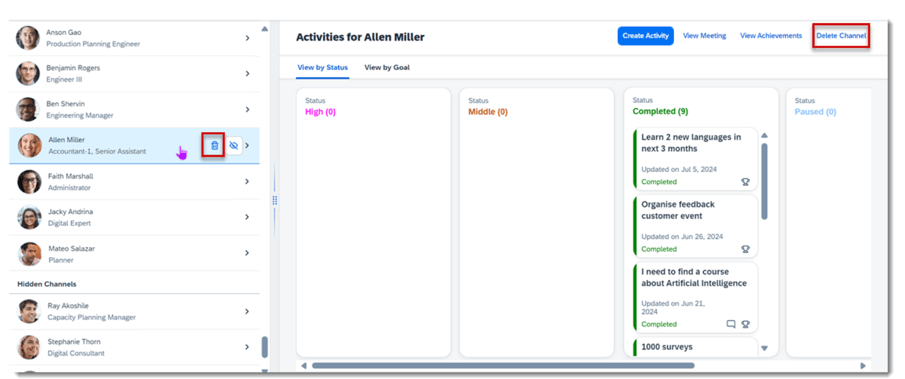
    • Single deletion: select the trash bin icon which appears when hovering over a channel item in the list, or select the Delete Channel button in the channel details page.
    Delete Channels
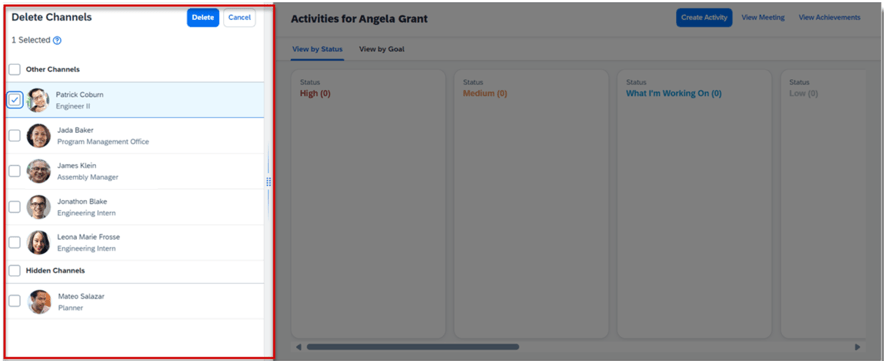
    • Bulk deletion: Choose Select and then the Delete Channels button on the header of the channel list. In the Delete Channels page, select and delete up to 50 channels in one time. Declined channel invitations can also be deleted.
    Bulk Deletion

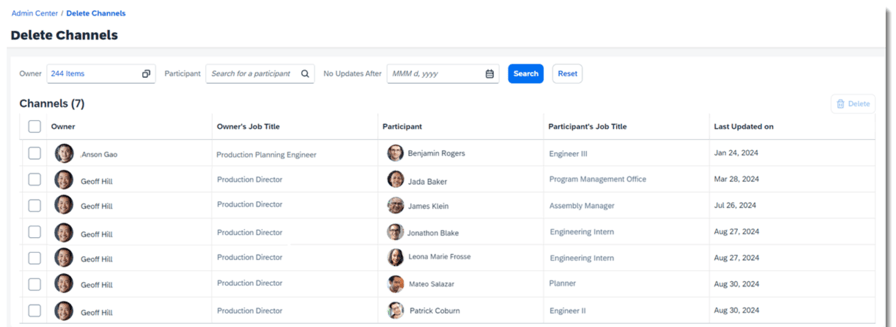
    An administrator can now search and delete the channels and declined channel invitations in the new Delete Channels admin tool. However, the employee-manager and employee-matrix manager relationships cannot be deleted.

    Admin Delete Channels Tool

    New Email Notifications for Deleted Channels

    There are new deleted channel email notifications now available and are enabled by default.

    • Channel Deletion Notification to Owners: channel owners are notified when the administrator deletes a channel for them.
    • Channel Deletion or Move Notification to Participants: channel participants are notified when a channel is deleted or moved to Hidden Channels.
    • Channel Deletion Notification to Administrators: administrators are notified of the deletion result of each channel. A deletion job will run in Provisioning when more than 50 channels need to be deleted at once. If an administrator chooses to delete 50 or fewer, the result immediately pops up in a message, then the system won’t send the email.

    User Experience Enhancements

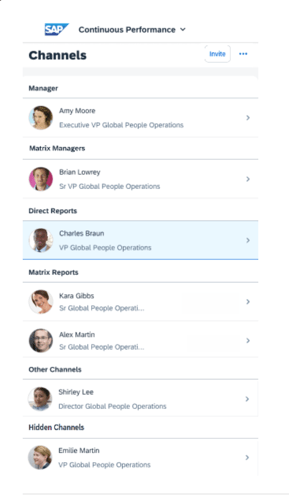
    The Channel list now has a header with up to six categories:

    • Manager
    • Matrix Managers
    • Direct Reports
    • Matrix Reports
    • Other Channels
    • Hidden Channels
    Channel List

    This allows users to easily locate channels based on different job relationships.

    A more consistent avatar experience

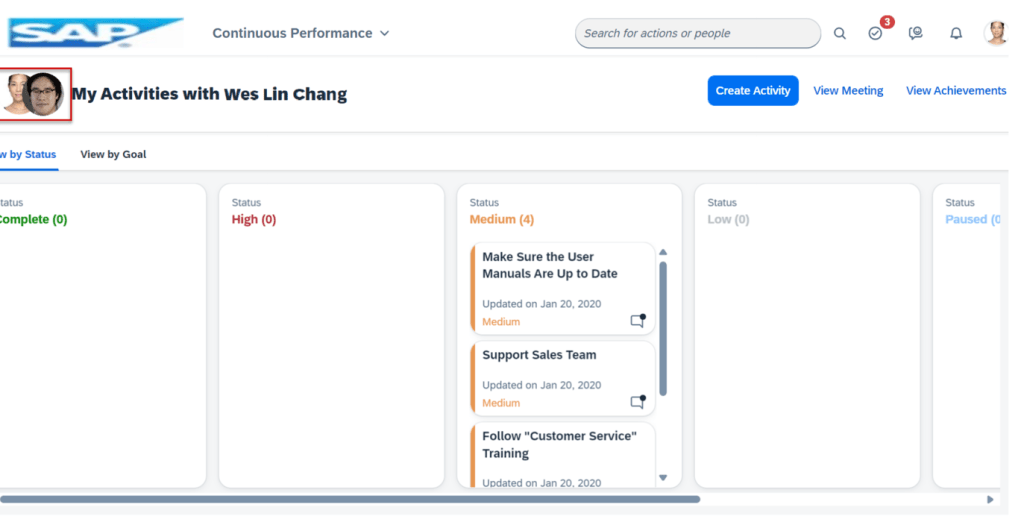
    Users who have no access to the channel list can see their manager’s avatar on the header of Activities view, together with their own one.

    View of Manager Avatar

    Streamlined Navigation

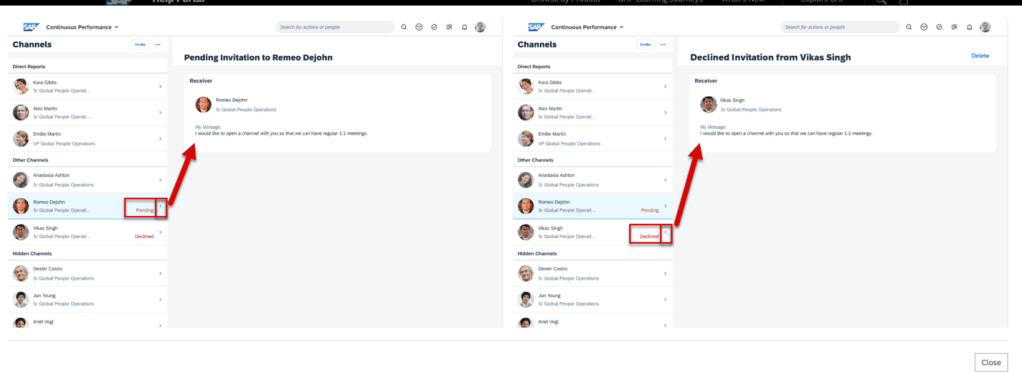
    All items on the Channels list are clickable which provides a more consistent experience. There is a chevron icon on each item for navigation to the right-side panel, where the invitation messages are displayed.

    Channel List Navigation

    Text and Icon Changes

    • The icon for deletion of the Declined channel invitations is now a trash bin which is visible when a user hovers on the channel list items.
    • The channel invitation icon button is replaced by the text button Invite.
    Channel List Features

    View Received Feedback from the Redesigned Activity Details Screen in Mobile Apps

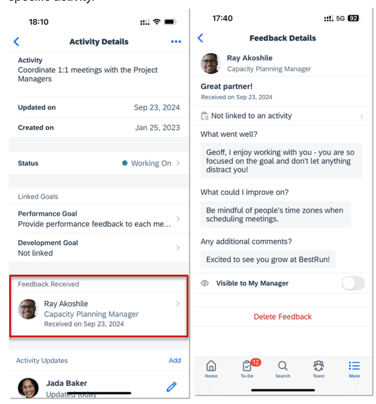
    Users can view and access the feedback they received about an activity from the Activity Details screen, now in improved detail.

    Here users can access details of each activity related feedback message in the Feedback Received list. Details include the name, profile photo, and job title of a feedback sender, and the date when the feedback was received.

    Selecting a row takes the user to the associated Feedback Details screen. Previously users could only see the count of feedback messages received for an activity. And when choosing a number, the users saw a screen that listed all feedback they received instead of the feedback related to the specific activity.

    Feedback Details

    Further Enhancements to the Activity Detail Screen

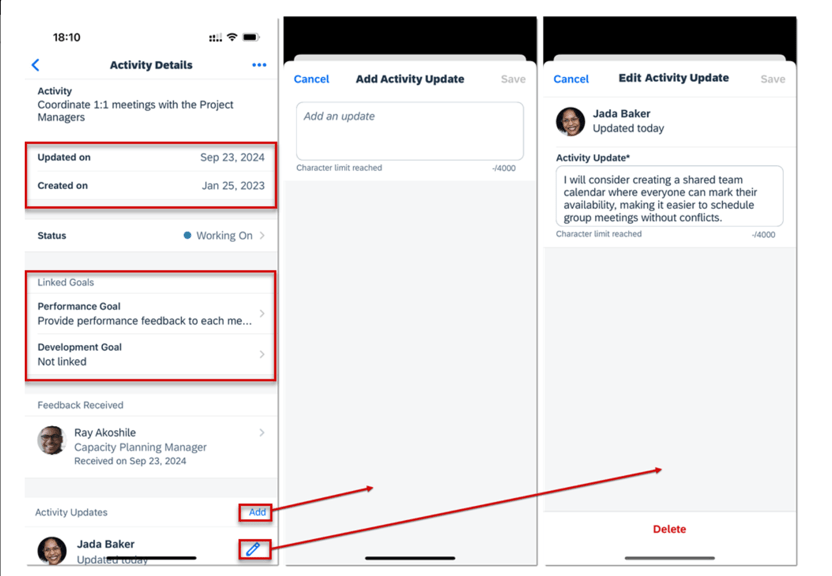
    The Activity Details screen has been enhanced with new sections to provide at a glance details.

    • Activity start date and modification dates are in the section.
    • There is a new section for linked goals
    • Activity updates- there is now a separate screen to add activities. The Edit Update screen was renamed Edit Activity Update.
    Add and Edit Activities


    Do you need help implementing or supporting your SAP SuccessFactors system?  Contact info@worklogix.com for assistance, download our support services brochure, or visit https://www.worklogix.com/implementation.html for additional information.