Blog

  • Actively Engage Prospective Candidates with SAP SuccessFactors Recruiting CRM Features

    Actively Engage Prospective Candidates with SAP SuccessFactors Recruiting CRM Features

    Are you having trouble achieving your recruiting metrics?  Specifically – are you having a hard time getting enough candidates to fill out a full application on your recruiting site?  Are candidates dropping mid application or just not bothering at all?  Do you feel like people are interested in applying to jobs at your company but just don’t see the positions they want so they don’t bother?  Are you looking to keep a growing number of potential candidates warm for when those positions are available?  If you answered yes to any of these, you might try taking a look at SAP SuccessFactors’ new Recruiting Candidate Relationship Management (CRM) features!

    The best news is that these features have been delivered free to all existing SAP SuccessFactors Recruiting Customers as of the Q2 2018 release.

    What’s included?

    SAP SuccessFactors Recruiting Candidate Relationship Management consist of these primary features:

    1. Data Capture Forms
    2. Talent Pools
    3. Email Campaigns

    Data Capture Forms

    The idea behind data capture forms is to gather information about prospective candidates without them actually applying for a specific position.  It is a great way to see who is out there that may be interested in your company and positions you typically hire (but may not have available now).  It could also be used for events like college recruiting or career fairs where prospective candidates are met that sound promising but aren’t quite a fit for a specific position or may not be able to fill out a full application at the moment.  Directing them to a landing page on your recruiting website later, or even having them fill out the form on a table or mobile phone at the event would be a great way to capture their information for later follow-up.

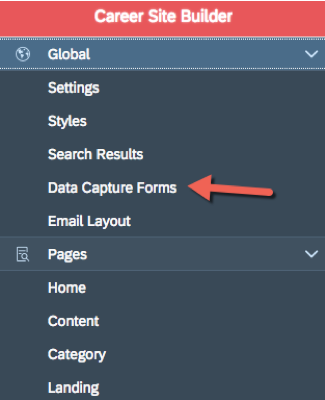
    To create a data capture form, you will need access to the Career Site Builder (the “Manage Career Site Builder” permission).  Once the feature is active it will appear in the “Global” menu of the Career Site Builder as shown in the screenshot below.

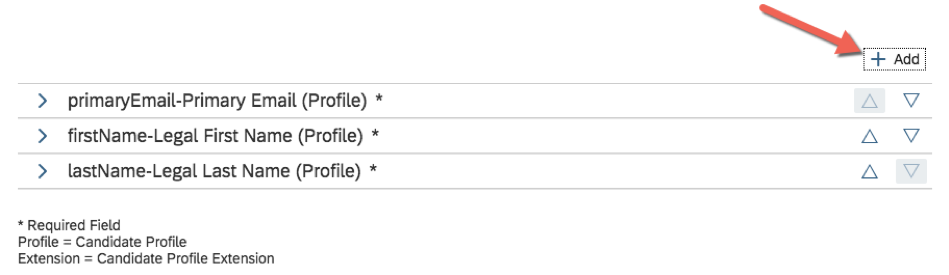
    Once your click the menu item and create a new data capture form you will come to the below screen that allows you to choose what fields to capture.  As users enter information they are really creating a recruiting candidate profile.  At a minimum you will need first and last name as well as email to create a profile.  You can add other fields by clicking the “+ Add” button as shown below.

    Clicking “+ Add” will bring up a popup like the one below with just a few more fields out-of-the-boz.  Most likely you will need to add more fields than what is available in this popup (for example, a drop down that asks what types of positions interest you, or another that asks how you heard about the company).

    To add more fields to this popup so you can add them to the data capture form, you will need to have access to manage object definitions.  If you are not familiar with the Metadata Framework (MDF) you might want someone familiar with this technology perform this part (I plan on writing another blog post on this, so check back soon!).  In a nutshell, you will want to add whatever fields you need to the “Candidate Profile Extension” object definition.  They will then show up in the popup above for you to add to your data capture form.  As fields are added to the object definition and filled out by your candidates, they will show up on the candidate profile as shown in the screenshot below:

    Clicking the “+” button will show all the fields you have added to the “Candidate Profile Extension” object definition (and any values your candidates have filled in) as shown below:

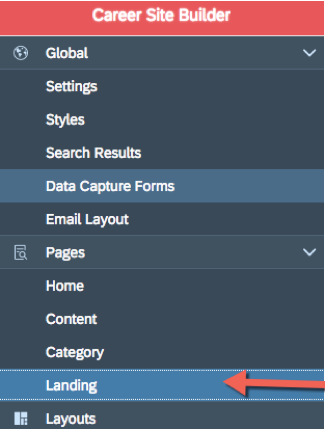
    Once you have finished editing your “Candidate Profile Extension” object definition and have added any needed fields to your data capture form, you can design a landing page that includes your form.  To create a landing page, click on the “Landing” menu item under “Pages” in the Career Site Builder.

    You can create a landing page and add components to determine the page’s layout.  Unlike other pages, you can add a special “Date Capture Form” component to the page and select the data capture form you have created.  By adding the data capture form to a landing page you can now create a visually pleasing page that includes any branding, images, text, etc. you desire!

    Once you have finished your page layout you can preview and/or publish your new page using the links at the top of the screen as shown below:

    Talent Pools

    The Talent Pools feature allows you to organize any candidates in your recruiting database such as those who have applied to positions or those who have filled out a data capture form.  This can be a very powerful tool to help you strategize how to use the pool of people in.  For example, you could create a pool of people you met at a particular event, or a group of alumni of a certain University, or people you think all have similar traits that make them qualified for a particular type of position.

    Once the Talent Pools functionality is activated and permissions have been granted to use it, a “Talent Pools” menu item shows up in the navigation hierarchy under Recruiting -> Candidates -> Talent Pools as shown below:

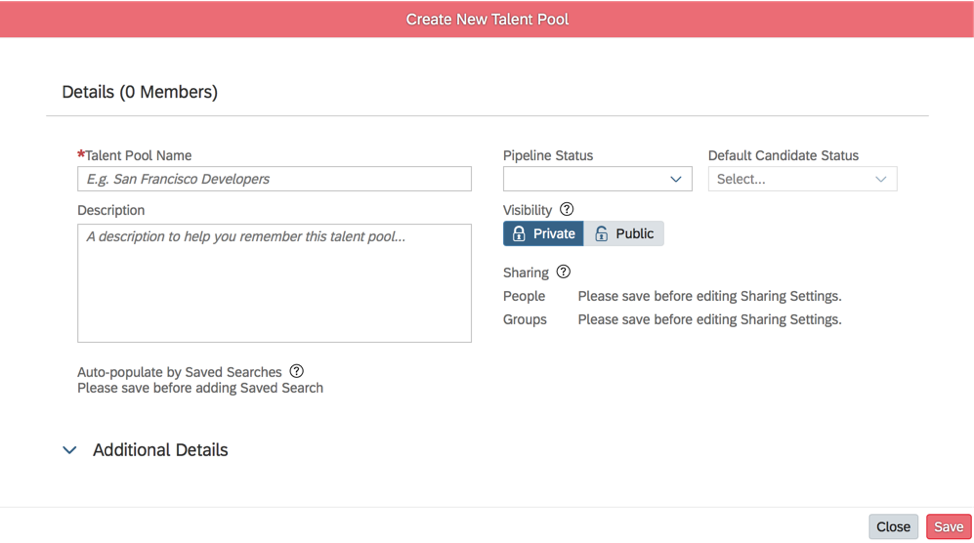
    You can create a new talent pool by clicking the “Create Talent Pool” link on the right-hand side of the screen.  You will get a popup like the one below:

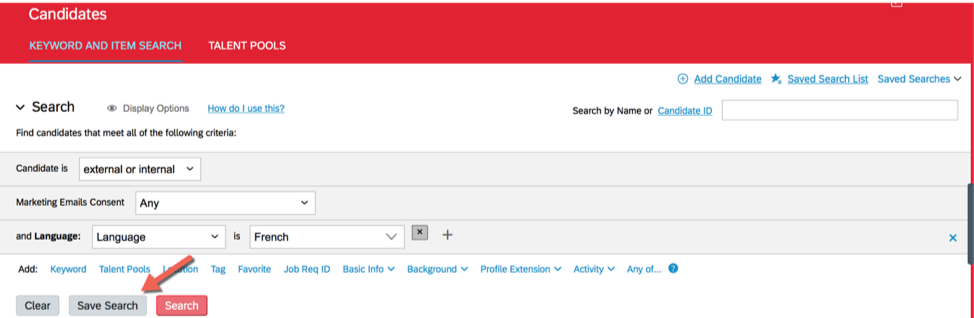
    Here you can see many of the features of the Talent Pools functionality.  For example, you can create a Talent Pipeline status and set a default candidate status.  These statuses can allow you to track where you are in the process of attracting each of the candidates within the pool.  You can also set the pool to be private only for your eyes or for a select group of people you choose, or make it visible to anyone with the Talent Pools permission.  Finally, you can also set the talent pool to auto-populate overnight based on saved searches you have already created (note that you will need to have created the saved search prior to creating / editing the talent pool).  To create a saved search, navigate to “Keyword and Item Search”, construct a search, and then click the “Save Search” button as shown below.  For example, in the below search we are gathering all candidates who listed French as a language skill.

    If you don’t want the system to auto-populate the talent pool for you overnight, you can also directly edit the pool and add candidates as you see fit in the candidate search area as shown below.

    Email Campaigns

    Now that you’ve captured a good collection of potential candidates and have them organized into pools of candidates, it is time to engage them!  Email campaigns enable you to send mass emails out to select candidates from your candidate database. 
    You will need to start with creating an email layout.  The layouts screen is found within the Career Site Builder as shown in the screenshot below:

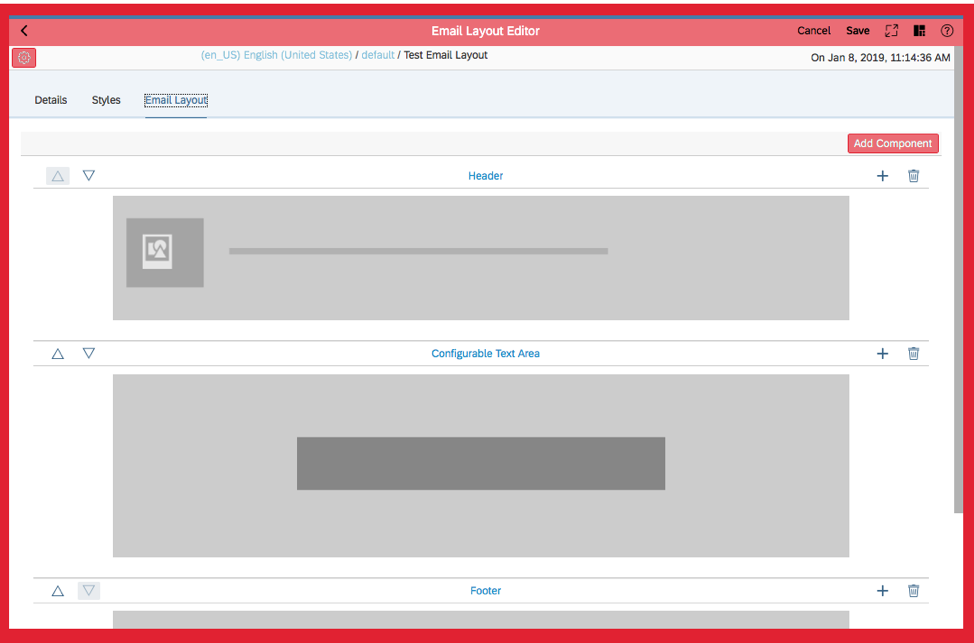
    The layout consists of a header, footer, and the main content area where you will compose your email.  In creating the layout, you would not add any content to the “Configurable Text Area” – this is simply a placeholder for the content you will create later for a specific campaign.  Typically, you would just create the header and footer content within the layout.  You can add rich text and images from your Career Site Builder image library within the header and footer.  Brands and multi-language are also supported.

    Once you have your layout complete, you can begin to create your first email campaign!  The email campaign screen can be found by navigating to Recruiting -> Marketing -> Email Campaigns.  Just click on the “New Email Campaign” link in the upper right to get started.

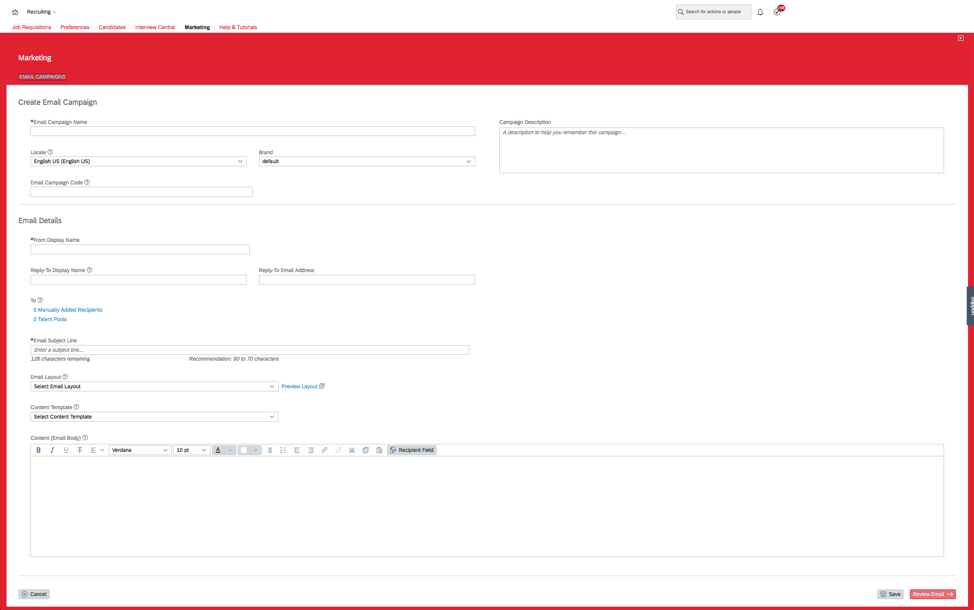
    The “Create Email Campaign” screen is shown below.  From here you can choose basic info like the name of the campaign and a description as well as the brand and language.  You can alo fill in the details of what the email will look like to individuals receiving it including the title, “Reply-To” the layout, and the content of the email.  There are also a limited number of tokens you can use by clicking on the “Recipient Field” link.  You can pick and choose individual candidates to send the email to or send to entire talent pools.  You can combine multiple talent pools and individual picks all in one campaign as well.

    Congratulations!  You have now captured new talent, organized them, and engaged them for new opportunities! J

    How Do I Activate These Features?

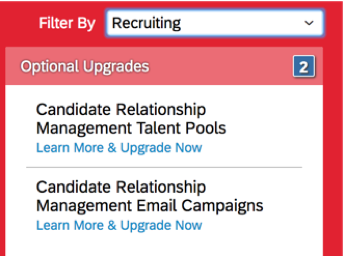
    SAP SuccessFactors customer administrators can easily turn on the Talent Pools and Email Campaigns via the Upgrade Center.  You will find the Upgrade Center in your “Admin Center” as show in the screenshot below:

    You can filter by “Recruiting” and see the items show up in the options below.  Click the “Learn More & Upgrade Now” link and follow the instructions to turn these on.

    Please note that once you activate each of these options, you will receive a screen indicating next steps to take such as assigning specific role-based permissions.  Please make sure you follow these instructions or you will not be able to get to the needed screens.

    To activate Data Capture forms and email campaigns, you need to make sure you are using the Career Site Builder (CSB) first.  As shown in the preceding instructions, all of the forms you will create have to be designed in the CSB and surfaced through landing pages in the CSB.  You can either request a partner turn on the data capture forms feature for you in Command Center, or open a support ticket with SAP to have them turn it on for you.

    Where Can I Find Out More?

    To find out more, visit the SuccessFactors Community Quarterly Release Page for Q2 2018 here (SAP login required):

    https://community.successfactors.com/t5/Product-Updates-Blog/Q2-2018/ba-p/202735

  • Five Healthy Behaviors to Maximize Your SAP SuccessFactors System

    Five Healthy Behaviors to Maximize Your SAP SuccessFactors System

    If you are a SuccessFactors customer (or soon to be one), here are our top five healthy behaviors to maximize the use of your SAP SuccessFactors system:

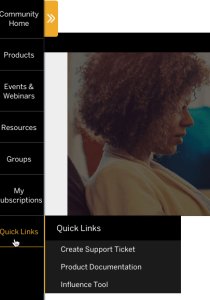
    1. Use the community site, which is located here: SuccessFactors Community Site You’ll need an S-User ID to log in (If you don’t have an S-User ID, you’ll want to contact your SAP and/or SuccessFactors administrator at your company). You’ll want to make yourself comfortable with this site, especially the sites available under “Quick Links” on the lower left of the screen.   From here, you can create a support ticket, review product documentation, and participate in SAP’s customer influence program where you can create and vote on ideas for future product enhancements.  
    2. Work in partnership with your SAP team. SAP assigns an AE (Account Executive), a CEE (Customer Engagement Executive), and a CSM (Customer Success Manager) to each customer.  Some customers have additional resources depending on their support level.  It’s important to establish the right relationship with these folks as they are your main communication back to SAP.
    3. Find the right implementation partner.  Most partners are not good at all things. You may want to search for partners here (Partner Certification Search, which is part of the Community Site above, rather than the Partner Finder on the SAP site. For example, Worklogix is a Recognized Expertise Partner in Onboarding/Recruiting as well as Talent Solutions (Performance/Goals, Compensation, Succession/Development), but we are not yet listed on that site.
    4. Be realistic with software expectations.  No software will be everything to everyone.  Not SuccessFactors, not Workday, and not the point solutions that some business folks are scheming to buy.
    5. Don’t forget the training. Yes, these cloud solutions are (in general) more intuitive to use, but don’t underestimate the need for training.  Visit the SAP SuccessFactors HCM Global Training site in the Community site, under Resources.  All too often, we see failed rollouts (or deployments that need to be reset) due to lack of training with the tool.  Like all software, it’s got its quirky parts.


    Worklogix Worklogix partners with clients to plan, configure, develop and integrate HR products and custom applications. We have assembled a global team with years of experience implementing HCM solutions. Our team is dedicated to understanding your business challenges, helping you leverage your technology and implement solutions that deliver results.


  • Don’t Panic – R2D2 Doesn’t Want Your Job

    Don’t Panic – R2D2 Doesn’t Want Your Job

    As technology and mechanization become widely available and evermore integral to operations in the workplace, a dynamic between human and robotic workmanship has emerged. This clash has lead many individuals and companies asking about job insecurity.

    Will my job be taken by a robot?

    One of the first breakthroughs in automation in the workplace was a paper written by Carl Benedikt Frey and Michael A. Osborne in 2013. In their paper, “The Future of Employment: How susceptible are jobs to computerisation?”, Frey and Osborne analyzed the probability of 702 occupations being automated. They estimate that 47% of these positions are at high risk (between 70 and 100 percent chance) of being automated. Since then, the internet has spun itself into a unfounded, alarmist spiral of Mother Jones fear-mongering. Frey and Osbourne warn against this kind of behavior in their paper:

    “We make no attempt to estimate the number of jobs that will actually be automated, and focus on potential job automatability over some unspecified number of years … we expect [high risk jobs] could be automated relatively soon, perhaps over the next decade or two.” (48)

    These probabilities aside, what can robots do in the workplace that make them so worthy of creation? Boston Dynamics has helped pioneer fully-capable robots. Their line of robots are uniquely designed for specific tasks. Atlas, their newest in the line, is a humanoid built robot that has arms and legs, a sense of balance and depth perception. Watch Atlas in action here:

    In theory, Atlas could do certain jobs, like delivery or surveying – both of which are singled out by Frey and Osborne as automatable, but Atlas and his cousins lack many human aspects that not make them up to snuff for certain tasks. Frankly, machines still lack the emotional component that made HAL 9000 such a successfully terrifying supervillian, but make humans unmatched for certain tasks. In fact, the occupations with the lowest risk of automation are those that deal with either managing large amounts of people and/or those that handle an emotional response, i.e. upper management, clergy, therapists, and counselors.

    Will robots help or hurt?

    The apex of the automation debate has been the discussion around replacing cashiers with kiosks in fast-food restaurants. Several chains have replaced traditional ordering with kiosks, automated vending, and mobile apps. Since 2015, McDonald’s has added ordering kiosks in most of their 14,000 locations. While polls indicate that most Americans prefer to order from human cashiers, McDonald’s reports that kiosks cut down on wait times and increase order accuracy. Other reports indicate that kiosks may help keep restaurants and their food cleaner by allowing employees to focus on table service and decreases the contamination of food by those interacting with people and money.

    What jobs can robots do?

    Robotics can improve more than just fast food companies. In their book, Machine, Platform, Crowd: Harnessing Our Digital Future, authors Andrew McAfee and Erik Brynjolfsson describe three main categories, the Three D’s, of jobs that robots are “taking” for humans:

    1. Dull jobs are tedious or cause repetitive stress injuries to humans.
    2. Dirty, or “Mike Rowe jobs,” are those that most Americans don’t think about, but they need to be done. Australian mining company, Rio Tinto, has already invested in “robo-trucks” to explore quarries of metals and diamonds.
    3. Most robots are being used to complete dangerous tasks. Military and police forces have long used drones, bomb diffusion robots, and, yes, the first Robo-Cop is employed by the Dubai Police Force.

    Bonus: engineers and companies have recently used two more categories, “The Domestic” (like the Roomba that self-vacuums your floor) and “The Dexterous” (like the da Vinci system that performs minimally invasive surgeries) to describe areas where robots are also used.

    While machines may be doing jobs that humans have done, it’s not quite true to to say that automation is taking jobs away from people. Robots are doing the jobs that people don’t want, and freeing humans to focus on advancing in places robots cannot operate.

    Even more promising, Gartner found that, by 2020, more jobs will be created through the use of automation, than jobs automation will eliminate. The research firm found that 1.8 million jobs will likely be eliminated by automation or artificial intelligence, but will create 2.3 million jobs in the same amount of time. In their press release, Gartner posited:

    “AI will improve the productivity of many jobs…[and will create] millions more new positions of highly skilled, management and even the entry-level and low-skilled variety.”

    How may we help you: robots in call centers

    One of the most at-risk occupations for automation are call center jobs. According to the BBC, call centers around the world may be soon using AI to replace millions of employees. On the other hand, T -Mobile CEO John Legere announced earlier this month that the company would be revamping their call centers to employ humans exclusively. In his announcement, Legere referred to the modern call center experience of phone menus, canned phrases and Interactive Voice Response (IVR) systems, “a massive digital fortress” that fails customers. Legere was so confident in the system that he alluded to customers abandoning competitors Verizon and and AT&T in favor of their customer service. He remarked about his competitors, “They are big. They are really good at sucking.”

    While it is true that many companies are beginning to rely more on IVR systems over human representatives, customers still prefer speaking to human representatives than robots. And when 90% of companies say they compete in customer service, it may be more pertinent to keep hiring people for customers to talk to.

    In essence, yes, automatons and AI are being used more in work environments. Whether it’s a threat to humans or if they are aiding human advancement in the workplace is uncertain. As much as half of all occupations may be subject to robot replacement, but to do so would be costly. While it may be pertinent to keep an eye on the growth of robotics, an alarmist attitude towards robotics is unwarranted. Look forward to more mechanical advances in the workplace. Sooner than we think, we could be working alongside C-3PO, WALL-E, or Jinx.


    Worklogix Worklogix partners with clients to plan, configure, develop and integrate HR products and custom applications. We have assembled a global team with years of experience implementing HCM solutions. Our team is dedicated to understanding your business challenges, helping you leverage your technology and implement solutions that deliver results.


    Baraniuk, Chris. 2018. “How Talking Machines Are Taking Call Centre Jobs”. BBC News. http://www.bbc.co.uk/news/business-45272835.
    “Boston Dynamics | Changing Your Idea Of What Robots Can Do”. 2018. Bostondynamics.Com. http://www.bostondynamics.com/.
    Drum, Kevin. 2017. “You Will Lose Your Job To A Robot—And Sooner Than You Think”. Mother Jones. http://www.motherjones.com/politics/2017/10/you-will-lose-your-job-to-a-robot-and-sooner-than-you-think/.
    Frey, Carl Benedikt, and Michael A. Osborne. 2013. “The Future Of Employment: How Susceptible Are Jobs To Computerisation?”. Oxford Martin Programme On Technology And Employment. http://www.oxfordmartin.ox.ac.uk/downloads/academic/future-of-employment.pdf.
    “Gartner Says By 2020, Artificial Intelligence Will Create More Jobs Than It Eliminates”. 2017. Gartner.Com. http://www.gartner.com/newsroom/id/3837763.
    Johnson, Hollis. 2018. “We Tried The Kiosks That Analysts Say Could Help Mcdonald’s Win Back $2.7 Billion In Sales. Here’s The Verdict.”. Business Insider. Accessed August 23 2018. http://www.businessinsider.com/mcdonalds-kiosk-vs-cashiers-photos-2018-3.
    Marr, Bernard. 2017. “The 4 Ds Of Robotization: Dull, Dirty, Dangerous And Dear”. Forbes.Com. http://www.forbes.com/sites/bernardmarr/2017/10/16/the-4-ds-of-robotization-dull-dirty-dangerous-and-dear/#950aa473e0df.
    Sorofman, Jake. 2018. “Gartner Surveys Confirm Customer Experience Is The New Battlefield”. Gartner.com. blogs.gartner.com/jake-sorofman/gartner-surveys-confirm-customer-experience-new-battlefield/.
    Vanian, Jonathan. 2018. “T-Mobile CEO John Legere Wants To Make Customer Service Something People Don’t Hate”. Fortune.Com. http://fortune.com/2018/08/15/tmobile-customer-service-wireless/.
    Witsoe, Craig. 2017. “Self-Ordering Will Be The New Normal In Fast Food”. Linkedin.Com. http://www.linkedin.com/pulse/self-ordering-new-normal-fast-food-craig-witsoe/.
  • Performance Reviews: Can’t Live with ’em, Can’t Operate a Productive Workspace Without ’em

    Performance Reviews: Can’t Live with ’em, Can’t Operate a Productive Workspace Without ’em

    Companies large and small are recently being asked to forgo employee evaluations. When industry giants like Adobe, Cigna, Microsoft, and GE give up on performance reviews, it’s easy to assume that it’s all for the good of the organization, but the evidence is mixed. Why, suddenly, are organizations passing up performance reviews and what good is it really doing?

    Why ditch the performance review process?

    According to the Harvard Business Review, by 2015 thirty large companies had either altered and reduced their performance reviews or had thrown them out altogether for their combined 1.5 million employees. These companies claimed that performance reviews were failing. Failing how, though? The four major reasons employers say they have replaced or removed their performance review process are:

    1. Numbers lie: Reviewers are increasingly finding it difficult to quantify work done by employees, especially when an emphasis is put on team projects – where does one person’s effort end and where does another person’s effort begin?
    2. Cohesion and collaboration: Performance reviews aren’t like grading a test, only a certain amount of As, Bs, and Cs can be given out. This hurts team cohesion when employees feel they did more work but received a poorer rating than a coworker.
    3. Limiting engagement: Annual performance reviews mean that, often, managers only meet with employees and discuss their progress and performance once a year. Removing performance reviews, apparently, encourages employers to speak to employees more often.
    4. Honesty and Openness: Both reviewers and reviewees report that they can have a more open and honest dialogue about tasks and workload when they don’t have to justify a rating come performance review time.

    So, how do ratingless performance reviews work? 

    If performance reviews don’t work, then what does?

    Consulting firm ETS tracked the performance review changes from 6 major corporations; Accenture, Adobe, Amazon, Deloitte, Google, and Netflix. Each of these organizations has a specific replacement for traditional performance reviews. In 2015, Accenture CEO Pierre Nanterme traded performance reviews with a process of “selecting [and] hiring the best people” and “[to] get people to their very best.”

    At Adobe, they’ve replaced performance reviews with “check-ins,” where managers are given a budget, salary range and where each employee’s compensation sits within that range. Based on this information, managers make recommendations in a “pay-for-performance” philosophy.

    Deloitte utilizes a performance snapshot which asks four yes or no questions about an employee’s performance at the completion of every project (around 4 times every year).  According to the firm, this process saves over two million hours that would have been spent on rating performance.  Where Deloitte’s goal is efficiency, Amazon focuses on data-driven results. Amazon has faced criticism for both its Anytime Feedback Tool and its Organization Level Reviews which created an environment of negativity and where one poor performance review could lead to firing.

    Google and Netflix have championed the 360 peer review process. Google asks its employees to evaluate their coworkers semi-annually. These reviews ask employees to tell their coworkers “…one thing the reviewee should do more of and one thing that they could do in a different way.” These reports go anonymously to the reviewee and their manager.

    Netflix however, has no guidelines as to how to review the employee, nor has anonymity to the reviews. Netflix utilizes a “keeper test” wherein they ask their management, if a member of their team were leaving, would the manager try hard to keep the employee? If the answer is no, the employee is cut.

    What is the global perspective of performance reviews?

    While American companies have thrown the metaphorical baby out with the bathwater in ditching performance reviews, abroad, companies have yet to adopt these radical changes. While each organization has their own evaluation system, most European-based companies are sticking to the traditional approach. One exception, SAP, comes at the cross-hairs of European and American influence. Since 2014, the German-based HR giant has been under the guidance of American CEO Bill McDermott. In 2016, McDermott announced that SAP would be scrapping their annual performance reviews. SAP’s shift is not just internal, however. Senior Vice President of Human Resources for SAP Wolfgang Fassnacht announced in February of 2016 that SAP would continue to market their traditional performance assessment software as well as a new “continuous performance management” software for those companies seeking to modernize their performance review process.

    Are performance reviews here to stay?

    Overhauling the performance appraisal process may aid in improving efficiency, team cohesion or even employee satisfaction, but these replacements have their own issues, including, in many cases, how to award compensation. Other cases, like the Netflix and the Accenture models, are unsustainable in their philosophies: just hire the right people or just remove employees who in any way underperform. 

    It’s easy to forget, too, that as much employers and managers rely on performance reviews, employees also benefit from these processes. In a case study of pharmaceutical company Eli Lilly, HR.com host Edie Goldberg found that employees who received high marks on their performance assessment felt, on average 70% more engaged with the company over the next year than employees who received low marks on their performance assessment. And in a survey conducted by CEB, now Gartner, found that:

    “…employee performance drops by around 10% when ratings are removed, and less than 5% of managers can effectively manage employees without them.”

    Performance review ratings will always be tricky, no matter how they are approached, but managers, employees, and companies rely on the ability to track performance and progress. Determining how to best go about designing an approach to performance assessment requires introspection, not only on what information is expected to come from evaluating the individuals, but also from evaluating the organization, as a whole. In the end it all comes down to the simple fact that employees are incapable of meeting, or exceeding, expectations, if management does not themselves know what those goals are.


    Worklogix


    Worklogix partners with clients to plan, configure, develop and integrate HR products and custom applications. We have assembled a global team with years of experience implementing HCM solutions. Our team is dedicated to understanding your business challenges, helping you leverage your technology and implement solutions that deliver results.


    Sources:
    Adobe. (n.d.) Adobe Check-In. Accessed August 16 2018. http://www.adobe.com/check-in.html. [Accessed 15 Aug 2018]
    “Culture At Netflix | Netflix Jobs”. 2018. Jobs.Netflix.Com. Accessed August 16 2018. jobs.netflix.com/culture.
    Cunningham, L. (2015). Accenture CEO explains why he’s overhauling performance reviews. Accenture.com. Available at: http://www.accenture.com/us-en/company-accenture-ceo-performance-review [Accessed 15 Aug. 2018].
    de Mello, F. (2016). Case Study: How Google does Performance Reviews. Squarespace.com. Available at: https://worklogix.blog/wp-content/uploads/2018/08/b3318-google.pdf [Accessed 16 Aug. 2018].
    ETS. (n.d.). Replacing performance ratings… How Amazon, Deloitte and Google do it. Available at: http://www.etsplc.com/replacing-performance-ratings-how-amazon-deloitte-and-google-do-it/ [Accessed 15 Aug. 2018].
    “Employee Performance Reviews In 23 Countries”. 2016. Slideshare.Net. Accessed August 17 2018. http://www.slideshare.net/ForeignStaffing/employee-performance-reviews-in-23-countries.
    Fortune. (2016). SAP, Maker of Performance Review Software, Ditches Performance Reviews. Available at: http://fortune.com/2016/08/12/sap-ends-performance-reviews/ [Accessed 16 Aug. 2018].
    Goldberg, E. (n.d.). Continuous Employee Performance Management. HR.com. Available at: http://www.hr.com/en?t=/network/event/attachment.supply&fileID=1464633654696 [Accessed 17 Aug. 2018].
    Rock, D. and Jones, B. (2015). Why More and More Companies Are Ditching Performance Ratings. Harvard Business Review. Available at: https://hbr.org/2015/09/why-more-and-more-companies-are-ditching-performance-ratings [Accessed 15 Aug. 2018].
    Sloan, N. (n.d.). Performance management: Does your process serve your strategy?. Deloitte United States. Available at: http://www2.deloitte.com/us/en/pages/finance/articles/cfo-insights-performance-management-process-strategy.html [Accessed 16 Aug. 2018]
    Soper, Taylor. 2016. Amazon To ‘Radically’ Simplify Employee Reviews, Changing Controversial Program Amid Huge Growth. Geekwire. Accessed August 16 2018. http://www.geekwire.com/2016/amazon-radically-simplify-employee-reviews-changing-controversial-program-amid-huge-growth/.
    Stone, M. (2015). Amazon employees reportedly slam each other through this internal review tool. Business Insider. Available at: http://www.businessinsider.com/amazon-employees-reportedly-slam-each-other-through-this-internal-review-tool-2015-8 [Accessed 15 Aug. 2018].
    Wiles, Jackie. 2018. “The Real Impact On Employees Of Removing Performance Ratings”. Gartner.Com. Accessed August 17 2018. http://www.gartner.com/smarterwithgartner/corporate-hr-removing-performance-ratings-is-unlikely-to-improve-performance/.