
Learn what’s currently available for Succession Planning with the 2H 2024 SAP SuccessFactors Release.
For greater details, you can view the full set of documentation in the What’s New Viewer here. For full details on the release cycle, check out the SAP SuccessFactors official product updates blog.
For tips on how to manage a release, check out our blog here.
Easier Experience of Nominating Talent Pool Members to a Position
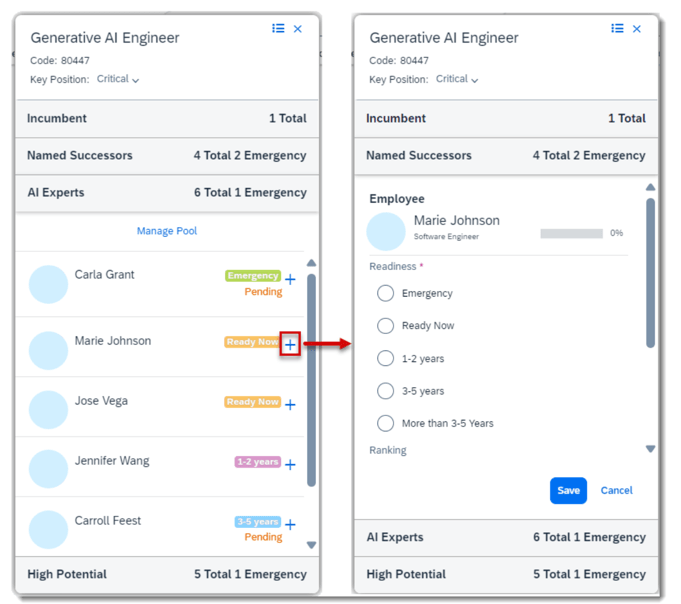
Succession planners can now add successors directly from the talent pool sections on the position card in the Succession Org Chart or in the Position Tile view. This applies to positions associated with talent pools.
Before the latest release, the user had to navigate to the employee’s talent card to begin the nomination process, including searching for the position. Now when the user selects the “Add as successor” button for a member of a talent pool, the Named Successors section expands to view more details before nominating the employee to the position.
Succession Text Changes
There are some minor visual changes for Succession. Previously the search box in Talent Search didn’t have a label. Now the search box is labeled Keywords: and the placeholder text has been changed to Enter your keywords.

On the details page of a talent pool, the field to filter the talent pool nominees did not have a label and was in the same line as other filters. Now it is labeled Nominee with Search for nominee in the placeholder text.

Now, this field is labeled as Nominee and has placeholder text and it is now placed above other filters.
Succession Notification Card Available in Microsoft Teams
If you are using the integration of SAP SuccessFactors and Microsoft 365, there is a new notification card available for users to review and approve pending nominations to a talent pool.

Do you need help implementing or supporting your SAP SuccessFactors system? Contact info@worklogix.com for assistance, download our support services brochure, or visit https://www.worklogix.com/implementation.html for additional information.T
 Worklogix Blog
Leave a comment