
Learn what’s currently available for 360 Reviews with the 2H 2024 SAP SuccessFactors Release.
For greater details, you can view the full set of documentation in the What’s New Viewer here. For full details on the release cycle, check out the SAP SuccessFactors official product updates blog.
For tips on how to manage a release, check out our blog here.
Enhancements to the latest My Forms Page for 360 Reviews
There are some improvements for the user’s experience when using the latest My Forms page. The My Forms page has updates to form creation, form lists and filters which is also applicable to PM forms.
Form Creation
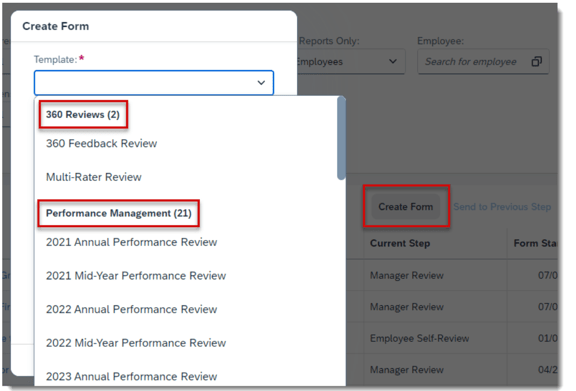
The Create Form button is now only visible for users that have permission to create at least one PM or 360 form.
The template dropdown list of forms is now grouped by two categories: 360 Reviews and Performance Management. Each heading lists the number of forms available for the category.
Form Lists
The number of forms is included in the forms list title.

Filters
There are a few changes to the filters available on the My Forms page.
Limit Filter Visibility by Role
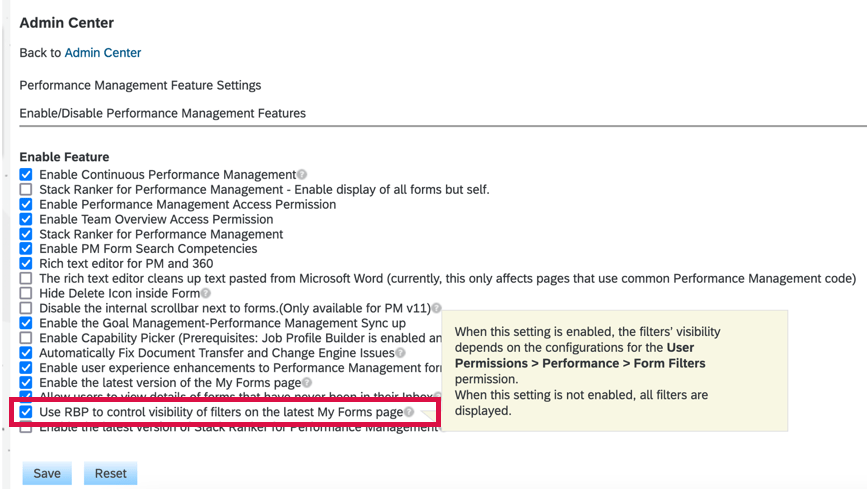
The standard and custom filters that are seen can be limited based on the user’s role. By default all the filters are shown but can be role based permissions can limit their visibility. To do this , enable Use RBP to control visibility of filters on the latest My Forms page in Performance Management Feature Settings.
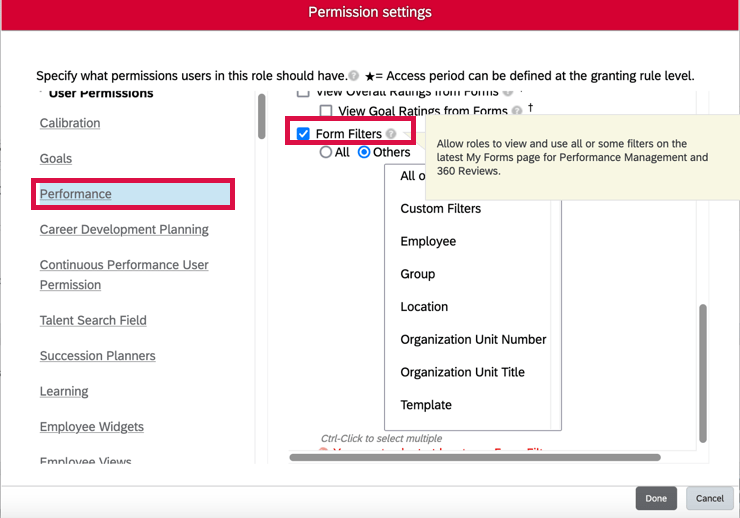
Then by role, grant User Permissions>Performance>Form Filters permission to show all or specific filters.
All or Reports Only filter
This filter is only available for users with direct reports, matrix reports or HR reports.
The Template filter is now dynamic
Options for the Template filter are based on templates of forms in a folder.
Reset button to clear filters
The user can reset filters at any time.
These new features are shown below.

Custom Learning in 360 Review Forms
In conjunction with the latest Goal Management, custom learning activities can now be added, edited, or deleted on 360 Reviews forms.
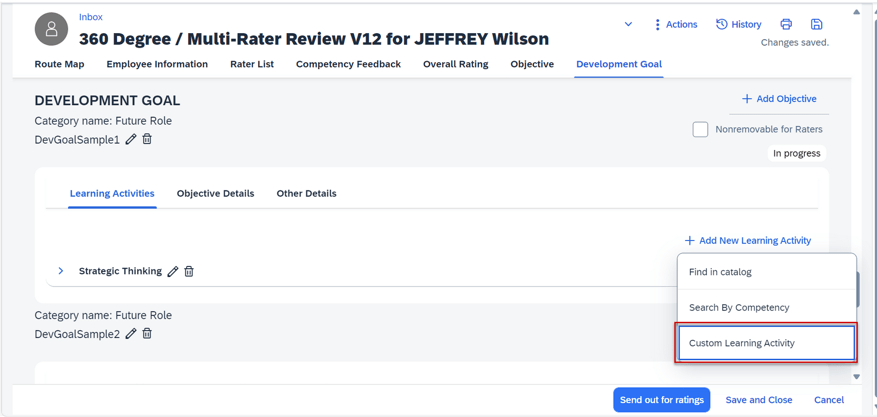
You must ensure that a development goal plan is linked to the form and the plan contains a learning activity template with custom learning activities.
Enhanced AI-Assisted Writing in 360 Reviews
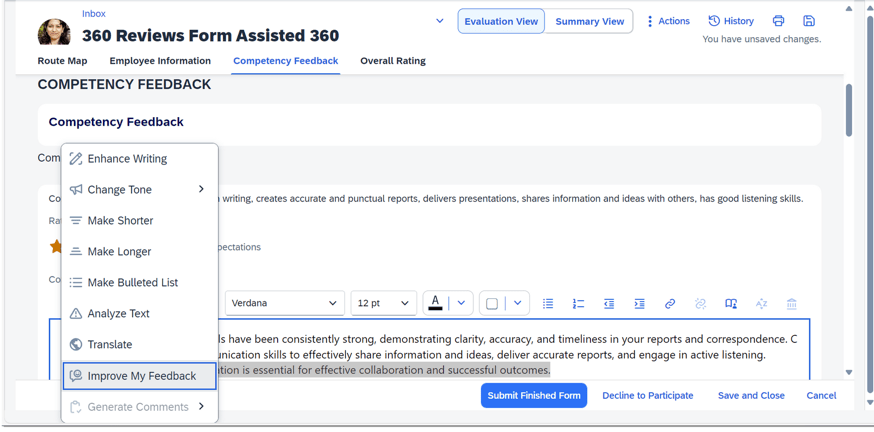
There is a AI-assisted writing tool to help generate comments and improve feedback. Both use the context menu of the tool.
To use this the following requirements must be met:
- AI-Units license has been purchased
- AI Services Administration Assisted Writing with Text Analyzer has been enabled in Admin Center
- Consent given for the AI Usage Acknowledgment Statement
Improve My Feedback
When comments are entered, feedback can be provided in a more concise manner and is related to a competency rating or skill. The user can go through multiple iterations of the updated feedback to find the comments with the best fit.
Generate Comments
When there are no comments entered for a competency or skill, six topics are dynamically generated. The user can select one of the topics and have detailed competency or skill related comments created.
AI-Assisted Insights into Detailed 360 Reports
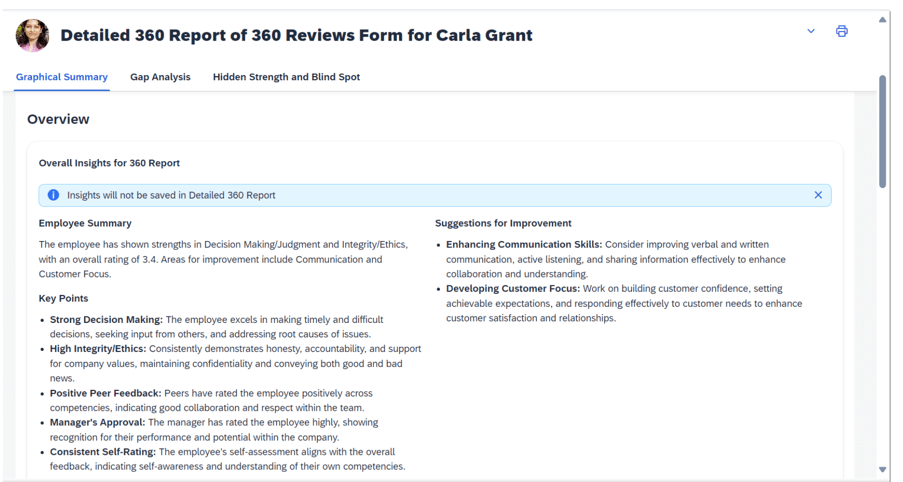
An additional feature when using AI is related to the Detailed 360 reports. A new Overall Insights for 360 Report section has been created. Here you will find a Generate Insights button. The insights relate to the overall form feedback as well as comments for specific competencies or skills.
Overall Insights
The overall insights contain the following:
- Employee Summary which provides a high-level overview of the employee’s performance
- Key Points to identify strengths and weaknesses of the employee
- Suggestions for Improvement
Analysis of Skills or Competencies
There is a View All Comments link which provides a summarized analysis for a skill or competency.
Sections include:
- Key Topics
- Growth Area Suggestions
- Summary of performance based on ratings and comments
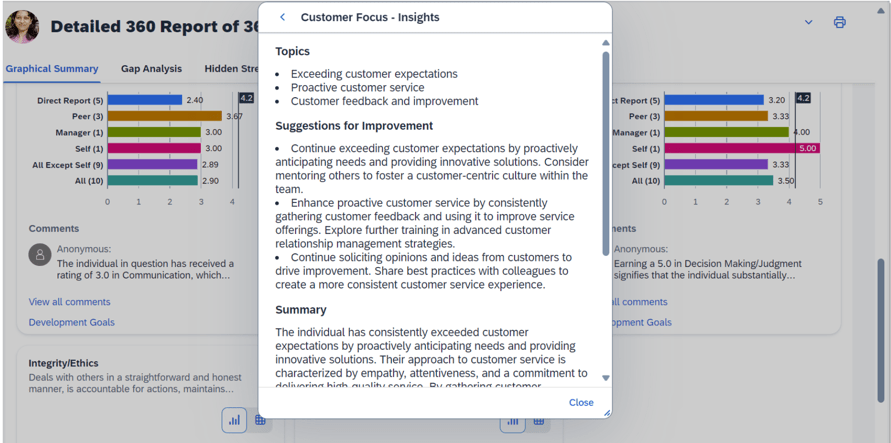
This view provides more detail about a specific skill or competency and provides guidance for areas of growth.
Do you need help implementing or supporting your SAP SuccessFactors system? Contact info@worklogix.com for assistance, download our support services brochure, or visit https://www.worklogix.com/implementation.html for additional information.
 Worklogix Blog
Leave a comment