Major updates are as follows:
Receive Reminders of Learning Assignments in Microsoft Teams
In Teams, the SAP SuccessFactors app sends adaptive cards to its bot chat on the following occasions:
- Employees have learning assignments due in the next 30 days.
- Managers have a learning assignment to approve.
On the cards, they can view details about the learning assignment or take quick actions of approving or declining.• Instructors
Learning Administrators can make the rest of their necessary currency changes through the Admin UI.
Learning objects with currencies that can be updated using the Admin UI, found under Finance:
• Prepaid Accounts
• Coupons
Learning objects with currencies that can be updated using the Admin UI, found under References ->
Physical Resources:
• Materials
• Custom Resources
• Equipment
• Facilities
• Locations.
Learning Integration with Talent Intelligence Hub
- A new automatic process job, Attributes Synchronization is scheduled to run daily to synchronize attributes from Talent Intelligence Hub to SAP SuccessFactors Learning. You can change this default schedule period only after the integration is complete.
- Existing Capabilities Synchronization and Competency Connector – SF are disabled, and you can’t schedule recurring jobs.
- You can use the new entity, Attributes from the Learning Activities menu to view the synced attributes and its associations.
- In the Talent Intelligence Hub integrated tenant, the legacy Competencies entity doesn’t appear in the menu by default. However, if necessary you can edit the visibility of this entity.
- You can refine your search using the new search field, Attributes on the items, programs, and tasks search pages.
- If the proficiency rating scale isn’t configured in Center of Capabilities, rating in SAP SuccessFactors Learning receives a default five-point proficiency level scale. This configuration applies only to customers who are migrating from Center of Capabilities. The default proficiency level scale is configurable. However, you can’t modify this scale after you enable Growth Portfolio in your tenant.
Role-Based Permission Prerequisites
- You have the Edit Competency and View Competency permissions to access the Attributes page.
- You have the Edit Attributes Synchronization automatic process permission to access the Attributes Synchronization page.
- You have the Search Security Domain permission to modify the security domain of the Attributes Synchronization job and the Edit Competency and View Competency permissions to run the job.
What’s Changed
How It Looks Now

In an integrated tenant, the Learning Activities menu includes a new entity, Attributes.

In an integrated tenant, a new search field, Attributes appears on the items, tasks, and programs search pages. We included only the program search page in this section.
How It Looked Before
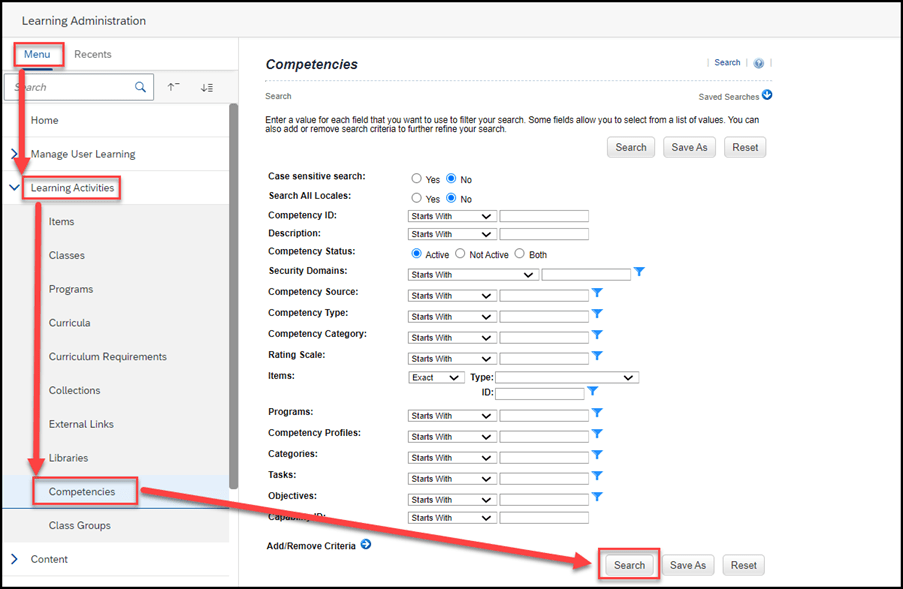
In a preintegrated tenant, the Learning Activities menu had the Competencies entity.
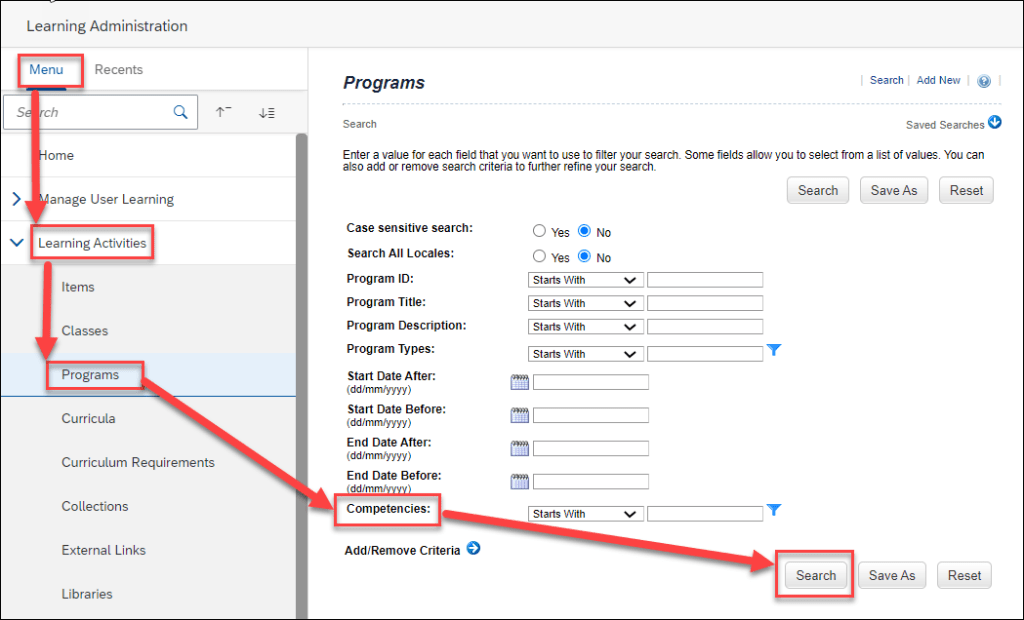
In a preintegrated tenant, the Competencies field appeared on the items, programs, and tasks search pages. We included only the program search page in this section.
Enhanced Course Home
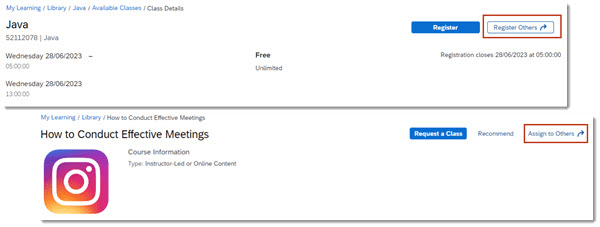
- Managers can use the Register Others action on the Class Details page to register their employees for a class and they can use the Assign to Others action on the Item Details page to assign an item to their employees.
- Managers can view Program details and Curricula requirements on the employee’s view. Viewing Item Details isn’t available to managers from the employee’s view.
- Users can add a comment to the approver when submitting an approval request for a course that has an associated price.

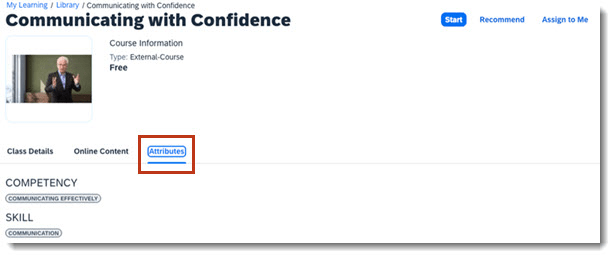
- Administrators can associate attributes with items. Users will see a terminology change in the Course Home experience, the Competencies tab name is now updated to Attributes for all users. A link to details on this terminology change is provided in the Related Information section at the bottom of this page.
- Users can edit Special Requests for a class registration until the registration closing date, or until the start date of the class if a registration closing date wasn’t defined.
- Administrators can configure instructional messages that display when users register for a course that has a price.
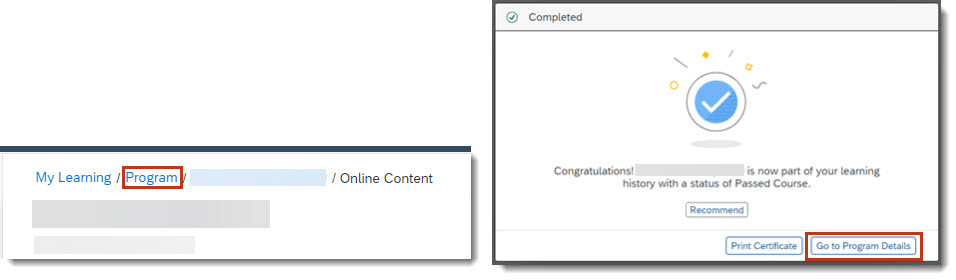
- When a user launches a course from a program, they’re returned to the Program Details page after completing or closing the item. They can also navigate back to the program at any time by using the navigation at the top of the page. Users see Program instead of Library and can select the link to return to the Program Details page.
If a user chooses the Disagree option when viewing AICC content, a message displays to inform them that they won’t receive credit and provides the option to cancel and make a different selection or to continue and not receive credit.
Removal of Free-Form Email Sender From Send Email Notification
We’ve removed the Free-form option from the Send email notification from field for the Send Email Notification Tool on the Application Administration page. If your environment was configured to use the Free-form option, it has been updated to the default Admin option. As a result of this change, administrators can no longer enter an ad hoc email address in the From field of the Send Email Notification page.
For the Send Email Notification Tool, the Free-form sender option has been removed from Learning Administration System Administration Configuration Global Application Settings Mail.

As a result of this change, you can no longer enter an ad hoc email address in the From field of the Send Email Notifications page. You can access this page from several places in the application, for example: Learning Administration People Users Actions Send Email Notification.
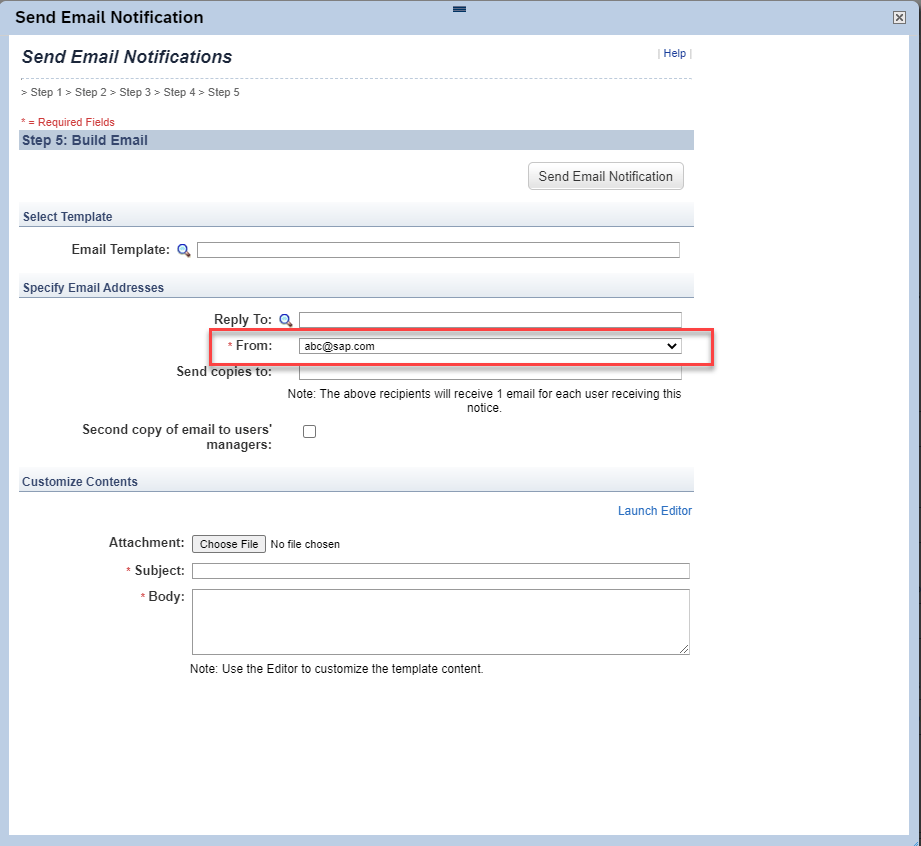
We’ve removed the ability for administrators to send email notifications from ad hoc email addresses to enhance system security.
Unsupported Platform Native Logins Warning and Report
We added a monthly warning message for administrators that appears when a platform user native login has occurred during the last thirty days. To help identify platform user native logins, we also added the ability to download the Unsupported Platform Native Logins Report from the Environment page in SuccessFactors Learning.
The warning message (outlined in red below) now appears to administrators monthly upon login if a platform user native login has occurred during the last thirty days. The new warning will appear in addition to the Native Login Deprecation warning if applicable.

To help identify native logins, we’ve added the Unsupported Platform Native Logins Report, which returns a list of Platform users who have accessed Learning through Native Login. You can download this report from System Administration Environment Download Unsupported Platform Native Logins.
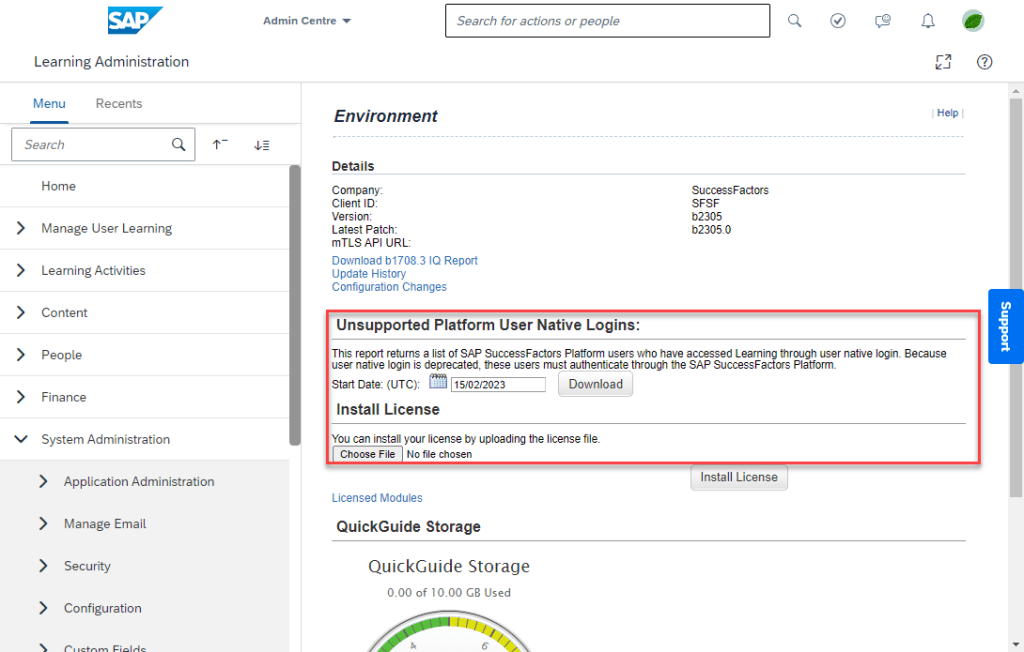
We added the Unsupported Platform Native Logins Report and warning message so you can identify users who are authenticating through native login instead of Platform.
Audit Information For Assessments
We’ve added audit information for user-taken assessments. You can now create change audit reports that include create, update, and delete audit information for the following:
- Quizzes
- Quiz Answer Choices
- Quiz Questions
- Quiz Objectives
- Exam Settings
We’ve added audit information for assessments to meet compliance requirements for our customers.
Deprecation of Copy User
Deprecation Details
The Copy User menu item will be removed from the following page: Learning Administration People Users Actions Copy.
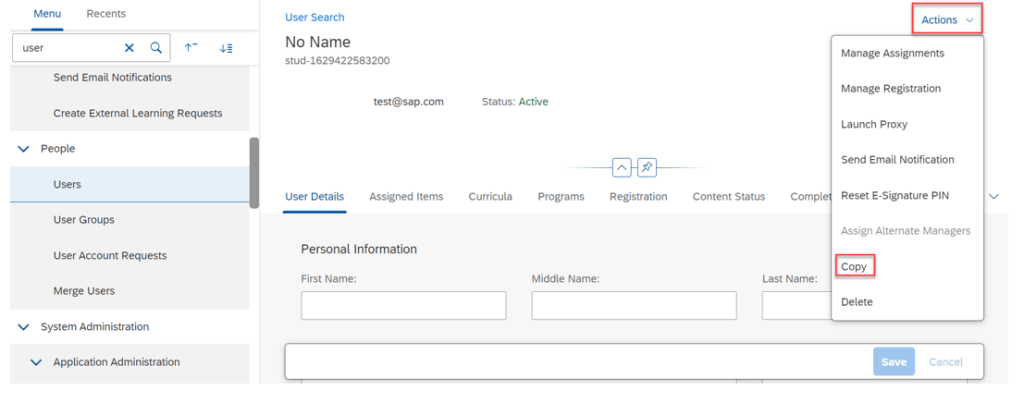
The copy user functionality will be deprecated because it is an artifact of Plateau products and does not work correctly in SAP SuccessFactors Learning.
Webex Meeting Center REST API Support for Virtual Learning
SAP SuccessFactors Learning now supports REST APIs for Webex Meeting Center. We also now support Webex Control Hub.
Webex has deprecated their XML-based API solution for Webex Meeting Center. We delivered these features in order to continue providing virtual learning capabilities for our customers who use Webex as a VLS vendor.
Configuration Requirements
- You have enabled the vleEnabled setting(Learning Administration System Administration Configuration System Configuration LMS_ADMIN vleEnabled=true).
- You have downloaded the webex_rest configuration file in Support Downloads.
- With this update, your existing Webex configuration file can no longer be used for virtual learning sessions where Webex Meeting Center is the vendor. In order to continue using Webex Meeting Center, you must create a new VLS configuration file in Learning (System Administration Configuration VLS Configuration).
Purge Data of Integrated External Learners from HXM Suite
You can now purge data of all integrated external learners from HXM Suite using the Upgrade Center after the migration to SAP Cloud Platform Identity Authentication Service (IAS) is complete.
If you perform the Purge Integrated External Learners upgrade from Upgrade Center, all integrated external learners and their associated data are permanently removed from the system and cannot be recovered.
Here is a screenshot where you can perform the upgrade.

We provided this upgrade so that customers can run a full purge of all integrated external learners data.
To Learn More
Overall there are 35 items being changed or enhanced in this release for LMS and we didn’t cover every detail here. For more information, What’s New Viewer here.
Do you need help managing your SuccessFactors Release cycles? Email info@worklogix.com or download our support services brochure to see how we can help!



 Worklogix Blog